|
|
|
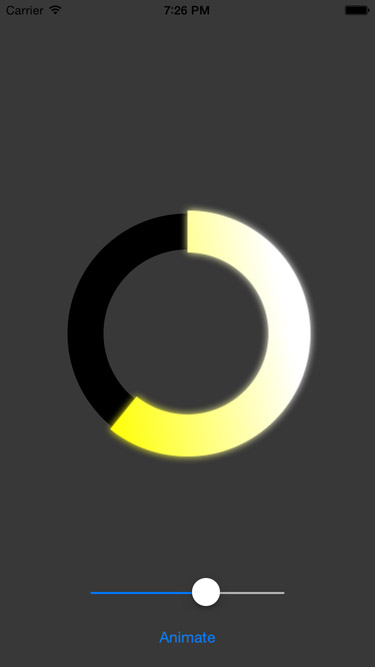
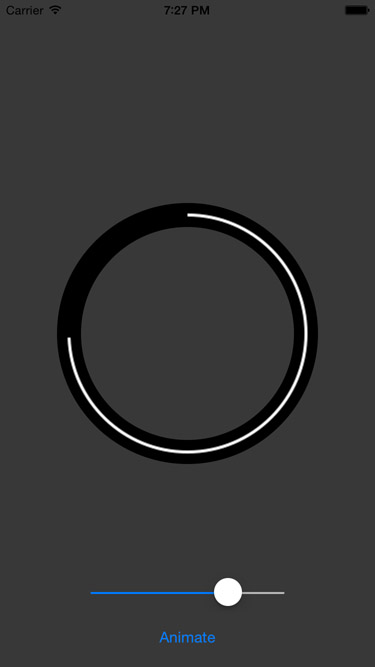
@@ -28,6 +28,44 @@ Here's an example
|
|
|
|
|
|
|
|
|
|
|
|
|
|
|
|
|
|
|
|
## Requirements
|
|
|
|
|
`KDCircularProgress` requires iOS 8+, although iOS 8 support hasn't been tested in a while.
|
|
|
|
|
|
|
|
|
|
## Installation
|
|
|
|
|
- It's on CocoaPods under the name (you guessed it!) KDCircularProgress
|
|
|
|
|
- Just drag `KDCircularProgress.swift` into your project. `Carthage` support is on To-do list.
|
|
|
|
|
|
|
|
|
|
### CocoaPods
|
|
|
|
|
|
|
|
|
|
KDCircularProgress is available through [CocoaPods](http://cocoapods.org). To install
|
|
|
|
|
it, simply add the following line to your Podfile:
|
|
|
|
|
|
|
|
|
|
```bash
|
|
|
|
|
pod 'KDCircularProgress'
|
|
|
|
|
```
|
|
|
|
|
|
|
|
|
|
then run
|
|
|
|
|
|
|
|
|
|
```bash
|
|
|
|
|
$ pod install
|
|
|
|
|
```
|
|
|
|
|
|
|
|
|
|
### Carthage
|
|
|
|
|
|
|
|
|
|
Add the line `github "kaandedeoglu/KDCircularProgress"` to your `Cartfile` and then run the command:
|
|
|
|
|
|
|
|
|
|
```bash
|
|
|
|
|
carthage update
|
|
|
|
|
```
|
|
|
|
|
|
|
|
|
|
|
|
|
|
|
### Manually
|
|
|
|
|
|
|
|
|
|
Just drag `KDCircularProgress.swift` into your project.
|
|
|
|
|
|
|
|
|
|
## Sample Code
|
|
|
|
|
Below you can see code that creates and sets up a `KCircularProgress` instance. Which gives you a configuration that looks similar to the progress in the example images.
|
|
|
|
|
|
|
|
|
|
```swift
|
|
|
|
|
progress = KDCircularProgress(frame: CGRect(x: 0, y: 0, width: 300, height: 300))
|
|
|
|
|
progress.startAngle = -90
|
|
|
|
@@ -43,66 +81,30 @@ progress.center = CGPoint(x: view.center.x, y: view.center.y + 25)
|
|
|
|
|
view.addSubview(progress)
|
|
|
|
|
```
|
|
|
|
|
|
|
|
|
|
## Installation
|
|
|
|
|
- It's on CocoaPods under the name (you guessed it!) KDCircularProgress
|
|
|
|
|
- Just drag `KDCircularProgress.swift` into your project. `Carthage` support is on To-do list.
|
|
|
|
|
|
|
|
|
|
### CocoaPods
|
|
|
|
|
|
|
|
|
|
KDCircularProgress is available through [CocoaPods](http://cocoapods.org). To install
|
|
|
|
|
it, simply add the following line to your Podfile:
|
|
|
|
|
|
|
|
|
|
```ruby
|
|
|
|
|
pod 'KDCircularProgress'
|
|
|
|
|
```
|
|
|
|
|
|
|
|
|
|
### Manually
|
|
|
|
|
|
|
|
|
|
Just drag `KDCircularProgress.swift` into your project.
|
|
|
|
|
|
|
|
|
|
### Carthage
|
|
|
|
|
|
|
|
|
|
`Carthage` support is on To-do list.
|
|
|
|
|
|
|
|
|
|
|
|
|
|
|
## Properties
|
|
|
|
|
|
|
|
|
|
####progressColors: `[UIColor]`
|
|
|
|
|
#### progressColors: `[UIColor]`
|
|
|
|
|
The colors used to generate the gradient of the progress. You can also set this using the variadic `setColors(UIColor...)` method. A gradient is used only if there is more than one color. A fill is used otherwise. The default is a white fill.
|
|
|
|
|
|
|
|
|
|
------
|
|
|
|
|
|
|
|
|
|
####angle: `Int`
|
|
|
|
|
#### angle: `Int`
|
|
|
|
|
The angle of the progress. Between 0 and 360 (inclusive). Simply change its value in order to change the visual progress of the component. Default is 0.
|
|
|
|
|
|
|
|
|
|
------
|
|
|
|
|
|
|
|
|
|
####startAngle: `Int`
|
|
|
|
|
#### startAngle: `Int`
|
|
|
|
|
The angle at which the progress will begin. Between 0 and 360 (inclusive), however you can pass any negative or positive values and the component will mod them automatically to the required range. Default is 0.
|
|
|
|
|
|
|
|
|
|
------
|
|
|
|
|
|
|
|
|
|
####clockwise: `Bool`
|
|
|
|
|
#### clockwise: `Bool`
|
|
|
|
|
Clockwise if true, Counter-clockwise if false. Default is true.
|
|
|
|
|
|
|
|
|
|
------
|
|
|
|
|
|
|
|
|
|
####roundedCorners: `Bool`
|
|
|
|
|
#### roundedCorners: `Bool`
|
|
|
|
|
When true, the ends of the progress track will be drawn with a half circle radius. Default is false.
|
|
|
|
|
|
|
|
|
|
------
|
|
|
|
|
|
|
|
|
|
####gradientRotateSpeed: `CGFloat`
|
|
|
|
|
#### gradientRotateSpeed: `CGFloat`
|
|
|
|
|
Describes how many times the underlying gradient will perform a 2π rotation for each full cycle of the progress. Integer values recommended. Default is 0.
|
|
|
|
|
|
|
|
|
|
------
|
|
|
|
|
|
|
|
|
|
####glowAmount: `CGFloat`
|
|
|
|
|
#### glowAmount: `CGFloat`
|
|
|
|
|
The intensity of the glow. Between 0 and 1.0. Default is 1.0.
|
|
|
|
|
|
|
|
|
|
------
|
|
|
|
|
|
|
|
|
|
####glowMode: `KDCircularProgressGlowMode`
|
|
|
|
|
#### glowMode: `KDCircularProgressGlowMode`
|
|
|
|
|
- **.forward** - The glow increases proportionaly to the angle. No glow at 0 degrees and full glow at 360 degrees.
|
|
|
|
|
|
|
|
|
|
- **.reverse** - The glow increases inversely proportional to the angle. Full glow at 0 degrees and no glow at 360 degrees.
|
|
|
|
@@ -113,105 +115,72 @@ The intensity of the glow. Between 0 and 1.0. Default is 1.0.
|
|
|
|
|
|
|
|
|
|
The default is **.forward**
|
|
|
|
|
|
|
|
|
|
------
|
|
|
|
|
|
|
|
|
|
####progressThickness: `CGFloat`
|
|
|
|
|
#### progressThickness: `CGFloat`
|
|
|
|
|
The thickness of the progress. Between 0 and 1. Default is 0.4
|
|
|
|
|
|
|
|
|
|
------
|
|
|
|
|
|
|
|
|
|
####trackThickness: `CGFloat`
|
|
|
|
|
#### trackThickness: `CGFloat`
|
|
|
|
|
The thickness of the background track. Between 0 and 1. Default is 0.5
|
|
|
|
|
|
|
|
|
|
------
|
|
|
|
|
|
|
|
|
|
####trackColor: `UIColor`
|
|
|
|
|
#### trackColor: `UIColor`
|
|
|
|
|
The color of the background track. Default is `UIColor.blackColor()`.
|
|
|
|
|
|
|
|
|
|
------
|
|
|
|
|
|
|
|
|
|
####progressInsideFillColor: `UIColor`
|
|
|
|
|
#### progressInsideFillColor: `UIColor`
|
|
|
|
|
The color of the center of the circle. Default is `UIColor.clearColor()`.
|
|
|
|
|
|
|
|
|
|
------
|
|
|
|
|
|
|
|
|
|
##Methods
|
|
|
|
|
## Methods
|
|
|
|
|
```swift
|
|
|
|
|
override public init(frame: CGRect)
|
|
|
|
|
```
|
|
|
|
|
Initialize with a frame. Please only use square frames.
|
|
|
|
|
|
|
|
|
|
------
|
|
|
|
|
|
|
|
|
|
```swift
|
|
|
|
|
convenience public init(frame:CGRect, colors: UIColor...)
|
|
|
|
|
```
|
|
|
|
|
Initialize with a frame and the gradient colors.
|
|
|
|
|
|
|
|
|
|
------
|
|
|
|
|
|
|
|
|
|
```swift
|
|
|
|
|
public func set(colors: UIColor...)
|
|
|
|
|
public func set(colors: [UIColor])
|
|
|
|
|
```
|
|
|
|
|
|
|
|
|
|
Set the colors for the progress gradient.
|
|
|
|
|
|
|
|
|
|
------
|
|
|
|
|
|
|
|
|
|
```swift
|
|
|
|
|
public func animateFromAngle(fromAngle: Int, toAngle: Int, duration: NSTimeInterval, relativeDuration: Bool = true, completion: ((Bool) -> Void)?)
|
|
|
|
|
```
|
|
|
|
|
|
|
|
|
|
Animate the progress from an initial value to a final value, with a completion block that fires after the animation is done.
|
|
|
|
|
|
|
|
|
|
`relativeDuration` - specify if the duration is for the specific animation or is the duration that would make a full turn.
|
|
|
|
|
|
|
|
|
|
------
|
|
|
|
|
|
|
|
|
|
```swift
|
|
|
|
|
public func animateToAngle(toAngle: Int, duration: NSTimeInterval, completion: ((Bool) -> Void)?)
|
|
|
|
|
```
|
|
|
|
|
|
|
|
|
|
Animate the progress from the current state to a target value.
|
|
|
|
|
|
|
|
|
|
------
|
|
|
|
|
|
|
|
|
|
```swift
|
|
|
|
|
public func pauseAnimation()
|
|
|
|
|
```
|
|
|
|
|
|
|
|
|
|
Pause the animation, if any.
|
|
|
|
|
|
|
|
|
|
------
|
|
|
|
|
|
|
|
|
|
```swift
|
|
|
|
|
public func isAnimating() -> Bool
|
|
|
|
|
```
|
|
|
|
|
|
|
|
|
|
Check if there's an active animation.
|
|
|
|
|
|
|
|
|
|
##Misc
|
|
|
|
|
## Misc
|
|
|
|
|
Prefering light colors in the gradients gives better results. As mentioned before, use square frames. Rectangular frames are not tested and might produce unexpected results.
|
|
|
|
|
|
|
|
|
|
##To-Do
|
|
|
|
|
- [x] Add example project
|
|
|
|
|
- [ ] Carthage Support
|
|
|
|
|
- [x] CocoaPods Support
|
|
|
|
|
- [x] IBDesignable/IBInspectable support
|
|
|
|
|
- [x] Adding a `progress` property as an alternative to `angle`
|
|
|
|
|
- [ ] Clean up
|
|
|
|
|
|
|
|
|
|
##Contact
|
|
|
|
|
## Contact
|
|
|
|
|
Drop me an email if you want discuss anything further.
|
|
|
|
|
|
|
|
|
|
[Email](kaandedeoglu@me.com)
|
|
|
|
|
|
|
|
|
|
##License
|
|
|
|
|
## License
|
|
|
|
|
|
|
|
|
|
The MIT License (MIT)
|
|
|
|
|
|
|
|
|
|
Copyright (c) 2016 Kaan Dedeoglu
|
|
|
|
|
Copyright (c) 2017 Kaan Dedeoglu
|
|
|
|
|
|
|
|
|
|
Permission is hereby granted, free of charge, to any person obtaining a copy
|
|
|
|
|
of this software and associated documentation files (the "Software"), to deal
|
|
|
|
|
 Kaan Dedeoglu
 Kaan Dedeoglu
 Brahim Hadriche
 Kuba Sokolowski