Compare commits
4 Commits
| Author | SHA1 | Date | |
|---|---|---|---|
 Kaan Dedeoglu Kaan Dedeoglu
|
b638783e61 | ||
|
Kaan Dedeoglu
|
9a74a70278 | ||
|
Kaan Dedeoglu
|
8e5a2cc59d | ||
|
Kaan Dedeoglu
|
adb66054af |
@@ -77,6 +77,14 @@ public class KDCircularProgress: UIView, CAAnimationDelegate {
|
||||
private var radius: CGFloat = 0 {
|
||||
didSet {
|
||||
progressLayer.radius = radius
|
||||
progressLayer.setNeedsDisplay()
|
||||
}
|
||||
}
|
||||
|
||||
@IBInspectable public var paddingPercentage: CGFloat = 20 {
|
||||
didSet {
|
||||
paddingPercentage = Utility.clamp(value: paddingPercentage, minMax: (0, 100))
|
||||
radius = (frame.size.width/2.0) * ((100 - paddingPercentage) / 100)
|
||||
}
|
||||
}
|
||||
|
||||
@@ -169,7 +177,7 @@ public class KDCircularProgress: UIView, CAAnimationDelegate {
|
||||
}
|
||||
}
|
||||
|
||||
@IBInspectable public var progressColors: [UIColor] {
|
||||
public var progressColors: [UIColor] {
|
||||
get {
|
||||
return progressLayer.colorsArray
|
||||
}
|
||||
@@ -218,11 +226,11 @@ public class KDCircularProgress: UIView, CAAnimationDelegate {
|
||||
|
||||
public override func layoutSubviews() {
|
||||
super.layoutSubviews()
|
||||
radius = (frame.size.width/2.0) * 0.8
|
||||
radius = (frame.size.width/2.0) * ((100 - paddingPercentage) / 100)
|
||||
}
|
||||
|
||||
private func setInitialValues() {
|
||||
radius = (frame.size.width/2.0) * 0.8 //We always apply a 20% padding, stopping glows from being clipped
|
||||
radius = (frame.size.width/2.0) * ((100 - paddingPercentage) / 100)
|
||||
backgroundColor = .clear
|
||||
set(colors: .white, .cyan)
|
||||
}
|
||||
@@ -424,8 +432,25 @@ public class KDCircularProgress: UIView, CAAnimationDelegate {
|
||||
|
||||
let trackLineWidth = radius * trackThickness
|
||||
let progressLineWidth = radius * progressThickness
|
||||
|
||||
let trackRadius: CGFloat
|
||||
let progressRadius: CGFloat
|
||||
|
||||
if trackLineWidth < progressLineWidth {
|
||||
trackRadius = radius - trackLineWidth/2 - (progressLineWidth - trackLineWidth)/2
|
||||
progressRadius = radius - progressLineWidth/2
|
||||
// trackLineWidth -= (progressLineWidth - trackLineWidth)/2
|
||||
} else if progressLineWidth < trackLineWidth {
|
||||
progressRadius = radius - progressLineWidth/2 - (trackLineWidth - progressLineWidth)/2
|
||||
trackRadius = radius - trackLineWidth/2
|
||||
// progressLineWidth -= (trackLineWidth - progressLineWidth)/2
|
||||
} else {
|
||||
progressRadius = radius - progressLineWidth/2
|
||||
trackRadius = radius - trackLineWidth/2
|
||||
}
|
||||
|
||||
let arcRadius = max(radius - trackLineWidth/2, radius - progressLineWidth/2)
|
||||
ctx.addArc(center: CGPoint(x: width/2.0, y: height/2.0), radius: arcRadius, startAngle: 0, endAngle: CGFloat.pi * 2, clockwise: false)
|
||||
ctx.addArc(center: CGPoint(x: width/2.0, y: height/2.0), radius: trackRadius, startAngle: 0, endAngle: CGFloat.pi * 2, clockwise: false)
|
||||
trackColor.set()
|
||||
ctx.setStrokeColor(trackColor.cgColor)
|
||||
ctx.setFillColor(progressInsideFillColor.cgColor)
|
||||
@@ -440,7 +465,7 @@ public class KDCircularProgress: UIView, CAAnimationDelegate {
|
||||
let fromAngle = Conversion.degreesToRadians(value: CGFloat(-startAngle))
|
||||
let toAngle = Conversion.degreesToRadians(value: CGFloat((clockwise == true ? -reducedAngle : reducedAngle) - startAngle))
|
||||
|
||||
imageCtx?.addArc(center: CGPoint(x: width/2.0, y: height/2.0), radius: arcRadius, startAngle: fromAngle, endAngle: toAngle, clockwise: clockwise)
|
||||
imageCtx?.addArc(center: CGPoint(x: width/2.0, y: height/2.0), radius: progressRadius, startAngle: fromAngle, endAngle: toAngle, clockwise: clockwise)
|
||||
|
||||
let glowValue = GlowConstants.glowAmount(forAngle: reducedAngle, glowAmount: glowAmount, glowMode: glowMode, size: width)
|
||||
if glowValue > 0 {
|
||||
|
||||
@@ -1,6 +1,6 @@
|
||||
The MIT License (MIT)
|
||||
|
||||
Copyright (c) 2015 Kaan Dedeoglu
|
||||
Copyright (c) 2016 Kaan Dedeoglu
|
||||
|
||||
Permission is hereby granted, free of charge, to any person obtaining a copy
|
||||
of this software and associated documentation files (the "Software"), to deal
|
||||
|
||||
@@ -28,6 +28,44 @@ Here's an example
|
||||
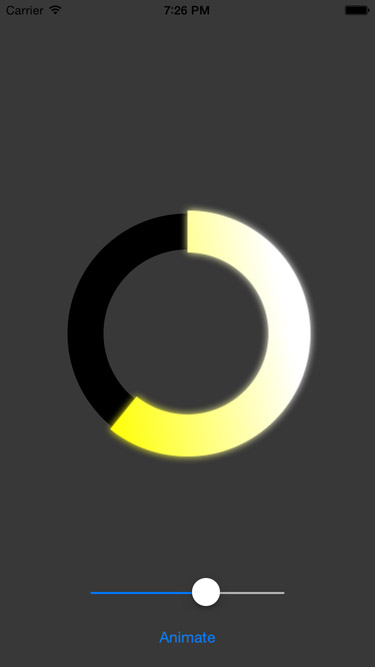
|
||||
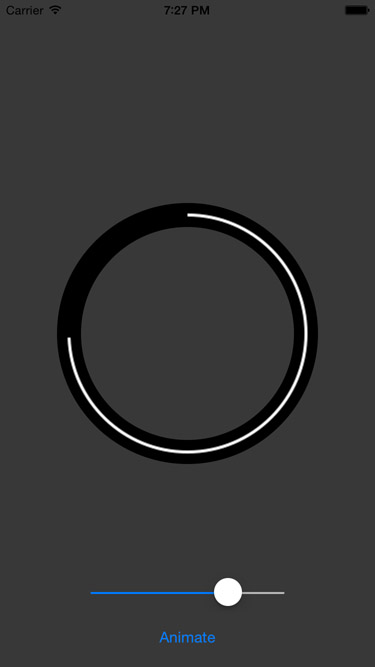
|
||||
|
||||
## Requirements
|
||||
`KDCircularProgress` requires iOS 8+, although iOS 8 support hasn't been tested in a while.
|
||||
|
||||
## Installation
|
||||
- It's on CocoaPods under the name (you guessed it!) KDCircularProgress
|
||||
- Just drag `KDCircularProgress.swift` into your project. `Carthage` support is on To-do list.
|
||||
|
||||
### CocoaPods
|
||||
|
||||
KDCircularProgress is available through [CocoaPods](http://cocoapods.org). To install
|
||||
it, simply add the following line to your Podfile:
|
||||
|
||||
```bash
|
||||
pod 'KDCircularProgress'
|
||||
```
|
||||
|
||||
then run
|
||||
|
||||
```bash
|
||||
$ pod install
|
||||
```
|
||||
|
||||
### Carthage
|
||||
|
||||
Add the line `github "kaandedeoglu/KDCircularProgress"` to your `Cartfile` and then run the command:
|
||||
|
||||
```bash
|
||||
carthage update
|
||||
```
|
||||
|
||||
|
||||
### Manually
|
||||
|
||||
Just drag `KDCircularProgress.swift` into your project.
|
||||
|
||||
##Sample Code
|
||||
Below you can see code that creates and sets up a `KCircularProgress` instance. Which gives you a configuration that looks similar to the progress in the example images.
|
||||
|
||||
```swift
|
||||
progress = KDCircularProgress(frame: CGRect(x: 0, y: 0, width: 300, height: 300))
|
||||
progress.startAngle = -90
|
||||
@@ -43,28 +81,6 @@ progress.center = CGPoint(x: view.center.x, y: view.center.y + 25)
|
||||
view.addSubview(progress)
|
||||
```
|
||||
|
||||
## Installation
|
||||
- It's on CocoaPods under the name (you guessed it!) KDCircularProgress
|
||||
- Just drag `KDCircularProgress.swift` into your project. `Carthage` support is on To-do list.
|
||||
|
||||
### CocoaPods
|
||||
|
||||
KDCircularProgress is available through [CocoaPods](http://cocoapods.org). To install
|
||||
it, simply add the following line to your Podfile:
|
||||
|
||||
```ruby
|
||||
pod 'KDCircularProgress'
|
||||
```
|
||||
|
||||
### Manually
|
||||
|
||||
Just drag `KDCircularProgress.swift` into your project.
|
||||
|
||||
### Carthage
|
||||
|
||||
`Carthage` support is on To-do list.
|
||||
|
||||
|
||||
## Properties
|
||||
|
||||
####progressColors: `[UIColor]`
|
||||
@@ -196,7 +212,7 @@ Prefering light colors in the gradients gives better results. As mentioned befor
|
||||
|
||||
##To-Do
|
||||
- [x] Add example project
|
||||
- [ ] Carthage Support
|
||||
- [x] Carthage Support
|
||||
- [x] CocoaPods Support
|
||||
- [x] IBDesignable/IBInspectable support
|
||||
- [x] Adding a `progress` property as an alternative to `angle`
|
||||
|
||||
Reference in New Issue
Block a user