Compare commits
11 Commits
| Author | SHA1 | Date | |
|---|---|---|---|
 Ahmed Bekhit Ahmed Bekhit
|
d7875a1b5b | ||
|
Ahmed Bekhit
|
d636abbe7e | ||
|
Ahmed Bekhit
|
7124b79549 | ||
|
Ahmed Bekhit
|
eddae7758c | ||
|
Ahmed Bekhit
|
08ad254271 | ||
|
Ahmed Bekhit
|
720c1af699 | ||
|
Ahmed Bekhit
|
e134ab9792 | ||
|
Ahmed Bekhit
|
e9c7cfaaca | ||
|
Ahmed Bekhit
|
2f40c3d9f0 | ||
|
Ahmed Bekhit
|
de62d34b9e | ||
|
Ahmed Bekhit
|
fe093e65d6 |
+3
-2
@@ -1,6 +1,6 @@
|
||||
Pod::Spec.new do |s|
|
||||
s.name = "ARVideoKit"
|
||||
s.version = "1.3"
|
||||
s.version = "1.5.11"
|
||||
s.summary = "Capture & record ARKit videos 📹, photos 🌄, Live Photos 🎇, and GIFs 🎆."
|
||||
s.description = "Enabling developers to capture videos 📹, photos 🌄, Live Photos 🎇, and GIFs 🎆 with augmented reality components."
|
||||
s.homepage = "https://github.com/AFathi/ARVideoKit"
|
||||
@@ -16,7 +16,8 @@ Pod::Spec.new do |s|
|
||||
|
||||
s.platform = :ios, "11.0"
|
||||
|
||||
s.source = { :git => "https://github.com/AFathi/ARVideoKit.git", :tag => "1.3" }
|
||||
# ARVideoKit for Swift 4.0
|
||||
s.source = { :git => "https://github.com/AFathi/ARVideoKit.git", :tag => "1.5.11" }
|
||||
s.source_files = "ARVideoKit", "ARVideoKit/**/*.{h,m,swift}"
|
||||
s.resources = "ARVideoKit/Assets/*.scnassets"
|
||||
end
|
||||
|
||||
@@ -1,5 +1,8 @@
|
||||
# Swift 4.0 Branch
|
||||
> Use [swift_4_2](https://github.com/AFathi/ARVideoKit/tree/swift_4_2) branch for projects written in Swift 4.2
|
||||
|
||||
> [swift_4_2](https://github.com/AFathi/ARVideoKit/tree/swift_4_2) branch has been set as the default branch for `ARVideoKit` as of March 6th, 2019.
|
||||
|
||||
|
||||
|
||||
An iOS Framework that enables developers to capture videos 📹, photos 🌄, Live Photos 🎇, and GIFs 🎆 with ARKit content.
|
||||
@@ -71,11 +74,15 @@ github "AFathi/ARVideoKit" ~> 1.31
|
||||
$ carthage update
|
||||
```
|
||||
|
||||
### Manual
|
||||
Drag the `ARVideoKit.framework` file as an embedded binary of your project targets. `ARVideoKit.framework` can be found in the `/Framework Build/` folder of this repository.
|
||||
### ~Manual~ _Deprecated_
|
||||
**If you're currently using the `.framework` file, I recommend to re-install the framework using one of the other installation options.**
|
||||
|
||||
|
||||
~Drag the `ARVideoKit.framework` file as an embedded binary of your project targets. `ARVideoKit.framework` can be found in the `/Framework Build/` folder of this repository.~
|
||||

|
||||
|
||||
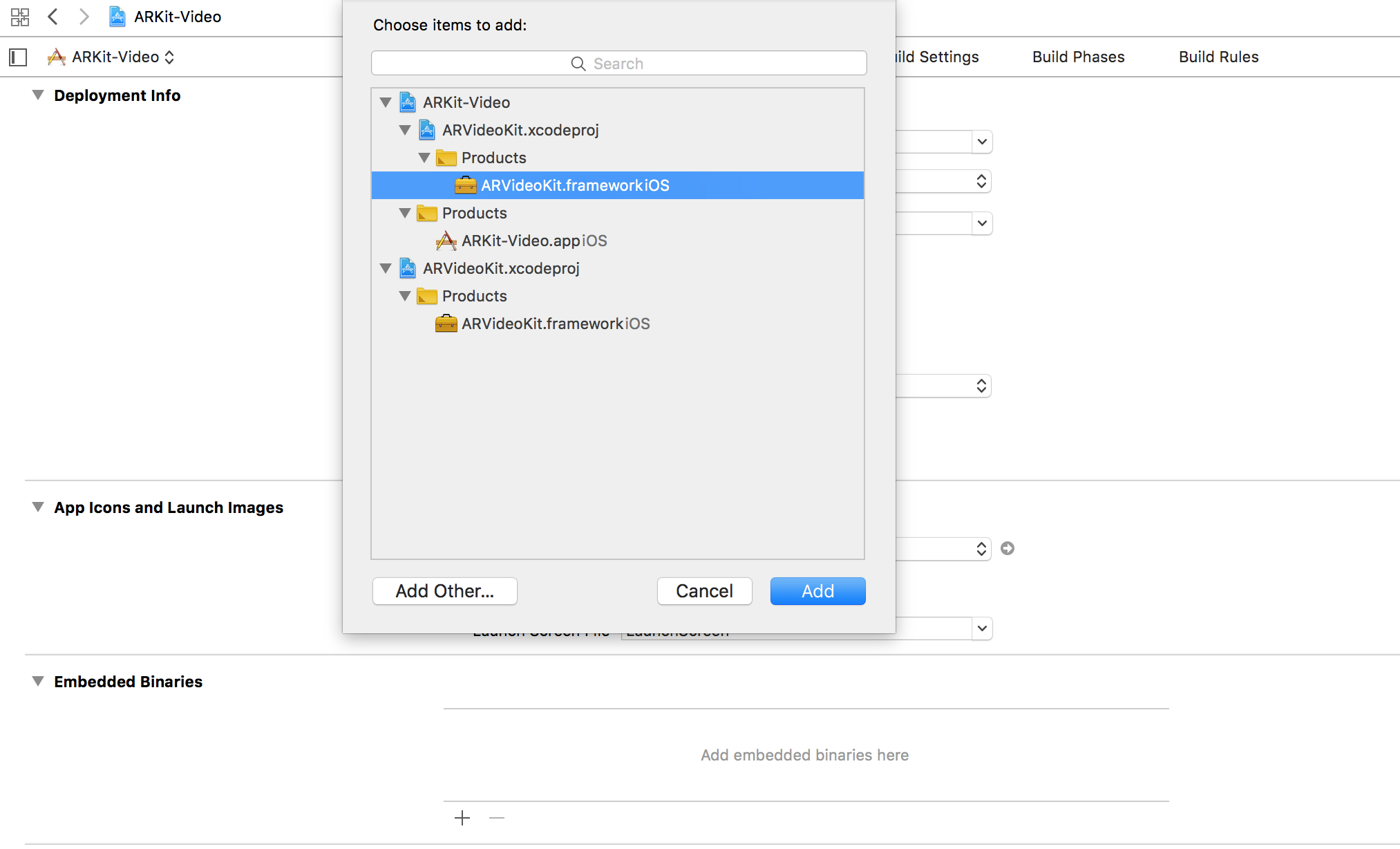
Or you may drag `ARVideoKit.xcodeproj` into your project and click the **+** button in the embedded binaries section of your project's target.
|
||||
### Manual (Supported)
|
||||
Drag `ARVideoKit.xcodeproj` into your project and click the **+** button in the embedded binaries section of your project's target.
|
||||
|
||||
## Implementation
|
||||
### Swift
|
||||
|
||||
Reference in New Issue
Block a user