mirror of
https://github.com/facebook/react-native.git
synced 2025-11-01 09:14:26 +00:00
 Janic Duplessis
8b9f790069
Janic Duplessis
8b9f790069
Summary: When using a medium (500) font weight on Android the wrong weight is used for the placeholder and for the first few seconds of input (before it gets text back from JS). To fix it I refactored the way we handle text styles (family, weight, style) to create a typeface to be more like the `Text` component. Since all these 3 props are linked and used to create the typeface object it makes more sense to do it at the end of setting props instead of in each prop handler and trying to recreate the object without losing styles set by other prop handlers. Do do that we now store fontFamily, fontStyle and fontWeight as ivar of the ReactEditText class. At the end of updating prop if any of those changed we recreate the typeface object. This doesn't actually fix the bug but was a first step towards it. There were a bunch of TODOs in the code to remove duplication between `Text` and `TextInput` for parsing and creating the typeface object. To do that I simply moved the code to util functions in a static class. Once the duplication was removed the bug was fixed! I assume proper support for medium font weights was added for `Text` but not in the duplicated code for `TextInput`. ## Changelog [Android] [Fixed] - Fix medium font weights for TextInput on Android Pull Request resolved: https://github.com/facebook/react-native/pull/26434 Test Plan: Tested in my app and in RNTester that custom styles for both text and textinput all seem to work. Repro in RNTester: ```js function Bug() { const [value, setValue] = React.useState(''); return ( <TextInput style={[ styles.singleLine, {fontFamily: 'sans-serif', fontWeight: '500', fontSize: 32}, ]} placeholder="Sans-Serif 500" value={value} onChangeText={setValue} /> ); } ``` Before: 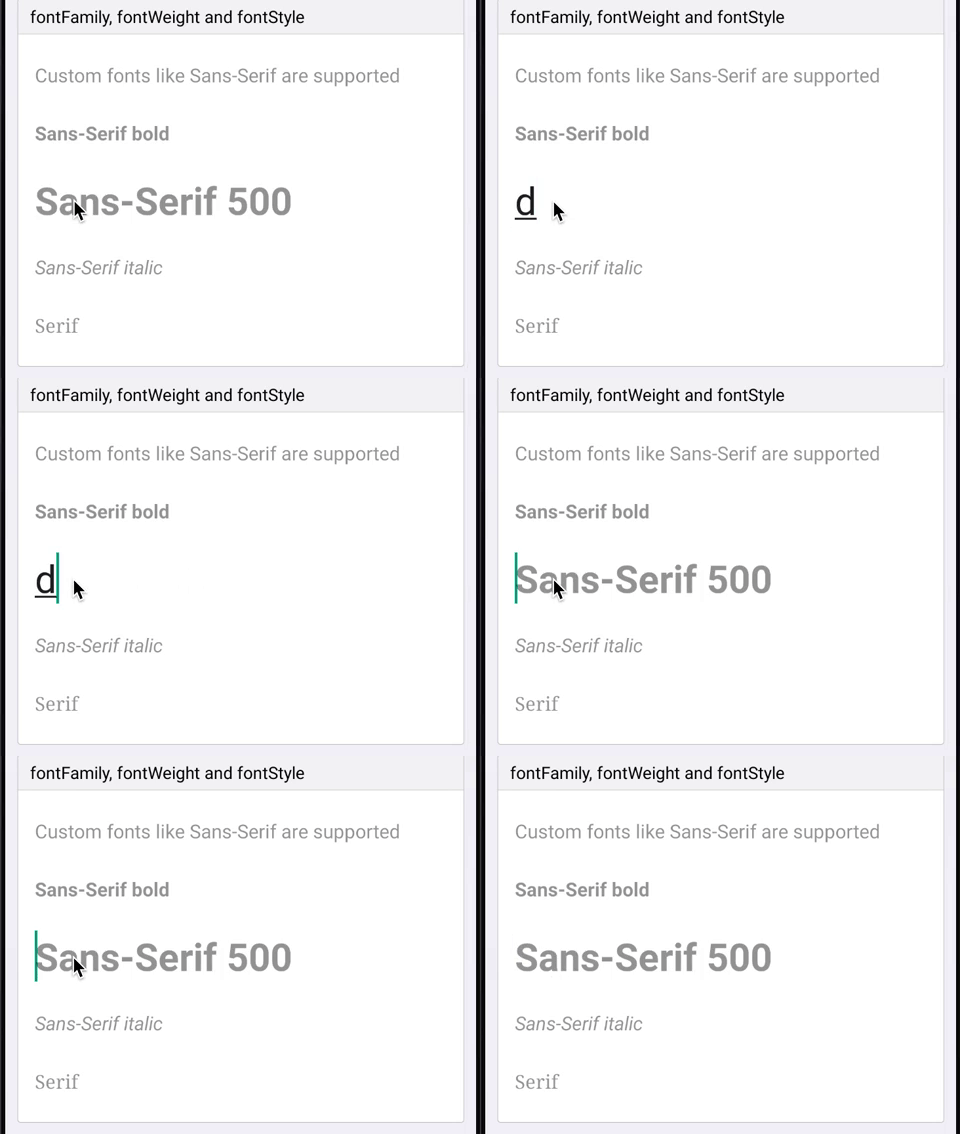 After: 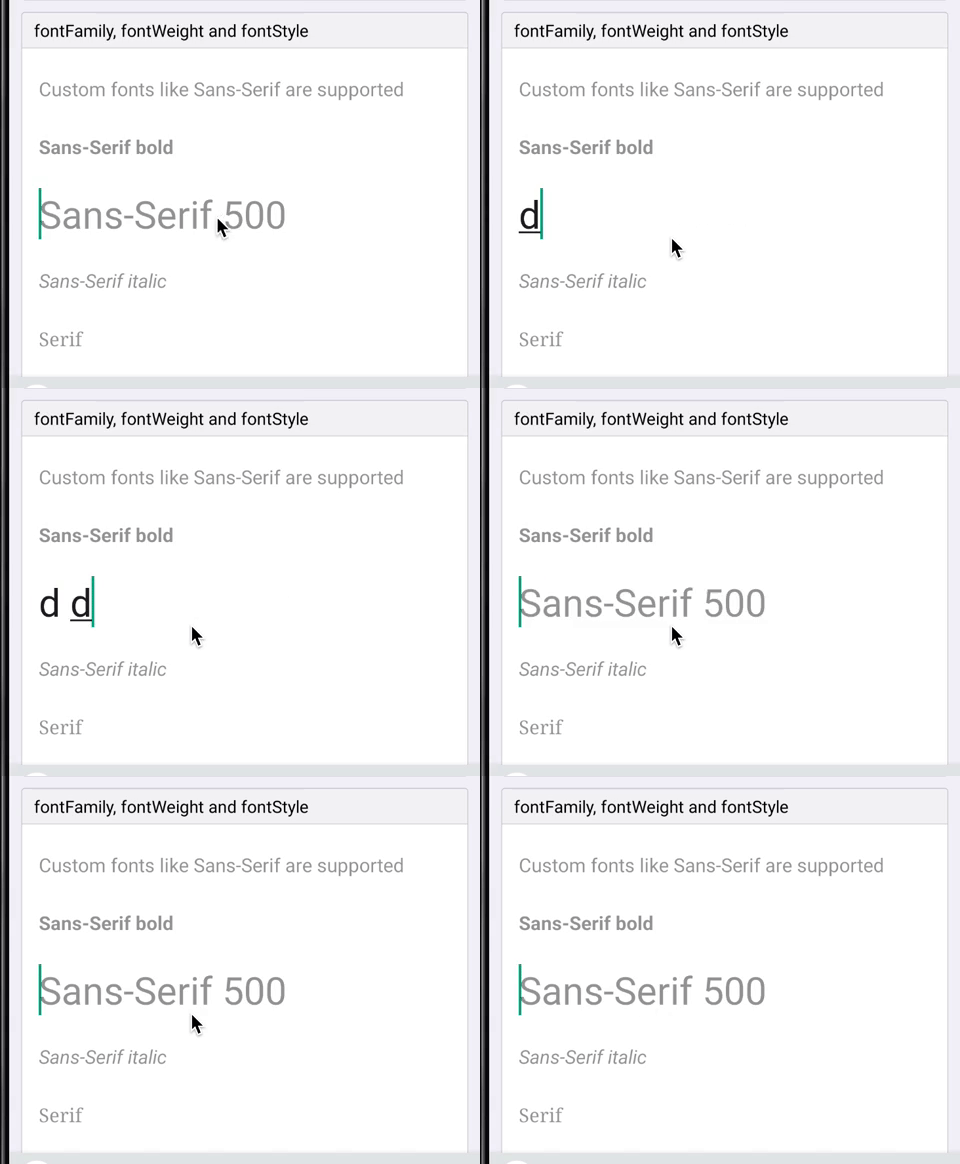 Reviewed By: mmmulani Differential Revision: D17468825 Pulled By: JoshuaGross fbshipit-source-id: bc2219facb94668551a06a68b0ee4690e5474d40


876 lines
23 KiB
JavaScript
876 lines
23 KiB
JavaScript
/**
|
|
* Copyright (c) Facebook, Inc. and its affiliates.
|
|
*
|
|
* This source code is licensed under the MIT license found in the
|
|
* LICENSE file in the root directory of this source tree.
|
|
*
|
|
* @format
|
|
* @flow
|
|
*/
|
|
|
|
'use strict';
|
|
|
|
const React = require('react');
|
|
|
|
const {
|
|
Text,
|
|
TextInput,
|
|
View,
|
|
StyleSheet,
|
|
Slider,
|
|
Switch,
|
|
} = require('react-native');
|
|
|
|
class TextEventsExample extends React.Component<{}, $FlowFixMeState> {
|
|
state = {
|
|
curText: '<No Event>',
|
|
prevText: '<No Event>',
|
|
prev2Text: '<No Event>',
|
|
prev3Text: '<No Event>',
|
|
};
|
|
|
|
updateText = text => {
|
|
this.setState(state => {
|
|
return {
|
|
curText: text,
|
|
prevText: state.curText,
|
|
prev2Text: state.prevText,
|
|
prev3Text: state.prev2Text,
|
|
};
|
|
});
|
|
};
|
|
|
|
render() {
|
|
return (
|
|
<View>
|
|
<TextInput
|
|
autoCapitalize="none"
|
|
placeholder="Enter text to see events"
|
|
autoCorrect={false}
|
|
multiline
|
|
onFocus={() => this.updateText('onFocus')}
|
|
onBlur={() => this.updateText('onBlur')}
|
|
onChange={event =>
|
|
this.updateText('onChange text: ' + event.nativeEvent.text)
|
|
}
|
|
onContentSizeChange={event =>
|
|
this.updateText(
|
|
'onContentSizeChange size: ' +
|
|
JSON.stringify(event.nativeEvent.contentSize),
|
|
)
|
|
}
|
|
onEndEditing={event =>
|
|
this.updateText('onEndEditing text: ' + event.nativeEvent.text)
|
|
}
|
|
onSubmitEditing={event =>
|
|
this.updateText('onSubmitEditing text: ' + event.nativeEvent.text)
|
|
}
|
|
onKeyPress={event =>
|
|
this.updateText('onKeyPress key: ' + event.nativeEvent.key)
|
|
}
|
|
style={styles.singleLine}
|
|
/>
|
|
<Text style={styles.eventLabel}>
|
|
{this.state.curText}
|
|
{'\n'}
|
|
(prev: {this.state.prevText}){'\n'}
|
|
(prev2: {this.state.prev2Text}){'\n'}
|
|
(prev3: {this.state.prev3Text})
|
|
</Text>
|
|
</View>
|
|
);
|
|
}
|
|
}
|
|
|
|
class RewriteExample extends React.Component<$FlowFixMeProps, $FlowFixMeState> {
|
|
constructor(props) {
|
|
super(props);
|
|
this.state = {text: ''};
|
|
}
|
|
render() {
|
|
const limit = 20;
|
|
const remainder = limit - this.state.text.length;
|
|
const remainderColor = remainder > 5 ? 'blue' : 'red';
|
|
return (
|
|
/* $FlowFixMe(>=0.78.0 site=react_native_android_fb) This issue was found
|
|
* when making Flow check .android.js files. */
|
|
<View style={styles.rewriteContainer}>
|
|
<TextInput
|
|
multiline={false}
|
|
maxLength={limit}
|
|
onChangeText={text => {
|
|
text = text.replace(/ /g, '_');
|
|
this.setState({text});
|
|
}}
|
|
/* $FlowFixMe(>=0.78.0 site=react_native_android_fb) This issue was
|
|
* found when making Flow check .android.js files. */
|
|
style={styles.default}
|
|
value={this.state.text}
|
|
/>
|
|
{/* $FlowFixMe(>=0.78.0 site=react_native_android_fb) This issue was
|
|
* found when making Flow check .android.js files. */}
|
|
<Text style={[styles.remainder, {color: remainderColor}]}>
|
|
{remainder}
|
|
</Text>
|
|
</View>
|
|
);
|
|
}
|
|
}
|
|
|
|
class TokenizedTextExample extends React.Component<
|
|
$FlowFixMeProps,
|
|
$FlowFixMeState,
|
|
> {
|
|
constructor(props) {
|
|
super(props);
|
|
this.state = {text: 'Hello #World'};
|
|
}
|
|
render() {
|
|
//define delimiter
|
|
let delimiter = /\s+/;
|
|
|
|
//split string
|
|
let _text = this.state.text;
|
|
let token,
|
|
index,
|
|
parts = [];
|
|
while (_text) {
|
|
delimiter.lastIndex = 0;
|
|
token = delimiter.exec(_text);
|
|
if (token === null) {
|
|
break;
|
|
}
|
|
index = token.index;
|
|
if (token[0].length === 0) {
|
|
index = 1;
|
|
}
|
|
parts.push(_text.substr(0, index));
|
|
parts.push(token[0]);
|
|
index = index + token[0].length;
|
|
_text = _text.slice(index);
|
|
}
|
|
parts.push(_text);
|
|
|
|
//highlight hashtags
|
|
parts = parts.map(text => {
|
|
if (/^#/.test(text)) {
|
|
return (
|
|
<Text key={text} style={styles.hashtag}>
|
|
{text}
|
|
</Text>
|
|
);
|
|
} else {
|
|
return text;
|
|
}
|
|
});
|
|
|
|
return (
|
|
<View>
|
|
<TextInput
|
|
multiline={true}
|
|
style={styles.multiline}
|
|
onChangeText={text => {
|
|
this.setState({text});
|
|
}}>
|
|
<Text>{parts}</Text>
|
|
</TextInput>
|
|
</View>
|
|
);
|
|
}
|
|
}
|
|
|
|
class BlurOnSubmitExample extends React.Component<{}> {
|
|
focusNextField = nextField => {
|
|
this.refs[nextField].focus();
|
|
};
|
|
|
|
render() {
|
|
return (
|
|
<View>
|
|
<TextInput
|
|
ref="1"
|
|
style={styles.singleLine}
|
|
placeholder="blurOnSubmit = false"
|
|
returnKeyType="next"
|
|
blurOnSubmit={false}
|
|
onSubmitEditing={() => this.focusNextField('2')}
|
|
/>
|
|
<TextInput
|
|
ref="2"
|
|
style={styles.singleLine}
|
|
keyboardType="email-address"
|
|
placeholder="blurOnSubmit = false"
|
|
returnKeyType="next"
|
|
blurOnSubmit={false}
|
|
onSubmitEditing={() => this.focusNextField('3')}
|
|
/>
|
|
<TextInput
|
|
ref="3"
|
|
style={styles.singleLine}
|
|
keyboardType="url"
|
|
placeholder="blurOnSubmit = false"
|
|
returnKeyType="next"
|
|
blurOnSubmit={false}
|
|
onSubmitEditing={() => this.focusNextField('4')}
|
|
/>
|
|
<TextInput
|
|
ref="4"
|
|
style={styles.singleLine}
|
|
keyboardType="numeric"
|
|
placeholder="blurOnSubmit = false"
|
|
blurOnSubmit={false}
|
|
onSubmitEditing={() => this.focusNextField('5')}
|
|
/>
|
|
<TextInput
|
|
ref="5"
|
|
style={styles.singleLine}
|
|
keyboardType="numbers-and-punctuation"
|
|
placeholder="blurOnSubmit = true"
|
|
returnKeyType="done"
|
|
/>
|
|
</View>
|
|
);
|
|
}
|
|
}
|
|
|
|
class ToggleDefaultPaddingExample extends React.Component<
|
|
$FlowFixMeProps,
|
|
$FlowFixMeState,
|
|
> {
|
|
constructor(props) {
|
|
super(props);
|
|
this.state = {hasPadding: false};
|
|
}
|
|
render() {
|
|
return (
|
|
<View>
|
|
<TextInput style={this.state.hasPadding ? {padding: 0} : null} />
|
|
<Text
|
|
onPress={() => this.setState({hasPadding: !this.state.hasPadding})}>
|
|
Toggle padding
|
|
</Text>
|
|
</View>
|
|
);
|
|
}
|
|
}
|
|
|
|
type SelectionExampleState = {
|
|
selection: $ReadOnly<{|
|
|
start: number,
|
|
end?: number,
|
|
|}>,
|
|
value: string,
|
|
};
|
|
|
|
class SelectionExample extends React.Component<
|
|
$FlowFixMeProps,
|
|
SelectionExampleState,
|
|
> {
|
|
_textInput: any;
|
|
|
|
constructor(props) {
|
|
super(props);
|
|
this.state = {
|
|
selection: {start: 0, end: 0},
|
|
value: props.value,
|
|
};
|
|
}
|
|
|
|
onSelectionChange({nativeEvent: {selection}}) {
|
|
this.setState({selection});
|
|
}
|
|
|
|
getRandomPosition() {
|
|
const length = this.state.value.length;
|
|
return Math.round(Math.random() * length);
|
|
}
|
|
|
|
select(start, end) {
|
|
this._textInput.focus();
|
|
this.setState({selection: {start, end}});
|
|
}
|
|
|
|
selectRandom() {
|
|
const positions = [
|
|
this.getRandomPosition(),
|
|
this.getRandomPosition(),
|
|
].sort();
|
|
this.select(...positions);
|
|
}
|
|
|
|
placeAt(position) {
|
|
this.select(position, position);
|
|
}
|
|
|
|
placeAtRandom() {
|
|
this.placeAt(this.getRandomPosition());
|
|
}
|
|
|
|
render() {
|
|
const length = this.state.value.length;
|
|
|
|
return (
|
|
<View>
|
|
<TextInput
|
|
multiline={this.props.multiline}
|
|
onChangeText={value => this.setState({value})}
|
|
onSelectionChange={this.onSelectionChange.bind(this)}
|
|
ref={textInput => (this._textInput = textInput)}
|
|
selection={this.state.selection}
|
|
style={this.props.style}
|
|
value={this.state.value}
|
|
/>
|
|
<View>
|
|
<Text>selection = {JSON.stringify(this.state.selection)}</Text>
|
|
<Text onPress={this.placeAt.bind(this, 0)}>
|
|
Place at Start (0, 0)
|
|
</Text>
|
|
<Text onPress={this.placeAt.bind(this, length)}>
|
|
Place at End ({length}, {length})
|
|
</Text>
|
|
<Text onPress={this.placeAtRandom.bind(this)}>Place at Random</Text>
|
|
<Text onPress={this.select.bind(this, 0, length)}>Select All</Text>
|
|
<Text onPress={this.selectRandom.bind(this)}>Select Random</Text>
|
|
</View>
|
|
</View>
|
|
);
|
|
}
|
|
}
|
|
|
|
class AutogrowingTextInputExample extends React.Component<{}> {
|
|
constructor(props) {
|
|
super(props);
|
|
|
|
/* $FlowFixMe(>=0.78.0 site=react_native_android_fb) This issue was found
|
|
* when making Flow check .android.js files. */
|
|
this.state = {
|
|
width: 100,
|
|
multiline: true,
|
|
text: '',
|
|
contentSize: {
|
|
width: 0,
|
|
height: 0,
|
|
},
|
|
};
|
|
}
|
|
|
|
UNSAFE_componentWillReceiveProps(props) {
|
|
/* $FlowFixMe(>=0.78.0 site=react_native_android_fb) This issue was found
|
|
* when making Flow check .android.js files. */
|
|
this.setState({
|
|
/* $FlowFixMe(>=0.78.0 site=react_native_android_fb) This issue was found
|
|
* when making Flow check .android.js files. */
|
|
multiline: props.multiline,
|
|
});
|
|
}
|
|
|
|
render() {
|
|
/* $FlowFixMe(>=0.78.0 site=react_native_android_fb) This issue was found
|
|
* when making Flow check .android.js files. */
|
|
const {style, multiline, ...props} = this.props;
|
|
return (
|
|
<View>
|
|
<Text>Width:</Text>
|
|
<Slider
|
|
value={100}
|
|
minimumValue={0}
|
|
maximumValue={100}
|
|
step={10}
|
|
/* $FlowFixMe(>=0.78.0 site=react_native_android_fb) This issue was
|
|
* found when making Flow check .android.js files. */
|
|
onValueChange={value => this.setState({width: value})}
|
|
/>
|
|
<Text>Multiline:</Text>
|
|
<Switch
|
|
/* $FlowFixMe(>=0.78.0 site=react_native_android_fb) This issue was
|
|
* found when making Flow check .android.js files. */
|
|
value={this.state.multiline}
|
|
/* $FlowFixMe(>=0.78.0 site=react_native_android_fb) This issue was
|
|
* found when making Flow check .android.js files. */
|
|
onValueChange={value => this.setState({multiline: value})}
|
|
/>
|
|
<Text>TextInput:</Text>
|
|
<TextInput
|
|
/* $FlowFixMe(>=0.78.0 site=react_native_android_fb) This issue was
|
|
* found when making Flow check .android.js files. */
|
|
multiline={this.state.multiline}
|
|
/* $FlowFixMe(>=0.78.0 site=react_native_android_fb) This issue was
|
|
* found when making Flow check .android.js files. */
|
|
style={[style, {width: this.state.width + '%'}]}
|
|
/* $FlowFixMe(>=0.78.0 site=react_native_android_fb) This issue was
|
|
* found when making Flow check .android.js files. */
|
|
onChangeText={value => this.setState({text: value})}
|
|
onContentSizeChange={event =>
|
|
/* $FlowFixMe(>=0.78.0 site=react_native_android_fb) This issue was
|
|
* found when making Flow check .android.js files. */
|
|
this.setState({contentSize: event.nativeEvent.contentSize})
|
|
}
|
|
{...props}
|
|
/>
|
|
<Text>Plain text value representation:</Text>
|
|
{/* $FlowFixMe(>=0.78.0 site=react_native_android_fb) This issue was
|
|
* found when making Flow check .android.js files. */}
|
|
<Text>{this.state.text}</Text>
|
|
{/* $FlowFixMe(>=0.78.0 site=react_native_android_fb) This issue was
|
|
* found when making Flow check .android.js files. */}
|
|
<Text>Content Size: {JSON.stringify(this.state.contentSize)}</Text>
|
|
</View>
|
|
);
|
|
}
|
|
}
|
|
|
|
const styles = StyleSheet.create({
|
|
multiline: {
|
|
height: 60,
|
|
fontSize: 16,
|
|
},
|
|
eventLabel: {
|
|
margin: 3,
|
|
fontSize: 12,
|
|
},
|
|
singleLine: {
|
|
fontSize: 16,
|
|
},
|
|
singleLineWithHeightTextInput: {
|
|
height: 30,
|
|
},
|
|
hashtag: {
|
|
color: 'blue',
|
|
fontWeight: 'bold',
|
|
},
|
|
});
|
|
|
|
exports.title = '<TextInput>';
|
|
exports.description = 'Single and multi-line text inputs.';
|
|
exports.examples = [
|
|
{
|
|
title: 'Auto-focus',
|
|
render: function(): React.Node {
|
|
return (
|
|
<TextInput
|
|
autoFocus={true}
|
|
multiline={true}
|
|
/* $FlowFixMe(>=0.78.0 site=react_native_android_fb) This issue was
|
|
* found when making Flow check .android.js files. */
|
|
style={styles.input}
|
|
accessibilityLabel="I am the accessibility label for text input"
|
|
/>
|
|
);
|
|
},
|
|
},
|
|
{
|
|
title: "Live Re-Write (<sp> -> '_')",
|
|
render: function(): React.Node {
|
|
return <RewriteExample />;
|
|
},
|
|
},
|
|
{
|
|
title: 'Auto-capitalize',
|
|
render: function(): React.Node {
|
|
const autoCapitalizeTypes = ['none', 'sentences', 'words', 'characters'];
|
|
const examples = autoCapitalizeTypes.map(type => {
|
|
return (
|
|
<TextInput
|
|
key={type}
|
|
autoCapitalize={type}
|
|
placeholder={'autoCapitalize: ' + type}
|
|
style={styles.singleLine}
|
|
/>
|
|
);
|
|
});
|
|
return <View>{examples}</View>;
|
|
},
|
|
},
|
|
{
|
|
title: 'Auto-correct',
|
|
render: function(): React.Node {
|
|
return (
|
|
<View>
|
|
<TextInput
|
|
autoCorrect={true}
|
|
placeholder="This has autoCorrect"
|
|
style={styles.singleLine}
|
|
/>
|
|
<TextInput
|
|
autoCorrect={false}
|
|
placeholder="This does not have autoCorrect"
|
|
style={styles.singleLine}
|
|
/>
|
|
</View>
|
|
);
|
|
},
|
|
},
|
|
{
|
|
title: 'Keyboard types',
|
|
render: function(): React.Node {
|
|
const keyboardTypes = [
|
|
'default',
|
|
'email-address',
|
|
'numeric',
|
|
'phone-pad',
|
|
];
|
|
const examples = keyboardTypes.map(type => {
|
|
return (
|
|
<TextInput
|
|
key={type}
|
|
keyboardType={type}
|
|
placeholder={'keyboardType: ' + type}
|
|
style={styles.singleLine}
|
|
/>
|
|
);
|
|
});
|
|
return <View>{examples}</View>;
|
|
},
|
|
},
|
|
{
|
|
title: 'Blur on submit',
|
|
render: function(): React.Element<any> {
|
|
return <BlurOnSubmitExample />;
|
|
},
|
|
},
|
|
{
|
|
title: 'Event handling',
|
|
render: function(): React.Element<any> {
|
|
return <TextEventsExample />;
|
|
},
|
|
},
|
|
{
|
|
title: 'Colors and text inputs',
|
|
render: function(): React.Node {
|
|
return (
|
|
<View>
|
|
<TextInput
|
|
style={[styles.singleLine]}
|
|
defaultValue="Default color text"
|
|
/>
|
|
<TextInput
|
|
style={[styles.singleLine, {color: 'green'}]}
|
|
defaultValue="Green Text"
|
|
/>
|
|
<TextInput
|
|
placeholder="Default placeholder text color"
|
|
style={styles.singleLine}
|
|
/>
|
|
<TextInput
|
|
placeholder="Red placeholder text color"
|
|
placeholderTextColor="red"
|
|
style={styles.singleLine}
|
|
/>
|
|
<TextInput
|
|
placeholder="Default underline color"
|
|
style={styles.singleLine}
|
|
/>
|
|
<TextInput
|
|
placeholder="Blue underline color"
|
|
style={styles.singleLine}
|
|
underlineColorAndroid="blue"
|
|
/>
|
|
<TextInput
|
|
defaultValue="Same BackgroundColor as View "
|
|
style={[
|
|
styles.singleLine,
|
|
{backgroundColor: 'rgba(100, 100, 100, 0.3)'},
|
|
]}>
|
|
<Text style={{backgroundColor: 'rgba(100, 100, 100, 0.3)'}}>
|
|
Darker backgroundColor
|
|
</Text>
|
|
</TextInput>
|
|
<TextInput
|
|
defaultValue="Highlight Color is red"
|
|
selectionColor={'red'}
|
|
style={styles.singleLine}
|
|
/>
|
|
</View>
|
|
);
|
|
},
|
|
},
|
|
{
|
|
title: 'Text input, themes and heights',
|
|
render: function(): React.Node {
|
|
return (
|
|
<TextInput
|
|
placeholder="If you set height, beware of padding set from themes"
|
|
style={[styles.singleLineWithHeightTextInput]}
|
|
/>
|
|
);
|
|
},
|
|
},
|
|
{
|
|
title: 'fontFamily, fontWeight and fontStyle',
|
|
render: function(): React.Node {
|
|
return (
|
|
<View>
|
|
<TextInput
|
|
style={[styles.singleLine, {fontFamily: 'sans-serif'}]}
|
|
placeholder="Custom fonts like Sans-Serif are supported"
|
|
/>
|
|
<TextInput
|
|
style={[
|
|
styles.singleLine,
|
|
{fontFamily: 'sans-serif', fontWeight: 'bold'},
|
|
]}
|
|
placeholder="Sans-Serif bold"
|
|
/>
|
|
<TextInput
|
|
style={[
|
|
styles.singleLine,
|
|
{fontFamily: 'sans-serif', fontWeight: '500'},
|
|
]}
|
|
placeholder="Sans-Serif 500"
|
|
/>
|
|
<TextInput
|
|
style={[
|
|
styles.singleLine,
|
|
{fontFamily: 'sans-serif', fontStyle: 'italic'},
|
|
]}
|
|
placeholder="Sans-Serif italic"
|
|
/>
|
|
<TextInput
|
|
style={[styles.singleLine, {fontFamily: 'serif'}]}
|
|
placeholder="Serif"
|
|
/>
|
|
</View>
|
|
);
|
|
},
|
|
},
|
|
{
|
|
title: 'letterSpacing',
|
|
render: function(): React.Node {
|
|
return (
|
|
<View>
|
|
<TextInput
|
|
style={[styles.singleLine, {letterSpacing: 0}]}
|
|
placeholder="letterSpacing = 0"
|
|
/>
|
|
<TextInput
|
|
style={[styles.singleLine, {letterSpacing: 2}]}
|
|
placeholder="letterSpacing = 2"
|
|
/>
|
|
<TextInput
|
|
style={[styles.singleLine, {letterSpacing: 9}]}
|
|
placeholder="letterSpacing = 9"
|
|
/>
|
|
<TextInput
|
|
style={[styles.singleLine, {letterSpacing: -1}]}
|
|
placeholder="letterSpacing = -1"
|
|
/>
|
|
</View>
|
|
);
|
|
},
|
|
},
|
|
{
|
|
title: 'Passwords',
|
|
render: function(): React.Node {
|
|
return (
|
|
<View>
|
|
<TextInput
|
|
defaultValue="iloveturtles"
|
|
secureTextEntry={true}
|
|
style={styles.singleLine}
|
|
/>
|
|
<TextInput
|
|
secureTextEntry={true}
|
|
style={[styles.singleLine, {color: 'red'}]}
|
|
placeholder="color is supported too"
|
|
placeholderTextColor="red"
|
|
/>
|
|
</View>
|
|
);
|
|
},
|
|
},
|
|
{
|
|
title: 'Editable',
|
|
render: function(): React.Node {
|
|
return (
|
|
<TextInput
|
|
defaultValue="Can't touch this! (>'-')> ^(' - ')^ <('-'<) (>'-')> ^(' - ')^"
|
|
editable={false}
|
|
style={styles.singleLine}
|
|
/>
|
|
);
|
|
},
|
|
},
|
|
{
|
|
title: 'Multiline',
|
|
render: function(): React.Node {
|
|
return (
|
|
<View>
|
|
<TextInput
|
|
autoCorrect={true}
|
|
placeholder="multiline, aligned top-left"
|
|
placeholderTextColor="red"
|
|
multiline={true}
|
|
style={[
|
|
styles.multiline,
|
|
{textAlign: 'left', textAlignVertical: 'top'},
|
|
]}
|
|
/>
|
|
<TextInput
|
|
autoCorrect={true}
|
|
placeholder="multiline, aligned center"
|
|
placeholderTextColor="green"
|
|
multiline={true}
|
|
style={[
|
|
styles.multiline,
|
|
{textAlign: 'center', textAlignVertical: 'center'},
|
|
]}
|
|
/>
|
|
<TextInput
|
|
autoCorrect={true}
|
|
multiline={true}
|
|
style={[
|
|
styles.multiline,
|
|
{color: 'blue'},
|
|
{textAlign: 'right', textAlignVertical: 'bottom'},
|
|
]}>
|
|
<Text style={styles.multiline}>
|
|
multiline with children, aligned bottom-right
|
|
</Text>
|
|
</TextInput>
|
|
</View>
|
|
);
|
|
},
|
|
},
|
|
{
|
|
title: 'Fixed number of lines',
|
|
platform: 'android',
|
|
render: function(): React.Node {
|
|
return (
|
|
<View>
|
|
<TextInput
|
|
numberOfLines={2}
|
|
multiline={true}
|
|
placeholder="Two line input"
|
|
/>
|
|
<TextInput
|
|
numberOfLines={5}
|
|
multiline={true}
|
|
placeholder="Five line input"
|
|
/>
|
|
</View>
|
|
);
|
|
},
|
|
},
|
|
{
|
|
title: 'Auto-expanding',
|
|
render: function(): React.Node {
|
|
return (
|
|
<View>
|
|
<AutogrowingTextInputExample
|
|
enablesReturnKeyAutomatically={true}
|
|
returnKeyType="done"
|
|
multiline={true}
|
|
style={{maxHeight: 400, minHeight: 20, backgroundColor: '#eeeeee'}}>
|
|
generic generic generic
|
|
<Text style={{fontSize: 6, color: 'red'}}>
|
|
small small small small small small
|
|
</Text>
|
|
<Text>regular regular</Text>
|
|
<Text style={{fontSize: 30, color: 'green'}}>
|
|
huge huge huge huge huge
|
|
</Text>
|
|
generic generic generic
|
|
</AutogrowingTextInputExample>
|
|
</View>
|
|
);
|
|
},
|
|
},
|
|
{
|
|
title: 'Attributed text',
|
|
render: function(): React.Node {
|
|
return <TokenizedTextExample />;
|
|
},
|
|
},
|
|
{
|
|
title: 'Return key',
|
|
render: function(): React.Node {
|
|
const returnKeyTypes = [
|
|
'none',
|
|
'go',
|
|
'search',
|
|
'send',
|
|
'done',
|
|
'previous',
|
|
'next',
|
|
];
|
|
const returnKeyLabels = ['Compile', 'React Native'];
|
|
const examples = returnKeyTypes.map(type => {
|
|
return (
|
|
<TextInput
|
|
key={type}
|
|
returnKeyType={type}
|
|
placeholder={'returnKeyType: ' + type}
|
|
style={styles.singleLine}
|
|
/>
|
|
);
|
|
});
|
|
const types = returnKeyLabels.map(type => {
|
|
return (
|
|
<TextInput
|
|
key={type}
|
|
returnKeyLabel={type}
|
|
placeholder={'returnKeyLabel: ' + type}
|
|
style={styles.singleLine}
|
|
/>
|
|
);
|
|
});
|
|
return (
|
|
<View>
|
|
{examples}
|
|
{types}
|
|
</View>
|
|
);
|
|
},
|
|
},
|
|
{
|
|
title: 'Inline Images',
|
|
render: function(): React.Node {
|
|
return (
|
|
<View>
|
|
<TextInput
|
|
inlineImageLeft="ic_menu_black_24dp"
|
|
placeholder="This has drawableLeft set"
|
|
style={styles.singleLine}
|
|
/>
|
|
<TextInput
|
|
inlineImageLeft="ic_menu_black_24dp"
|
|
inlineImagePadding={30}
|
|
placeholder="This has drawableLeft and drawablePadding set"
|
|
style={styles.singleLine}
|
|
/>
|
|
<TextInput
|
|
placeholder="This does not have drawable props set"
|
|
style={styles.singleLine}
|
|
/>
|
|
</View>
|
|
);
|
|
},
|
|
},
|
|
{
|
|
title: 'Toggle Default Padding',
|
|
render: function(): React.Node {
|
|
return <ToggleDefaultPaddingExample />;
|
|
},
|
|
},
|
|
{
|
|
title: 'Text selection & cursor placement',
|
|
render: function(): React.Node {
|
|
return (
|
|
<View>
|
|
<SelectionExample
|
|
/* $FlowFixMe(>=0.78.0 site=react_native_android_fb) This issue was
|
|
* found when making Flow check .android.js files. */
|
|
style={styles.default}
|
|
value="text selection can be changed"
|
|
/>
|
|
<SelectionExample
|
|
multiline
|
|
style={styles.multiline}
|
|
value={'multiline text selection\ncan also be changed'}
|
|
/>
|
|
</View>
|
|
);
|
|
},
|
|
},
|
|
];
|