Compare commits
| Author | SHA1 | Date | |
|---|---|---|---|
 Alex.k Alex.k
|
6474edec91 | ||
|
Alex.k
|
e6818ed0d4 | ||
|
Alex.k
|
f2c31da3b5 | ||
|
Alex.k
|
c87b5f5892 |
+1
-1
@@ -1,6 +1,6 @@
|
||||
Pod::Spec.new do |s|
|
||||
s.name = 'FoldingCell'
|
||||
s.version = '0.8.6'
|
||||
s.version = '0.8.7'
|
||||
s.summary = 'UITableViewCell with folding animation.'
|
||||
s.homepage = 'https://github.com/Ramotion/folding-cell'
|
||||
s.license = 'MIT'
|
||||
|
||||
@@ -1,4 +1,4 @@
|
||||

|
||||

|
||||
# FoldingCell
|
||||
[](https://cocoapods.org/pods/FoldingCell)
|
||||
[](http://cocoapods.org/pods/FoldingCell)
|
||||
@@ -10,7 +10,7 @@
|
||||
[](https://github.com/Carthage/Carthage)
|
||||
|
||||
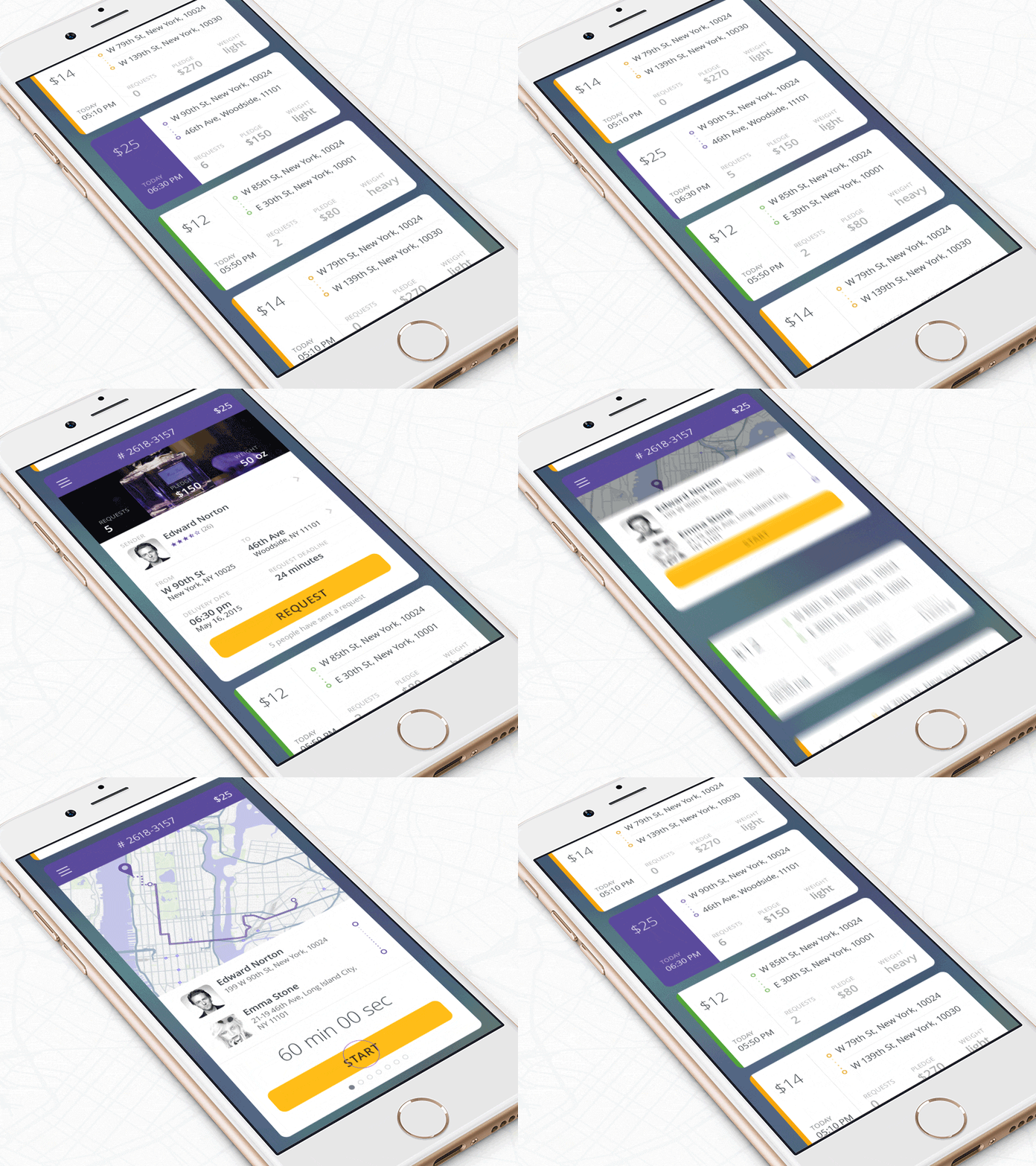
[shot on dribbble](https://dribbble.com/shots/2121350-Delivery-Card):
|
||||

|
||||
|
||||
|
||||
|
||||
The [iPhone mockup](https://store.ramotion.com/product/iphone-6-mockups?utm_source=gthb&utm_medium=special&utm_campaign=folding-cell) available [here](https://store.ramotion.com/product/iphone-6-mockups?utm_source=gthb&utm_medium=special&utm_campaign=folding-cell).
|
||||
@@ -34,7 +34,7 @@ github "Ramotion/folding-cell"
|
||||
```
|
||||
|
||||
## Solution
|
||||

|
||||

|
||||
## Usage
|
||||
|
||||
1) Create a new cell inheriting from `FoldingCell`
|
||||
@@ -42,7 +42,8 @@ github "Ramotion/folding-cell"
|
||||
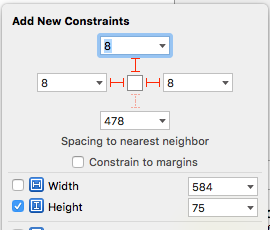
2) Add a UIView to your cell in your storyboard or nib file, inheriting from `RotatedView`.
|
||||
Connect the outlet from this view to the cell property `foregroundView`.
|
||||
Add constraints from this view to the superview, as in this picture:
|
||||

|
||||
|
||||
|
||||
|
||||
(constants of constraints may be different). Add the identifier `ForegroundViewTop`
|
||||
for the top constraint. (This view will be shown when the cell is in its normal state).
|
||||
@@ -50,13 +51,14 @@ for the top constraint. (This view will be shown when the cell is in its normal
|
||||
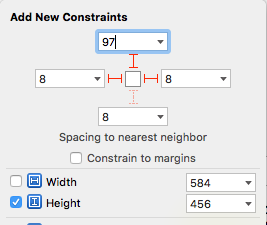
3) Add other UIViews to your cell, connect the outlet from this view to the cell
|
||||
property `containerView`. Add constraints from this view to the superview like in the picture:
|
||||
|
||||

|
||||
|
||||
|
||||
(constants of constraints may be different). Add the identifier "ContainerViewTop" for the top constraint.
|
||||
(This view will be shown when the cell is opened)
|
||||
|
||||
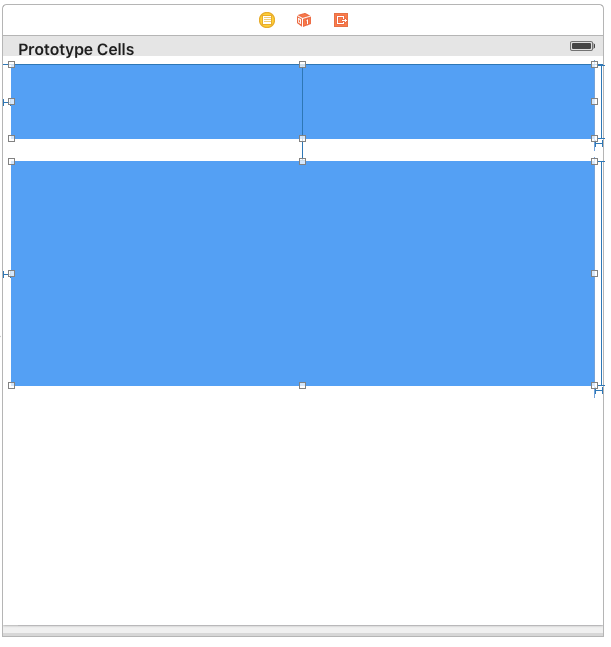
Your result should be something like this picture:
|
||||

|
||||
|
||||
|
||||
|
||||
[Demonstration adding constraints for foregroundView, containerView](https://vimeo.com/154954299)
|
||||
|
||||
@@ -143,6 +145,12 @@ Ok, we've finished configuring the cell.
|
||||
}
|
||||
```
|
||||
|
||||
|
||||
#### if don't use storyboard and xib files
|
||||
|
||||
Create foregroundView and containerView from code (steps 2 - 3) look example:
|
||||
[Folding-cell-programmatically](https://github.com/ober01/Folding-cell-programmatically)
|
||||
|
||||
## Licence
|
||||
|
||||
Folding cell is released under the MIT license.
|
||||
|
||||
+2
-2
@@ -13,7 +13,7 @@
|
||||
<a title="Classes Reference"></a>
|
||||
<header>
|
||||
<div class="content-wrapper">
|
||||
<p><a href="index.html">FoldingCellDemo Docs</a> (50% documented)</p>
|
||||
<p><a href="index.html">FoldingCellDemo Docs</a> (47% documented)</p>
|
||||
</div>
|
||||
</header>
|
||||
<div class="content-wrapper">
|
||||
@@ -79,7 +79,7 @@
|
||||
</section>
|
||||
</section>
|
||||
<section id="footer">
|
||||
<p>© 2016 <a class="link" href="" target="_blank" rel="external">AlexKalinkin</a>. All rights reserved. (Last updated: 2016-06-09)</p>
|
||||
<p>© 2016 <a class="link" href="" target="_blank" rel="external">AlexKalinkin</a>. All rights reserved. (Last updated: 2016-06-10)</p>
|
||||
<p>Generated by <a class="link" href="https://github.com/realm/jazzy" target="_blank" rel="external">jazzy ♪♫ v0.5.0</a>, a <a class="link" href="http://realm.io" target="_blank" rel="external">Realm</a> project.</p>
|
||||
</section>
|
||||
</article>
|
||||
|
||||
@@ -14,7 +14,7 @@
|
||||
<a title="FoldingCell Class Reference"></a>
|
||||
<header>
|
||||
<div class="content-wrapper">
|
||||
<p><a href="../index.html">FoldingCellDemo Docs</a> (50% documented)</p>
|
||||
<p><a href="../index.html">FoldingCellDemo Docs</a> (47% documented)</p>
|
||||
</div>
|
||||
</header>
|
||||
<div class="content-wrapper">
|
||||
@@ -320,7 +320,7 @@
|
||||
</section>
|
||||
</section>
|
||||
<section id="footer">
|
||||
<p>© 2016 <a class="link" href="" target="_blank" rel="external">AlexKalinkin</a>. All rights reserved. (Last updated: 2016-06-09)</p>
|
||||
<p>© 2016 <a class="link" href="" target="_blank" rel="external">AlexKalinkin</a>. All rights reserved. (Last updated: 2016-06-10)</p>
|
||||
<p>Generated by <a class="link" href="https://github.com/realm/jazzy" target="_blank" rel="external">jazzy ♪♫ v0.5.0</a>, a <a class="link" href="http://realm.io" target="_blank" rel="external">Realm</a> project.</p>
|
||||
</section>
|
||||
</article>
|
||||
|
||||
@@ -13,7 +13,7 @@
|
||||
<a title="Classes Reference"></a>
|
||||
<header>
|
||||
<div class="content-wrapper">
|
||||
<p><a href="index.html">FoldingCellDemo Docs</a> (50% documented)</p>
|
||||
<p><a href="index.html">FoldingCellDemo Docs</a> (47% documented)</p>
|
||||
</div>
|
||||
</header>
|
||||
<div class="content-wrapper">
|
||||
@@ -79,7 +79,7 @@
|
||||
</section>
|
||||
</section>
|
||||
<section id="footer">
|
||||
<p>© 2016 <a class="link" href="" target="_blank" rel="external">AlexKalinkin</a>. All rights reserved. (Last updated: 2016-06-09)</p>
|
||||
<p>© 2016 <a class="link" href="" target="_blank" rel="external">AlexKalinkin</a>. All rights reserved. (Last updated: 2016-06-10)</p>
|
||||
<p>Generated by <a class="link" href="https://github.com/realm/jazzy" target="_blank" rel="external">jazzy ♪♫ v0.5.0</a>, a <a class="link" href="http://realm.io" target="_blank" rel="external">Realm</a> project.</p>
|
||||
</section>
|
||||
</article>
|
||||
|
||||
+2
-2
@@ -14,7 +14,7 @@
|
||||
<a title="FoldingCell Class Reference"></a>
|
||||
<header>
|
||||
<div class="content-wrapper">
|
||||
<p><a href="../index.html">FoldingCellDemo Docs</a> (50% documented)</p>
|
||||
<p><a href="../index.html">FoldingCellDemo Docs</a> (47% documented)</p>
|
||||
</div>
|
||||
</header>
|
||||
<div class="content-wrapper">
|
||||
@@ -320,7 +320,7 @@
|
||||
</section>
|
||||
</section>
|
||||
<section id="footer">
|
||||
<p>© 2016 <a class="link" href="" target="_blank" rel="external">AlexKalinkin</a>. All rights reserved. (Last updated: 2016-06-09)</p>
|
||||
<p>© 2016 <a class="link" href="" target="_blank" rel="external">AlexKalinkin</a>. All rights reserved. (Last updated: 2016-06-10)</p>
|
||||
<p>Generated by <a class="link" href="https://github.com/realm/jazzy" target="_blank" rel="external">jazzy ♪♫ v0.5.0</a>, a <a class="link" href="http://realm.io" target="_blank" rel="external">Realm</a> project.</p>
|
||||
</section>
|
||||
</article>
|
||||
|
||||
@@ -13,7 +13,7 @@
|
||||
<a title="FoldingCellDemo Reference"></a>
|
||||
<header>
|
||||
<div class="content-wrapper">
|
||||
<p><a href="index.html">FoldingCellDemo Docs</a> (50% documented)</p>
|
||||
<p><a href="index.html">FoldingCellDemo Docs</a> (47% documented)</p>
|
||||
</div>
|
||||
</header>
|
||||
<div class="content-wrapper">
|
||||
@@ -40,7 +40,7 @@
|
||||
<section>
|
||||
<section class="section">
|
||||
|
||||
<p><img src="./header.png" alt="header"></p>
|
||||
<p><img src="https://raw.githubusercontent.com/Ramotion/folding-cell/master/header.png" alt="header"></p>
|
||||
<a href='#foldingcell' class='anchor' aria-hidden=true><span class="header-anchor"></span></a><h1 id='foldingcell'>FoldingCell</h1>
|
||||
|
||||
<p><a href="https://cocoapods.org/pods/FoldingCell"><img src="https://img.shields.io/cocoapods/p/FoldingCell.svg" alt="CocoaPods"></a>
|
||||
@@ -53,7 +53,7 @@
|
||||
<a href="https://github.com/Carthage/Carthage"><img src="https://img.shields.io/badge/Carthage-compatible-4BC51D.svg?style=flat" alt="Carthage compatible"></a></p>
|
||||
|
||||
<p><a href="https://dribbble.com/shots/2121350-Delivery-Card">shot on dribbble</a>:
|
||||
<img src="Screenshots/folding-cell.gif" alt="Animation"></p>
|
||||
<img src="https://raw.githubusercontent.com/Ramotion/folding-cell/master/Screenshots/folding-cell.gif" alt="Animation"></p>
|
||||
|
||||
<p>The <a href="https://store.ramotion.com/product/iphone-6-mockups?utm_source=gthb&utm_medium=special&utm_campaign=folding-cell">iPhone mockup</a> available <a href="https://store.ramotion.com/product/iphone-6-mockups?utm_source=gthb&utm_medium=special&utm_campaign=folding-cell">here</a>.</p>
|
||||
<a href='#requirements' class='anchor' aria-hidden=true><span class="header-anchor"></span></a><h2 id='requirements'>Requirements</h2>
|
||||
@@ -77,15 +77,16 @@ github "Ramotion/folding-cell"
|
||||
</code></p>
|
||||
<a href='#solution' class='anchor' aria-hidden=true><span class="header-anchor"></span></a><h2 id='solution'>Solution</h2>
|
||||
|
||||
<p><img src="/Tutorial-resources/Solution.png" alt="Solution"></p>
|
||||
<p><img src="https://raw.githubusercontent.com/Ramotion/folding-cell/master/Tutorial-resources/Solution.png" alt="Solution"></p>
|
||||
<a href='#usage' class='anchor' aria-hidden=true><span class="header-anchor"></span></a><h2 id='usage'>Usage</h2>
|
||||
|
||||
<p>1) Create a new cell inheriting from <code>FoldingCell</code></p>
|
||||
|
||||
<p>2) Add a UIView to your cell in your storyboard or nib file, inheriting from <code>RotatedView</code>.
|
||||
Connect the outlet from this view to the cell property <code>foregroundView</code>.
|
||||
Add constraints from this view to the superview, as in this picture:
|
||||
<img src="/Tutorial-resources/1.1.png" alt="1.1"></p>
|
||||
Add constraints from this view to the superview, as in this picture:</p>
|
||||
|
||||
<p><img src="https://raw.githubusercontent.com/Ramotion/folding-cell/master/Tutorial-resources/1.1.png" alt="1.1"></p>
|
||||
|
||||
<p>(constants of constraints may be different). Add the identifier <code>ForegroundViewTop</code>
|
||||
for the top constraint. (This view will be shown when the cell is in its normal state).</p>
|
||||
@@ -93,13 +94,14 @@ for the top constraint. (This view will be shown when the cell is in its normal
|
||||
<p>3) Add other UIViews to your cell, connect the outlet from this view to the cell
|
||||
property <code>containerView</code>. Add constraints from this view to the superview like in the picture:</p>
|
||||
|
||||
<p><img src="/Tutorial-resources/1.2.png" alt="1.2"></p>
|
||||
<p><img src="https://raw.githubusercontent.com/Ramotion/folding-cell/master/Tutorial-resources/1.2.png" alt="1.2"></p>
|
||||
|
||||
<p>(constants of constraints may be different). Add the identifier <q>ContainerViewTop</q> for the top constraint.
|
||||
(This view will be shown when the cell is opened)</p>
|
||||
|
||||
<p>Your result should be something like this picture:
|
||||
<img src="/Tutorial-resources/1.3.png" alt="1.3"></p>
|
||||
<p>Your result should be something like this picture:</p>
|
||||
|
||||
<p><img src="https://raw.githubusercontent.com/Ramotion/folding-cell/master/Tutorial-resources/1.3.png" alt="1.3"></p>
|
||||
|
||||
<p><a href="https://vimeo.com/154954299">Demonstration adding constraints for foregroundView, containerView</a></p>
|
||||
|
||||
@@ -181,6 +183,12 @@ property <code>containerView</code>. Add constraints from this view to the super
|
||||
}
|
||||
</code></pre>
|
||||
<pre class="highlight plaintext"><code>
|
||||
|
||||
#### if don't use storyboard and xib files
|
||||
|
||||
Create foregroundView and containerView from code (steps 2 - 3) look example:
|
||||
[Folding-cell-programmatically](https://github.com/ober01/Folding-cell-programmatically)
|
||||
|
||||
## Licence
|
||||
|
||||
Folding cell is released under the MIT license.
|
||||
@@ -198,7 +206,7 @@ See our other [open-source projects](https://github.com/ramotion) or [hire](http
|
||||
</section>
|
||||
</section>
|
||||
<section id="footer">
|
||||
<p>© 2016 <a class="link" href="" target="_blank" rel="external">AlexKalinkin</a>. All rights reserved. (Last updated: 2016-06-09)</p>
|
||||
<p>© 2016 <a class="link" href="" target="_blank" rel="external">AlexKalinkin</a>. All rights reserved. (Last updated: 2016-06-10)</p>
|
||||
<p>Generated by <a class="link" href="https://github.com/realm/jazzy" target="_blank" rel="external">jazzy ♪♫ v0.5.0</a>, a <a class="link" href="http://realm.io" target="_blank" rel="external">Realm</a> project.</p>
|
||||
</section>
|
||||
</article>
|
||||
|
||||
@@ -1,6 +1,7 @@
|
||||
FoldingCell.swift
|
||||
case Open
|
||||
case Close
|
||||
override public init(style: UITableViewCellStyle, reuseIdentifier: String?)
|
||||
required public init?(coder aDecoder: NSCoder)
|
||||
override public func awakeFromNib()
|
||||
public func isAnimating()->Bool
|
||||
|
||||
Binary file not shown.
+18
-10
@@ -13,7 +13,7 @@
|
||||
<a title="FoldingCellDemo Reference"></a>
|
||||
<header>
|
||||
<div class="content-wrapper">
|
||||
<p><a href="index.html">FoldingCellDemo Docs</a> (50% documented)</p>
|
||||
<p><a href="index.html">FoldingCellDemo Docs</a> (47% documented)</p>
|
||||
</div>
|
||||
</header>
|
||||
<div class="content-wrapper">
|
||||
@@ -40,7 +40,7 @@
|
||||
<section>
|
||||
<section class="section">
|
||||
|
||||
<p><img src="./header.png" alt="header"></p>
|
||||
<p><img src="https://raw.githubusercontent.com/Ramotion/folding-cell/master/header.png" alt="header"></p>
|
||||
<a href='#foldingcell' class='anchor' aria-hidden=true><span class="header-anchor"></span></a><h1 id='foldingcell'>FoldingCell</h1>
|
||||
|
||||
<p><a href="https://cocoapods.org/pods/FoldingCell"><img src="https://img.shields.io/cocoapods/p/FoldingCell.svg" alt="CocoaPods"></a>
|
||||
@@ -53,7 +53,7 @@
|
||||
<a href="https://github.com/Carthage/Carthage"><img src="https://img.shields.io/badge/Carthage-compatible-4BC51D.svg?style=flat" alt="Carthage compatible"></a></p>
|
||||
|
||||
<p><a href="https://dribbble.com/shots/2121350-Delivery-Card">shot on dribbble</a>:
|
||||
<img src="Screenshots/folding-cell.gif" alt="Animation"></p>
|
||||
<img src="https://raw.githubusercontent.com/Ramotion/folding-cell/master/Screenshots/folding-cell.gif" alt="Animation"></p>
|
||||
|
||||
<p>The <a href="https://store.ramotion.com/product/iphone-6-mockups?utm_source=gthb&utm_medium=special&utm_campaign=folding-cell">iPhone mockup</a> available <a href="https://store.ramotion.com/product/iphone-6-mockups?utm_source=gthb&utm_medium=special&utm_campaign=folding-cell">here</a>.</p>
|
||||
<a href='#requirements' class='anchor' aria-hidden=true><span class="header-anchor"></span></a><h2 id='requirements'>Requirements</h2>
|
||||
@@ -77,15 +77,16 @@ github "Ramotion/folding-cell"
|
||||
</code></p>
|
||||
<a href='#solution' class='anchor' aria-hidden=true><span class="header-anchor"></span></a><h2 id='solution'>Solution</h2>
|
||||
|
||||
<p><img src="/Tutorial-resources/Solution.png" alt="Solution"></p>
|
||||
<p><img src="https://raw.githubusercontent.com/Ramotion/folding-cell/master/Tutorial-resources/Solution.png" alt="Solution"></p>
|
||||
<a href='#usage' class='anchor' aria-hidden=true><span class="header-anchor"></span></a><h2 id='usage'>Usage</h2>
|
||||
|
||||
<p>1) Create a new cell inheriting from <code>FoldingCell</code></p>
|
||||
|
||||
<p>2) Add a UIView to your cell in your storyboard or nib file, inheriting from <code>RotatedView</code>.
|
||||
Connect the outlet from this view to the cell property <code>foregroundView</code>.
|
||||
Add constraints from this view to the superview, as in this picture:
|
||||
<img src="/Tutorial-resources/1.1.png" alt="1.1"></p>
|
||||
Add constraints from this view to the superview, as in this picture:</p>
|
||||
|
||||
<p><img src="https://raw.githubusercontent.com/Ramotion/folding-cell/master/Tutorial-resources/1.1.png" alt="1.1"></p>
|
||||
|
||||
<p>(constants of constraints may be different). Add the identifier <code>ForegroundViewTop</code>
|
||||
for the top constraint. (This view will be shown when the cell is in its normal state).</p>
|
||||
@@ -93,13 +94,14 @@ for the top constraint. (This view will be shown when the cell is in its normal
|
||||
<p>3) Add other UIViews to your cell, connect the outlet from this view to the cell
|
||||
property <code>containerView</code>. Add constraints from this view to the superview like in the picture:</p>
|
||||
|
||||
<p><img src="/Tutorial-resources/1.2.png" alt="1.2"></p>
|
||||
<p><img src="https://raw.githubusercontent.com/Ramotion/folding-cell/master/Tutorial-resources/1.2.png" alt="1.2"></p>
|
||||
|
||||
<p>(constants of constraints may be different). Add the identifier <q>ContainerViewTop</q> for the top constraint.
|
||||
(This view will be shown when the cell is opened)</p>
|
||||
|
||||
<p>Your result should be something like this picture:
|
||||
<img src="/Tutorial-resources/1.3.png" alt="1.3"></p>
|
||||
<p>Your result should be something like this picture:</p>
|
||||
|
||||
<p><img src="https://raw.githubusercontent.com/Ramotion/folding-cell/master/Tutorial-resources/1.3.png" alt="1.3"></p>
|
||||
|
||||
<p><a href="https://vimeo.com/154954299">Demonstration adding constraints for foregroundView, containerView</a></p>
|
||||
|
||||
@@ -181,6 +183,12 @@ property <code>containerView</code>. Add constraints from this view to the super
|
||||
}
|
||||
</code></pre>
|
||||
<pre class="highlight plaintext"><code>
|
||||
|
||||
#### if don't use storyboard and xib files
|
||||
|
||||
Create foregroundView and containerView from code (steps 2 - 3) look example:
|
||||
[Folding-cell-programmatically](https://github.com/ober01/Folding-cell-programmatically)
|
||||
|
||||
## Licence
|
||||
|
||||
Folding cell is released under the MIT license.
|
||||
@@ -198,7 +206,7 @@ See our other [open-source projects](https://github.com/ramotion) or [hire](http
|
||||
</section>
|
||||
</section>
|
||||
<section id="footer">
|
||||
<p>© 2016 <a class="link" href="" target="_blank" rel="external">AlexKalinkin</a>. All rights reserved. (Last updated: 2016-06-09)</p>
|
||||
<p>© 2016 <a class="link" href="" target="_blank" rel="external">AlexKalinkin</a>. All rights reserved. (Last updated: 2016-06-10)</p>
|
||||
<p>Generated by <a class="link" href="https://github.com/realm/jazzy" target="_blank" rel="external">jazzy ♪♫ v0.5.0</a>, a <a class="link" href="http://realm.io" target="_blank" rel="external">Realm</a> project.</p>
|
||||
</section>
|
||||
</article>
|
||||
|
||||
@@ -1,6 +1,7 @@
|
||||
FoldingCell.swift
|
||||
case Open
|
||||
case Close
|
||||
override public init(style: UITableViewCellStyle, reuseIdentifier: String?)
|
||||
required public init?(coder aDecoder: NSCoder)
|
||||
override public func awakeFromNib()
|
||||
public func isAnimating()->Bool
|
||||
|
||||
Reference in New Issue
Block a user