
 Eli WhiteandFacebook Github Bot
e9b4928311
Eli WhiteandFacebook Github Bot
e9b4928311
Summary: I wrote up a bunch of context for this in response to #27038 by fat. That comment is reproduced here in this commit message. You can see it in it's original contxt here: https://github.com/facebook/react-native/pull/27038 Okay, here is what I think is happening. For context, here is a diagram I have of how focus and blur propagates through the system. This might be interesting to refer back to as you go through the rest of my explanation. 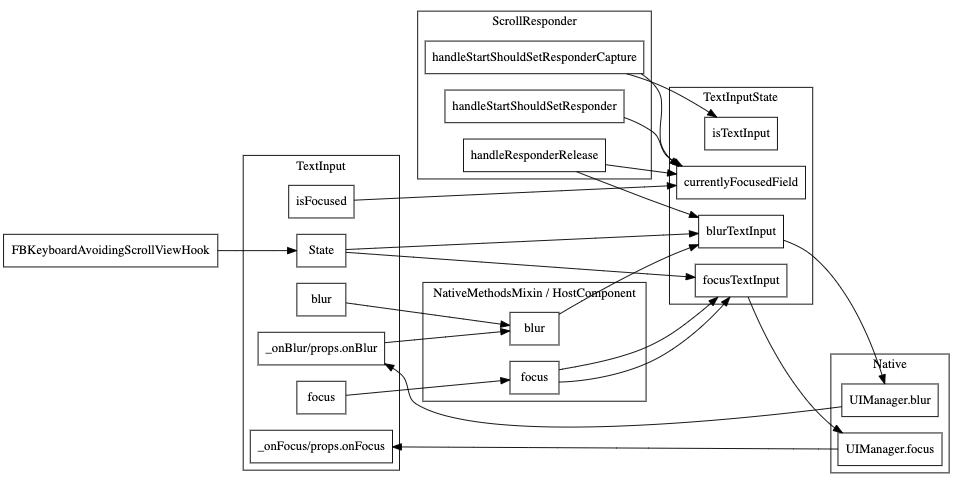 ScrollView's scrollResponder is responsible for blurring text inputs when a touch occurs in the ScrollView but outside of the currently focused TextInput. The code for that is here: https://github.com/facebook/react-native/blob/6ba2769f0f92ca75fb0eb60ccb8337920a9c31eb/Libraries/Components/ScrollResponder.js#L301-L314 This happens on `scrollResponderHandleResponderRelease` aka, touch up. It checks for what the currently focused textinput is by calling `TextInputState.currentlyFocusedField()`. That function is a JS variable that is being updated by calls to `TextInputState.focusTextInput` and `TextInputState.blurTextInput`: https://github.com/facebook/react-native/blob/6ba2769f0f92ca75fb0eb60ccb8337920a9c31eb/Libraries/Components/TextInput/TextInputState.js#L36-L71 I added some console logs to those methods to see which ones are being called when running your repro (thanks for the repro!). **This is without your fix** Click on and off: ``` // Click on input 1 focusTextInput input1 TextInput's _onFocus called // Click on blank space scrollResponderHandleResponderRelease blur input1 blurTextInput input1 TextInput's _onBlur called ``` Click on input1, then input 2, then off ``` // Click on input 1 focusTextInput input1 TextInput's _onFocus called for input1 // Click on input 2 focusTextInput input2 TextInput's _onBlur called for input1 TextInput's _onFocus called for input2 // Click on blank space scrollResponderHandleResponderRelease blur input2 blurTextInput input2 TextInput's _onBlur called for input2 ``` And now for the bug. Click on input 1, tab to 2, then off ``` // Click on input 1 focusTextInput input1 TextInput's _onFocus called for input1 // Tab to input 2 TextInput's _onBlur called for input1 TextInput's _onFocus called for input2 // Click on blank space scrollResponderHandleResponderRelease blur input1 blurTextInput input1 ``` Notice how `focusTextInput` was never called with input2 in the last example. Since this is the function that sets the `currentlyFocusedField` when we click on the blank space RN is trying to blur the first input instead of the second. # The root cause We are tracking the state of which field is focused in JS which has to stay in sync with what native knows is focused. We [listen to _onPress](https://github.com/facebook/react-native/blob/6ba2769f0f92ca75fb0eb60ccb8337920a9c31eb/Libraries/Components/TextInput/TextInput.js#L1103-L1107) and call `TextInputState.focusTextInput` in that handler. However, we don't currently have anything listening to other ways for an input to become focused (like tabbing) so it doesn't end up updating the `currentlyFocusedField`. We have the same problem with blur that we actually fixed the same way you did here in this PR: https://github.com/facebook/react-native/blob/6ba2769f0f92ca75fb0eb60ccb8337920a9c31eb/Libraries/Components/TextInput/TextInput.js#L1182-L1189 If you look back at my diagram at the beginning of this post, you'll notice the missing edge from `TextInput._onFocus` to `TextInputState.focusTextInput`. That's the problem. :) The reason this solution works is because this function **is** the notification from native that an input was focused or blurred. This solution is *fine* because this updates the `currentlyFocusedID` but isn't great because it both sets that value and **calls the native code to focus or blur again**. Luckily the native code doesn't send an event back to JS if you try to blur an already blurred TextInput otherwise we'd have an infinite loop. # The correct solution The correct thing would probably be to have all of this tracking in native code and not in JavaScript code. That's a pretty big change though and very out of scope. Something for our team to keep in mind for the future. A short term term solution would be to refactor `focusTextInput` and `blurTextInput` to pull out the part that sets the `currentlyFocusedID` that we could call from `TextInput` directly from `_onFocus` and `_onBlur`. # ^This short term term solution is what this commit is doing. Changelog: [General][Changed] TextInput no longer does an extra round trip to native on focus/blur Reviewed By: RSNara Differential Revision: D18278359 fbshipit-source-id: 417566f25075a847b0f4bac2888f92fbac934096

React Native
Learn once, write anywhere:
Build mobile apps with React.





Getting Started · Learn the Basics · Showcase · Contribute · Community · Support
React Native brings React's declarative UI framework to iOS and Android. With React Native, you use native UI controls and have full access to the native platform.
- Declarative. React makes it painless to create interactive UIs. Declarative views make your code more predictable and easier to debug.
- Component-Based. Build encapsulated components that manage their state, then compose them to make complex UIs.
- Developer Velocity. See local changes in seconds. Changes to JavaScript code can be live reloaded without rebuilding the native app.
- Portability. Reuse code across iOS, Android, and other platforms.
React Native is developed and supported by many companies and individual core contributors. Find out more in our ecosystem overview.
Contents
- Requirements
- Building your first React Native app
- Documentation
- Upgrading
- How to Contribute
- Code of Conduct
- License
📋 Requirements
React Native apps may target iOS 9.0 and Android 4.1 (API 16) or newer. You may use Windows, macOS, or Linux as your development operating system, though building and running iOS apps is limited to macOS. Tools like Expo can be used to work around this.
🎉 Building your first React Native app
Follow the Getting Started guide. The recommended way to install React Native depends on your project. Here you can find short guides for the most common scenarios:
📖 Documentation
The full documentation for React Native can be found on our website.
The React Native documentation discusses components, APIs, and topics that are specific to React Native. For further documentation on the React API that is shared between React Native and React DOM, refer to the React documentation.
The source for the React Native documentation and website is hosted on a separate repo, @facebook/react-native-website.
🚀 Upgrading
Upgrading to new versions of React Native may give you access to more APIs, views, developer tools, and other goodies. See the Upgrading Guide for instructions.
React Native releases are discussed in the React Native Community, @react-native-community/react-native-releases.
👏 How to Contribute
The main purpose of this repository is to continue evolving React Native core. We want to make contributing to this project as easy and transparent as possible, and we are grateful to the community for contributing bug fixes and improvements. Read below to learn how you can take part in improving React Native.
Code of Conduct
Facebook has adopted a Code of Conduct that we expect project participants to adhere to. Please read the full text so that you can understand what actions will and will not be tolerated.
Contributing Guide
Read our Contributing Guide to learn about our development process, how to propose bugfixes and improvements, and how to build and test your changes to React Native.
Open Source Roadmap
You can learn more about our vision for React Native in the Roadmap.
Good First Issues
We have a list of good first issues that contain bugs which have a relatively limited scope. This is a great place to get started, gain experience, and get familiar with our contribution process.
Discussions
Larger discussions and proposals are discussed in @react-native-community/discussions-and-proposals.
📄 License
React Native is MIT licensed, as found in the LICENSE file.
React Native documentation is Creative Commons licensed, as found in the LICENSE-docs file.