mirror of
https://github.com/facebook/react-native.git
synced 2025-11-01 09:14:26 +00:00
 Eli White
e9b4928311
Eli White
e9b4928311
Summary: I wrote up a bunch of context for this in response to #27038 by fat. That comment is reproduced here in this commit message. You can see it in it's original contxt here: https://github.com/facebook/react-native/pull/27038 Okay, here is what I think is happening. For context, here is a diagram I have of how focus and blur propagates through the system. This might be interesting to refer back to as you go through the rest of my explanation. 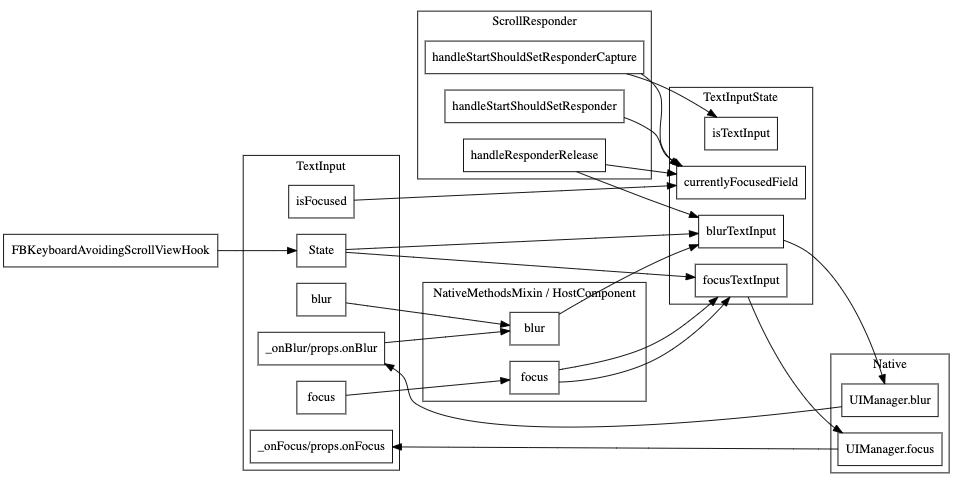 ScrollView's scrollResponder is responsible for blurring text inputs when a touch occurs in the ScrollView but outside of the currently focused TextInput. The code for that is here: https://github.com/facebook/react-native/blob/6ba2769f0f92ca75fb0eb60ccb8337920a9c31eb/Libraries/Components/ScrollResponder.js#L301-L314 This happens on `scrollResponderHandleResponderRelease` aka, touch up. It checks for what the currently focused textinput is by calling `TextInputState.currentlyFocusedField()`. That function is a JS variable that is being updated by calls to `TextInputState.focusTextInput` and `TextInputState.blurTextInput`: https://github.com/facebook/react-native/blob/6ba2769f0f92ca75fb0eb60ccb8337920a9c31eb/Libraries/Components/TextInput/TextInputState.js#L36-L71 I added some console logs to those methods to see which ones are being called when running your repro (thanks for the repro!). **This is without your fix** Click on and off: ``` // Click on input 1 focusTextInput input1 TextInput's _onFocus called // Click on blank space scrollResponderHandleResponderRelease blur input1 blurTextInput input1 TextInput's _onBlur called ``` Click on input1, then input 2, then off ``` // Click on input 1 focusTextInput input1 TextInput's _onFocus called for input1 // Click on input 2 focusTextInput input2 TextInput's _onBlur called for input1 TextInput's _onFocus called for input2 // Click on blank space scrollResponderHandleResponderRelease blur input2 blurTextInput input2 TextInput's _onBlur called for input2 ``` And now for the bug. Click on input 1, tab to 2, then off ``` // Click on input 1 focusTextInput input1 TextInput's _onFocus called for input1 // Tab to input 2 TextInput's _onBlur called for input1 TextInput's _onFocus called for input2 // Click on blank space scrollResponderHandleResponderRelease blur input1 blurTextInput input1 ``` Notice how `focusTextInput` was never called with input2 in the last example. Since this is the function that sets the `currentlyFocusedField` when we click on the blank space RN is trying to blur the first input instead of the second. # The root cause We are tracking the state of which field is focused in JS which has to stay in sync with what native knows is focused. We [listen to _onPress](https://github.com/facebook/react-native/blob/6ba2769f0f92ca75fb0eb60ccb8337920a9c31eb/Libraries/Components/TextInput/TextInput.js#L1103-L1107) and call `TextInputState.focusTextInput` in that handler. However, we don't currently have anything listening to other ways for an input to become focused (like tabbing) so it doesn't end up updating the `currentlyFocusedField`. We have the same problem with blur that we actually fixed the same way you did here in this PR: https://github.com/facebook/react-native/blob/6ba2769f0f92ca75fb0eb60ccb8337920a9c31eb/Libraries/Components/TextInput/TextInput.js#L1182-L1189 If you look back at my diagram at the beginning of this post, you'll notice the missing edge from `TextInput._onFocus` to `TextInputState.focusTextInput`. That's the problem. :) The reason this solution works is because this function **is** the notification from native that an input was focused or blurred. This solution is *fine* because this updates the `currentlyFocusedID` but isn't great because it both sets that value and **calls the native code to focus or blur again**. Luckily the native code doesn't send an event back to JS if you try to blur an already blurred TextInput otherwise we'd have an infinite loop. # The correct solution The correct thing would probably be to have all of this tracking in native code and not in JavaScript code. That's a pretty big change though and very out of scope. Something for our team to keep in mind for the future. A short term term solution would be to refactor `focusTextInput` and `blurTextInput` to pull out the part that sets the `currentlyFocusedID` that we could call from `TextInput` directly from `_onFocus` and `_onBlur`. # ^This short term term solution is what this commit is doing. Changelog: [General][Changed] TextInput no longer does an extra round trip to native on focus/blur Reviewed By: RSNara Differential Revision: D18278359 fbshipit-source-id: 417566f25075a847b0f4bac2888f92fbac934096

107 lines
2.6 KiB
JavaScript
107 lines
2.6 KiB
JavaScript
/**
|
|
* Copyright (c) Facebook, Inc. and its affiliates.
|
|
*
|
|
* This source code is licensed under the MIT license found in the
|
|
* LICENSE file in the root directory of this source tree.
|
|
*
|
|
* @format
|
|
* @flow strict-local
|
|
*/
|
|
|
|
// This class is responsible for coordinating the "focused" state for
|
|
// TextInputs. All calls relating to the keyboard should be funneled
|
|
// through here.
|
|
|
|
'use strict';
|
|
|
|
const Platform = require('../../Utilities/Platform');
|
|
const UIManager = require('../../ReactNative/UIManager');
|
|
|
|
let currentlyFocusedID: ?number = null;
|
|
const inputs = new Set();
|
|
|
|
/**
|
|
* Returns the ID of the currently focused text field, if one exists
|
|
* If no text field is focused it returns null
|
|
*/
|
|
function currentlyFocusedField(): ?number {
|
|
return currentlyFocusedID;
|
|
}
|
|
|
|
function focusField(textFieldID: ?number): void {
|
|
if (currentlyFocusedID !== textFieldID && textFieldID != null) {
|
|
currentlyFocusedID = textFieldID;
|
|
}
|
|
}
|
|
|
|
function blurField(textFieldID: ?number) {
|
|
if (currentlyFocusedID === textFieldID && textFieldID != null) {
|
|
currentlyFocusedID = null;
|
|
}
|
|
}
|
|
|
|
/**
|
|
* @param {number} TextInputID id of the text field to focus
|
|
* Focuses the specified text field
|
|
* noop if the text field was already focused
|
|
*/
|
|
function focusTextInput(textFieldID: ?number) {
|
|
if (currentlyFocusedID !== textFieldID && textFieldID != null) {
|
|
focusField(textFieldID);
|
|
if (Platform.OS === 'ios') {
|
|
UIManager.focus(textFieldID);
|
|
} else if (Platform.OS === 'android') {
|
|
UIManager.dispatchViewManagerCommand(
|
|
textFieldID,
|
|
UIManager.getViewManagerConfig('AndroidTextInput').Commands
|
|
.focusTextInput,
|
|
null,
|
|
);
|
|
}
|
|
}
|
|
}
|
|
|
|
/**
|
|
* @param {number} textFieldID id of the text field to unfocus
|
|
* Unfocuses the specified text field
|
|
* noop if it wasn't focused
|
|
*/
|
|
function blurTextInput(textFieldID: ?number) {
|
|
if (currentlyFocusedID === textFieldID && textFieldID != null) {
|
|
blurField(textFieldID);
|
|
if (Platform.OS === 'ios') {
|
|
UIManager.blur(textFieldID);
|
|
} else if (Platform.OS === 'android') {
|
|
UIManager.dispatchViewManagerCommand(
|
|
textFieldID,
|
|
UIManager.getViewManagerConfig('AndroidTextInput').Commands
|
|
.blurTextInput,
|
|
null,
|
|
);
|
|
}
|
|
}
|
|
}
|
|
|
|
function registerInput(textFieldID: number) {
|
|
inputs.add(textFieldID);
|
|
}
|
|
|
|
function unregisterInput(textFieldID: number) {
|
|
inputs.delete(textFieldID);
|
|
}
|
|
|
|
function isTextInput(textFieldID: number): boolean {
|
|
return inputs.has(textFieldID);
|
|
}
|
|
|
|
module.exports = {
|
|
currentlyFocusedField,
|
|
focusField,
|
|
blurField,
|
|
focusTextInput,
|
|
blurTextInput,
|
|
registerInput,
|
|
unregisterInput,
|
|
isTextInput,
|
|
};
|