Moti Zilberman
0459e4ffaa
Summary:
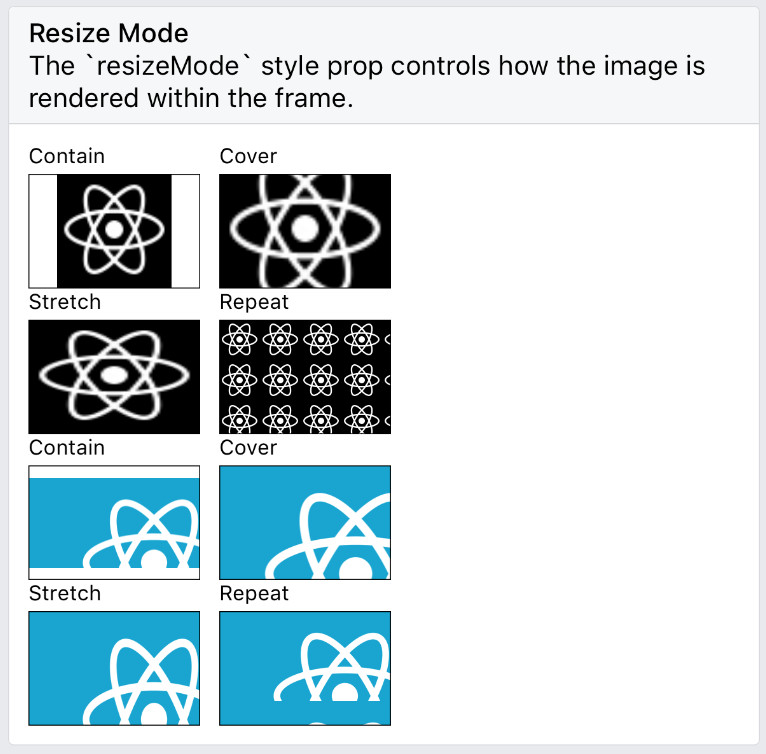
`<Image resizeMode="repeat" />` for Android, matching the iOS implementation (#7968). (Non-goal: changing the component's API for finer-grained control / feature parity with CSS - this would be nice in the future)

As requested in e.g. #14158.

Given https://github.com/facebook/fresco/issues/1575, and lacking the context to follow the specific recommendations in https://github.com/facebook/fresco/issues/1575#issuecomment-267004303, I've opted for a minimal change within RN itself.

It's likely that performance can be improved by offloading this work to Fresco in some clever way; but I'm assuming that the present naive approach is still an improvement over a userland implementation with `onLayout` and multiple `<Image>` instances.

- Picking up on a TODO note in the existing code, I implemented `MultiPostprocessor` to allow arbitrary chaining of Fresco-compatible postprocessors inside `ReactImageView`.
- Rather than extensively refactor `ImageResizeMode`, `ReactImageManager` and `ReactImageView`, I mostly preserved the existing API that maps `resizeMode` values to [`ScaleType`](http://frescolib.org/javadoc/reference/com/facebook/drawee/drawable/ScalingUtils.ScaleType.html) instances, and simply added a second mapping, to [`TileMode`](https://developer.android.com/reference/android/graphics/Shader.TileMode.html).
- To match the iOS rendering exactly for oversized images, I found that scaling with a custom `ScaleType` was required - a kind of combination of `CENTER_INSIDE` and `FIT_START` which Fresco doesn't provide - so I implemented that as `ScaleTypeStartInside`. (This is, frankly, questionable as the default behaviour on iOS to begin with - but I am aiming for parity here)
- `resizeMode="repeat"` is therefore unpacked by the view manager to the effect of:
  ```js
     view.setScaleType(ScaleTypeStartInside.INSTANCE);
     view.setTileMode(Shader.TileMode.REPEAT);
   ```
  And the added postprocessing in the view (in case of a non-`CLAMP` tile mode) consists of waiting for layout, allocating a destination bitmap and painting the source bitmap with the requested tile mode and scale type.

Note that as in https://github.com/facebook/react-native/pull/17398#issue-285235247, I have neither updated nor tested the "Flat" UI implementation - everything compiles but I've taken [this comment](https://github.com/facebook/react-native/issues/12770#issuecomment-294052694) to mean there's no point in trying to wade through it on my own right now; I'm happy to tackle it if given some pointers.

Also, I'm happy to address any code style issues or other feedback; I'm new to this codebase and a very infrequent Android/Java coder.

Tested by enabling the relevant case in RNTester on Android.

| iOS | Android |
|-|-|
| <img src=https://user-images.githubusercontent.com/2246565/34461897-4e12008e-ee2f-11e7-8581-1dc0cc8f2779.png width=300>| <img src=https://user-images.githubusercontent.com/2246565/34461894-40b2c8ec-ee2f-11e7-8a8f-96704f3c8caa.png width=300> |

Docs update: https://github.com/facebook/react-native-website/pull/106

[ANDROID] [FEATURE] [Image] - Implement resizeMode=repeat
Closes https://github.com/facebook/react-native/pull/17404

Reviewed By: achen1

Differential Revision: D7070329

Pulled By: mdvacca

fbshipit-source-id: 6a72fcbdcc7c7c2daf293dc1d8b6728f54ad0249
React Native · 


Learn once, write anywhere: Build mobile apps with React.
- Build native mobile apps using JavaScript and React: React Native lets you build mobile apps using only JavaScript. It uses the same design as React, letting you compose a rich mobile UI from declarative components.
- A React Native app is a real mobile app: With React Native, you don't build a "mobile web app", an "HTML5 app", or a "hybrid app". You build a real mobile app that's indistinguishable from an app built using Objective-C, Java, or Swift. React Native uses the same fundamental UI building blocks as regular iOS and Android apps. You just put those building blocks together using JavaScript and React.
- Don't waste time recompiling: React Native lets you build your app faster. Instead of recompiling, you can reload your app instantly. With hot reloading, you can even run new code while retaining your application state. Give it a try - it's a magical experience.
- Use native code when you need to: React Native combines smoothly with components written in Objective-C, Java, or Swift. It's simple to drop down to native code if you need to optimize a few aspects of your application. It's also easy to build part of your app in React Native, and part of your app using native code directly - that's how the Facebook app works.
The focus of React Native is on developer efficiency across all the platforms you care about - learn once, write anywhere. Facebook uses React Native in multiple production apps and will continue investing in React Native.
See the official React Native website for an introduction to React Native.
Supported operating systems are >= Android 4.1 (API 16) and >= iOS 8.0.
Getting Started
Follow the Getting Started guide. The recommended way to install React Native depends on your project. Here you can find short guides for the most common scenarios:
Documentation
The website’s documentation is divided into multiple sections.
- There are Guides that discuss topics like debugging, integrating with existing apps, and the gesture responder system.
- The Components section covers React components such as
ViewandButton. - The APIs section covers other libraries like Animated and StyleSheet that aren’t React components themselves.
- Finally, React Native provides a small number of Polyfills that offer web-like APIs.
Another great way to learn more about the components and APIs included with React Native is to read their source. Look under the Libraries/Components directory for components like ScrollView and TextInput, for example. The RNTester example is also here to demonstrate some of the ways to use these components. From the source you can get an accurate understanding of each component’s behavior and API.
The React Native documentation only discusses the components, APIs and topics specific to React Native (React on iOS and Android). For further documentation on the React API that is shared between React Native and React DOM, refer to the React documentation.
Upgrading
React Native is under active development. See the guide on upgrading React Native to keep your project up-to-date.
Contributing
Read below to learn how you can take part in improving React Native.
Code of Conduct
Facebook has adopted a Code of Conduct that we expect project participants to adhere to. Please read the full text so that you can understand what actions will and will not be tolerated.
Contributing Guide
Read our contributing guide to learn about our development process, how to propose bug fixes and improvements, and how to build and test your changes to React Native.
Beginner Friendly Bugs
We have a list of beginner friendly issues to help you get your feet wet in the React Native codebase and familiar with our contribution process. This is a great place to get started.
License
React Native is MIT licensed.
React Native documentation is Creative Commons licensed.