Summary:
Changes React Native so that when `accessibilityState` is used to change a view from `selected: true` to `selected: false`, the change in state is announced.

This is how `checked` works; it is unclear why Android does not do this for `selected`, too.

Changelog:
[Android][Added] - TalkBack now announces "unselected" when changing `accessibilityState.selected` to false.

Reviewed By: blavalla

Differential Revision: D27449293

fbshipit-source-id: a6d77b55d63655973ad93c4d5e3743742501f378
Summary:
This issue fixes https://github.com/facebook/react-native/issues/30955 and is a follow up to pr https://github.com/facebook/react-native/pull/24608 which added the basic Accessibility functionalities to React Native.

TextInput should announce "selected" to the user when screenreader focused.
The focus is moved to the TextInput by navigating with the screenreader to the TextInput.

This PR adds call to View#setSelected in BaseViewManager https://developer.android.com/reference/android/view/View#setSelected(boolean)
The View#setSelected method definition https://github.com/aosp-mirror/platform_frameworks_base/blob/master/core/java/android/view/View.java
```java
/**
 * Changes the selection state of this view. A view can be selected or not.
 * Note that selection is not the same as focus. Views are typically
 * selected in the context of an AdapterView like ListView or GridView;
 * the selected view is the view that is highlighted.
 *
 * param selected true if the view must be selected, false otherwise
 */
public void setSelected(boolean selected) {
  if (((mPrivateFlags & PFLAG_SELECTED) != 0) != selected) {
    // ... hidden logic
    if (selected) {
      sendAccessibilityEvent(AccessibilityEvent.TYPE_VIEW_SELECTED);
    } // ... hidden logic
  }
}
```

VoiceOver and TalkBack was tested with video samples included below.

## Changelog

<!-- Help reviewers and the release process by writing your own changelog entry. For an example, see:
https://github.com/facebook/react-native/wiki/Changelog
-->

[Android] [Fixed] - Fix Selected State does not announce when TextInput Component selected on Android

Pull Request resolved: https://github.com/facebook/react-native/pull/31144

Test Plan:
**<details><summary>CLICK TO OPEN TESTS RESULTS</summary>**
<p>

**ENABLE THE AUDIO** to hear the TalkBack announcing **SELECTED** when the user taps on the TextInput

```javascript
        <TextInput
          accessibilityLabel="element 20"
          accessibilityState={{
            selected: true,
          }} />
```

| selected is true |
|:-------------------------:|
| <video src="https://user-images.githubusercontent.com/24992535/111652826-afc4f000-8807-11eb-9c79-8c51d7bf455b.mp4" width="700" height="" /> |

```javascript
        <TextInput
          accessibilityLabel="element 20"
          accessibilityState={{
            selected: false,
          }} />
```

| selected is false |
|:-------------------------:|
| <video src="https://user-images.githubusercontent.com/24992535/111652919-c10dfc80-8807-11eb-8244-83db6c327bcd.mp4" width="700" height="" /> |

The functionality does not present issues on iOS

| iOS testing |
|:-------------------------:|
| <video src="https://user-images.githubusercontent.com/24992535/111647656-f401c180-8802-11eb-9fa9-a4c211cf1665.mp4" width="400" height="" /> |

</p>
</details>

</p>
</details>

Reviewed By: blavalla

Differential Revision: D27306166

Pulled By: kacieb

fbshipit-source-id: 1b3cb37b2d0875cf53f6f1bff4bf095a877b2f0e
Summary:
We've deprecated API 20 and below. This is just a cleanup to remove code that assumes API level <21.

Changelog: [Android][Deprecated] Deprecate support of Android API levels 19 and 20.

Reviewed By: fkgozali

Differential Revision: D24380233

fbshipit-source-id: d8f98d7cb19446a60ba36137f1f9290e35f27c02
Summary:
This PR adds support for the `shadowColor` style on Android.
This is possible as of Android P using the `setOutlineAmbientShadowColor` and `setOutlineSpotShadowColor` View methods. The actual rendered color is a multiplication of the color-alpha, shadow-effect and elevation-value.
## Changelog
`[Android] [Added] - Add support for shadowColor on API level >= 28`
Pull Request resolved: https://github.com/facebook/react-native/pull/28650
Test Plan:
- Only execute code on Android P
- Added Android `BoxShadow` tests to RNTester app
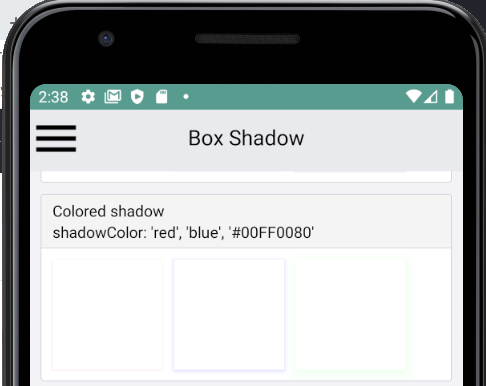
Reviewed By: mdvacca
Differential Revision: D21125479
Pulled By: shergin
fbshipit-source-id: 14dcc023977d7a9d304fabcd3c90bcf34482f137
Summary:
This diff disables accessibility state changes of the focused view for Android API < 21.
This is necessary because the method view.isAccessibilityFocused was introduced in Android API 21
Users in Android API < 21 will not be able to hear accessibility state changes of the focused view (feature introduced by D17903205)

Changelog: disables accessibility state changes of the focused view for Android API < 21, see PR: 26624

Reviewed By: fkgozali

Differential Revision: D19199096

fbshipit-source-id: 12b349f0ac94b77e9e7328ae40e1ae1a278e8b24
Summary:
Currently the react native framework doesn't handle the accessibility state changes of the focused item that happen not upon double tapping. Screen reader doesn't get notified when the state of the focused item changes in the background.
To fix this problem, post a layout change notification for every state changes on iOS.
On Android, send a click event whenever state "checked", "selected" or "disabled" changes. In the case that such states changes upon user's clicking, the duplicated click event will be skipped by Talkback.

## Changelog:
[General][Fixed] - Announce accessibility state changes happening in the background
Pull Request resolved: https://github.com/facebook/react-native/pull/26624

Test Plan: Add a nested checkbox example which state changes after a delay in the AccessibilityExample.

Differential Revision: D17903205

Pulled By: cpojer

fbshipit-source-id: 9245ee0b79936cf11b408b52d45c59ba3415b9f9
Summary:
React Native components need a mechanism to specify their value to assistive technologies. This PR adds the notion of accessibilityValueDescription-- a property which either contains a textual description of a component's value, or for range-based components, such as sliders and progress bars, it contains range information (minimum, current, and maximum).

On iOS, the range-based info if present is converted into a percentage and added to the accessibilityValue property of the UIView. If text is present as part of the accessibilityValueDescription, it is used instead of the range-based information.

On Android, any range-based information in accessibilityValueDescription is exposed in the AccessibilityNodeInfo's RangeInfo. Text which is part of accessibilityValueDescription is appended to the content description.

## Changelog

[GENERAL] [Change] - add accessibilityValuedescription property.
Pull Request resolved: https://github.com/facebook/react-native/pull/26169

Test Plan: Added two new accessibility examples to RNTester, one which uses text and another which uses range-based info in accessibilityValueDescription. Verified that they both behave correctly on both Android and iOS.

Differential Revision: D17444730

Pulled By: cpojer

fbshipit-source-id: 1fb3252a90f88f7cafe1cbf7db08c03f14cc2321
Summary: Fixes the crash when calling setCameraDistance with NaN on Android Q.

Reviewed By: JoshuaGross, mdvacca

Differential Revision: D17170045

fbshipit-source-id: 386f969e70c56bca6ae5b8ffead62453ebb72857
Summary:
Our JS codegen assumes that all Android view managers extend `BaseViewManager` which allows generated delegates to set base view props using `BaseViewManagerDelegate`, see and example of the generated delegate for `FbReactTTRCStepRenderFlagManager`:
```
public class TTRCStepRenderFlagManagerDelegate<T extends View, U extends BaseViewManager<T, ? extends LayoutShadowNode> & TTRCStepRenderFlagManagerInterface<T>>{
  public TTRCStepRenderFlagManagerDelegate(U viewManager) {
    super(viewManager);
  }
  Override
  public void setProperty(T view, String propName, Nullable Object value) {
    switch (propName) {
      case "traceId":
        mViewManager.setTraceId(view, value == null ? null : (String) value);
        break;
      case "stepName":
        mViewManager.setStepName(view, value == null ? null : (String) value);
        break;
      default:
        super.setProperty(view, propName, value);
    }
  }
}
```
The problem is that `FbReactTTRCStepRenderFlagManager` doesn't extend `BaseViewManager`, but `ViewManager`, which means that we cannot use it with the generated delegate. We cannot use  `ViewManager` instead of `BaseViewManager` in our JS codegen either, otherwise we will not be able to set base view props.

This diff makes it possible for delegates generated by JS to be used by Android view managers that do not extend `BaseViewManager`. By having a `BaseViewManagerInterface` we will be able to introduce a no-op base view manager implementation and wrap our original view manager in it so that we can pass as a constructor parameter to `BaseViewManagerDelegate`.

See an example of this approach for `FbReactTTRCStepRenderFlagManager`:

```
public class FbReactTTRCStepRenderFlagManager extends ViewManager<FbReactTTRCStepRenderFlag, ReactShadowNodeImpl> implements TTRCStepRenderFlagManagerInterface<FbReactTTRCStepRenderFlag> {

    private final ViewManagerDelegate<FbReactTTRCStepRenderFlag> mDelegate;

    public FbReactTTRCStepRenderFlagManager() {
        mDelegate = new TTRCStepRenderFlagManagerDelegate<>(new ViewManagerWrapper(this));
    }
    ...

    private static class ViewManagerWrapper extends BaseViewManagerAdapter<FbReactTTRCStepRenderFlag> implements TTRCStepRenderFlagManagerInterface<FbReactTTRCStepRenderFlag> {

        private final TTRCStepRenderFlagManagerInterface<FbReactTTRCStepRenderFlag> mViewManager;

        private FbReactTTRCStepRenderFlagManagerAdapter(TTRCStepRenderFlagManagerInterface<FbReactTTRCStepRenderFlag> viewManager) {
          mViewManager = viewManager;
        }

        Override
        public void setTraceId(FbReactTTRCStepRenderFlag view, Nullable String traceId) {
          mViewManager.setTraceId(view, traceId);
        }

        Override
        public void setStepName(FbReactTTRCStepRenderFlag view, Nullable String stepName) {
          mViewManager.setStepName(view, stepName);
        }
    }
}
```

Reviewed By: mdvacca

Differential Revision: D16984121

fbshipit-source-id: ea2761dda68a96ff3ba6ac64153bc4e56e396774
Summary:
We added the accessibilityState property as a more semantically rich way for components to describe information about their state to accessibility services. This PR removes the old accessibilityStates property.

 <!-- Explain the **motivation** for making this change. What existing problem does the pull request solve? -->

## Changelog

[General] [Change] - Remove accessibilityStates property.
Pull Request resolved: https://github.com/facebook/react-native/pull/26168

Test Plan: Ensure that RNTester accessibility examples function properly on both iOS and Android.

Differential Revision: D17152891

Pulled By: cpojer

fbshipit-source-id: d71d3cf0f2e0846979d2ba104b6c69e4e5725252
Summary: Prior to Android P things like setScaleX() allowed passing float values that were bogus such as Float.NaN. If the app is targeting Android P or later then passing these values will result in an exception being thrown. Since JS might still send Float.NaN, we want to keep the code backward compatible and continue using the fallback value if an invalid float is passed. `sanitizeFloatPropertyValue` is an exact copy of the private method with the same name in `android.view.View.java`.

Reviewed By: cpojer

Differential Revision: D17153279

fbshipit-source-id: 036acc4baa6f0b7f206488991b428a84374fa453
Summary:
This diff introduces an interface `ViewManagerDelegate` and its base implementation `BaseViewManagerDelegate`, which is used as a parent class for all view manager delegates generated by the JS codegen. Before the changes in this diff, generated delegates didn't support setting the base view properties such as background color, rotation, opacity, etc. Now it's possible to do by using `BaseViewManagerDelegate.setProperty(...)`, and since all generated delegates extend BaseViewManagerDelegate, they can just call `super.setProperty(...)` for properties they don't want to handle.

This diff also introduced a new method `ViewManager.getDelegate()`. This will allow view managers to return an instance of the delegate generated by JS and ensure that the view properties are set in a type-safe manner. If this method returns null (it does by default), we fall back to the default implementation of setting view properties using Java-generated `$$PropsSetter`
classes.

This is an example of an interface class generated by JS:

```
public interface RCTAxialGradientViewViewManagerInterface<T extends View> {
  void setColors(T view, Nullable ReadableArray value);
  void setLocations(T view, Nullable ReadableArray value);
  void setEndX(T view, Float value);
  void setEndY(T view, Float value);
  void setStartX(T view, Float value);
  void setStartY(T view, Float value);
}
```

This is an example of a delegate class generated by JS:

```
public class RCTAxialGradientViewManagerDelegate<T extends View, U extends BaseViewManager<T, ? extends LayoutShadowNode> & RCTAxialGradientViewManagerInterface<T>> extends BaseViewManagerDelegate<T, U> {
  public RCTAxialGradientViewManagerDelegate(U viewManager) {
    super(viewManager);
  }
  Override
  public void setProperty(T view, String propName, Nullable Object value) {
    switch (propName) {
      case "colors":
        mViewManager.setColors(view, (ReadableArray) value);
        break;
      case "locations":
        mViewManager.setLocations(view, (ReadableArray) value);
        break;
      case "endX":
        mViewManager.setEndX(view, value == null ? Float.NaN : ((Double) value).floatValue());
        break;
      case "endY":
        mViewManager.setEndY(view, value == null ? Float.NaN : ((Double) value).floatValue());
        break;
      case "startX":
        mViewManager.setStartX(view, value == null ? Float.NaN : ((Double) value).floatValue());
        break;
      case "startY":
        mViewManager.setStartY(view, value == null ? Float.NaN : ((Double) value).floatValue());
        break;
      default:
        super.setProperty(view, propName, value);
    }
  }
}
```

NOTE: What if a view manager, for instance ReactAxialGradientManager, wanted to add support for the borderRadius prop? In the old Java codegen, it would just need to create a method and annotate it with ReactProp (name = ViewProps.BORDER_RADIUS) and $$PropsSetter would call this method when a property with this name must be set. With the new JS codegen, borderRadius is a part of the basic view props, so setBorderRadius is not generated as a part of the ViewManagerInterface, so it’s not possible to set this value. I see two options: 1) add a method boolean setProperty (String propName, Object value) and let the view manager handle it in a non-type safe way (return true if it’s been handled). 2) Generate BaseViewManagerInterface which will include all basic view props and make BaseViewManager implement this interface, leaving all methods empty so that it stays compatible with the current implementation. Override these methods in a view manager that needs to handle a specific property in a custom way (so we would override setBorderRadius in ReactAxialGradientManager).

Reviewed By: mdvacca

Differential Revision: D16667686

fbshipit-source-id: 06a15a92f8af55640b7a53c5a34f40366d1be2a8
Summary:
This diff migrates the usages Nullable and NonNull annotations to AndroidX instead of javax.

The purpose of this change is to bring consistency in the annotations used by the core of RN

Reviewed By: makovkastar

Differential Revision: D16054504

fbshipit-source-id: 21d888854da088d2a14615a90d4dc058e5286b91
Summary: I've been analyzing some issue in RN Android code and I noticed some warnings to clean up

Reviewed By: ejanzer

Differential Revision: D16060522

fbshipit-source-id: 327fa86c24c7dd67ac2376bbd2f0ca4339f106d1
Summary:
This diff formats the Java class files inside xplat/js/react-native-github. Since google-java-format was enabled in D16071401 we want to codemode the existing code so that users don't have to deal with formatter lint noise at diff-time.

```arc f --paths-cmd 'hg files -I "**/*.java"'```

drop-conflicts

Reviewed By: cpojer

Differential Revision: D16071725

fbshipit-source-id: fc6e3852e45742c109f0c5ac4065d64201c74204
Summary:
Prior to this commit React Native on Android was not properly setting
the transform's scale properly correctly when setting it to 0. In order
to properly set one would need to use values close to 0, like 0.0001.
This was happing due to BaseViewManager sharing sMatrixDecompositionContext
across all views in a React Native app.
In some cases the decomposeMatrix() method from the MatrixMathHelper would
return early and not set any new values in sMatrixDecompositionContext
(this is, the new transform values) and
since this is a shared object the BaseViewManager would set the transform values
from the a previous transform.
In order to prevent this issue, before setting the new transform values
always reset the sMatrixDecompositionContext values.
## Changelog
[Android] [Fixed] - Reset sMatrixDecompositionContext before applying transformations
Pull Request resolved: https://github.com/facebook/react-native/pull/25438
Test Plan:
Run the code below on an Android device/emulator and you should see the following results:
### Android without the patch - current implementation
Notice that the scale 0 is not properly applied to the last rectangle and the second rectangle does not animate properly.

### Android with the patch
Everything works fine

### iOS - current implementation
Everything works fine

```javascript
/**
* Sample React Native App
* https://github.com/facebook/react-native
*
* format
* flow
*/
import React from 'react';
import { Animated, Button, StyleSheet, View, Text, SafeAreaView } from 'react-native';
const HorizontalContainer = ({ children, title }) => (
<View style={styles.horizontalContainer}>
{children}
<Text style={styles.text}>{title}</Text>
</View>
);
const App = () => {
const animValue1 = React.useRef(new Animated.Value(1)).current;
const animValue2 = React.useRef(new Animated.Value(1)).current;
const onStartAnim = React.useCallback(() => {
animValue1.setValue(0);
animValue2.setValue(0);
Animated.sequence([
Animated.timing(animValue1, {
toValue: 1,
duration: 300,
useNativeDriver: true,
}),
Animated.timing(animValue2, {
toValue: 1,
delay: 700,
duration: 300,
useNativeDriver: true,
})
]).start();
}, [animValue1, animValue2]);
return (
<SafeAreaView style={styles.container}>
<Button title="Start Animation" onPress={onStartAnim} />
<HorizontalContainer title="Animated scale from 0 to 1">
<Animated.View style={[styles.view, { transform: [{ scaleX: animValue1 }] }]} />
</HorizontalContainer>
<HorizontalContainer title="Animated scale from 0 to 1 - delayed">
<Animated.View style={[styles.view, { transform: [{ scaleX: animValue2 }] }]} />
</HorizontalContainer>
<HorizontalContainer title="Scale 0.4">
<View style={[styles.view, { transform: [{ scaleX: 0.4 }] }]} />
</HorizontalContainer>
<HorizontalContainer title="Scale 0.2">
<View style={[styles.view, { transform: [{ scaleX: 0.2 }] }]} />
</HorizontalContainer>
<HorizontalContainer title="Scale 0">
<View style={[styles.view, { transform: [{ scaleX: 0 }, { translateY: 100 }] }]} />
</HorizontalContainer>
</SafeAreaView>
);
};
export default App;
const styles = StyleSheet.create({
text: {
fontSize: 10,
color: 'black',
marginLeft: 10,
},
horizontalContainer: {
justifyContent: 'center',
alignItems: 'center',
flex: 1,
flexDirection: 'row',
},
container: {
flex: 1,
justifyContent: 'center',
alignItems: 'center',
backgroundColor: '#F5FCFF',
},
view: {
width: 100,
height: 100,
backgroundColor: 'indigo',
marginVertical: 5,
}
});
```
Closes https://github.com/facebook/react-native/issues/25205
Closes https://github.com/facebook/react-native/issues/6278
Closes https://github.com/facebook/react-native/issues/6278
Differential Revision: D16071126
Pulled By: cpojer
fbshipit-source-id: 50820229db2e3c22cf6296831413d26b42f57070
Summary: D15391408 (https://github.com/facebook/react-native/pull/24695) added a new event type with the registration name 'onAccessibilityAction' on Android, using the key 'performAction'. On iOS the same event uses the key 'topAccessibilityAction', which caused a runtime error after I started registering both using the unified JS view config in D15488008. This diff changes Android to use the same name as iOS since the convention is to start with 'top'.

Reviewed By: cpojer

Differential Revision: D15542623

fbshipit-source-id: c339621d2b4d3e1700feb5419ae3e3af8b185ca8
Summary:
This diff fixes a bug on the update of accessibiltyState prop in RN Android.
In particular, this bug was reproducible when a view has an accessibiltyState = ['disabled'] and there was a state update to set the {accessibiltyState = {null}}. In this scenario, the BaseViewManager.setViewStates method did not update the view with the default values for accessibilityState

Reviewed By: sahrens

Differential Revision: D15446078

fbshipit-source-id: 75f160916e55f0ee469516db2fe9b0a7d4758cd8
Summary:
As currently defined, accessibilityStates is an array of strings, which represents the state of an object. The array of strings notion doesn't well encapsulate how various states are related, nor enforce any level of correctness.

This PR converts accessibilityStates to an object with a specific definition. So, rather than:

<View
...
accessibilityStates={['unchecked']}>

We have:

<View
accessibilityStates={{'checked': false}}>

And specifically define the checked state to either take a boolean or the "mixed" string (to represent mixed checkboxes).

We feel this API is easier to understand an implement, and provides better semantic definition of the states themselves, and how states are related to one another.

## Changelog

[general] [change] - Convert accessibilityStates to an object instead of an array of strings.
Pull Request resolved: https://github.com/facebook/react-native/pull/24608

Differential Revision: D15467980

Pulled By: cpojer

fbshipit-source-id: f0414c0ef6add3f10f7f551d323d82d978754278
Summary:
This is a reconstitution of #24190. It extends accessibility actions to include both a name and user facing label. These extensions support both standard and custom actions.

We've also added actions support on Android, and added examples to RNTester showing how both standard and custom accessibility actions are used.

## Changelog

[general] [changed] - Enhanced accessibility actions support
Pull Request resolved: https://github.com/facebook/react-native/pull/24695

Differential Revision: D15391408

Pulled By: cpojer

fbshipit-source-id: 5ed48004d46d9887da53baea7fdcd0e7e15c5739
Summary:
In #24095, we removed the code that changes the underlying Android view's enabled state to false when "disabled" is included in the accessibility states, which seems correct. The Android view's state shouldn't mirror the accessibility state, it should be the other way round-- the accessibility state should represent the state of the view.

It seems that the existing test is brokenly setting the disabled state in the Javascript object, and then querying the Android view's enabled state to confirm the change. If the Button implementation is actually the culprit, then IMHO, the correct fix would be to have the Button implementation manipulate the Android View's enabled state, not the accessibilityStates code.

[android] [fix] - Fix internal test case around disabled state of buttons
Pull Request resolved: https://github.com/facebook/react-native/pull/24678

Differential Revision: D15237590

Pulled By: cpojer

fbshipit-source-id: d7ebefbcba9d4d9425da4285175302e4b6435df7
Summary:
Assistive technologies use the accessibility role of a component to tell the disabled user what the component is, and provide hints about how to use it. Many important roles do not have analog AccessibilityTraits on iOS. This PR adds many critical roles, such as editabletext, checkbox, menu, and switch to name a few.

Accessibility states are used to convey the current state of a component. This PR adds several critical states such as checked, unchecked, on and off.

[general] [change] - Adds critical accessibility roles and states.
Pull Request resolved: https://github.com/facebook/react-native/pull/24095

Differential Revision: D15079245

Pulled By: cpojer

fbshipit-source-id: 941b30eb8f5d565597e5ea3a04687d9809cbe372
Summary:
In order to meet our accessibility requirements we need to have full support for keyboard navigation. The Touchable components works with press/tap with a finger, but doesn't respond to 'enter' when using a keyboard. Navigation works fine. This PR adds an onClick listener to touchable views that have the onPress prop defined.

[Android] [Added] - Add View.OnClickListener to Touchable components when onPress is defined
Pull Request resolved: https://github.com/facebook/react-native/pull/24359

Differential Revision: D14971230

Pulled By: cpojer

fbshipit-source-id: ca5559ca1308ee6c338532a00dcea4d00fa57f42
Summary:
Closes: https://github.com/facebook/react-native/issues/24016

React Native 0.57 introduced cross-platform `accessibilityRole` and `accessibilityStates` props in order to replace `accessibilityComponentType` (for android) and `accessibilityTraits` (for iOS). With #24095 `accessibilityRole` and `accessibilityStates` will increase, receiving more options, which seems to be a good moment to remove deprecated props.

Remove deprecated `accessibilityComponentType` and `accessibilityTraits` props.

[General] [Removed] - Remove accessibilityComponentType and accessibilityTraits props
Pull Request resolved: https://github.com/facebook/react-native/pull/24344

Reviewed By: rickhanlonii

Differential Revision: D14842214

Pulled By: cpojer

fbshipit-source-id: 279945e503d8a23bfee7a49d42f5db490c5f6069
Summary:
This diff migrates RN to AndroidX.
As part of this diff I disabled few tests in RNAndroid OSS that will be re-enabled this week. As part of the refactor of BUCK files in OSS

Reviewed By: shergin

Differential Revision: D14200097

fbshipit-source-id: 932fcae251d1553e672acd67ecd0e703dcb364aa
Summary:
Add nullable annotations to BaseViewManager and ViewManager methods. This will improve Kotlin developer experience and help Android Studio to offer better autocomplete.

[Android] [Changed] - add nullable annotations to BaseViewManager and ViewManager methods. Might break ViewManagers in Kotlin.
Pull Request resolved: https://github.com/facebook/react-native/pull/23610

Differential Revision: D14198630

Pulled By: mdvacca

fbshipit-source-id: c596c88254e1d02f0af233a466f685200fac8917
Summary:
Fix lint errors and warning, which might be a cause of various crashes on older Android OS, using Android Support Library.

```bash
./gradlew :ReactAndroid:lint
```

[Android] [Changed] - fix lint error/warnings
Pull Request resolved: https://github.com/facebook/react-native/pull/23333

Differential Revision: D14019322

Pulled By: mdvacca

fbshipit-source-id: 74c98da269c318cf3b114c8d9c876186369f2b8c
Summary:
React Native's minSdkVersion is 16, or we support Android versions 16 (Jelly Bean) and above. But in the code we have many checks if Android is Jelly Bean or newer, which are unnecessary. This PR removes unnecessary Android version checks, also uses Android version names instead of numbers.

[Android] [Changes] - remove unnecessary Android version checks
Pull Request resolved: https://github.com/facebook/react-native/pull/23277

Differential Revision: D13955909

Pulled By: cpojer

fbshipit-source-id: 6b1caa5ef4fe42273d3c69a6617fff140a697b5c
Summary:
There is a variation in iOS and Android output while performing perspective transformation. The variation exists even when used in Android devices with different screen density.
Pull Request resolved: https://github.com/facebook/react-native/pull/18302

Differential Revision: D13877483

Pulled By: cpojer

fbshipit-source-id: e48be047a8047c7562722923a67666cb098243d8
Summary: This change drops the year from the copyright headers and the LICENSE file.

Reviewed By: yungsters

Differential Revision: D9727774

fbshipit-source-id: df4fc1e4390733fe774b1a160dd41b4a3d83302a
Summary:
Accessibility roles are enums that are looked up by matching a string accessibility role from JS to the enum's name using .toUpperCase(). .toUpperCase() causes issues in certain languages such as Turkish because the "i"s translate to "?".

D9402330 tried to address this by forcing the .toUpperCase to use Locale.US, but now it sometimes translates to "?"

Use .equalsIgnoreCase() instead to avoid translations.

Reviewed By: mdvacca, mmmulani

Differential Revision: D9497494

fbshipit-source-id: 0f8b7f2071b08ccb86655fee7bfd2d009ddde8eb
Summary: We were using a locale-specific `toUpperCase()` for accessibility roles. In the Turkish locale, `"image".toUpperCase()` does not become `"IMAGE"`; it becomes some weird turkish alphabet word, and we throw an error. This diff uses US-locale to avoid the error.

Reviewed By: YaoPersonal

Differential Revision: D9402330

fbshipit-source-id: a3fd7c54eec4b313c7e9df9236adb7ae42854ed8
Summary:
Implemented a version of accessibility Hints on android by adding hint text to the end of contentDescription. There is already an existing prop on js and iOS implementation.

Changes involve:
* adding a prop on native android code for accessibilityHints
* setting the accessibilityDelegate after the props are all loaded.
* Instead of directly updating the accessibility delegate, the prop setters now update state by setting the values of the variables. Once all props are set, the accessibility delegate is set based on the props
   * BaseViewManager keeps track of whether or not accessibility props have been set
   * AccessibilityDelegateUtil keeps track of what the props have been set to. (Renamed AccessibilityRoleUtil to AccessibilityDelegateUtil)

Currently, this is the easiest way of emulating the way accessibility hints work on iOS, and I think having an android counter part is better than having nothing.

It's different from iOS in that it will announce the hint before the role, and also cannot be turned off.

Ex:

if I set the accessibility like this:
```
      <View
        style={styles.container}
        accessible={true}
        accessibilityLabel="accessibility label"
        accessibilityRole="button"
        accessibilityStates={['selected']}
        accessibilityHint="accessibility Hint">
        <Text> Tester </Text>
      </View>
```

Talk back will read:
`accessibility label, accessibility Hint, button, selected`

In the future for next steps, I plan on investigating the process of making a second announcement after the first

Reviewed By: achen1

Differential Revision: D9037226

fbshipit-source-id: 8d484e1114eb69aa5f5314b3755b351b8ea80b09
Summary:
Added a check for null on `accessibilityStates`.
Now, if a null value is passed in to the prop, it simply does not do anything.

Reviewed By: achen1

Differential Revision: D9034714

fbshipit-source-id: caffa41a1d8b08d5358d085e4e268e8e6f1c9344
Summary:
Context:
After discussing with @[1038750002:yungsters], `currentViewStates` is a very ambiguous name for a prop, especially because there are only two possible values. From a developer's perspective, it makes more sense to just call them `accessibilityStates` because the main use for them is to add states to Talkback and Voiceover.
Defense for changing name in Android: The actual implementation of what we're changing under the hood in Native Code is abstracted away from developers using React Native, so as long as behavior is as they would expect, it makes more sense to change the name into a clear one regardless of how it is implemented.

Changes:
changed the Prop name from `currentViewStates` to `accessibilityStates` in the BaseViewManager file where the view property is being exposed.

Reviewed By: PeteTheHeat

Differential Revision: D8896389

fbshipit-source-id: 35dcd9239fae016b790e528947994681684bd654
Summary:
Added native android support for the prop accessibilityStates.

If 'selected' is passed in, it calls view.setSelected(true)
If 'disabled' is passed in, it calls view.setEnabled(false)

If both are passed in, both are set on the view.

Reviewed By: blavalla

Differential Revision: D8838407

fbshipit-source-id: a942dabcdc5d9e35f0316465e97317739a8b4b25
Summary:
Added a new property to View for Accessibility called `accessibilityRole`. This property merges functionality of existing properties: `accessibilityTraits` (iOS) and `accessibilityComponentType` (android).

Currently, nine values are supported with equivalent behavior as `accessibilityTraits` (iOS) when `accessibilityRole` is set on iOS Voiceover and Android TalkBack

```
  | 'none'
  | 'button'
  | 'link'
  | 'search'
  | 'image'
  | 'keyboardkey'
  | 'text'
  | 'adjustable'
  | 'tabbar'
```
They currently support similar behavior on talkback on Android and voice over on iOS
Does not break functionality of existing properties, but have not tested for behavior of setting both this one and the old one.

* iOS - I added a property accessibilityRoles, and basically remapped it to the same thing as accessibilityTraits. I also added in enum mappings for keyboardkey and tabbar.
* Android - Also added a property accessibilityRoles, from the Android side. For the underlying native functionality, I built a helper class that is based off of AccessibilityRolesUtil.java from the accessibility team. Biggest changes made are that I defined my own enums if needed, and also set some properties to match the functionality of iOS Accessibility Traits. I also handled the logic for switch/case statements of setting roles for the android side on this file. Also, I currently haven't localized strings for setRoleDescription, but plan to.
* Javascript - I added a view property accessibilityRoles in ViewPropTypes.

Reviewed By: blavalla

Differential Revision: D8756225

fbshipit-source-id: e03eec40cce86042551764f433e1defe7ee41b35
Summary:
If the z-index was updated after the initial mount, changes would not be reflected because we did not recalculate the z-index mapped child views and redraw the view. This adds code to do that and call it whenever we update z-index.

**Test plan**
Tested by reproducing the bug with 2 overlapping views that change z-index every second. Made sure it now works properly and z-index changes are reflected.
Closes https://github.com/facebook/react-native/pull/15203

Differential Revision: D5564832

Pulled By: achen1

fbshipit-source-id: 5b6c20147211ce0b7e8954d60f8614eafe128fb4
Summary:
This is the better fix for the same issue as mentioned in PR https://github.com/facebook/react-native/pull/14560

Certain rotateX, rotateY, scaleX and scaleY animations do not work correctly on some phones in Android 7.0.0, causing issues such as https://github.com/facebook/react-native/issues/14462 and https://github.com/facebook/react-native/issues/13522.

The issue can be fixed on JS side by setting an additional transform for perspective, eg. `{perspective: 1}` which triggers a `setCameraDistance` call in native code.

The fix in this PR always sets the camera distance on transforms, even when no perspective transform was specified. The default camera distance is set before the scale multiplication, to make sure that the value is appropriate for the phones density. The value calculates to an Android 'default' camera distance of 1280 * scale multiplier; https://developer.android.com/reference/android/view/View.html#setCameraDistance(float)

If a perspective transform is specified, this value will be used correctly still.

This fix was tested on the RNTester. Before the fix, on some devices, the FlatList example, with inverted turned on, will not display the list.

Devices that have been confirmed to have this issue:
FRD-AL10(honor 8) EMUI:5.0 android: 7.0
MHA-AL00(Mate9) EMUI:5.0 android:7.0
Huawei P10 VTR-L09, running Android 7.0

After the fix, the inverted FlatList displays correctly.
Closes https://github.com/facebook/react-native/pull/14646

Differential Revision: D5492009

Pulled By: shergin

fbshipit-source-id: d4da3b090a7e65df3b84e48ea32c964f4f8f7c88
Summary: View tags are currently used for end-to-end test IDs. We'd like to overload the tag field with other information such as nativeID (for native refs) and transitionID (for shared element transitions) in the future. Added a key for testID's tag

Reviewed By: AaaChiuuu

Differential Revision: D4833045

fbshipit-source-id: c2f9371c9a3dbb2411e114f4f096f723ac3132c0
Summary: View tags are currently used for end-to-end test IDs. We'd like to overload the tag field with other information such as nativeID (for native refs) and transitionID (for shared element transitions) in the future. Added a key for testID's tag

Reviewed By: AaaChiuuu

Differential Revision: D4770368

fbshipit-source-id: b76c53a20520aac1b25d435b6d5eb809e8833675
 Tim Yung
 fabriziobertoglio1987
 Joshua Gross
 Hein Rutjes
 David Vacca
 Andres Suarez
 Sharon Gong
 Marc Mulcahy
 Oleg Lokhvitsky
 Oleksandr Melnykov
 Guilherme Iscaro
 Emily Janzer
 Sam Mathias Weggersen
 Estevão Lucas
 Dulmandakh
 Ranjan Shrestha
 Héctor Ramos
 Andrew Chen (Eng)
 Haseeb Saeed
 Ziqi Chen
 Aaron Chiu
 Janic Duplessis
 Bartol Karuza
 Satyajit Sahoo



