Summary: Currently, link groups depend on supermodules to generate. To continue supporting link groups while allowing us to migrate off supermodules, we'll add a talkios_link_group label on all talkios targets to persist the current hierarchical information.

Reviewed By: jkeljo

Differential Revision: D40268252

fbshipit-source-id: 9211add120448e95f892d36a85583c700b2ec9a0
Summary:
Currently, fbios link groups depend on supermodules to generate. To continue supporting
link groups while allowing us to migrate off supermodules, we'll add a `fbios_link_group` label on all fbios targets to persist the current hierarchical information.

Reviewed By: jkeljo

Differential Revision: D39543862

fbshipit-source-id: 2abe5b3ee883e77336076d88436a1c84139b5a97
Summary:
Changelog: [Internal] Move Bridge-only constants into a separate file

- Move Bridge only constants from RCTBridge.h into  RCTBridgeConstants.h.
- Move shared constants from RCTBridge.h into RCTConstants.h.

This way, new architecture does not need to import RCTBridge.h just for the constants.

Reviewed By: sammy-SC

Differential Revision: D39085713

fbshipit-source-id: 40177cbed72a326b40ec448c98751d1dd3464504
Summary:
In an app using `UIScene`, `Alert` no longer pops up because the window
that gets created are not attached to a scene.

## Changelog

[iOS] [Fixed] - Fix `Alert` not showing in an app using `UIScene`

Pull Request resolved: https://github.com/facebook/react-native/pull/34562

Test Plan: Use the test plan in https://github.com/facebook/react-native/issues/29295. This should not regress that fix.

Reviewed By: cipolleschi

Differential Revision: D39276976

Pulled By: lunaleaps

fbshipit-source-id: e48e985ed4abec77d6f01a6c17292d664ed88f13
Summary:
D38460203 (https://github.com/facebook/react-native/commit/e6ef0836c132d6b798e2ff1fc1e1a66c7e238e0b) was reverted because it broke OSS, the root cause is that OSS doesn't have MapBuffer module.

Fixed the issue in this diff by moving MapBuffer usage to fb internal class (FBReactModule) and will re-land.

Changelog:
[iOS][Changed] Replace Folly with MapBuffer for passing js error data

Reviewed By: sammy-SC

Differential Revision: D39210957

fbshipit-source-id: dda0e8c55dbd13bc96310e10a3b09ea53978e8bc
Summary:
The motivation of this PR is for the Alert to follow the same style override (`overrideUserInterfaceStyle` being light/dark) as the one used by the root window (`UIApplication.sharedApplication.delegate.window`).
This is something that has worked previously because `RCTPResentedViewController()` was used to present the Alert (the behavior has changed in https://github.com/vonovak/react-native/commit/f319ff321c4b7c0929b99e3ebe7e1ce1fa50b34c). With the former approach, the alert would "inherit" the `userInterfaceStyle` of the view controller it was presented within (and that one, in turn, would "inherit" from `UIApplication.sharedApplication.delegate.window`).
With the current approach, the "style inheritance" does not work with the view controller being created [here](https://github.com/facebook/react-native/blob/f3db6cc52792e3006a16408df4ae40f3aee19a86/React/CoreModules/RCTAlertController.m#L24).
Because this viewcontroller instance does not have where to "inherit" the styling from, the styling might be different from the rest of the app. This PR fixes that.
## Changelog
[iOS] [Fixed] - fix: RCTAlertController's UserInterfaceStyle to follow root window
Pull Request resolved: https://github.com/facebook/react-native/pull/34218
Test Plan:
Instead of
```
self.overrideUserInterfaceStyle = UIApplication.sharedApplication.delegate.window.overrideUserInterfaceStyle;
```
you can do
```
self.overrideUserInterfaceStyle = UIUserInterfaceStyleDark;
```
and observe the result. So if the override is set, it'll manifest itself. If it's not set, the value of `UIApplication.sharedApplication.delegate.window.overrideUserInterfaceStyle` will be `UIUserInterfaceStyleUnspecified`, and it'll have no effect.
<details>
<summary>screenshot</summary>

</details>
Reviewed By: dmitryrykun
Differential Revision: D38660799
Pulled By: cipolleschi
fbshipit-source-id: c979266900e27be7a4732bdb6e9a496906534931
Summary:
A crash encountered in react-native-macOS is very similar to one fixed by https://github.com/microsoft/react-native-macos/pull/489#discussion_r451789471 (see discussion), and it's possible this `replacement` string also suffers from sharing the same backing store as the attributed string (maybe only when the range encompasses the entire string?) and therefore should be copied as well.

Changelog:
[iOS][Fixed] - Possible fix for convertIdToFollyDynamic crash in RCTBaseTextInputView and RCTEventDispatcher

Reviewed By: sammy-SC

Differential Revision: D38064551

fbshipit-source-id: 9c15f2a980155ab3cbb3fde79fcb93b24ee2091a
Summary:
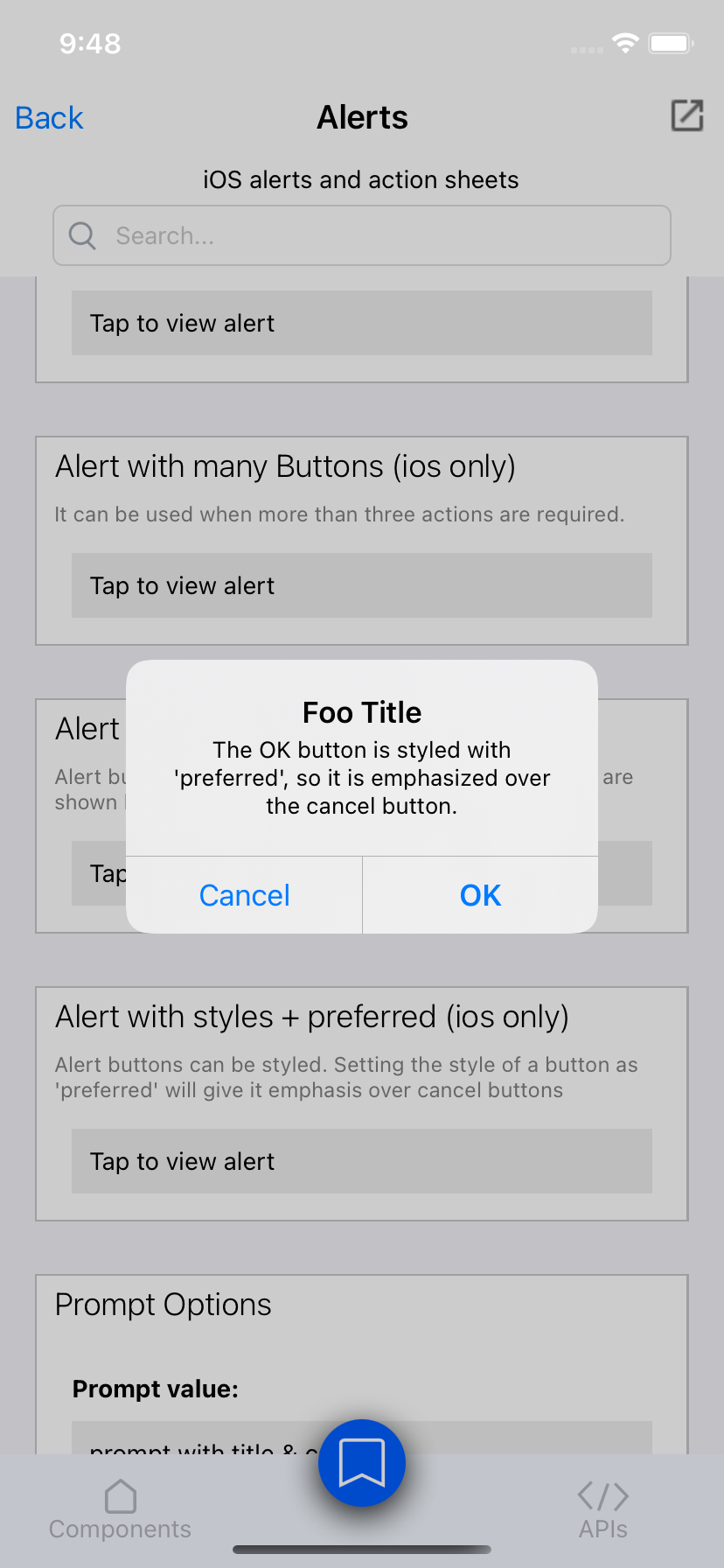
Currently, with the Alert API on iOS, the only way to bold one of the buttons is by setting the style to "cancel". This has the side-effect of moving it to the left. The underlying UIKit API has a way of setting a "preferred" button, which does not have this negative side-effect, so this PR wires this up.
See preferredAction on UIAlertController https://developer.apple.com/documentation/uikit/uialertcontroller/
Docs PR: https://github.com/facebook/react-native-website/pull/2839
## Changelog
[iOS] [Added] - Support setting an Alert button as "preferred", to emphasize it without needing to set it as a "cancel" button.
Pull Request resolved: https://github.com/facebook/react-native/pull/32538
Test Plan:
I ran the RNTesterPods app and added an example. It has a button styled with "preferred" and another with "cancel", to demonstrate that the "preferred" button takes emphasis over the "cancel" button.
Luna:
* Also tested this on Catalyst
{F754959632}
Reviewed By: sammy-SC
Differential Revision: D34357811
Pulled By: lunaleaps
fbshipit-source-id: 3d860702c49cb219f950904ae0b9fabef03b5588
Summary:
Changelog: [Internal][iOS] Minor: Rename RCTNotAllowedInAppWideFabric to RCTNotAllowedInFabricWithoutLegacy

`RCTNewArchitectureValidationPlaceholder(RCTNotAllowedInBridgeless` is to track Bridge APIs that are okay in Fabric but not in Bridgeless.

`RCTNewArchitectureValidationPlaceholder(RCTNotAllowedInFabricWithoutLegacy` is to track legacy APIs that should not exist if the app was using Fabric **without any legacy architecture**. e.g. RCTBridgeModule, legacy interop view components.

Reviewed By: fkgozali

Differential Revision: D37659105

fbshipit-source-id: aee4e083820e83a8dac19eb3b5efc49b37d90039
Summary:
This fix solves a problem very well evaluated [here](https://github.com/Expensify/App/issues/2727) as well as this [one](https://github.com/facebook/react-native/issues/29290).

The issue is that when the app goes to background, in landscape mode, the RCTDeviceInfo code triggers an orientation change event that did not physically happen. Due to that, we get swapped values returned when going back to the app.

I debugged the react-native code, and to me it seems that react native publishes the orientation change event one extra time when switching the state of the app to 'inactive'. Here is what is happening:

1. iPad is in landscape.
2. We move the app to inactive state.
3. Native Code queues portrait orientation change (no such change happened physically), and immediately after it triggers landscape change (same as we had in point 1).
4. We restore the app to active state.
5. The app receives two queued orientation change events, one after another.
6. The quick transition between portrait and landscape happens even though it never went back to portrait.

Fresh `react-native init` app repro case can be found here: https://github.com/lbaldy/issue-34014-repro

Video presenting the issue (recorded while working on: https://github.com/Expensify/App/issues/2727 ): https://www.youtube.com/watch?v=nFDOml9M8w4

## Changelog

<!-- Help reviewers and the release process by writing your own changelog entry. For an example, see:
https://github.com/facebook/react-native/wiki/Changelog
-->
[iOS] [Fixed] - Fix the way the orientation events are published, to avoid false publish on orientation change when app changes state to inactive

Pull Request resolved: https://github.com/facebook/react-native/pull/34014

Test Plan:
### Test Preparation

1. Make sure you have a working version of E/App.
2. Open App/src/components/withWindowDimensions.js and update the constructor by changing this line:

`this.onDimensionChange = _.debounce(this.onDimensionChange.bind(this), 100);`

to

`this.onDimensionChange = this.onDimensionChange.bind(this);`

3. Open the NewExpensify.xcodeproj in xCode.
4. Open the RCTDeviceInfo.mm file and replace it's contents with the file from this PR.
5. Select your device of choice (I suggest starting with iPad mini) and run the app though xCode.
6. From this point you can move to the test scenarios described below.

### iPad Mini tests:

Reproduction + Fix test video (Test 1): https://youtu.be/jyzoNHLYHPo
Reproduction + Fix test video (Test 2): https://youtu.be/CLimE-Fba-g

**Test 1:**
1. Launch app in portrait, open chat - no sidebar visible.
7. Switch to landscape - sidebar shows.
8. Put app to background.
9. Put app back to foreground - make sure the side menu doesn't flicker.

**Test 2:**
1. Launch app in portrait, open chat - no sidebar visible.
2. Switch to landscape - sidebar shows.
3. Put app to background. Switch orientation back to portrait.
4. Put app back to foreground - make sure the side menu hides again as it should be in portrait.

### iPad Pro tests:

Reproduction + Fix test video (Test 3, Test 4): https://youtu.be/EJkUUQCiLRg

iPad mini test 1 applies.

Scenario 2 does not as the screen is too wide in both orientations and iPad pro shows sidebar always.

**Test 3:**

1.  launch the app.
2. Make sure you're in landscape mode.
3. See split screen with some other app. Make sure the side bar is visible.
4. Play with the size of the view, resize it a bit. When the view shrinks it should hide the sidebar, when it grows it should show it.
10. Move the app to background and back to foreground, please observe there are no flickers.

**Test 4:**

1.  Launch the app.
2. Make sure you're in landscape mode.
3. Make the multitasking view and make Expensify app a slide over app.
4. Move back to fullscreen/split screen. Make sure the menu is shown accordingly
5. Move the app to background and back to foreground, please observe there are no flickers.

### iPhone:

Non reg with and without the fix video: https://youtu.be/kuv9in8vtbk

Please perform standard smoke tests on transformation changes.

Reviewed By: cipolleschi

Differential Revision: D37239891

Pulled By: jacdebug

fbshipit-source-id: e6090153820e921dcfb0d823e0377abd25225bdf
Summary:
We will use this error reporting pipeline for all js errors not only early js errors, so remove all "early" prefixes.

Changelog:
[General][Changed] - Remove "Early" in Js error reporting pipeline

Reviewed By: fkgozali

Differential Revision: D37379339

fbshipit-source-id: d44772818ead977a164c8632c081863851046be6
Summary:
Bumping RTC-Folly version used to address CVE-2022-24440.

## Changelog

<!-- Help reviewers and the release process by writing your own changelog entry. For an example, see:
https://github.com/facebook/react-native/wiki/Changelog
-->

[General][Security] - Bump RTC-Folly to 2021-07-22

Pull Request resolved: https://github.com/facebook/react-native/pull/33841

Reviewed By: Andjeliko, philIip

Differential Revision: D36425598

Pulled By: cortinico

fbshipit-source-id: d38c5f020dbecf794b10f12ed2da30e1825071af
Summary:
# Context
ScrollView sticky headers rely on this bit of code to work:

```
AnimatedImplementation.attachNativeEvent(
  this._scrollViewRef,
  'onScroll',
  [{nativeEvent: {contentOffset: {y: this._scrollAnimatedValue}}}],
);
```

What this code means:

When the ScrollView host component receives the "onScroll" event, assign event.nativeEvent.contentOffSet.y to the this._scrollAnimatedValue AnimatedValue.

How this subscription mechanism is set up:

NativeAnimatedTurboModule subscribes to events dispatched by RCTEventDispatcher sendEvent. Then, whenever RCTEventEmitter sendEvent executes, NativeAnimatedTurboModule also updates the AnimatedValue for that event.

# Problem
Previously, in bridgeless, we started dispatching RCTScrollView via the RCTEventDispatcher sendEvent to update the AnimatedValue for ScrollView. This meant that we started dispatching the onScroll event to JavaScript via RCTEventEmitter.receiveEvent JSModule, which isn't supported in the Fabric renderer.

With this diff, we dialed back that solution. Instead of (1) notifying NativeAnimatedTurboModule and (2) sending the onScroll event to JavaScript, we're only doing (1) (i.e: notifying NativeAnimatedTurboModule).

Changelog: [Internal]

Reviewed By: fkgozali

Differential Revision: D37257719

fbshipit-source-id: 7dea3cf8b9ae78f6b0fd40414b8f224d43367a5a
Summary: [RN][iOS] Changelog: [Internal][Fix] Minor fix: Don't display a legacy surface from Logbox if Bridge is invalid

Reviewed By: RSNara

Differential Revision: D36268234

fbshipit-source-id: 227f465fb1fc2953b5d6813485ed6750b1d3dea3
Summary:
Changelog: [Internal][iOS] Fix AppState in Bridgeless mode by removing guard for bridge, since it doesn't use bridge

AppState doesn't use bridge because RCTAppState subclasses RCTEventEmitter, which calls `_callableJSModules invokeModule` in both Bridge and Bridgeless mode to send events to JS.

Reviewed By: fkgozali

Differential Revision: D35988515

fbshipit-source-id: fb19f0f2df5b270f0ef57637930f94686e39a9a1
Summary:
This would fix test errors caused by including <string> in non-C++ compatible files.

Changelog:
[General][Changed] - Remove usage of std::string in EarlyJsErrorHandler.

Reviewed By: RSNara

Differential Revision: D35645334

fbshipit-source-id: 7f04d2c66d53dc1eef63367de1a64ed9273898f5
Summary:
Changelog:
[iOS][Fixed] - Expose the extraData dict attached to JavaScript errors to the native ExceptionManager on iOS, similar to Android

Attaching the `extraData` dict to JavaScript crash reports is something that was done for Android only in 2019 (D16133080 (https://github.com/facebook/react-native/commit/3a825c036065783aae6fb734028f986dbead80d7)), and somehow we never really got around to adding it in iOS. This diff finally adds the capability to iOS as well. `extraData` can be used to attach various bits of data to a crash report for better debugging and categorization. As with the Android implementation, `extraData` is not attached if the `reportException` API is not used.

Reviewed By: dmitryrykun

Differential Revision: D35743658

fbshipit-source-id: de4060cb6e514db1d85907441a8962f98e9b8392
Summary:
`hotkeysEnabled` property is added to `RCTDevMenu` which allows enabling/disabling hotkeys that triggers developer menu popup

Changelog:
[iOS][Added] - `hotkeysEnabled` property is added to `RCTDevMenu` which allows enabling/disabling hotkeys that triggers developer menu popup

Reviewed By: arhelmus

Differential Revision: D35777883

fbshipit-source-id: a7435358701bedb54e33198724180eb1c27248b8
Summary:
Changelog: [internal]

we have an issue where the moduleRegistry that the TM uses is released, adding this log to check if it's bc the bridge was released

Reviewed By: RSNara

Differential Revision: D35420922

fbshipit-source-id: 93c206b5afefeac3121df148940d9658736cb9d2
Summary:
changelog: [internal]

this never fired, so it's not the cause of the nil moduleRegistry issue

Reviewed By: christophpurrer

Differential Revision: D35419873

fbshipit-source-id: 45693d3aa97d9efed2fe5085c281b57f1629764d
Summary:
Now that the PFH node has been renamed this updates the pfh label.

Produced via `xbgs -l -e '"pfh:ReactNative_CommonInfrastructurePlaceholde"' | xargs sed -i 's/"pfh:ReactNative_CommonInfrastructurePlaceholde"/"pfh:ReactNative_CommonInfrastructurePlaceholder"/'`

Reviewed By: jkeljo

Differential Revision: D35374087

fbshipit-source-id: 61590f69de5a69ec3b8a0478f6dd43409de3c70b
Summary:
While it would be better to be able to do all of the ownership metadata at the Buck macro level, that proved to be more work than expected.

This diff adds the corresponding pfh label to all targets in `xplat/js/react-native-github` that have a Supermodule label. Once the migration is complete the Supermodules labels will be able to be removed.

Reviewed By: cortinico

Differential Revision: D35221544

fbshipit-source-id: d87d5e266dfb5e6ee087251dc34dff5db299bbaf
Summary:
Changelog: [iOS][Internal] Refactor: Migrate Logbox surface initialization to Fabric when available, in Bridge and Bridgeless modes

# Why
This diff main purpose is to add `RCTErrorNewArchitectureValidation(RCTNotAllowedInAppWideFabric)` in `RCTSurface`, to ensure Paper surfaces are never created in FBiOS.

# The Situation
Before this diff, in Bridged Fabric, `[RCTLogbox show]` initializes a Paper `RCTSurface`, [using `[RCTLogBoxView initWithWindow]`](https://github.com/facebook/react-native/blob/main/React/CoreModules/RCTLogBoxView.mm#L46))
In this diff,  in Bridged and Bridgeless Fabric, `[RCTLogbox show]` initializes a Fabric `RCTFabricSurface`.

Before this diff, in Bridgeless Fabric,  RCTLogBox posts a "CreateLogBoxSurface" notification to RCTInstance.
In this diff, the notification hack is replaced by the same `RCTFabricSurface` initialization above.
Behavior is the same.

Reviewed By: RSNara

Differential Revision: D35177311

fbshipit-source-id: 6de418af8a01f914c9a806bb8d74915015f9087a
Summary:
In short, if an RCTEventDispatcher observer sends an event on the same thread that the observer was initially on, there will be a deadlock due to `sendEvent` already having the lock active on the `_observers` NSHashTable. An example where this occurred was when we had react-native-gesture-handler trigger an animated event, which then triggered an event on the underlying component being animated as a result of it being an observer on the animation event. Since this all occurred on the main thread, we ended up with a deadlock and the app froze.

To prevent this scenario, I used a `NSRecursiveLock` for _observersLock to be able to dispatch events on the same thread from observers.

joebernard

## Changelog

<!-- Help reviewers and the release process by writing your own changelog entry. For an example, see:
https://github.com/facebook/react-native/wiki/Changelog
-->

[iOS] [Fix] - Prevent deadlock when dispatching events from observers on the same thread.

Pull Request resolved: https://github.com/facebook/react-native/pull/33490

Test Plan:
Not sure if there are any tests present for sending events with RCTEventDispatcher already in place, but In regular app usage this solution has proved to be a viable and stable option so far and has prevented the deadlock from occurring.

This would still be thread-safe since we are now allowing the event to be sent through observers on the same thread the initial event was dispatched on. The only issue I could see here is the behavior of sending an event could be changed.

Reviewed By: RSNara

Differential Revision: D35118752

Pulled By: charlesbdudley

fbshipit-source-id: 7e93a8d49841e001b235a437ccca1e072dcc7ab1
Summary:
If an RN app is embedded in a Mac Catalyst app that uses the UIWindowScene API to manage multiple windows, LogBox would fail to render because it didn't know which UIWindowScene to render to. This diff fixes that situation by ensuring that the LogBox window gets rendered in the key window's scene.

Changelog:
[iOS][Fixed] - Update iOS LogBox to render its UIWindow with the key window's UIWindowScene

Reviewed By: appden

Differential Revision: D35027831

fbshipit-source-id: e0df5865f95323b03d08d6b1fb3ec912aa9a9167
Summary:
Changelog: [Internal]

this doesn't really make any sense, first of all CGFloat is a primitive data type so comparing it against nil only will return true if it's 0. but that won't catch cases where CGFloat is uninitialized bc it will be holding junk in memory.

the error checking of the value is already handled in the accessibility manager, so just remove it here.

Reviewed By: p-sun

Differential Revision: D34909365

fbshipit-source-id: 483f9c100433f8533edd784622523c5469c616c2
Summary:
Changelog: [Internal]

for the last 6 months or so, we've been getting this task where the moduleRegistry in RCTDeviceInfo is nil. in this change, i add some logs to see what might be setting this to nil.

 in all honestly, i don't really think this is happening, but it would be good to verify.

Reviewed By: sshic

Differential Revision: D34908902

fbshipit-source-id: d375285467a87453605ba0fecfc124bc3bff6e63
Summary:
This PR adds a `dismissActionSheet` method to `ActionSheetIOS` in order to allow dismissing an ActionSheet programmatically. This is especially useful in apps where a user has the ability to open an ActionSheet and then open a push notification that will redirect them to another screen which usually leads to scenarios where the presented ActionSheet has no relation with the current screen.

#### TODO
- [ ]  Submit react-native-website PR updating ActionSheetIOS documentation.

## Changelog

[iOS] [Added] - Add dismissActionSheet method to ActionSheetIOS

Pull Request resolved: https://github.com/facebook/react-native/pull/33189

Test Plan:
1. Open the RNTester app and navigate to the ActionSheetIOS page
2. Test `dismissActionSheet` through the `Show Action Sheet and automatically dismiss it` example

https://user-images.githubusercontent.com/11707729/155867546-c6770a49-9b09-45e3-a6b1-4f7645d67dbf.mov

Reviewed By: lunaleaps

Differential Revision: D34518952

Pulled By: cortinico

fbshipit-source-id: 912a9b83ee078f791b42efddf5abb7e1cd09d520
Summary:
alternative solution for https://github.com/facebook/react-native/issues/33379

> when `use_frameworks!` is on, there are errors like:
> ```
> 'FBReactNativeSpec/FBReactNativeSpec.h' file not found
> #import <FBReactNativeSpec/FBReactNativeSpec.h>
> ```
> this error may come from from https://github.com/facebook/react-native/commit/f7e4c07c84b6 regression.
>
> when `use_frameworks!` is on, xcode will search headers from framework directories, the correct imports would be `#import <React_Codegen/FBReactNativeSpec/FBReactNativeSpec.h>` (xcode will transform dash to underscore, so it is `React_Codegen` but not `React-Codegen`). in the other hand, when `use_frameworks!` is off, the correct import is `#import <React-Codegen/FBReactNativeSpec/FBReactNativeSpec.h>`.
>
>
> this fix is specific for old architecture (fabric is off).
>
> when fabric is on, there are other errors from duplicated headers when copying to build folder. [the reason is that framework build would try to flatten headers](https://mkonrad.net/2015/03/29/xcode-static-libraries-preserving-header-directory-structure.html). we have `primitives.h` in different folders and they would be flattened into `React_Fabric.framework/Headers`. to be honest, i don't know how to deal with the problem in the meantime,  maybe subspecs are not enough, we should separate them from subspecs to dedicated podspecs so that we can have these targets as different frameworks.

in this alternative fix, i try to add `React-Codegen/React_Codegen.framework/Headers` into header search paths and make original `#import <FBReactNativeSpec/FBReactNativeSpec.h>` reachable.

[this change](https://github.com/facebook/react-native/commit/7a0398c331f22abc619a64b444ec7153357b0a30) in the pr is just a workaround to solve breaking in latest main branch and this is not important to the `use_frameworks!` fix at all. this breaking was coming from https://github.com/facebook/react-native/commit/180495159517dc0bfa103621e5ff62fc04cb3c8b.

## Changelog

[iOS] [Fixed] - Fix iOS build error when Podfile `use_frameworks!` is on and Fabric is off

Pull Request resolved: https://github.com/facebook/react-native/pull/33409

Test Plan:
verify with rn-tester
1. change `fabric_enabled` to false in `packages/rn-tester/Podfile`
2. `USE_FRAMEWORKS=1 pod install`
3. build rn-tester in xcode

Reviewed By: dmitryrykun

Differential Revision: D34817041

Pulled By: cortinico

fbshipit-source-id: 4d1a610e99a807793eb3f64461e0d735c0a9ca9c
Summary:
Hoop up EarlyJsErrorHandler so we could pass js error data to object-c to report.

Changelog:
[iOS][Chagned] - Add function to report early js errors

Reviewed By: RSNara

Differential Revision: D34096343

fbshipit-source-id: fdbc6ea5d1f3cc6ab55fcd22b48bbe8fb1f1ca8f
Summary:
In iOS, the native LogBox that gets rendered for JS errors/warnings is statically sized once and bases that size off of the entire screen's size. This causes issues when being run in a Mac Catalyst app since 1) the sizing is not static since we can resize the window and 2) the size of the LogBox's root should fill the *window* and not the screen. This diff fixes both of these issues.

Changelog:
[iOS][Fixed] - Ensure LogBoxView is sized relative to the key window instead of the full screen

Reviewed By: appden

Differential Revision: D34697076

fbshipit-source-id: 9665fd51bc86ed29837672cec882bac97904b0c8
Summary:
iOS will sometimes invoke the UIAlertAction handler for the cancel button more than once on iPad. This can be reproduced relatively easily by having a button that opens an action sheet and spam tapping outside the action sheet while it is opening. Since native module callbacks can only be invoked once this causes the app to crash here https://github.com/facebook/react-native/blob/main/ReactCommon/react/nativemodule/core/platform/ios/RCTTurboModule.mm#L206.

## Changelog

[iOS] [Fixed] - Fix action sheet callback invoked more than once on iPad

Pull Request resolved: https://github.com/facebook/react-native/pull/33099

Test Plan: Tested on iPad simulator to reproduce the crash and verified that this fixes it.

Reviewed By: philIip

Differential Revision: D34215327

Pulled By: ShikaSD

fbshipit-source-id: 6f406e4df737a57e6dd702dd54260aa72eab31d6
Summary:
Fix for iOS displaying a RedBox for LogBox handled errors, this has been happening since RN 0.65 (in 64.2 and earlier, if it was handled by LogBox then it wouldn't trigger RedBox)

Fixes https://github.com/facebook/react-native/issues/32106

## Changelog

[iOS] [Fixed] - Stop RedBox from appearing for LogBox handled errors

Pull Request resolved: https://github.com/facebook/react-native/pull/32641

Test Plan: Manually tested. Seems to fix things (and RedBox still displays for things like 'Could not connect to development server') but I would appreciate RSNara or someone else who is more familiar with the code to confirm that the original switch was a mistake and not something deliberately changed.

Reviewed By: christophpurrer

Differential Revision: D33661481

Pulled By: cortinico

fbshipit-source-id: c9c262adb3f977ae3f13beb9575d3eaa2445f663
 Chenglin Liu
 evanbacon
 Chenglin Liu
 Luna Wei
 Paige Sun
 Tommy Nguyen
 Lulu Wu
 Vojtech Novak
 Gabriel Donadel Dall'Agnol
 Christoph Purrer
 Robbie Coomber
 lbaldy
 Luis Santana
 Ramanpreet Nara
 luoxuhai
 Vincent Riemer
 Gijs Weterings
 Richard Howell
 Ersan Kavafoglu
 Phillip Pan
 Chris Olszewski
 Imran Shitta-Bey
 CodemodService Bot
 Erich Graham
 Kudo Chien
 Samuel Susla
 Janic Duplessis
 Moses DeJong
 Liam Jones




