Summary:
Potential breaking change: The signature of ReactShadowNode's onBeforeLayout method was changed
  - Before: public void onBeforeLayout()
  - After:  public void onBeforeLayout(NativeViewHierarchyOptimizer nativeViewHierarchyOptimizer)

Implements same feature as this iOS PR: https://github.com/facebook/react-native/pull/7304

Previously, only Text and Image could be nested within Text. Now, any view can be nested within Text. One restriction of this feature is that developers must give inline views a width and a height via the style prop.

Previously, inline Images were supported via FrescoBasedReactTextInlineImageSpan. To get support for nesting views within Text, we create one special kind of span per inline view. This span is called TextInlineViewPlaceholderSpan. It is the same size as the inline view. Its job is just to occupy space -- it doesn't render any visual. After the text is rendered, we query the Android Layout object associated with the TextView to find out where it has positioned each TextInlineViewPlaceholderSpan. We then position the views to be at those locations.

One tricky aspect of the implementation is that the Text component needs to be able to render native children (the inline views) but the Android TextView cannot have children. This is solved by having the native parent of the ReactTextView also host the inline views. Implementation-wise, this was accomplished by extending the NativeViewHierarchyOptimizer to handle this case. The optimizer now handles these cases:
  - Node is not in the native tree. An ancestor must host its children.
  - Node is in the native tree and it can host its own children.
  - (new) Node is in the native tree but it cannot host its own children. An ancestor must host both this node and its children.

I added the `onInlineViewLayout` event which is useful for writing tests for verifying that the inline views are positioned properly.

Limitation: Clipping
----------

If Text's height/width is small such that an inline view doesn't completely fit, the inline view may still be fully visible due to hoisting (the inline view isn't actually parented to the Text which has the limited size. It is parented to an ancestor which may have a different clipping rectangle.). Prior to this change, layout-only views had a similar limitation.
Pull Request resolved: https://github.com/facebook/react-native/pull/23195

Differential Revision: D14014668

Pulled By: shergin

fbshipit-source-id: d46130f3d19cc83ac7ddf423adcc9e23988245d3
Summary:
Equivalent of this iOS PR: https://github.com/facebook/react-native/pull/20915

Motivation:
----------

Whenever a user changes the system font size to its maximum allowable setting, React Native apps that allow font scaling can become unusable because the text gets too big. Experimenting with a native app like iMessage on iOS, the font size used for non-body text (e.g. header, navigational elements) is capped while the body text (e.g. text in the message bubbles) is allowed to grow.

This PR introduces a new prop on `<Text>` and `<TextInput>` called `maxFontSizeMultiplier`. This enables devs to set the maximum allowed text scale factor on a Text/TextInput. The default is 0 which means no limit.
Pull Request resolved: https://github.com/facebook/react-native/pull/23069

Differential Revision: D13748513

Pulled By: mdvacca

fbshipit-source-id: 8dd5d6d97bf79387d9a2236fa2e586ccb01afde9
Summary:
For certain style props, each time any style prop changed, the previous version of the style would remain. For example, if you passed `"underline"` for `textDecorationLine` on a `TextInput` and then later passed `undefined` for `textDecorationLine`, the underline would remain.

We solved this problem before in https://github.com/facebook/react-native/commit/de586bfa186289114974674bc2aece462f40393e. The fix was to use `manageSpans` to remove the old spans we added before adding the new spans. However, that fix hardcoded the list of spans to remove. Every span type that was introduced since that commit is affected by this bug:
  - CustomLetterSpacingSpan
  - CustomLineHeightSpan
  - CustomTextTransformSpan
  - ShadowStyleSpan
  - StrikethroughSpan
  - UnderlineSpan
  - TextInlineImageSpan

The reason this bug was reintroduced is `ReactBaseTextShadowNode` is responsible for adding spans and `ReactEditText` is responsible for removing spans. These classes fell out of sync.

This fix attempts a more robust solution. Every span that React Native adds to text now implements the `ReactSpan` interface. `manageSpans` deletes all spans that React Native adds by targeting the ones that implement `ReactSpan`. `ReactBaseTextShadowNode.SetSpanOperation` has been updated so that it's a compiler error to add a span that doesn't implement `ReactSpan`.
Pull Request resolved: https://github.com/facebook/react-native/pull/22994

Differential Revision: D13727580

Pulled By: mdvacca

fbshipit-source-id: 07b2eb08832efafb6c2806aa3329f0e9466b09fb
Summary:
iOS's `allowFontScaling` example was copied to Android. Also, I added a case illustrating that `allowFontScaling` gets inherited in nested `<Text>` scenarios. This tests the bug fix from #22917. This nested case was added to both iOS and Android.

Also, moved the comment in `TextAttributes.java` from the top of the file to the top of the class definition as requested in #22917.
Pull Request resolved: https://github.com/facebook/react-native/pull/22991

Differential Revision: D13671380

Pulled By: cpojer

fbshipit-source-id: a8aae4f051c76391e33bdbd6bdc80aff9b7de5cd
Summary:
If you set `letterSpacing` on an outer text and then set `fontSize` on an inner text, the wrong `letterSpacing` will be rendered.

Here's an example:

```
<Text style={{ fontSize: 10, letterSpacing: 10 }}>
  <Text style={{ fontSize: 20 }}>Some text</Text>
</Text>
```

`fontSize` affects letter spacing. In this case, the bug is that setting `fontSize` to `20` doesn't cause the letter spacing to be recalculated.

Notice that the logic for applying letter spacing only applies it if the node has a different value for `getEffectiveLetterSpacing()` than its parent. The problem is that `getEffectiveLetterSpacing()` doesn't represent the final letter spacing value -- it doesn't take `fontSize` into account. Consequently, it sometimes incorrectly skips applying letter spacing as illustrated above.

The fix is to ensure `getEffectiveLetterSpacing()` represents the final rendered letter spacing value. To do this, some of the letter spacing calculation code was moved from `CustomLetterSpacingSpan` to `getEffectiveLetterSpacing()`.
Pull Request resolved: https://github.com/facebook/react-native/pull/22993

Differential Revision: D13671505

Pulled By: cpojer

fbshipit-source-id: 400f36d3fd71ab7cb6cba8508baa71f2973f8f0e
Summary:
Currently, the `TextInput's` placeholder is always sized as though `allowFontScaling` is `true`.
Note that `allowFontScaling` works fine for the content of the `TextInput`. The reason is that we set the font size in two places: in the shadow node and in the Android view. The shadow node logic determines the size of the content and the Android view logic determines the size of the placeholder. The handler for the `allowFontScaling` prop is only present in the shadow node logic. Consequently, the Android view logic always uses the default value of `true` for the `allowFontScaling` prop.
The fix is to add logic for handling the `allowFontScaling` prop to the Android view.
It would be great if we could handle all text props in one spot instead of duplicating code between the shadow node and the Android view. That would eliminate this whole class of bugs. However, I don't have enough familiarity with the history of this code to know how hard that would be or if it's even possible.
Fixes#18827.
Pull Request resolved: https://github.com/facebook/react-native/pull/22992
Differential Revision: D13671400
Pulled By: cpojer
fbshipit-source-id: 40bae3cfb0ca6298e91a81c05211538935f5a0e8
Summary:
Purpose
----------

This commit fixes a bug and prepares us for adding support for the `maxContentSizeMultiplier` prop (it's currently only supported on iOS).

Details
----------

Today we don't explicitly track inheritance of text props. Instead we rely on `SpannableStringBuilder` to handle this for us. Consider this example:

```
<Text style={{fontSize: 10}}>
  <Text style={{letterSpacing: 5}}>
    ...
  </Text>
</Text>
```

In today's implementation, the inner text doesn't know about `fontSize` (i.e. its `mFontSize` instance variable is `Float.NaN`). But everything works properly because the outer `Text` told `SpannableStringBuilder` to apply the font size across the entire string of text.

However, today's approach breaks down when computing the value to apply to the `SpannableStringBuilder` depends on multiple props. Suppose that RN Android supported the `maxContentSizeMultiplier` prop. Then calculating the font size to apply to the `SpannableStringBuilder` would involve both the `fontSize` prop and the `maxContentSizeMultiplier` prop. If `fontSize` was set on an outer `Text` and `maxContentSizeMultiplier` was set on an inner `Text` then the inner `Text` wouldn't be able to calculate the font size to apply to the `SpannableStringBuilder` because the outer `Text's` `fontSize` prop isn't available to it.

The `TextAttributes` class solves this problem. Every `Text` has a `TextAttributes` instance which stores its text props. During rendering, a child's `TextAttributes` is combined with its parent's and handed down the tree. In this way, during rendering a `Text` has access to the relevant text props from itself and its ancestors.

This design is inspired by the [`RCTTextAttributes`](https://github.com/facebook/react-native/blob/7197aa026b6d262faa8f4dc6bb3e591f860cdc95/Libraries/Text/RCTTextAttributes.m) class from RN iOS.

Bug Fix
----------

This refactoring happens to fix a bug. Today, when setting `fontSize` on nested Text, `allowFontScaling` is always treated as though it is true regardless of the value on the root `Text`. For example, the following snippets should render "hello" identically, Instead, the bottom snippet renders "hello" as though `allowFontScaling` is true.

```
<Text allowFontScaling={false} style={{fontSize: 50}}>hello</Text>
<Text allowFontScaling={false}><Text style={{fontSize: 50}}>hello</Text></Text>
```

(The repro assumes you've increased your device's font setting so that the font size multiplier is not 1.0.)

Introducing the `TextAttributes` class fixed this. It forced us to think about how inheritance should work for `allowFontScaling`. In the new implementation, `Text` components use the value of `allowFontScaling` from the outermost `Text` component. This matches the behavior on iOS (the `allowFontScaling` prop gets ignored on virtual text nodes because it doesn't appear [in this list](https://github.com/facebook/react-native/blob/3749da13127cb7455d533cb2bc5f2cf37470c0c7/Libraries/Text/Text.js#L266-L269).)
Pull Request resolved: https://github.com/facebook/react-native/pull/22917

Reviewed By: mdvacca

Differential Revision: D13630235

Pulled By: shergin

fbshipit-source-id: e58f458de4fc3cdcbec49c8e0509da51966ef93c
Summary:
Prior to this change, when you passed text to `TextInput` via the `value` or `defaultValue` props, React Native didn't apply any of the styles in `buildSpannedFromShadowNode` to the text. This is because `spannedFromShadowNode` appends `value` after calling `buildSpannedFromShadowNode`. Many styles worked because their logic is included in both `buildSpannedFromShadowNode` and `ReactTextInputManager`. However, some only appear in `buildSpannedFromShadowNode` such as `textDecorationLine` (it would be good to understand why we need to duplicate styling logic in `buildSpannedFromShadowNode` & `ReactTextInputManager` and to know whether `ReactTextInputManager` should be handling `textDecorationLine`).

Also, this commit improves consistency between iOS and Android if you specify both `value` and children on a `TextInput`. Prior to this, iOS concatenated the strings such that the `value` prop came before the children whereas Android put the children before the `value` prop. Now Android matches iOS's behavior and puts the `value` prop before the children.

These appear to be regressions. The `value` prop used to be appended before calling `buildSpannedFromShadowNode` (this behavior appears to have been changed by accident in https://github.com/facebook/react-native/commit/80027ce6dba1b632b080dc17a08b9f904d649217#diff-4f5947f2fe0381c4a6373a30e596b8c3).

The fix is to append the `value` prop before calling `buildSpannedFromShadowNode`. Additionally, we have to expose a new `start` parameter on `buildSpannedFromShadowNode` so that we can tell it to include the text from the `value` prop in the range that it styles. Without this, the start of the styled text would be immediately after `value` because `value` is appended before calling `buildSpannedFromShadowNode`
Pull Request resolved: https://github.com/facebook/react-native/pull/22461

Reviewed By: mdvacca

Differential Revision: D13282065

Pulled By: shergin

fbshipit-source-id: 4c99094741441cf54cdec0075bfd08ff7d889e66
Summary:
If text is truncated and an inline view appears after the truncation point, the user should not see the inline view. Instead, we have a bug such that the inline view is always visible at the end of the visible text.
This commit fixes this by marking the inline view as hidden if it appears after the truncation point.
This appears to be a regression. React Native used to have logic similar to what this commit is adding: https://github.com/facebook/react-native/blob/1e2a924ba60001c6f0587c7561536f00b2922cbf/Libraries/Text/RCTShadowText.m#L186-L192
**Before fix**
Inline view (blue square) is visible even though it appears after the truncation point:

The full text being rendered was:
```
<Text numberOfLines={1}>
Lorem ipsum dolor sit amet, consectetur adipiscing elit,
sed do eiusmod tempor incididunt ut labore et dolore magna
<View style={{width: 50, height: 50, backgroundColor: 'steelblue'}} />
</Text>
```
**After fix**
Inline view is properly truncated:
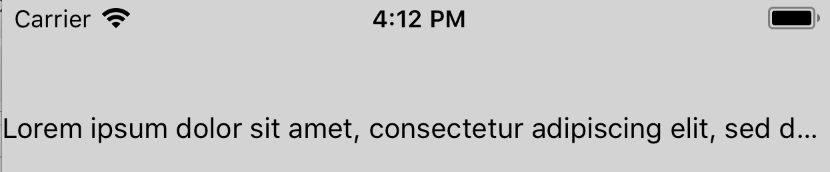
**Test Plan**
Tested that the inline view is hidden if it appears after the truncation point when `numberOfLines` is 1 and 2. Similarly, verified that the inline view is visible if it appears before the truncation point.
**Release Notes**
[IOS] [BUGFIX] [Text] - Fix case where inline view is visible even though it should have been truncated
Adam Comella
Microsoft Corp.
Pull Request resolved: https://github.com/facebook/react-native/pull/21456
Differential Revision: D10182991
Pulled By: shergin
fbshipit-source-id: a5bddddb1bb8672b61d4feaa04013a92c8224155
Summary:
If a view inside of an inline view became dirty (e.g. its top/left prop changed), its position would not update on screen. This is because Yoga didn't know the view needed to be relaid out because Yoga's dirty signal didn't propagate all the way up to the root.

The problem is that inline views don't have a parent in the Yoga tree causing Yoga's dirtiness signal propagation to get cut off early. The fix is, when an inline views gets dirty, mark the parent Text's Yoga node as dirty. This will cause Yoga's dirtiness signal to propagate all the way up to the root node.

Yoga has a hook to inform you when your node is marked as dirty: `YGNodeSetDirtiedFunc`. We leverage this to find out when an inline view's Yoga node gets dirtied.

React Native almost handled this case. Everything worked fine as long as the inline view was nested inside of a virtual text node like this:

```
<Text>
  <Text>
    <InlineView />
  </Text>
</Text>
```

However, the bug repros when the inline view is nested in a non-virtual text node:

```
<Text>
  <InlineView />
</Text>
```

The fix is to move the special dirtiness propagation logic from `RCTVirtualTextShadowView` to `RCTBaseTextShadowView`.

**Test Plan**

Created an inline view. Tested the following kinds of updates on the inline view's content:
  - Moved the content
  - Removed the content
  - Added the content

Tested this for an inline view that is directly inside of a text node as well as one that is nested under a virtual text node.

Here's the code I used for the inline view that moved its content after 2 seconds:

```
const RN = require('react-native');
const React = require('react');

export default class InlineView extends React.Component {
  constructor(props, context) {
    super(props, context);
    this.state = { posBottom: false };
  }

  componentDidMount() {
    super.componentDidMount && super.componentDidMount();
    setTimeout(() => { this.setState({ posBottom: true }); }, 2000);
  }

  render() {
    const pos = this.state.posBottom ? 25 : 0;
    const color = this.state.posBottom ? 'pink' : 'green';
    return (
      <RN.View style={{ width: 50, height: 50, backgroundColor: 'steelblue'}}>
        <RN.View style={{ width: 25, height: 25, top: pos, left: pos, backgroundColor: color }} />
      </RN.View>
    );
  }
}
```

**Release Notes**

[IOS] [BUGFIX] [Text] - Fix case where content of inline views didn't get relaid out

Adam Comella
Microsoft Corp.
Pull Request resolved: https://github.com/facebook/react-native/pull/21968

Differential Revision: D12873795

Pulled By: shergin

fbshipit-source-id: bbc9f5d3ef25063b0015cec8c4aaf2e41ecd60a8
Summary:
Fixes#815
Imagine a node with this style: `{ paddingHorizontal: 10, paddingStart: 0 }`.
After running layout on this node, we expect its computed `paddingStart` to be `0`. However, it is actually `10`.
Consider the expression `paddingEdgeStart.getValue() > 0.0f` in [`getLeadingPadding`](https://github.com/facebook/yoga/blob/328ec7dc4d104b42b836d5ccebff04033d045133/yoga/YGNode.cpp#L461). Why is `0` handled like a negative number rather than a positive number? I suspect this should be `>=` so `0` is handled like the positive numbers (this is how `getTrailingPadding` works).
It looks like https://github.com/facebook/yoga/commit/3a82d2b1a8f5b65a2c3bd1407552d3ed2226238e?diff=unified&w=1#diff-07b4949bf42749fde386e769ff08a124 changed the operator from `>=` to `>` in `getLeadingPadding`. I suspect it was a mistake. `getTrailingPadding` still uses `>=`.
I manually verified this using the code in #815 and added some unit tests to catch this bug and other similar issues.
Adam Comella
Microsoft Corp.
Pull Request resolved: https://github.com/facebook/yoga/pull/816
Reviewed By: priteshrnandgaonkar
Differential Revision: D10282617
Pulled By: shergin
fbshipit-source-id: 2ab2874ae39d9454308a020a960ace85573fe777
Summary:
`YGRoundValueToPixelGrid` currently rounds negative numbers incorrectly. For example:
```
YGRoundValueToPixelGrid(-2.2, 1.0, /* ceil */ false, /* floor */ true) = -2.0
```
However, that operation is supposed to take the floor of the number so the result should acutally be `-3.0`.
There's a detailed comment in `YGRoundValueToPixelGrid` about the fix and why it works.
A symptom that manifested because of this bug is that text nodes could get smaller and smaller on each layout pass. For details see https://github.com/facebook/yoga/issues/824.
Fixes#824
Adam Comella
Microsoft Corp.
Pull Request resolved: https://github.com/facebook/yoga/pull/825
Reviewed By: priteshrnandgaonkar
Differential Revision: D10282064
Pulled By: shergin
fbshipit-source-id: 16ca966e6cb0cfc88b1dbf4ba31e7b1dbe1f2049
Summary:
This consists of several fixes:
  - Some of the C++ functions called by the tests were missing `WIN_EXPORT`
  - It looks like Yoga was changed to round up after `TestMeasureFuncWithFloat` was written. Here's the function call that results in the rounding: https://github.com/facebook/yoga/blob/357ca78f9f7bd86298ef00a1426cac5ca2041d3b/yoga/Yoga.cpp#L4019-L4026
  - The format of the result of the `Print` method was changed after `TestPrint` was written.
Pull Request resolved: https://github.com/facebook/yoga/pull/818

Differential Revision: D10282902

Pulled By: shergin

fbshipit-source-id: a5fd732a7dbff1a704cbafbfc95ae3e0c0a0cdd8
Summary:
**Motivation**

Whenever a user changes the system font size to its maximum allowable setting, React Native apps that allow font scaling can become unusable because the text gets too big. Experimenting with a native app like iMessage on iOS, the font size used for non-body text (e.g. header, navigational elements) is capped while the body text (e.g. text in the message bubbles) is allowed to grow.

This PR introduces a new prop on `<Text>` and `<TextInput>` called `maxFontSizeMultiplier`. This enables devs to set the maximum allowed text scale factor on a Text/TextInput. The default is 0 which means no limit.

Another PR will add this feature to Android.

**Test Plan**

I created a test app which utilizes all categories of values of `maxFontSizeMultiplier`:
  - `undefined`: inherit from parent
  - `0`: no limit
  - `1`, `1.2`: fixed limits

I tried this with `Text`, `TextInput` with `value`, and `TextInput` with children. For `Text`, I also verified that nesting works properly (if a child `Text` doesn't specify `maxFontSizeMultiplier`, it inherits it from its parent).

Lastly, we've been using a version of this in Skype for several months.

**Release Notes**

[GENERAL] [ENHANCEMENT] [Text/TextInput] - Added maxFontSizeMultiplier prop to prevent some text from getting unusably large as user increases OS's font scale setting (iOS)

Adam Comella
Microsoft Corp.
Pull Request resolved: https://github.com/facebook/react-native/pull/20915

Differential Revision: D9646739

Pulled By: shergin

fbshipit-source-id: c823f59c1e342c22d6297b88b2cb11c5a1f10310
Summary:
Currently, only `Text` supports the `allowFontScaling` prop. This commit adds support for it on `TextInput`.

As part of this change, the TextInput setters for font attributes (e.g. size, weight) had to be refactored. The problem with them is that they use RCTFont's helpers which create a new font based on an existing font. These helpers lose information. In particular, they lose the scaleMultiplier.

For example, suppose the font size is 12 and the device's font multiplier is set to 1.5. So we'd create a font with size 12 and scaleMultiplier 1.5 which is an effective size of 18 (which is the only thing stored in the font). Next, suppose the device's font multiplier changes to 1. So we'd use an RCTFont helper to create a new font based on the existing font but with a scaleMultiplier of 1. However, the font didn't store the font size (12) and scaleMultiplier (1.5) separately. It just knows the (effective) font size of 18. So RCTFont thinks the new font has a font size of 18 and a scaleMultiplier of 1 so its effective font size is 18. This is incorrect and it should have been 12.

To fix this, the font attributes are now all stored individually. Anytime one of them changes, updateFont is called which recreates the font from scratch. This happens to fix some bugs around fontStyle and fontWeight which were reported several times before: #13730, #12738, #2140, #8533.

Created a test app where I verified that `allowFontScaling` works properly for `TextInputs` for all values (`undefined`, `true`, `false`) for a variety of `TextInputs`:
  - Singleline TextInput
  - Singleline TextInput's placeholder
  - Multiline TextInput
  - Multiline TextInput's placeholder
  - Multiline TextInput using children instead of `value`

Also, verified switching `fontSize`, `fontWeight`, `fontStyle` and `fontFamily` through a bunch of combinations works properly.

Lastly, my team has been using this change in our app.

Adam Comella
Microsoft Corp.
Closes https://github.com/facebook/react-native/pull/14030

Reviewed By: TheSavior

Differential Revision: D5899959

Pulled By: shergin

fbshipit-source-id: c8c8c4d4d670cd2a142286e79bfffef3b58cecd3
Summary:
This change enables developers to tell the Geolocation module to skip its permissions requests so the app can manage the permissions requests on its own. React Native Android's Geolocation module already requires apps to request permissions on their own.

Currently, the Geolocation module automatically makes permissions requests for you based on what you've specified in your property list file. However, the property list file doesn't always represent what permissions the app wants right now. For example, suppose an app sometimes wants location when "in use" and sometimes wants location "always" depending on what app features the user has engaged with. The Geolocation API will request the "always" location permission even if that's not what the app wants for the current scenario.

This change enables developers to tell the Geolocation module to skip permission requests so that the app can explicitly ask for the appropriate permissions. By default, Geolocation will still ask for permissions so this is not a breaking change.

This change adds a method to Geolocation that is not supported by the web spec for geolocation (`setRNConfiguration`). This method includes `RN` in the name to minimize the chances that the web spec will introduce an API with the same name.

**Test plan (required)**

Verified that Geolocation requests permissions by default and when `skipPermissionRequests` is `false`. Verified the permission requests are skipped when `skipPermissionRequests` is `true`. Also, my team is using this change in our app.

Adam Comella
Microsoft Corp.
Closes https://github.com/facebook/react-native/pull/15096

Differential Revision: D5725563

Pulled By: javache

fbshipit-source-id: fd23fedb7e57408fa0f0d0568e0f1ef2aea1cdd4
Summary:
When code blocks the UI thread for too long, it's a bad sign because this can prevent the app from remaining responsive. This change helps detect such responsiveness issues by warning when a React method executes on the UI thread longer than some threshold.

**Test Plan**

Changed AppState's getCurrentAppState method to sleep for 500 ms and verified that a warning was emitted:

```
2017-08-17 19:45:29.479 [warn][tid:main][RCTModuleMethod.mm:527] mainThreadWatchdog: invocation of [RCTAppState getCurrentAppState:error:] took 501ms
```

Adam Comella
Microsoft Corp.
Closes https://github.com/facebook/react-native/pull/15542

Differential Revision: D5724764

Pulled By: shergin

fbshipit-source-id: f1dc4bf17d3657c397720a47fabc7f32bf81b7ac
Summary:
**Breaking Change Notes**

To adapt to the breaking change, app developers that are consuming React Native through CocoaPods must update their Podfile to refer to yoga with a lowercase "y". In other words:

    pod 'Yoga', :path => '../node_modules/react-native/ReactCommon/yoga'

Must be changed to (note the lowercase "y"):

    pod 'yoga', :path => '../node_modules/react-native/ReactCommon/yoga'

**Symptom**

If you consume React Native as a CocoaPod and consume a third-party React Native module not as a CocoaPod, you will receive a `nonportable-include-path` warning in Xcode >= 8.3.

**Details**

Xcode 8.3 introduced -Wnonportable-include-path which triggers if you import a header using different casing than the path to the header on disk. This triggers when consuming React Native as a CocoaPod from a library that isn't a CocoaPod. React Native imports Yoga using paths like this:

    #import <yoga/Yoga.h>

Which means Yoga's headers are expected to be located in a directory called "yoga" with a lowercase "y". However, when React Native is a CocoaPod the Yoga headers for non-CocoaPods end up in the directory "$(BUILT_PRODUCTS_DIR)/Yoga".

To fix this such that Yoga's headers end up in "$(BUILT_PRODUCTS_DIR)/yoga" (note the lowercase "y"), I've changed Yoga's podspec name to have a lowercase "y".

**Test Plan**

Created a test app where React Native is consumed as a CocoaPod. Added the react-native-maps library to the project and configured it to not be consumed through CocoaPods. Verified that the app compiles properly without the `nonportable-include-path` warnings.

Adam Comella
Microsoft Corp.
Closes https://github.com/facebook/react-native/pull/15527

Differential Revision: D5706338

Pulled By: javache

fbshipit-source-id: 090daa2c3ebb1c66bd467e78a1e91791dbb06651
Summary:
This change intends to fix 2 issues with the NetInfo API:
  - The NetInfo API is currently platform-specific. It returns completely different values on iOS and Android.
  - The NetInfo API currently doesn't expose a way to determine whether the connection is 2g, 3g, or 4g.

The NetInfo API currently just exposes a string-based enum representing the connectivity type. The string values are different between iOS and Andorid. Because of this design, it's not obvious how to achieve the goals of this change without making a breaking change. Consequently, this change deprecates the old NetInfo APIs and introduces new ones. Specifically, these are the API changes:
  - The `fetch` method is deprecated in favor of `getConnection`
  - The `change` event is deprecated in favor of the `connectionchange` event.
  - `getConnection`/`connectionchange` use a new set of enum values compared to `fetch`/`change`. See the documentation for the new values.
    - On iOS, `cell` is now known as `cellular`. It's worth pointing out this one in particular because the old and new names are so similar. The rest of the iOS values have remained the same.
    - Some of the Android enum values have been removed without a replacement (e.g. `DUMMY`, `MOBILE_DUN`, `MOBILE_HIPRI`, `MOBILE_MMS`, `MOBILE_SUPL`, `VPN`). If desirable, we could find a way to expose these in the new API. For example, we could have a `platformValue` key that exposes the platform's enum values directly (like the old `fetch` API did).

`getConnection` and `connectionchange` each expose an object which has 2 keys conveying a `ConnectionType` (e.g. wifi, cellular) and an `EffectiveConnectionType` (e.g. 2g, 3g). These enums and their values are taken directly from the W3C's Network Information API spec (https://wicg.github.io/netinfo/). Copying the W3C's API will make it easy to expose a `navigation.connection` polyfill, if we want, in the future. Additionally, because the new APIs expose an object instead of a string, it's easier to extend the APIs in the future by adding keys to the object without causing a breaking change.

Note that the W3C's spec doesn't have an "unknown" value for `EffectiveConnectionType`. I chose to introduce this non-standard value because it's possible for the current implementation to not have an `effectiveConnectionType` and I figured it was worth representing this possibility explicitly with "unknown" instead of implicitly with `null`.

**Test Plan (required)**

Verified that the methods (`fetch` and `getConnection`) and the events (`change` and `connectionchange`) return the correct data on iOS and Android when connected to a wifi network and a 4G cellular network. Verified that switching networks causes the event to fire with the correct information. Verified that the old APIs (`fetch' and 'change') emit a deprecation warning when used. My team is using a similar patch in our app.

Adam Comella
Microsoft Corp.
Closes https://github.com/facebook/react-native/pull/14618

Differential Revision: D5459593

Pulled By: shergin

fbshipit-source-id: f1e6c5d572bb3e2669fbd4ba7d0fbb106525280e
Summary:
This fixes support for the `backgroundColor` style prop on an `ART.Surface`.

`ARTSurfaceViewManager` inherits its `setBackgroundColor` implementation from `BaseViewManager`. This implementation broke in API 24 because API 24 removed support for `setBackgroundColor`on `TextureViews`. `ARTSurfaceView` inherits from `TextureView` so it also lost support for `setBackgroundColor`.

To fix this, the implementation of `ART.Surface's` `setBackgroundColor` was moved to the shadow node. The implementation now draws the background color on the canvas.

In a test app, verified that initializing and changing the background color on an `ART.Surface` works. Verified that the background renders as transparent when a background color isn't set. Also, this change is being used in my team's app.

Adam Comella
Microsoft Corp.
Closes https://github.com/facebook/react-native/pull/14117

Differential Revision: D5419574

Pulled By: hramos

fbshipit-source-id: 022bfed553e33e2d493f68b4bf5aa16dd304934d
Summary:
Fixes#13691.
Prior to this change, VoiceOver generally didn't say anything when selecting a multiline TextInput. The only exception was VoiceOver would announce the TextInput's placeholder if it had one set.
After this change, VoiceOver announces the following for multiline TextInputs:
- The TextInput's content.
- The TextInput's placeholder if the TextInput doesn't have any content in it.
- The fact that the TextInput is a textfield.
- The cursor position if the TextInput is being edited.
This is similar to the behavior of single line TextInputs.
This change achieves this by disabling `RCTTextView` as an accessibility element. `RCTTextView` is a subclass of `RCTView` so VoiceOver doesn't recognize this as a textfield. Instead, VoiceOver now sees the child `RCTUITextView` which is a subclass of `UITextView` so VoiceOver does recognize it as a textfield. Additionally, an `accessibilityLabel` implementation was added to `RCTUITextView` in order to take the value of the placeholder into account.
Verified the announcements of TextInputs with various props:
- No placeholder and no content
- Just a placeholder
- Just content
- Both a placeholder and content
Did this for both singe line inputs and multiline inputs. For setting content in multiline inputs, I tested both using the `value` prop and passing children. All other props being equal, these configurations resulted in similar announcements.
I verified that the following accessibility props work the same on singleline and multiline TextInputs:
- `accessible`
- `accessibilityLabel`
- `accessibilityTraits`
- `accessibilityViewIsModal`
- `onAccessibilityTap`
- `onMagicTap`
Additionally, my team has been using this change in our app.
Adam Comella
Microsoft Corp.
Closes https://github.com/facebook/react-native/pull/14200
Differential Revision: D5185727
Pulled By: shergin
fbshipit-source-id: 94271e6c8b089eb82006b52fe7917649d69e74af
Summary:
This change introduces some APIs that are useful for making announcements through the screen reader on iOS:
  - `announceForAccessibility`: The screen reader announces the string that is passed in.
  - `announcementFinished`: An event that fires when the screen reader has finished making an announcement.

You can already solve similar problems with RN Android using the `accessibilityLiveRegion` prop. Live regions are a different feature but they can be used to solve the same problem. This commit does not attempt to add live region support in RN iOS because Apple did not build live region support into iOS.

Verified that `announceForAccessibility` causes VoiceOver to announce the string when VoiceOver is enabled. Verified that `announcementFinished` fires with the appropriate data in the event object. Additionally, my team has been using this change in our app.

Adam Comella
Microsoft Corp.
Closes https://github.com/facebook/react-native/pull/14168

Differential Revision: D5137004

Pulled By: javache

fbshipit-source-id: b3c10f3dfc716430a16fcc98e1bb6fe52cabd6a5
Summary:
On some devices, we saw many Chrome windows open when the WebView attempted to send the user to about:blank. This change allows the WebView to handle about:blank which prevents the Chrome windows from opening and gives the user a better experience.

Verified that the WebView no longer opens the device's browser when navigating to about:blank. My team has been using this change in our app.

Adam Comella
Microsoft Corp.
Closes https://github.com/facebook/react-native/pull/14173

Differential Revision: D5142352

Pulled By: hramos

fbshipit-source-id: 1070d4381b385a5bf1829fd8e97efba2045f7968
Summary:
This change introduces an API, `setAccessibilityFocus`, which moves the screen reader's focus to the passed in element. This causes VoiceOver to announce the element and draw a focus rectangle around it.

Similar functionality is already available in RN Android through the `sendAccessibilityEvent` method. Here's an example of what exists today in RN Android:

```
RCTUIManager.sendAccessibilityEvent(
  node,
  8 /* TYPE_VIEW_FOCUSED */);
```

Called `setAccessibilityFocus` on a couple of elements to verify that focus does indeed move when VoiceOver is enabled. Additionally, my team is using this change in our app.

Adam Comella
Microsoft Corp.
Closes https://github.com/facebook/react-native/pull/14169

Differential Revision: D5137002

Pulled By: javache

fbshipit-source-id: 466e8b187e625de7c0f0d36e0400327dcd8d192a
Summary:
This change fixes a memory leak in `AccessibilityInfoModule`.

Our tooling detected this memory leak. After this commit, we no longer see the leak in the tool. We've been using the change in our app.

Adam Comella
Microsoft Corp.
Closes https://github.com/facebook/react-native/pull/14171

Differential Revision: D5128845

Pulled By: javache

fbshipit-source-id: b604902188eb8cc029b1ad39d087e199ae26877c
Summary:
In some cases, `RCTRecursiveAccessibilityLabel` could return an accessibility label that had leading space, trailing space, or multiple spaces between words. This is because it always added a space before adding a label even if the label turned out to be empty.

This is fixed by being stricter about adding spaces.

Found test cases that used to introduce leading space, trailing space, or multiple spaces between words and verified that there aren't any extra spaces after the fix.

```
{/* Used to have leading space */}
<View accessible={true}>
  <View />
  <View accessibilityLabel='Two' />
  <View accessibilityLabel='Three' />
</View>

{/* Used to have 2 spaces between "One" and "Three" */}
<View accessible={true}>
  <View accessibilityLabel='One' />
  <View />
  <View accessibilityLabel='Three' />
</View>

{/* Used to have trailing space */}
<View accessible={true}>
  <View accessibilityLabel='One' />
  <View accessibilityLabel='Two' />
  <View />
</View>
```

Additionally, my team is using this fix in our app.

Adam Comella
Microsoft Corp.
Closes https://github.com/facebook/react-native/pull/14177

Differential Revision: D5127891

Pulled By: shergin

fbshipit-source-id: 42c3022895d844959e0037eaf381b326af3cd6d1
Summary:
Corresponding iOS PR: #12275
Respect the withCredentials XMLHttpRequest flag for sending cookies with requests. This can reduce payload sizes where large cookies are set for domains.
This should fix#5347.
This is a breaking change because it alters the default behavior of XHR. Prior to this change, XHR would send cookies by default. After this change, by default, XHR does not send cookies which is consistent with the default behavior of XHR on web for cross-site requests. Developers can restore the previous behavior by passing `true` for XHR's `withCredentials` argument.
**Test plan (required)**
Verified in a test app that XHR works properly when specifying `withCredentials` as `true`, `false`, and `undefined`. Also, my team uses this change in our app.
Adam Comella
Microsoft Corp.
Closes https://github.com/facebook/react-native/pull/12276
Differential Revision: D4673646
Pulled By: ericvicenti
fbshipit-source-id: 924c230c9df72071b3cf9151c3ac201905ac28a5
Summary:
Corresponding Android PR: #12276
Respect the withCredentials XMLHttpRequest flag for sending cookies with requests. This can reduce payload sizes where large cookies are set for domains.
This should fix#5347.
This is a breaking change because it alters the default behavior of XHR. Prior to this change, XHR would send cookies by default. After this change, by default, XHR does not send cookies which is consistent with the default behavior of XHR on web for cross-site requests. Developers can restore the previous behavior by passing `true` for XHR's `withCredentials` argument.
**Test plan (required)**
Verified in a test app that XHR works properly when specifying `withCredentials` as `true`, `false`, and `undefined`. Also, my team uses this change in our app.
Adam Comella
Microsoft Corp.
Closes https://github.com/facebook/react-native/pull/12275
Differential Revision: D4673644
Pulled By: mkonicek
fbshipit-source-id: 2fd8f536d02fb39d872eb849584c5c4f7e7698c5
Summary:
A related Android PR is #11008.

Font scale was exposed through:
  - The `getContentSizeMultiplier` method
  - The `didUpdateContentSizeMultiplier` event

These are now deprecated. The reason is that there was already an API that exposed font scale. However, it was Android only. We now expose font scale through that API on iOS as well. Specifically:
  - Font scale is now available as `PixelRatio.getFontScale()`.
  - The `change` event on the `Dimensions` object now fires when font scale changes.

This change also adds support for `Dimensions.get('screen')` on iOS. Previously, only `Dimensions.get('window')` was available on iOS. The motivation is that, [according to this comment](https://github.com/facebook/react-native/pull/11008#issuecomment-275123609), we'd like to deprecate `window` dimensions in favor of `screen` dimensions in the future.

**Test plan (required)**

Verified that `PixelRatio.getFontScale()` and the `change` event work properly in a test app.

Adam Comella
Microsoft Corp.
Closes https://github.com/facebook/react-native/pull/12268

Differential Revision: D4673642

Pulled By: mkonicek

fbshipit-source-id: 2602204da6998a96216e06f5321f28f6603e4972
Summary:
04d870b added support for onabort in XHRs. The other on* events are declared on XMLHttpRequest and XMLHttpRequestEventTarget. This adds onabort there as well.

Adam Comella
Microsoft Corp.
Closes https://github.com/facebook/react-native/pull/12277

Differential Revision: D4673648

Pulled By: mkonicek

fbshipit-source-id: 0c5255da77537103c5ad91d9b2826d064140708d
Summary:
Fixes#11592
This bug was seen on a Galaxy S4 running Android 4.4.2. On this device, Android's `Layout.getDesiredWidth` method doesn't correctly measure text that contains unicode emoticons. It appears to think the emoticons take up 0 space.
Setting ANTI_ALIAS_FLAG in the TextPaint's constructor instead of setting it later with setFlags works around the Android bug.
**Test plan (required)**
My team uses this fix in our app.
Adam Comella
Microsoft Corp.
Closes https://github.com/facebook/react-native/pull/12690
Differential Revision: D4673649
Pulled By: mkonicek
fbshipit-source-id: 535f371281927bfff5d8b42966496bc8daf30045
Summary:
This PR is based on files ericvicenti gave me. Specifically, he gave me:
  - AccessibilityInfo.android.js
  - AccessibilityInfo.ios.js
  - AccessibilityInfoModule.java

Before this change, only a native iOS implementation of AccessibilityInfo existed. This change includes:
  - A native Android implementation of AccessibilityInfo.
  - JavaScript wrappers for the AccessibilityInfo module for both iOS and Android.
  - UIExplorer changes to illustrate how to use AccessibilityInfo on iOS and Android.
  - Documentation for the AccessibilityInfo APIs.

**Test plan (required)**

Tested the UIExplorer AccessibilityInfo example on iOS and Android with the screen reader both enabled and disabled.

Adam Comella
Microsoft Corp.
Closes https://github.com/facebook/react-native/pull/12273

Reviewed By: mkonicek

Differential Revision: D4527224

Pulled By: ericvicenti

fbshipit-source-id: d04638465ccbdbb35ecfc9504daaeb8e33aab57a
Summary:
In some cases, the accessibilityLabel contains a leading space. This is because `RCTRecursiveAccessibilityLabel` adds a space before every iteration of the loop including the first.

After this change, the contract is that:
  - `RCTRecursiveAccessibilityLabel` always returns a string with a leading space.
  - `accessibilityLabel` never returns a string with a leading space.

**Test plan**

I created a test app with the following code:

```
<View style={{height: 100, width: 100, backgroundColor: 'steelblue'}} accessible={true}>
  <View style={{height: 20, width: 20, backgroundColor: 'red'}} accessibilityLabel='One' />
  <View style={{height: 20, width: 20, backgroundColor: 'yellow'}} accessibilityLabel='Two' />
  <View style={{height: 20, width: 20, backgroundColor: 'green'}} accessibilityLabel='Three' />
</View>
```

Before this change, the accessibilityLabel of the outermost View was " One Two Three" (notice the leading space).

After this change, it is "One Two Three" as desired.

Adam
Closes https://github.com/facebook/react-native/pull/12269

Reviewed By: javache

Differential Revision: D4596761

Pulled By: shergin

fbshipit-source-id: 7d5ff704e858d9f277d1547339a2831ffa90f592
Summary:
The PR description has been updated to reflect the new approach.

**Breaking Change Summary**

On Android, the following properties now return a different number:
  - `Dimensions.get('window').fontScale`
  - `Dimensions.get('screen').fontScale`
  - `PixelRatio.getFontScale()`

This is a breaking change to anyone who was using these properties because the meaning of these properties has now changed.

These properties used to return a value representing font scale times density ([`DisplayMetrics.scaledDensity`](https://developer.android.com/reference/android/util/DisplayMetrics.html#scaledDensity)). Now they return a value representing just font scale ([`Configuration.fontScale`](https://developer.android.com/reference/android/content/res/Configuration.html#fontScale)).

**PR Description**

This PR changes a few things:
  - Correctly exposes the font scale to JavaScript as `Dimensions.get('screen').fontScale`. UIManager was exporting `DisplayMetrics.scaledDensity` under the name `fontScale`. How
Closes https://github.com/facebook/react-native/pull/11008

Differential Revision: D4558207

Pulled By: astreet

fbshipit-source-id: 096ce7b28051325dfd45fdb2a14b5e9b7d3bc46f
Summary:
cc astreet

The goal of this PR is to enable the buck module `uimanager` to depend on `modules/core` without introducing any dependency cycles.

PR #11008 relies on this PR. PR #11008 needs `uimanager` to depend on `modules/core` so that `uimanager` can fire events using `RCTDeviceEventEmitter` which is in `modules/core`.

This PR moved a number of classes and interfaces:
  - `com.facebook.react.modules.debug.DeveloperSettings` -> `com.facebook.react.modules.debug.interfaces.DeveloperSettings`
  - `com.facebook.react.devsupport.DevOptionHandler` -> `com.facebook.react.devsupport.interfaces.DevOptionHandler `
  - `com.facebook.react.devsupport.DevSupportManager` -> `com.facebook.react.devsupport.interfaces.DevSupportManager`
  - `com.facebook.react.devsupport.DevServerHelper.PackagerStatusCallback` -> `com.facebook.react.devsupport.interfaces.PackagerStatusCallback`
  - The class `com.facebook.react.devsupport.StackTraceHelper.StackFrame` was renamed to `StackFram
Closes https://github.com/facebook/react-native/pull/12329

Differential Revision: D4551160

Pulled By: astreet

fbshipit-source-id: 3a78443c4f30469b13ddfbdcc9bbef6af9e8381a
Summary:
Corresponding iOS PR: https://github.com/facebook/react-native/pull/11002

This adds an onScroll event to TextInput which is useful when a multiline TextInput has so much content that it is scrollable.

**Test plan (required)**

Verified the event works properly in a test app. Also, my team uses this event in our app.

Adam Comella
Microsoft Corp.
Closes https://github.com/facebook/react-native/pull/11001

Differential Revision: D4220941

Pulled By: mkonicek

fbshipit-source-id: 7e420579946f2ae840c9e1fcdc8afab68007da17
Summary:
This prop exposes the functionality provided by Android ScrollView's setOverScrollMode method.

One interesting thing to note is that, if you were to read the Android docs, you would think that the value "always" is the default over scroll mode. However, the docs are incorrect and "always-if-content-scrolls" is actually the default value (http://stackoverflow.com/a/27116306).

**Test plan (required)**

Verified this change in a test app. Also, our team uses this change in our app.

Adam Comella
Microsoft Corp.
Closes https://github.com/facebook/react-native/pull/10905

Differential Revision: D4500957

Pulled By: mkonicek

fbshipit-source-id: 873eba38183defba133c228e0c1038efa83297d3
Summary:
This PR was split from a commit originally in #8619. /cc dmmiller

When an inline image was larger than the specified line height,
the image would be clipped. This changes the behavior so
that the line height is changed to make room for the inline
image. This is consistent with the behavior of RN for iOS.

Here's how the change works.

ReactTextView now receives its line height from the layout thread
rather than directly from JavaScript.

The reason is that the layout thread may pick a different line height.
In the case that the tallest inline image is larger than the line
height supplied by JavaScript, we want to use that image's height as
the line height rather than the supplied line height.

Also fixed a bug where the image, which is supposed to be baseline
aligned, would be positioned at the wrong y location. To fix this,
we use `y` (the baseline) in the `draw` method rather than trying
to calculate the baseline from `bottom`. For more information
see https://code.google.com/p/andro
Closes https://github.com/facebook/react-native/pull/8907

Differential Revision: D3592781

Pulled By: dmmiller
Summary:
An exception is thrown when the native animation code attempts to play an animation on a view that hasn't been created yet. This can happen because views are created in batches. If this particular view didn't make it into a batch yet, the view won't exist and an exception will be thrown when attempting to start an animation on it.
This change eats the exception rather than crashing. The impact is that the app may drop one or more frames of the animation.
**Notes**
I'm not familiar enough with the Android native animation code to know whether or not this is a good fix. My team is using this change in our app because dropping animation frames is better than crashing the app. [This is the code](https://github.com/facebook/react-native/blob/c612c615449b8645976429ad1c0661a4f6e56115/ReactAndroid/src/main/java/com/facebook/react/uimanager/UIViewOperationQueue.java#L874-L892) that is creating the views in batches. Hopefully my PR at least provides some insight into the cause of the bug.
This may fix#9887
Closes https://github.com/facebook/react-native/pull/10907
Differential Revision: D4340129
Pulled By: lacker
fbshipit-source-id: 69160d9e71281a96a7445d764b4715a3e54c0357
Summary:
Android has a text API called breakStrategy for controlling how paragraphs are broken up into lines. For example, some modes support automatically hyphenating words so a word can be split across lines while others do not.

One source of complexity is that Android provides different defaults for `breakStrategy` for `TextView` vs `EditText`. `TextView`'s default is `BREAK_STRATEGY_HIGH_QUALITY` while `EditText`'s default is `BREAK_STRATEGY_SIMPLE`.

In addition to exposing `textBreakStrategy`, this change also fixes a couple of rendering glitches with `Text` and `TextInput`. `TextView` and `EditText` have different default values for `breakStrategy` and `hyphenationFrequency` than `StaticLayout`. Consequently, we were using different parameters for measuring and rendering. Whenever measuring and rendering parameters are inconsistent, it can result in visual glitches such as the text taking up too much space or being clipped.

This change fixes these inconsistencies by setting `breakStrategy` and `hyphenat
Closes https://github.com/facebook/react-native/pull/11007

Differential Revision: D4227495

Pulled By: lacker

fbshipit-source-id: c2d96bd0ddc7bd315fda016fb4f1b5108a2e35cf
Summary:
This change suppresses access checking during reflection which makes reflection faster by decreasing its overhead.

**Test plan (required)**

My team uses this change in our app.

Adam Comella
Microsoft Corp.
Closes https://github.com/facebook/react-native/pull/11204

Differential Revision: D4250790

Pulled By: astreet

fbshipit-source-id: 0ee2f40dcadccc695980fcae14fafe1050acb52f
Summary:
Suppose that the user is scrolled to the bottom of a ScrollView. Next, the ScrollView's content is edited such that the height of the content changes and the current scroll position is larger than the new height of the content. Consequently, the user sees a blank ScrollView. As soon as the user interacts with the ScrollView, the ScrollView will jump to its max scroll position.
This change improves this scenario by ensuring that the user is never staring at a blank ScrollView when the ScrollView has content in it. It does this by moving the ScrollView to its max scroll position when the scroll position after an edit is larger than the max scroll position of the ScrollView.
Here are some pictures to illustrate how this PR improves the scenario described above:


**Test plan (require
Closes https://github.com/facebook/react-native/pull/11000
Differential Revision: D4250792
Pulled By: astreet
fbshipit-source-id: 940fff6282ad29c796726f68b4519cbdabbfe554
Summary:
ReactAndroid/build.gradle downloads a number of ad-hoc dependencies from the internet such as boost, JSC headers, and folly. Having the build depend on the internet is problematic. For example, if the site hosting the JSC headers was to go down, then CI builds would start failing.

This change introduces the environment variable REACT_NATIVE_DEPENDENCIES which refers to a path. Developers can pre-download all of the ad-hoc dependencies into that path and then the build process will grab the dependencies from that local path rather than trying to download them from the internet. This solution is in the spirit of the existing REACT_NATIVE_BOOST_PATH hook.

**Test plan (required)**

This change is used by my team's app.

Adam Comella
Microsoft Corp.
Closes https://github.com/facebook/react-native/pull/11195

Differential Revision: D4247080

Pulled By: mkonicek

fbshipit-source-id: 7c4350339c8d509a829e258d8f1bf320ff8eef64
Summary:
The `FrescoModule` supports providing a custom image pipeline configuration. This module is created by `MainReactPackage` but `MainReactPackage` doesn't expose any way to customize the Fresco configuration. This change adds a parameter to `MainReactPackage`'s constructor so that the `FrescoModule`'s configuration can be customized by the app. A couple of design choices were made in this change:
  - `MainReactPackage`'s new constructor parameter is a `MainPackageConfig`. Introducing `MainPackageConfig` enables `MainReactPackage` to nicely support new optional configuration options in the future. Imagine the alternative of each optional configuration being a separate parameter to the `MainReactPackage` constructor.
  - `FrescoModule` exposes its default configuration as a builder object through the `getDefaultConfigBuilder` method. This enables app's to start with `FrescoModule`'s default configuration and then modify it.

**Test plan (required)**

Verified that passing a custom config based on React Nati
Closes https://github.com/facebook/react-native/pull/10906

Differential Revision: D4237054

Pulled By: mkonicek

fbshipit-source-id: 8a62a6f0e77ca5f6d35238950094686756262196
Summary:
This exposes iOS's spellCheckingType functionality to JavaScript. The native functionality is a three state enum. It gets exposed to JavaScript as a boolean. The initial value and JS null map to the third state.

An alternative design for this API would have been to expose a three state enum to JavaScript:
  - "on" which maps to UITextSpellCheckingTypeYes
  - "off" which maps to UITextSpellCheckingTypeNo
  - "auto" (default) which maps to UITextSpellCheckingTypeDefault

For consistency, I decided to use the same API design as spellCheck. We don't have many options for fixing spellCheck in #11055 without introducing a breaking change.

**Test plan (required)**

Verified that switching `spellCheck` between `true`, `false`, and `null` all work correctly in single line and multiline `TextInputs`.
Closes https://github.com/facebook/react-native/pull/11056

Differential Revision: D4232802

Pulled By: javache

fbshipit-source-id: 79e03307fa6a30a169f7e2fd0ec5ac826663e7c1
Summary:
On Android, if there is a small amount of space available around a text input (e.g. landscape orientation on a phone), Android may choose to have the user edit the text inside of a full screen text input mode. This behavior isn't always desirable. For example, if your app offers some UI controls for controlling the formatting of the text, you want the controls to be visible while the user is editing the text. This Android feature conflicts with that desired experience because the UI controls would be hidden while the text is being edited.

The `disableExtractUI` prop enables developers to choose whether or not Android's full screen text input editing mode is enabled. When this prop is true, Android's `IME_FLAG_NO_EXTRACT_UI` flag is passed to the `setImeOptions` method.

**Test plan (required)**

Verified `disableExtractUI` works for both `true` and `false` values in a test app.

My team is also using this change in our app.

Adam Comella
Microsoft Corp.
Closes https://github.com/facebook/react-native/pull/10900

Differential Revision: D4226483

Pulled By: mkonicek

fbshipit-source-id: 8f1055f6e612b05bafabe6f07a3705dd8788e3da
Summary:
There's an inconsistency in autoCorrect's default state:
  - If you don't specify a value for autoCorrect, it defaults to on.
  - If you specify true/false for autoCorrect and later specify null, autoCorrect turns off. It should have reverted to its initial state of on.

The reason for this discrepancy is that autoCorrect is exposed to JS as a boolean but it is actually an enum with three states in native:
  - UITextAutocorrectionTypeDefault (the default value)
  - UITextAutocorrectionTypeYes
  - UITextAutocorrectionTypeNo

This is fixed by explicitly mapping JS null to UITextAutocorrectionTypeDefault.

**Test plan (required)**

Verified that switching `autoCorrect` between `true`, `false`, and `null` all work correctly in single line and multiline `TextInputs`.

Adam Comella
Microsoft Corp.
Closes https://github.com/facebook/react-native/pull/11055

Differential Revision: D4226419

Pulled By: javache

fbshipit-source-id: e3e5769a3aa537f00fb56ca4ae622ff4213481c5
Summary:
When tapping on a link in a WebView with an unknown scheme, the app would crash. For example, if you have the link "something://example/" but your device doesn't have anything to handle the "something" scheme, the app would crash when the user clicks on the link. This change handles the exception to prevent the app from crashing. Instead, the click is a no-op and the WebView doesn't navigate anywhere.

**Test plan (required)**

Verified the app no longer crashes when clicking on unknown schemes in a test app. Also, my team uses this change in our app.

Adam Comella
Microsoft Corp.
Closes https://github.com/facebook/react-native/pull/10903

Differential Revision: D4226371

Pulled By: mkonicek

fbshipit-source-id: a6d3957806c6063e74fe055b0979cb9d1ce40e51
Summary:
The only callsite of `coalesce` looks like this:

```
newEvent.coalesce(oldEvent);
```

The default `coalesce` implementation returns the event with the most recent timestamp. When the events have the same timestamp then, using the variable names from above, `coalesce` returns `oldEvent`.

This change updates `coalesce`'s implementation to make it explicit that it returns `this` (`newEvent` in the variable names from above) in the case of a tie.

The motivation for this change is related to scroll events. In my team's app, we were seeing scroll events being emitted with the same timestamp and the coalescing logic was causing the oldest scroll event to be chosen. This was causing our JavaScript code to receive stale scroll information and the way the JavaScript code utilized this stale scroll information resulted in the ScrollView settling on the wrong scroll position.

**Test plan (required)**

Verified that scroll events work properly in a ScrollView in a test app. Also, my team's app uses this
Closes https://github.com/facebook/react-native/pull/11080

Differential Revision: D4226152

Pulled By: andreicoman11

fbshipit-source-id: d28a2569225ca95de662f2239a0fa14de0540a7d
Summary:
Corresponding Android PR: https://github.com/facebook/react-native/pull/11001

This adds an onScroll event to TextInput which is useful when a multiline TextInput has so much content that it is scrollable.

**Test plan (required)**

Verified the event works properly in a test app. Also, my team uses this event in our app.

Adam Comella
Microsoft Corp.
Closes https://github.com/facebook/react-native/pull/11002

Differential Revision: D4203565

Pulled By: ericvicenti

fbshipit-source-id: 7cb5e10325c3b03c6b395cce0f1bacb0528db40a
Summary:
TextInput rounds padding down with `floor` when measuring. However, it rounds padding up with `ceil` when rendering.

This change makes things consistent by moving TextInput's rendering code to use `floor` as well. It looks like this is the intended behavior because commit bdff10b moved measuring from `ceil` to `floor`. It looks like TextInput's rendering code was just overlooked in that commit.

**Test plan (required)**

Verified TextInput padding works in a test app. Also, my team uses this change in our app.

Adam Comella
Microsoft Corp.
Closes https://github.com/facebook/react-native/pull/11003

Differential Revision: D4220855

Pulled By: mkonicek

fbshipit-source-id: 95349867ef89c021a8441b383a09052ca0dd569c
Summary:
Sometimes, `gesture.overswipe` can be `null`/`undefined` in `_moveAttachedGesture` resulting in a crash. This change adds a null check to avoid the crash. `_matchGestureAction` has a similar check so it looks like this case was overlooked in `_moveAttachedGesture`.

**Test plan (required)**

My team's app is using this change.

Adam Comella
Microsoft Corp.
Closes https://github.com/facebook/react-native/pull/11017

Differential Revision: D4207277

Pulled By: ericvicenti

fbshipit-source-id: a22817c2ebec1c996583269a59d6767f5713771b
Summary:
Corresponding Android PR: https://github.com/facebook/react-native/pull/11008

This gives apps the ability to find out the current scaling factor for fonts on the device. An event was also added so that apps can find out when this value changes.

**Test plan (required)**

Verified that the getter and the event work properly in a test app. Also, this change is used in my team's app.

Adam Comella
Microsoft Corp.
Closes https://github.com/facebook/react-native/pull/11010

Differential Revision: D4207620

Pulled By: ericvicenti

fbshipit-source-id: b3f6f4a412557ba97e1f5fb63446c7ff9a2ff753
Summary:
When building a native component which takes an image reference as a prop, `resolveAssetSource` needs to be called on the image reference. If this isn't done, the native component may receive the opaque type returned by `require` (e.g. `require('./foo.png')`) which is useless to the native component. `resolveAssetSource` is used by builtin components that take image references such as `Image`, `WebView` and `MapView`.

This change makes `resolveAssetSource` public so that third-party native components can correctly handle image references.

**Test plan (required)**

Verified that `Image.resolveAssetSource` works in a test app. Also, my team is using this change in our app.

Adam Comella
Microsoft Corp.
Closes https://github.com/facebook/react-native/pull/10904

Differential Revision: D4177803

Pulled By: ericvicenti

fbshipit-source-id: ffc511b9340325f7d1111002309cd8558ab8e6b0
Summary:
iOS supports an Image onError event. Android was firing the event but it was never reaching JavaScript because Android didn't include this event in `getExportedCustomDirectEventTypeConstants`.

**Test plan (required)**

Verified that the `onError` event now fires in a test app.

My team uses this change in our app.

Adam Comella
Microsoft Corp.
Closes https://github.com/facebook/react-native/pull/10902

Differential Revision: D4180149

Pulled By: ericvicenti

fbshipit-source-id: 4bf0b9aa7dc221d838d7b6b3e88bb47196dcadef
Summary:
When testing an app on Android using the monkey, the monkey shouldn't be able to open or interact with the dev menu.

**Test plan (required)**

My team uses this change in our app.

Adam Comella
Microsoft Corp.
Closes https://github.com/facebook/react-native/pull/10901

Differential Revision: D4176167

Pulled By: ericvicenti

fbshipit-source-id: 8eb64715ae7496cdf957ee963777f66ab358546c
Summary:
Cards which are not visible because another card is occluding them are still being rendered by Android resulting in overdraw. This results in wasted GPU time because some pixels are drawn multiple times. This change reduces overdraw by changing the opacity of occluded cards to 0.

This bug was found using the tools described in Android's overdraw docs: https://developer.android.com/topic/performance/rendering/overdraw.html

**Test plan (required)**

This change is being used in my team's app.

Adam Comella
Microsoft Corp.
Closes https://github.com/facebook/react-native/pull/10908

Differential Revision: D4175758

Pulled By: ericvicenti

fbshipit-source-id: 4bfac7df16d2a7ea67db977659237a9aa6598f87
Summary:
Here's a little background. Resizing is inferior to scaling. See http://frescolib.org/docs/resizing-rotating.html#_

Currently, React Native has a heuristic to use resize when the image is likely to be from the device's camera. However, there may be other cases where a developer wants to use resize. For example, when the developer knows they'll be downloading a large image from a service but the image will be rendered at a small size on the device.

This change adds a `resizeMethod` prop to the `Image` component so developers can choose how Fresco resizes the image. The options are 'auto', 'resize', or 'scale'. When 'auto' is specified, a heuristic is used to choose between 'resize' and 'scale'. The default value is 'auto'.

**Test plan (required)**

In a small test app, verified that the `resizeMethod` prop properly influences the mechanism that is used to resize the image (e.g. resize or scale).

Adam Comella
Microsoft Corp.
Closes https://github.com/facebook/react-native/pull/9652

Differential Revision: D3841322

Pulled By: foghina

fbshipit-source-id: 6c78b5c75ea73053aa10386afd4cbff45f5b8ffe
Summary:
Currently, `<Text>` and `<TextInput>` components on Android do not support borders.
This change adds support for the borderRadius, borderColor, and
borderWidth props on the `<Text>` and `<TextInput>` components on Android.

ReactViewGroup already implements this functionality so
we copied its implementation over into the ReactTextView
and ReactEditText classes.

**Test plan (required)**

Verified that the various border props work on Text and TextInput components in a test app.

Adam Comella
Microsoft Corp.
Closes https://github.com/facebook/react-native/pull/9658

Differential Revision: D3819993

Pulled By: lexs

fbshipit-source-id: 183b0aa95369dd781f03b5a1f0f409ab47284e39
Summary:
Currently when doing a file upload, the Content-Type header gets set to whatever MIME type iOS computed for the file. The Content-Type header the developer provided never takes precedence.

For example, when uploading an image, iOS might determine that the MIME type is "image/jpeg" and so this would be the Content-Type of the HTTP request. But the developer might need the Content-Type to be "application/octet-stream". With this change, if the developer provides a Content-Type header, it will not be overriden.

There is only one exception to this rule which is for "multipart" requests. In this case, the developer's Content-Type header is always ignored. This is because the Content-Type header needs to contain the boundary string and that information is not available to the developer in JavaScript.

This change makes iOS's behavior more consistent with Android's.

**Test plan (required)**

In a small test app, verified that the developer's Content-Type header takes precedence when it's provided. Verif
Closes https://github.com/facebook/react-native/pull/9651

Differential Revision: D3820001

Pulled By: mkonicek

fbshipit-source-id: fdb8871f88a0d0db1ae59f75bb62b896fe69542d
Summary:
There are a couple of buggy behaviors in the current implementation of the `ellipsizeMode` prop on Android:
  - Setting the `numberOfLines` prop stomps on whatever value you provided for `ellipsizeMode` earlier.
  - The value you've provided for `ellipsizeMode` is used even if you've configured your view to have an unlimited size (i.e. `numberOfLines` is 0 or unspecified).

This change fixes these issues which makes Android's `ellipsizeMode` prop more consistent with iOS's. Additionally, it renames LineBreakMode to EllipsizeMode in a couple of places.

**Test plan (required)**

Verified that the `numberOfLines` and `ellipsizeMode` props work correctly in an Android test app.

Adam Comella
Microsoft Corp.
Closes https://github.com/facebook/react-native/pull/9594

Differential Revision: D3810166

Pulled By: foghina

fbshipit-source-id: 229c9bfc3ef10670a1090311ea9d095cb2c1121a
Summary:
This is similar to the iOS feature that was implemented by 84f68c338a.

**Test plan (required)**

Verified that the image dimensions are included in the `onLoad` callback in a test app. Also, this change is used in my team's app.

Adam Comella
Microsoft Corp.
Closes https://github.com/facebook/react-native/pull/9608

Differential Revision: D3797659

Pulled By: foghina

fbshipit-source-id: ea83a907bf6b0b61d9bc1e90fc7c64b7132db81f
Summary:
In profiling our app, we found that the usage
of `merge` in `Text.js` was showing up as a
hotspot. We've replaced this usage of `merge`
with `mergeFast`.

**Test plan (required)**

This change is used in my team's app.

Adam Comella
Microsoft Corp.
Closes https://github.com/facebook/react-native/pull/9654

Differential Revision: D3801791

fbshipit-source-id: 004652ed6537b557d00541ab2e5fbe64b56fa73b
Summary:
When an absolutely positioned node appeared inside an overflow:hidden
parent, we were limiting its height. This is inconsistent with how
layout behaves on the web.
Closes https://github.com/facebook/css-layout/pull/218

Reviewed By: lucasr

Differential Revision: D3797285

Pulled By: emilsjolander

fbshipit-source-id: 98f98e77aa26edce86b9882c1cac284799b69a27
Summary:
One of the impacts of this bug is that Java is firing timer
completion events into JavaScript for timers that should have
been deleted. JavaScript filters these out so it doesn't impact
the app developer. However, Java is completing more timers
than necessary.

When cleaning up a timer, we were accidentally deleting the
whole set of timers for that context. Instead, we should
just delete that timer from its context.

Adam Comella
Microsoft Corp.
Closes https://github.com/facebook/react-native/pull/9361

Differential Revision: D3797573

fbshipit-source-id: c30ed600af741601f2babdfc61da9aac549cbadb
Summary:
This makes the Text component more consistent with the contracts implemented by the Touchable* components.

**Test plan (required)**

Verified the event object gets passed to the `onPress` and `onLongPress` handlers in a test app. Also, this change is being used by my team's app.

Adam Comella
Microsoft Corp.
Closes https://github.com/facebook/react-native/pull/9657

Differential Revision: D3790550

fbshipit-source-id: 026b579ef6b354d9519abd5e9a92f0d562159132
Summary:
`mRCTEventEmitter` is used by 2 different threads. It's assigned on the UI thread and it's accessed on the JavaScript thread. Currently, it can be the case that the UI thread assigns `mRCTEventEmitter` and later the JS thread accesses it but still sees null.

This change fixes the issue by marking the `mRCTEventEmitter` variable as `volatile` to ensure that both threads see the same value for `mRCTEventEmitter`.

**Test plan (required)**

This change is currently used in my team's app. We're no longer seeing a crash in `EventDispatcher`.

Adam Comella
Microsoft Corp.
Closes https://github.com/facebook/react-native/pull/9655

Differential Revision: D3790888

Pulled By: andreicoman11

fbshipit-source-id: 68cdbc74faffb36dc2bca8ad3d4a78929badbe9c
Summary:
The overflow prop needs to be set on the shadow view so that it can make its way into the layout engine. In some situations, the value of the overflow prop affects the calculations of the layout engine.

**Test plan (required)**

Verified in a test app that the `overflow` prop makes its way into the layout engine. Also, my team's app is currently using this change.

Adam Comella
Microsoft Corp.
Closes https://github.com/facebook/react-native/pull/9659

Differential Revision: D3790552

fbshipit-source-id: 61513ece63ae214f48c6cb6f40fb29757a0ac706
Summary:
The MessageQueue has a _debugInfo object where it stores debug information associated with each callback. The size of this structure is currently unbounded.

It looks like the code attempted to restrict _debugInfo to a fixed number of entries but due to a logic bug, it leaked around 30 entries for every 1 entry it cleaned up.

This change limits the _debugInfo object to around 30 entries.

**Test plan (required)**

This change is currently being used in my team's app.

Adam Comella
Microsoft Corp.
Closes https://github.com/facebook/react-native/pull/9611

Differential Revision: D3781875

fbshipit-source-id: 58c645c52c3e295fe571b7ca7e0d882169c301ef
Summary:
Running the command `./gradlew clean` resulted in the following error:

```
./node_modules/react-native/ReactAndroid/src/main/jni//xreact/jni/Android.mk:42: *** Android NDK: Aborting.    .  Stop.
Android NDK: ./node_modules/react-native/ReactAndroid/src/main/jni//xreact/jni/Android.mk: Cannot find module with tag 'cxxreact' in import path
Android NDK: Are you sure your NDK_MODULE_PATH variable is properly defined ?
Android NDK: The following directories were searched:
```

The problem was that `REACT_COMMON_DIR` wasn't defined.

**Test plan (required)**

Running `./gradlew clean` now works.

Adam Comella
Microsoft Corp.
Closes https://github.com/facebook/react-native/pull/9607

Differential Revision: D3780364

fbshipit-source-id: 2b45d538413f7ee2cf0b36a1fa33287f0b1bf23f
Summary:
Due to an earlier commit, we now have to use the full path for requiring `performanceNow`.

**Test plan (required)**

Verified that the IncrementalExample works when adding it to UIExplorer.
Closes https://github.com/facebook/react-native/pull/9595

Differential Revision: D3775101

Pulled By: javache

fbshipit-source-id: 6252ce8c872896f4cfdb9a31bdbc79d6aaf4684d
Summary:
This PR was split from a commit originally in #8619. /cc dmmiller

When an inline image was larger than the specified line height,
the image would be clipped. This changes the behavior so
that the line height is changed to make room for the inline
image. This is consistent with the behavior of RN for iOS.

Here's how the change works.

ReactTextView now receives its line height from the layout thread
rather than directly from JavaScript.

The reason is that the layout thread may pick a different line height.
In the case that the tallest inline image is larger than the line
height supplied by JavaScript, we want to use that image's height as
the line height rather than the supplied line height.

Also fixed a bug where the image, which is supposed to be baseline
aligned, would be positioned at the wrong y location. To fix this,
we use `y` (the baseline) in the `draw` method rather than trying
to calculate the baseline from `bottom`. For more information
see https://code.google.com/p/andro
Closes https://github.com/facebook/react-native/pull/8907

Differential Revision: D3592781

Pulled By: dmmiller

fbshipit-source-id: cba6cd86eb4e3abef6a0d7a81f802bdb0958492e
Summary:
This PR was split from commits originally in #8619. /cc dmmiller

These refactorings to the HierarchyOptimizer are in preparation for implementing support for inline views in #8619.

**Refactoring 1: Collapse add*LayoutOnlyNodeToLayoutOnlyNode**

addLayoutOnlyNodeToLayoutOnlyNode and addNonLayoutOnlyNodeToLayoutOnlyNode
had nearly identical implementations. They both walk thru the ancestors
looking for a nonlayout-only node and adjusting the passed in index at each
step. This introduces a new function, walkUpUntilNonLayoutOnly, which
takes care of that responsibility. This simplifies addNodeToNode
because it can now consider the type of the parent and the type of
the child independently.

**Refactoring 2: Extract addGrandchildren**

Pull out addLayoutOnlyNode's logic into a helper called
addGrandchildren. We will need to call this method in
another place later.

**Test plan (required)**

This change was tested with UIExplorer and a small test app and it's being used in my team's app.
Closes https://github.com/facebook/react-native/pull/8908

Differential Revision: D3592783

Pulled By: dmmiller

fbshipit-source-id: a513e8d381e71112ce6348bbee7d4a7c62c33619
Summary:
Attempt to fix#7919.
Currently, if the app is launched into the background and you read `AppState.currentState` too soon, you will see the value `'active'` instead of `'background'`. This is because the default value of `AppState.currentState` is hardcoded to be `'active'` and it is initialized with the actual value asynchronously.
This attempts to fix the bug by having the `RCTAppState` module provide the initial state as a module constant.
As noted in #7919, it looks like this fix was already tried and reverted with 0fb3d8de83. zjj010104, hedgerwang, nicklockwood -- can you explain why? I would very much like to get this bug fixed. Nobody has followed up on the issue I filed so I decided to just go ahead and make a PR with my best guess at a fix.
**Test plan (required)**
Built a small app as described in the repro steps for #7919 and verified that, when the app is launched into the background, `init currentState: background` is printed. Also verified that `i
Closes https://github.com/facebook/react-native/pull/8058
Differential Revision: D3554619
fbshipit-source-id: 5d950b85e335765552bbd3cf6ed91534062e35a1
Summary:
Allows developers to specify headers to include in the HTTP request
when fetching a remote image. For example, one might leverage this
when fetching an image from an endpoint that requires authentication:

```
<Image
  style={styles.logo}
  source={{
    uri: 'http://facebook.github.io/react/img/logo_og.png',
    headers: {
      Authorization: 'someAuthToken'
    }
  }}
/>
```

Note that the header values must be strings.

Works on iOS and Android.

**Test plan (required)**

- Ran a small example like the one above on iOS and Android and ensured the headers were sent to the server.
- Ran a small example to ensure that \<Image\> components without headers still work.
- Currently using this code in our app.

Adam Comella
Microsoft Corp.
Closes https://github.com/facebook/react-native/pull/7338

Reviewed By: javache

Differential Revision: D3371458

Pulled By: nicklockwood

fbshipit-source-id: cdb24fe2572c3ae3ba82c86ad383af6d85157e20
Summary:
Previously, only Text and Image could be nested within Text. Now, any
view can be nested within Text. One restriction of this feature is
that developers must give inline views a width and a height via
the style prop.

Previously, inline Images were supported by using iOS's built-in support
for rendering images with an NSAttributedString via NSTextAttachment.
However, NSAttributedString doesn't support rendering arbitrary views.

This change adds support for nesting views within Text by creating one
NSTextAttachment per inline view. The NSTextAttachments act as placeholders.
They are set to be the size of the corresponding view. After the text is
laid out, we query the text system to find out where it has positioned each
NSTextAttachment. We then position the views to be at those locations.

This commit also contains a change in `RCTShadowText.m`
`_setParagraphStyleOnAttributedString:heightOfTallestSubview:`. It now only sets
`lineHeight`, `textAlign`, and `writingDirection` when they've actua
Closes https://github.com/facebook/react-native/pull/7304

Reviewed By: javache

Differential Revision: D3365373

Pulled By: nicklockwood

fbshipit-source-id: 66d149eb80c5c6725311e1e46d7323eec086ce64
Summary:
Autocorrect was broken for controlled TextInput components by a change to batch event handling in React Native:
https://github.com/facebook/react/commit/9f11f8c2634921e657df2691e6bfda18fead5bcc

For example, a TextInput like this would be affected by this bug:

```javascript
<TextInput
  autoCorrect={true}
  style={{height: 26, width: 100}}
  onChangeText={(text) => this.setState({ text })}
  value={this.state.text}
/>
```
This fix uses the same approach as
https://github.com/facebook/react-native/commit/0cd2904b235f53ed684bb9898280461e2cee0b5b

The problem is that TextInput's _onChange handler relied on this.props.value being updated synchronously when calling this.props.onChangeText(text). However, this assumption was broken when React Native event handling started being batched.

The fix is to move the code that relies on this.props.value being up-to-date to componentDidUpdate.

**Test plan (required)**

Tested autocorrect now works on iOS in a small app and a large app. Also tested t
Closes https://github.com/facebook/react-native/pull/7676

Differential Revision: D3346221

Pulled By: nicklockwood

fbshipit-source-id: 715df3e8a03aa58cb0a462de4add02289d42782f
Summary:
Previously, only Text and Image could be nested within Text. Now, any
view can be nested within Text. One restriction of this feature is
that developers must give inline views a width and a height via
the style prop.

Previously, inline Images were supported by using iOS's built-in support
for rendering images with an NSAttributedString via NSTextAttachment.
However, NSAttributedString doesn't support rendering arbitrary views.

This change adds support for nesting views within Text by creating one
NSTextAttachment per inline view. The NSTextAttachments act as placeholders.
They are set to be the size of the corresponding view. After the text is
laid out, we query the text system to find out where it has positioned each
NSTextAttachment. We then position the views to be at those locations.

This commit also contains a change in `RCTShadowText.m`
`_setParagraphStyleOnAttributedString:heightOfTallestSubview:`. It now only sets
`lineHeight`, `textAlign`, and `writingDirection` when they've actua
Closes https://github.com/facebook/react-native/pull/7304

Differential Revision: D3269333

Pulled By: nicklockwood

fbshipit-source-id: 2b59f1c5445a4012f9c29df9f10f5010060ea517
Summary:
Currently, `7 << 16` is used as the animation easing function for both the showing and hiding of the keyboard.

Instead, `7 << 16` should be used for showing the keyboard and `6 << 16` for hiding the keyboard.

For details, see: http://stackoverflow.com/questions/18870447/how-to-use-the-default-ios7-uianimation-curve/19439283#19439283

**Test plan (required)**

Testing animating the position of a view to coordinate with the keyboard hiding and showing and it looks good.

Adam Comella
Microsoft Corp.
Closes https://github.com/facebook/react-native/pull/7372

Differential Revision: D3300464

Pulled By: nicklockwood

fbshipit-source-id: 3fdc161f709de11deb7de511aad28767f5d80bd6
Summary:
When throttling scroll events with `scrollEventThrottle`, `onScroll`
is not guaranteed to be fired for the final scroll position
of the `ScrollView`. This can cause a component to render UI that
is consistent with the resting scroll position of the `ScrollView`.

This commit guarantees that an `onScroll` event will be fired for
the resting scroll position of the `ScrollView`.

**Test plan (required)**

Verified commit fixes a reduced repro. Also tested fix in a larger app.

Adam Comella
Microsoft Corp.
Closes https://github.com/facebook/react-native/pull/7366

Differential Revision: D3269303

Pulled By: javache

fb-gh-sync-id: f68ecb7e9c18d1ac255c6f872fb7eb4aadd07799
fbshipit-source-id: f68ecb7e9c18d1ac255c6f872fb7eb4aadd07799
Summary:
Previously, the back swipe navigation gesture would be enabled when the navigation bar is shown and disabled when the navigation bar is hidden.

This change enables developers to control the back swipe gesture independently of the visibility of the navigation bar. An example use case would be that an app wants to render a custom navigation bar so it sets `navigationBarHidden` to true and it wants to enable the back swipe gesture so it sets `interactivePopGestureEnabled` to true.

**Test plan (required)**

- Created a test app to verify setting `interactivePopGestureEnabled` to `true` and `false` with the navigation bar both hidden and shown.
- Verified prop works in a larger app.

Adam Comella
Microsoft Corp.
Closes https://github.com/facebook/react-native/pull/7369

Differential Revision: D3269304

Pulled By: javache

fb-gh-sync-id: ec4324f6517cec4b4fc4f62c4394dc9208a8af6a
fbshipit-source-id: ec4324f6517cec4b4fc4f62c4394dc9208a8af6a
 Adam Comella




