Summary:
In order to properly set the view's borderRadius the inner*RadiusX/inner*RadiusY should not
be used, since their values are obtained via the following formula:
int innerTopLeftRadiusX = Math.max(topLeftRadius - borderWidth.left, 0);
If topLeftRadius and borderWidth.left have the same value innerTopLeftRadiusX will
be zero and it will cause the top left radius to never be set since
"(innerTopLeftRadiusX > 0 ? extraRadiusForOutline : 0)" will evaluate to zero.
In order to prevent this issue the condition will only consider topLeftRadius, topRightRadius, and etc.
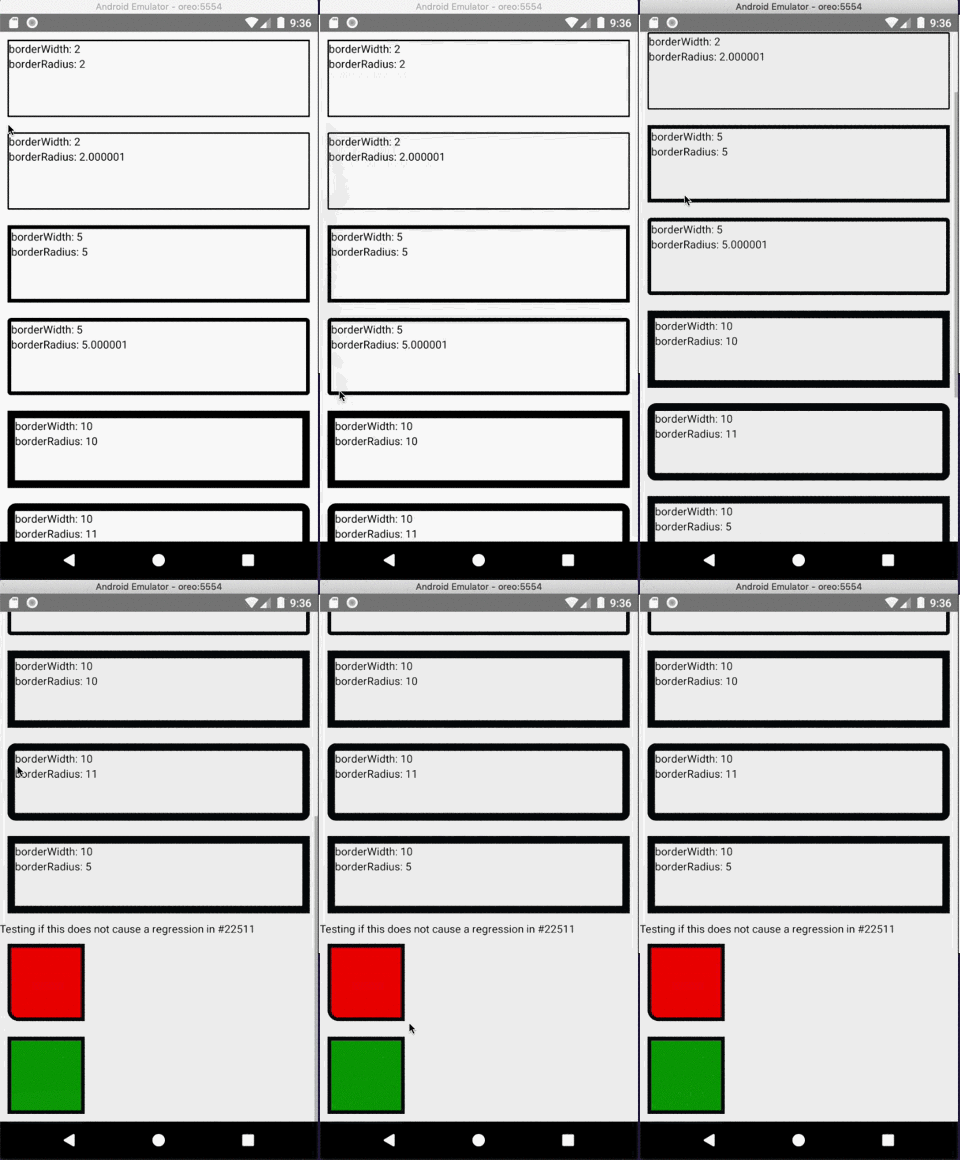
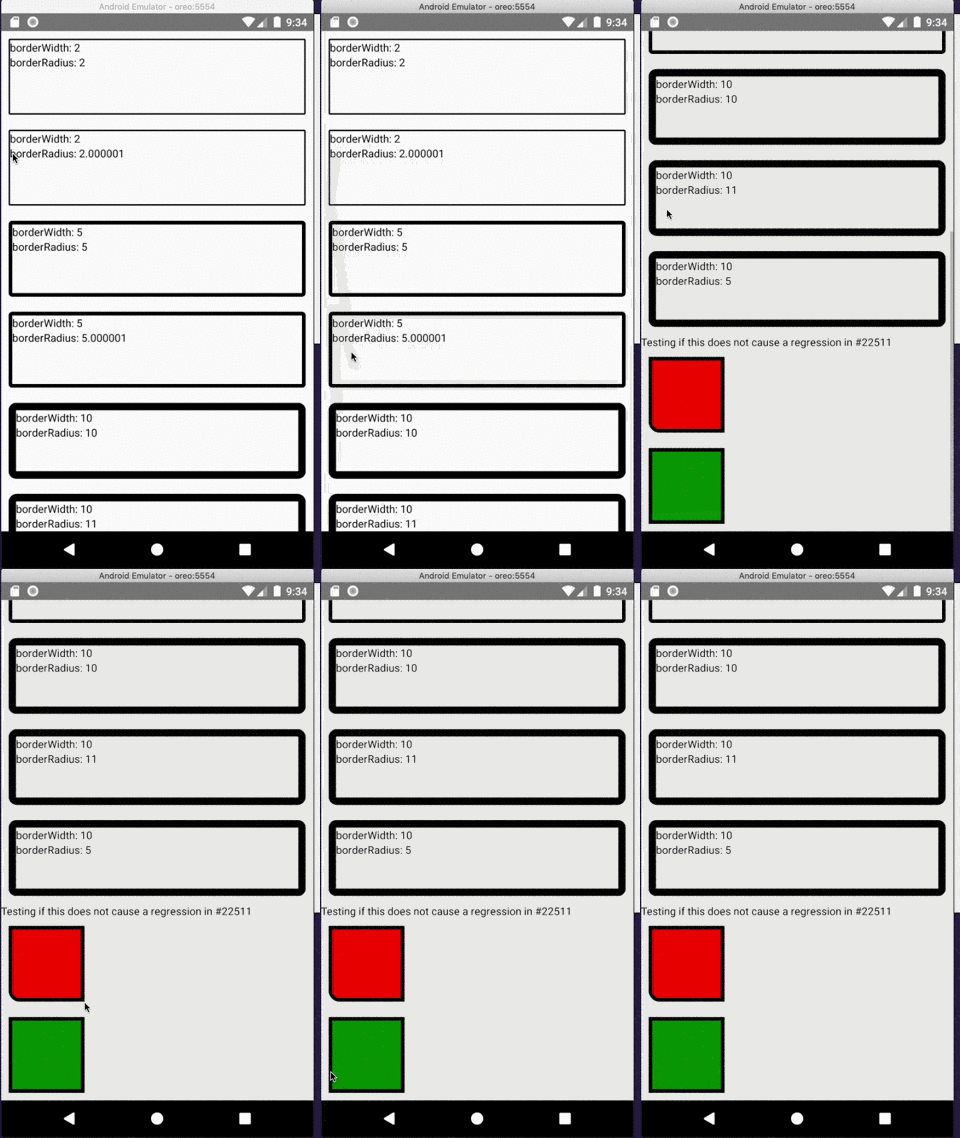
I took a closer look to see if this fix does not causes a regression in https://github.com/facebook/react-native/issues/22511
[Android] [FIX] - Correctly set the border radius on android
Pull Request resolved: https://github.com/facebook/react-native/pull/25626
Test Plan:
Using the following code and Android certify that the border radius is correctly applied.
```javascript
import React from "react";
import { ScrollView, StyleSheet, Text, View } from "react-native";
export default class App extends React.Component<Props> {
render() {
return (
<ScrollView style={styles.container}>
<View style={styles.box1}>
<Text>borderWidth: 2</Text>
<Text>borderRadius: 2</Text>
</View>
<View style={styles.box2}>
<Text>borderWidth: 2</Text>
<Text>borderRadius: 2.000001</Text>
</View>
<View style={styles.box3}>
<Text>borderWidth: 5</Text>
<Text>borderRadius: 5</Text>
</View>
<View style={styles.box4}>
<Text>borderWidth: 5</Text>
<Text>borderRadius: 5.000001</Text>
</View>
<View style={styles.box5}>
<Text>borderWidth: 10</Text>
<Text>borderRadius: 10</Text>
</View>
<View style={styles.box6}>
<Text>borderWidth: 10</Text>
<Text>borderRadius: 11</Text>
</View>
<View style={styles.box7}>
<Text>borderWidth: 10</Text>
<Text>borderRadius: 5</Text>
</View>
<Text>Testing if this does not cause a regression in https://github.com/facebook/react-native/issues/22511</Text>
<View style={{
margin: 10,
backgroundColor: 'red',
width: 100,
height: 100,
borderWidth: 5,
borderBottomLeftRadius: 15,
}} />
<View style={{
margin: 10,
backgroundColor: 'green',
borderWidth: 5,
width: 100,
height: 100,
}} />
</ScrollView>
);
}
}
const styles = StyleSheet.create({
container: {
flex: 1
},
box1: {
margin: 10,
height: 100,
borderRadius: 2,
borderWidth: 2,
borderColor: "#000000"
},
box2: {
margin: 10,
height: 100,
borderRadius: 2.000001,
borderWidth: 2,
borderColor: "#000000"
},
box3: {
margin: 10,
height: 100,
borderRadius: 5,
borderWidth: 5,
borderColor: "#000000"
},
box4: {
margin: 10,
height: 100,
borderRadius: 5.000001,
borderWidth: 5,
borderColor: "#000000"
},
box5: {
margin: 10,
height: 100,
borderRadius: 10,
borderWidth: 10,
borderColor: "#000000"
},
box6: {
margin: 10,
height: 100,
borderRadius: 11,
borderWidth: 10,
borderColor: "#000000"
},
box7: {
margin: 10,
height: 100,
borderRadius: 5,
borderWidth: 10,
borderColor: "#000000"
}
});
```
Closes https://github.com/facebook/react-native/issues/25591
Reviewed By: osdnk
Differential Revision: D16243602
Pulled By: mdvacca
fbshipit-source-id: 1e16572fdf6936aa19c3d4c01ff6434028652942
Summary:
Add prop showSoftInputOnFocus to TextInput. This fixes#14045. This prop can be used to prevent the system keyboard from displaying at all when focusing an input text, for example if a custom keyboard component needs to be displayed instead.
On Android, currently TextInput always open the soft keyboard when focused. This is because `requestFocus` calls `showSoftKeyboard`, which in turn instructs `InputMethodManager` to show the soft keyboard.
Unfortunately even if we were to define a new input type that extends ReactEditText, there is no way to overcome this issue.
This is because `showSoftKeyboard` is a private method so it can't be overriden. And at the same time `requestFocus` needs to invoke `super.requestFocus` to properly instruct Android that the field has gained focused, so overriding `requestFocus` in a subclass of ReactEditText is also not an option, as when invoking `super.requestFocus` we would end up calling again the one defined in ReactEditText.
So currently the only way of doing this is to basically add a listener on the focus event that will close the soft keyboard immediately after. But for a split second it will still be displayed.
The code in the PR changes `requestFocus` to honor showSoftInputOnFocus as defined in Android TextView, displaying the soft keyboard unless instructed otherwise.
## Changelog
[Android] [Added] - Add showSoftInputOnFocus to TextInput
Pull Request resolved: https://github.com/facebook/react-native/pull/25028
Differential Revision: D15503070
Pulled By: mdvacca
fbshipit-source-id: db4616fa165643d6ef2b3185008c4d279ae08092
* Add DoNotStrip annotation for Hermes

This adds the @DoNotStrip annotation to disallow Proguard/R8 from stripping the AndroidUnicodeUtils class during release build and causing a `ClassNotFound` crash.

* Add @DoNotStrip annotations on all methods

* Update AndroidUnicodeUtils.java
Summary:
Bump Fresco to 2.0.0, which supports AndroidX. We should cherry-pick to 0.60 release, to support brown field apps but also native components.

## Changelog

[Android] [Changed] - Bump Fresco to 2.0.0, supports AndroidX
Pull Request resolved: https://github.com/facebook/react-native/pull/25358

Test Plan: CI is green, and RNTester builds and runs as expected.

Differential Revision: D15959443

Pulled By: mdvacca

fbshipit-source-id: 58ba2c3e4d1342014d6ea632cd865b4f413548d9
Summary:
I found that on Android we only support 2 fontWeight options, either **normal** or **bold**, even developer can set any numeric value. But iOS supports all possible numeric values. This PR tries to add support for all possible numeric values on Android, even if it's supported only on Android P(28) and above.

This change might break texts where fontWeight use improperly, because this PR removes conversion of values above 500 to BOLD and below 500 to normal.

FYI, also moved **mCustomTypefaceCache** usage up because it was working after unnecessary mFontCache usage.

## Changelog

[Android] [Changed] - add custom font weight support to Text component on Android, only on P(API 28) and above versions.
Pull Request resolved: https://github.com/facebook/react-native/pull/25341

Test Plan: RNTester app's Text examples will show Rubik Regular, Rubik Light, Rubik Bold, Rubik Medium and Rubik Medium Italic texts in corresponding font family, style and weights.

Differential Revision: D15956350

Pulled By: mdvacca

fbshipit-source-id: 61079d953c65fb34ab4497d44c22317912a5a616
Summary:
### Problem

According to https://github.com/facebook/react-native/issues/9145, the `--port` setting is not respected when executing `react-native run-android`. The templates that report things like what port the dev server runs on are hard coded as well.

### Solution

This commit replaces the hardcoded instances of port 8081 on Android with a build configuration property. This allows setting of the port React Native Android connects to for the local build server.

For this change to work, there must also be an update to the react native CLI to pass along this setting:

https://github.com/react-native-community/react-native-cli/compare/master...nhunzaker:9145-android-no-port-hardcode-cli

To avoid some noise on their end, I figured I wouldn't submit a PR until it's this approach is deemed workable.

## Changelog

[Android][fixed] - `react-native run-android --port <x>` correctly connects to dev server and related error messages display the correct port
Pull Request resolved: https://github.com/facebook/react-native/pull/23616

Differential Revision: D15645200

Pulled By: cpojer

fbshipit-source-id: 3bdfd458b8ac3ec78290736c9ed0db2e5776ed46
Summary:
Co-Authored: zamotany
With React Native 0.59.8 the app keeps crashing with indexed RAM bundle on Android with the following error:

```
2019-05-09 11:58:06.684 2793-2856/? E/AndroidRuntime: FATAL EXCEPTION: mqt_js
    Process: com.ramtestapp, PID: 2793
    com.facebook.jni.CppException: getPropertyAsObject: property '__fbRequireBatchedBridge' is not an Object

    no stack
        at com.facebook.react.bridge.queue.NativeRunnable.run(Native Method)
        at android.os.Handler.handleCallback(Handler.java:873)
        at android.os.Handler.dispatchMessage(Handler.java:99)
        at com.facebook.react.bridge.queue.MessageQueueThreadHandler.dispatchMessage(MessageQueueThreadHandler.java:29)
        at android.os.Looper.loop(Looper.java:193)
        at com.facebook.react.bridge.queue.MessageQueueThreadImpl$4.run(MessageQueueThreadImpl.java:232)
        at java.lang.Thread.run(Thread.java:764)
```

After investigation we found that when using any bundle, let it be non-ram, FIle RAM bundle or Index RAM bundle, the `CatalystInstanceImpl.java` is always using `loadScriptsFromAsset`, which is calling `CatalystInstanceImpl::jniLoadScriptFromAssets` in C++. This method when checking if bundle is a RAM bundle, uses `JniJSModulesUnbundle::isUnbundle` which only check for js-modules/UNBUNDLE - file generated when building File RAM bundle. There is no other logic to handle Indexed RAM bundle, so it figures that the bundle is not RAM, cause there is no js-modules/UNBUNDLE file and tries to load as regular bundle and fails.

In this PR we added check if it is indexed RAM bundle in `jniLoadScriptFromAssets` and handle it if it is.
## Changelog
[Android] [Fixed] fix indexed RAM bundle

Solves https://github.com/facebook/react-native/issues/21282
Pull Request resolved: https://github.com/facebook/react-native/pull/24967

Differential Revision: D15575924

Pulled By: cpojer

fbshipit-source-id: 5ea428e0b793edd8242243f39f933d1092b35260
Summary:
If you (try to) build React Native for Android without having the NDK properly installed and referenced, you get the following error:
>A problem occurred evaluating project ':ReactAndroid'.
\> Cannot get property 'absolutePath' on null object
This is not an overly helpful diagnostic. This PR results in this message instead:
>ndk-build binary cannot be found, check if you've set $ANDROID_NDK environment variable correctly or if ndk.dir is setup in local.properties
Fixes#25087
## Changelog
[Android] [Fixed] - Show proper error message instead of throwing a NullReferenceException if Gradle cannot find the NDK
Pull Request resolved: https://github.com/facebook/react-native/pull/25088
Differential Revision: D15559271
Pulled By: cpojer
fbshipit-source-id: 35c9a9321af4e4a34bf519144ada48884b48352d
Summary:
This PR solves bug https://github.com/facebook/react-native/issues/24393 for Android. Allows an app to be opened with an NFC tag and getting the url trough Linking.getInitialURL()

## Changelog
[Android] [Fixed] - This branch checks also for `ACTION_NDEF_DISCOVERED` intent matches to set the initialURL
Pull Request resolved: https://github.com/facebook/react-native/pull/25055

Differential Revision: D15516873

Pulled By: cpojer

fbshipit-source-id: e8803738d857a69e1063e926fc3858a416a0b25e
Summary:
Changelog: [Android] [FIXED] - Fix backgroundColor top level prop of TextInput

This diff fixes two issues with the `backgroundColor` top level property of TextInput on Android:
 * Now it is possible to set a **string** value for the top-level `backgroundColor` property of TextInput (crashed the app previously):
```
<TextInput backgroundColor="#ffccbb">Hello, React Native</TextInput>
```
* Now it's possible to set an **integer** value for the top-level `backgroundColor` property of TextInput (had no effect previously):
```
<TextInput backgroundColor={0xffccbbff}>Hello, React Native</TextInput>
```

A `customType = "Color"` annotation parameter must be provided for `ReactBaseTextShadowNode.setBackgroundColor(...)` since the color value must be previously processed in JS before sending it over the bridge to the native code. The JS code will parse the color value and return the proper ARGB color integer to the native platforms (https://fburl.com/uqup52tn).

Without providing the custom type for the background color, if a string value is set for the top-level `backgroundColor` property in the JS code, the Android code will crash since it expects an integer value for the color in `ReactBaseTextShadowNode.setBackgroundColor(...)`, but a string will be passed from JS without any conversion and there will be a `ClassCastException` thrown. If an integer value without the alpha component (like `0xffccbb`) is set, the Android native view would get an integer color value with its alpha component set to `0x00`, which means a transparent color.

On a side note: the alpha component of a color must always be set when using an integer value for `backgroundColor` since the JS code, while processing the color type, shifts the rightmost 8 bytes (alpha component) to the leftmost position. If those 8 bytes are not the alpha component, you will get the wrong color in the end. It doesn't seem to be a problem for string values of `backgroundColor` though.

Reviewed By: mdvacca

Differential Revision: D15453980

fbshipit-source-id: f3f5d9c9877cdbce79a67f2ed93ad4589576d166
Summary:
This is a reconstitution of #24190. It extends accessibility actions to include both a name and user facing label. These extensions support both standard and custom actions.

We've also added actions support on Android, and added examples to RNTester showing how both standard and custom accessibility actions are used.

## Changelog

[general] [changed] - Enhanced accessibility actions support
Pull Request resolved: https://github.com/facebook/react-native/pull/24695

Differential Revision: D15391408

Pulled By: cpojer

fbshipit-source-id: 5ed48004d46d9887da53baea7fdcd0e7e15c5739
Summary: Make sure that `importKeys` doesn't choke on null `map_`, since ReadableNativeMap can have a null backing `map_`.

Reviewed By: mdvacca

Differential Revision: D15360094

fbshipit-source-id: b507bdd93c247153aa34e4f62ac6f93349c1faf5
Summary:
This is already handled cleanly on the JS side of things in AnimatedInterpolation.js: https://github.com/facebook/react-native/blob/0ee5f68929610106ee6864baa04ea90be0fc5160/Libraries/Animated/src/nodes/AnimatedInterpolation.js#L133-L142

However, the native driver interpolation will try to divide by 0, produce NaN and then crash. This change just copies the logic from the JS version of the interpolation logic and adds it to the Java version.

Note that this bug only reproduces on Android Q. It seems that RenderNode::setCameraDistance now crashes when receiving NaN on Android Q.

Reviewed By: sahrens

Differential Revision: D15380844

fbshipit-source-id: cfa82d8f58574e1040a851aaa5b5af1e23c9daa8
Summary: `android.util.ArrayMap` ins't available on API < 19. Let's use the one that Android Support Library (aka AndroidX) provides.

Reviewed By: mdvacca

Differential Revision: D15372704

fbshipit-source-id: 5c2ea3c7ea7368bb75ff22c54af0b258558556b5
Summary:
Revert Gradle download plugin import, because new way is causing some issues when building from source.

## Changelog

[Android] [Changed] - revert Gradle download plugin import
Pull Request resolved: https://github.com/facebook/react-native/pull/24863

Differential Revision: D15352002

Pulled By: cpojer

fbshipit-source-id: 5996ce8aeeca1fdd8b43fdc9087af705cf7f682d
Summary:
Adds YogaEventListener interface and it's implementation which will be used in flipper for events coming from Yoga
After this diff , we will start getting layout calculate events in flipper listener

Reviewed By: davidaurelio

Differential Revision: D15316928

fbshipit-source-id: da3a53374a52386037b553d460038d988b0162c2
Summary:
The `measure` API receives LocalData and Props, it should also receive State.

This will also be used in future diffs.

Reviewed By: mdvacca

Differential Revision: D15325182

fbshipit-source-id: 6cb46dd603ce7d46673def16f0ddb517e2cf0c4f
Summary:
Fixes redbox/yellowbox symbolication when the Java delta client is enabled. Previously the modules would get concatenated in a nondeterministic order (owing to Metro's parallelism) which differed from their order in the source map, where they're explicitly sorted by module ID.

This diff changes the data structure holding modules in memory from a `LinkedHashMap` (which iterates in insertion order) to a `TreeMap` (which iterates in key order).

NOTE: Similar to this change in the Chrome debugger's delta client: https://github.com/react-native-community/cli/pull/279

Reviewed By: dcaspi

Differential Revision: D15301927

fbshipit-source-id: 27bdecfb3d6963aa358e4d542c8b7663fd9eb437
Summary:
When running Android app for the first time, the packager is requesting delta bundles from metro instead of a bundle (in dev settings delta bundles are disabled by default and marked as experimental). UI of dev settings is not consistent with the current state, to turn off delta bundles you have to enable them and then disable.

[Android] [Fixed] - Disable delta bundles on the first app run
Pull Request resolved: https://github.com/facebook/react-native/pull/24848

Differential Revision: D15334059

Pulled By: cpojer

fbshipit-source-id: 384a8abba64c54db3656a4d5d0e24acc825870c8
Summary:
The files in `ReactAndroid/src/androidTest/js` use Haste names; this commit migrates them to use path-based imports. This helps us move RN towards standard path-based requires. All the requires in `androidTest` have been rewritten to use relative requires.

[General] [Changed] - Migrate "androidTest" JS from Haste to path-based requires
Pull Request resolved: https://github.com/facebook/react-native/pull/24813

Differential Revision: D15318108

Pulled By: cpojer

fbshipit-source-id: dddc68f992b8dea48afb01fd4481bd5b846231ca
Summary: The existing implementation of JSCallInvoker holds a reference to Instance (aka the bridge). This diff makes JSCallInvoker an abstract base class that's extended by BridgeJSCallInvoker, which is what's returned by CatalystInstance to initialize TurboModules. This will allow us to add another class that derives from JSCallInvoker that doesn't rely on the bridge.

Reviewed By: shergin

Differential Revision: D15252375

fbshipit-source-id: 75eee2ca149235a63e2a2cd8cdd361b163d1d1ab
Summary:
We are getting errors where views are being dropped twice.
This is following from logic that viewManagers are only removed from `mTagsToViewManagers` from `dropView`.

This log will hopefully identify if we are getting improper operations because we shouldn't be re-using tags

Reviewed By: mdvacca

Differential Revision: D15152869

fbshipit-source-id: 914ee9c1772fa066adefde0753075ecba6377a0c
Summary:
This diff ensures the method scheduler.constraintSurfaceLayout is executed before the JS run application start.
This is necessary to properly set the pointScaleFactor for the Root before running JS.

This is a workaround to fix a bug when the pointScaleFactor changes over time for the rootShadowNode. The bug is easily reproducible when rendering the "fabric" indicator on Fabric screens. During the first render of a Fabric screen this method was called before "JS run application" starts, and the Fabric indicator was render correctly.
Beacuse of timing of measure APIS, the second time a Fabric screen is rendered the method is called after the "JS run application process started", as a consecuence the Fabric indicator is not rendered correctlly (the pointScaleFactor is incorrectly assigned into the layout metrics of the Fabric indicator text).

We still need to analyze why the pointScaleFactor is not correctly assigned when it is set after the "JS run application process started", but this will be part of another diff.

Reviewed By: shergin

Differential Revision: D15303554

fbshipit-source-id: 7d985cefee20fd40dbe04166c1a1358b3f3ddc85
Summary: `YogaStylableProps.yogaStyle` is designed to be consumed by Yoga only. Making it `protected` allows us to avoid confusion and misuse of this props.

Reviewed By: JoshuaGross

Differential Revision: D15296474

fbshipit-source-id: cf9e416afee99fb426d72765557b34d303a63dbe
Summary:
Fixes#13351
Two root causes:
1. Android Spinner will reset selection to undefined after setAdapter()
which will trigger onValueChange().
The behavior is not expected for RN.
And the solution is to setSelection() explicitly
2. In original implementation, it setups `items` immediately,
but delays the `selected` setup after update transaction.
There will be some race condition and incosistency
if update `items` only.
The fix will do the setup all after update transaction.
[Android] [Fixed] - Fix#13351 PickerAndroid will reset selected value during items update.
Pull Request resolved: https://github.com/facebook/react-native/pull/24793
Differential Revision: D15293516
Pulled By: cpojer
fbshipit-source-id: 5a99a60015c7e1b2968252cdc0b2661d52a15b9d
Summary:
Fixes this issue:
https://github.com/facebook/react-native/issues/24468
It was incorrectly closed by a fix on react-native-community CameraRoll implementation. CameraRoll in react-native still crashes when finding a file with # sign

[Android] [Fix] - Fix Android Camera Roll crash on mime type guessing
Pull Request resolved: https://github.com/facebook/react-native/pull/24780

Reviewed By: mdvacca

Differential Revision: D15281062

Pulled By: lunaleaps

fbshipit-source-id: ca3364c8478d9bfc9a0a6657b531ffb384145d8c
Summary: In the future we're planning to decouple ThemedReactContext from the bridge (CatalystInstance). For now, we just need to be able to create a ThemedReactContext with a ReactContext that has no Catalyst instance.

Reviewed By: mdvacca

Differential Revision: D15246442

fbshipit-source-id: 99ebda6521f4df72969011ea0e6ea41b046875c8
 Andrew Coates
 Lorenzo Sciandra
 Guilherme Iscaro
 valerio.ponte
 marcmulcahy
 thecodrr
 cpojer
 Jerry.Luo
 soh335
 Dulmandakh
 Nate
Nate
 Dratwas
 Petter Hesselberg
 Andrea Cimitan
 Oleksandr Melnykov
 Héctor Ramos
 Mike Grabowski
 Eric Lewis
 Uilque Messias
 Sharon Gong
 Joshua Gross
 luancurti
 Oleg Lokhvitsky
 David Vacca
 Alexey Lang
 Dulmandakh
 Sidharth Guglani
 Moti Zilberman
 wojteg1337
 James Ide
 Emily Janzer
 Luna Wei
 Valentin Shergin
 Kudo Chien
 Maciej Srokowski

