Summary:
Merging react-native-windows to 0.60 - the visual studio compiler seems to take issue with the existing code

## Changelog

[Internal] [Fixed] - Build fix for react-native-windows (MSVC)
Pull Request resolved: https://github.com/facebook/react-native/pull/26462

Test Plan:
No real change, just making compilers happy.

### Side Note
We'll want this change cherry-pickered to RN 0.60 and RN 0.61 so users of react-native-windows dont have to use our fork of react-native.

Reviewed By: mhorowitz

Differential Revision: D17406081

Pulled By: TheSavior

fbshipit-source-id: bc056e1a545c6478fdcbd5645f3a8dea657162c8
Summary:
In order to properly set the view's borderRadius the inner*RadiusX/inner*RadiusY should not
be used, since their values are obtained via the following formula:
int innerTopLeftRadiusX = Math.max(topLeftRadius - borderWidth.left, 0);
If topLeftRadius and borderWidth.left have the same value innerTopLeftRadiusX will
be zero and it will cause the top left radius to never be set since
"(innerTopLeftRadiusX > 0 ? extraRadiusForOutline : 0)" will evaluate to zero.
In order to prevent this issue the condition will only consider topLeftRadius, topRightRadius, and etc.
I took a closer look to see if this fix does not causes a regression in https://github.com/facebook/react-native/issues/22511
[Android] [FIX] - Correctly set the border radius on android
Pull Request resolved: https://github.com/facebook/react-native/pull/25626
Test Plan:
Using the following code and Android certify that the border radius is correctly applied.
```javascript
import React from "react";
import { ScrollView, StyleSheet, Text, View } from "react-native";
export default class App extends React.Component<Props> {
render() {
return (
<ScrollView style={styles.container}>
<View style={styles.box1}>
<Text>borderWidth: 2</Text>
<Text>borderRadius: 2</Text>
</View>
<View style={styles.box2}>
<Text>borderWidth: 2</Text>
<Text>borderRadius: 2.000001</Text>
</View>
<View style={styles.box3}>
<Text>borderWidth: 5</Text>
<Text>borderRadius: 5</Text>
</View>
<View style={styles.box4}>
<Text>borderWidth: 5</Text>
<Text>borderRadius: 5.000001</Text>
</View>
<View style={styles.box5}>
<Text>borderWidth: 10</Text>
<Text>borderRadius: 10</Text>
</View>
<View style={styles.box6}>
<Text>borderWidth: 10</Text>
<Text>borderRadius: 11</Text>
</View>
<View style={styles.box7}>
<Text>borderWidth: 10</Text>
<Text>borderRadius: 5</Text>
</View>
<Text>Testing if this does not cause a regression in https://github.com/facebook/react-native/issues/22511</Text>
<View style={{
margin: 10,
backgroundColor: 'red',
width: 100,
height: 100,
borderWidth: 5,
borderBottomLeftRadius: 15,
}} />
<View style={{
margin: 10,
backgroundColor: 'green',
borderWidth: 5,
width: 100,
height: 100,
}} />
</ScrollView>
);
}
}
const styles = StyleSheet.create({
container: {
flex: 1
},
box1: {
margin: 10,
height: 100,
borderRadius: 2,
borderWidth: 2,
borderColor: "#000000"
},
box2: {
margin: 10,
height: 100,
borderRadius: 2.000001,
borderWidth: 2,
borderColor: "#000000"
},
box3: {
margin: 10,
height: 100,
borderRadius: 5,
borderWidth: 5,
borderColor: "#000000"
},
box4: {
margin: 10,
height: 100,
borderRadius: 5.000001,
borderWidth: 5,
borderColor: "#000000"
},
box5: {
margin: 10,
height: 100,
borderRadius: 10,
borderWidth: 10,
borderColor: "#000000"
},
box6: {
margin: 10,
height: 100,
borderRadius: 11,
borderWidth: 10,
borderColor: "#000000"
},
box7: {
margin: 10,
height: 100,
borderRadius: 5,
borderWidth: 10,
borderColor: "#000000"
}
});
```
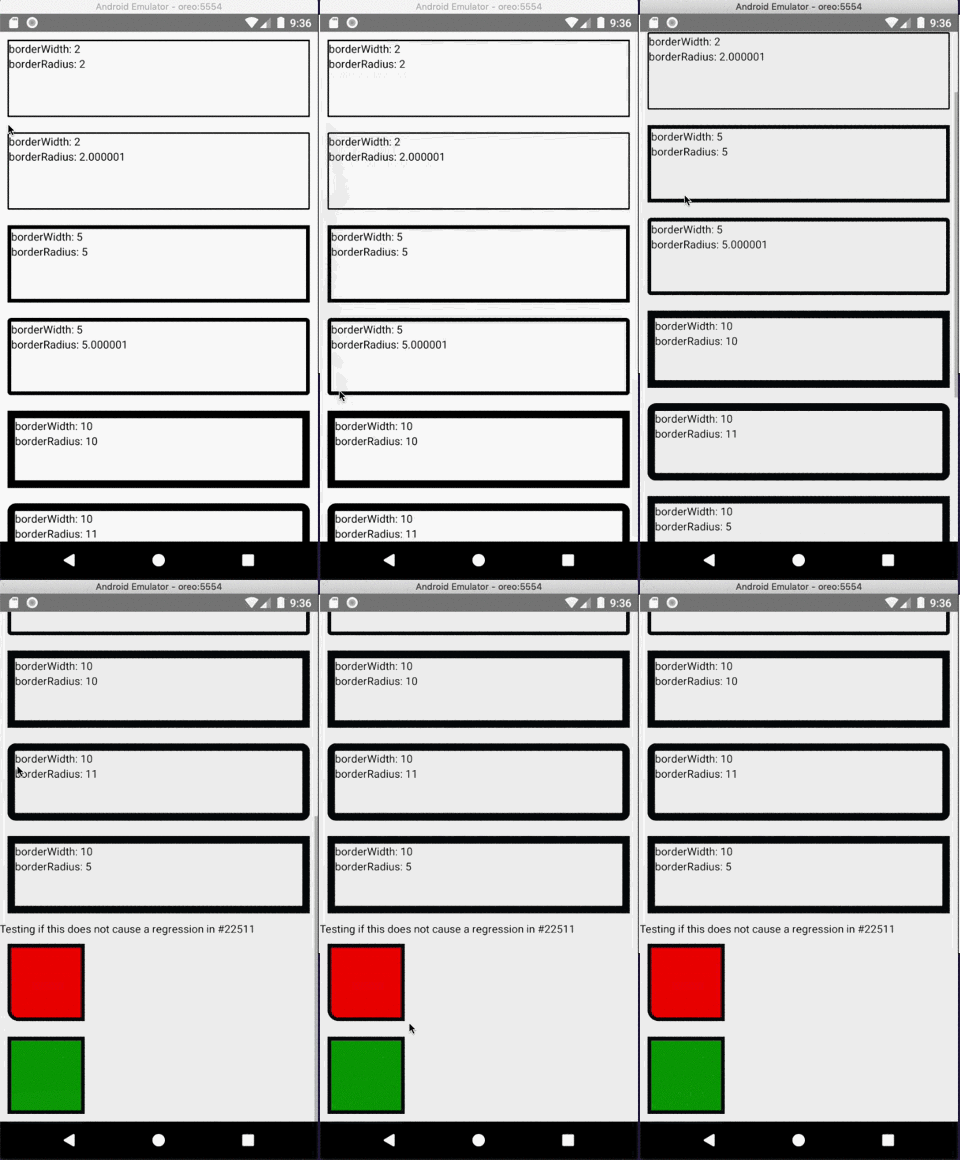
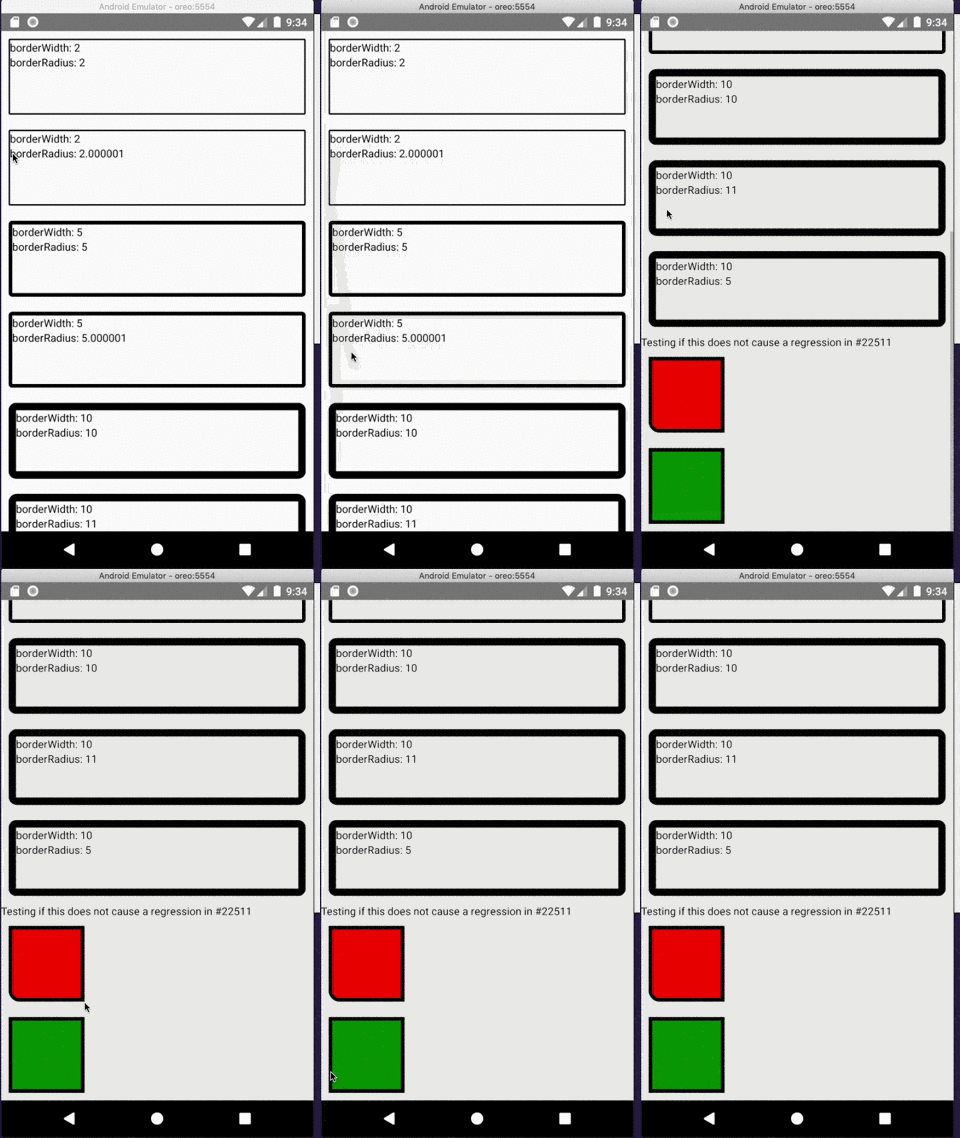
Closes https://github.com/facebook/react-native/issues/25591
Reviewed By: osdnk
Differential Revision: D16243602
Pulled By: mdvacca
fbshipit-source-id: 1e16572fdf6936aa19c3d4c01ff6434028652942
Summary: Fishhook was used to try to hide the log messages from RCTReconnectingWebSocket but that doesn't really work anymore. Deleting it now to unblock people trying to build for iOS 13.

Reviewed By: cpojer

Differential Revision: D15779390

fbshipit-source-id: ef18575d5d92ac374e189b1267dee3a9befc3551
Summary:
Fixes https://github.com/facebook/react-native/issues/25477

This PR adds a `.prettierrc.js` config file to the HelloWorld template.

`eslint-config-react-native-community` includes custom settings for some rules which conflict with Prettier's default settings.

Consequently, if you run `eslint` immediately after scaffolding a new app you get errors (see linked issue).

This PR configures Prettier to be compatible with both the existing ESLint config and the existing project template (with no code changes to the latter).

## Changelog

[General] [Changed] - Added a default Prettier config for new projects
Pull Request resolved: https://github.com/facebook/react-native/pull/25478

Test Plan:
- The following screenshots show the output of `yarn lint` before and after these changes
- These were run immediate after running `npx react-native-cli init RN060`

### Without these changes

- Linting errors on new projects
- Unfixable automatically due to conflicting rules
<img width="1116" alt="Screenshot 2019-07-03 at 17 44 55" src="https://user-images.githubusercontent.com/2393035/60610078-f6b44d00-9dba-11e9-826f-1524b949e4fd.png">
<img width="1116" alt="Screenshot 2019-07-03 at 17 45 07" src="https://user-images.githubusercontent.com/2393035/60610085-fb790100-9dba-11e9-9a9c-33f4cfefd51e.png">

### With these changes

- Brand new projects will not produce lint errors out of the box
<img width="1116" alt="Screenshot 2019-07-03 at 17 48 25" src="https://user-images.githubusercontent.com/2393035/60610266-57dc2080-9dbb-11e9-8a55-fd09f3549c17.png">

Differential Revision: D16223094

Pulled By: cpojer

fbshipit-source-id: bd2c00b1fcf27b1afcad8c18b357b95a3900bdf7
Summary:
This removes the `--projectRoot` flag in `launchPackager.bat` as it was removed,  fixing [this bundler not opening issue on cli repo](https://github.com/react-native-community/cli/issues/484) when `yarn react-native run-android` is run.

This is Windows related only so should be only tested on Windows.

## Changelog

[Internal] [Fixed] - Fixed Metro Bundler not opening when running `yarn react-native run-android`
Pull Request resolved: https://github.com/facebook/react-native/pull/25517

Test Plan:
1. Create a new repo using `react-native init`
2. Edit the `launchPackager.bat` file
3. Run `yarn react-native run-android`

Differential Revision: D16162108

Pulled By: cpojer

fbshipit-source-id: c12d9853ad49f00d56b9a8254a5b2c40a358cb2e
Summary:
Add prop showSoftInputOnFocus to TextInput. This fixes#14045. This prop can be used to prevent the system keyboard from displaying at all when focusing an input text, for example if a custom keyboard component needs to be displayed instead.
On Android, currently TextInput always open the soft keyboard when focused. This is because `requestFocus` calls `showSoftKeyboard`, which in turn instructs `InputMethodManager` to show the soft keyboard.
Unfortunately even if we were to define a new input type that extends ReactEditText, there is no way to overcome this issue.
This is because `showSoftKeyboard` is a private method so it can't be overriden. And at the same time `requestFocus` needs to invoke `super.requestFocus` to properly instruct Android that the field has gained focused, so overriding `requestFocus` in a subclass of ReactEditText is also not an option, as when invoking `super.requestFocus` we would end up calling again the one defined in ReactEditText.
So currently the only way of doing this is to basically add a listener on the focus event that will close the soft keyboard immediately after. But for a split second it will still be displayed.
The code in the PR changes `requestFocus` to honor showSoftInputOnFocus as defined in Android TextView, displaying the soft keyboard unless instructed otherwise.
## Changelog
[Android] [Added] - Add showSoftInputOnFocus to TextInput
Pull Request resolved: https://github.com/facebook/react-native/pull/25028
Differential Revision: D15503070
Pulled By: mdvacca
fbshipit-source-id: db4616fa165643d6ef2b3185008c4d279ae08092
* Add DoNotStrip annotation for Hermes

This adds the @DoNotStrip annotation to disallow Proguard/R8 from stripping the AndroidUnicodeUtils class during release build and causing a `ClassNotFound` crash.

* Add @DoNotStrip annotations on all methods

* Update AndroidUnicodeUtils.java
Summary:
Looks we forgot to add this file to publish list. By adding it, we can remove some code in CLI that special-cases `react-native` package, since it now announces itself as a proper platform.

cc kelset, we'd like to have this cherry-picked for 0.60.

## Changelog

[Internal] [Fixed] - Publish `react-native.config.js`
Pull Request resolved: https://github.com/facebook/react-native/pull/25436

Test Plan: `npm pack` shows `react-native.config.js`

Differential Revision: D16071113

Pulled By: cpojer

fbshipit-source-id: df18affbb9a0ad7f2cfdd1a4cc93191aa5ffadeb
Summary:
The current technique we use to draw text uses linear memory, which means that when text is too long the UIView layer is unable to draw it. This causes the issue described [here](https://github.com/facebook/react-native/issues/19453). On an iOS simulator the bug happens at around 500 lines which is quite annoying. It can also happen on a real device but requires a lot more text.

To be more specific the amount of text doesn't actually matter, it is the size of the UIView that we use to draw the text. When we use `[drawRect:]` the view creates a bitmap to send to the gpu to render, if that bitmap is too big it cannot render.

To fix this we can use `CATiledLayer` which will split drawing into smaller parts, that gets executed when the content is about to be visible. This drawing is also async which means the text can seem to appear during scroll. See https://developer.apple.com/documentation/quartzcore/calayer?language=objc.

`CATiledLayer` also adds some overhead that we don't want when rendering small amount of text. To fix this we can use either a regular `CALayer` or a `CATiledLayer` depending on the size of the view containing the text. I picked 1024 as the threshold which is about 1 screen and a half, and is still smaller than the height needed for the bug to occur when using a regular `CALayer` on a iOS simulator.

Also found this which addresses the problem in a similar manner and took some inspiration from the code linked there https://github.com/GitHawkApp/StyledTextKit/issues/14#issuecomment-395234885

Fixes https://github.com/facebook/react-native/issues/19453

## Changelog

[iOS] [Fixed] - Use CALayers to draw text, fixes rendering for long text
Pull Request resolved: https://github.com/facebook/react-native/pull/24387

Test Plan:
- Added the example I was using to verify the fix to RNTester.
- Made sure all other examples are still rendering properly.
- Tested text selection

Reviewed By: shergin

Differential Revision: D15918277

Pulled By: sammy-SC

fbshipit-source-id: c45409a8413e6e3ad272be39ba527a4e8d349e28
Summary:
Bump Fresco to 2.0.0, which supports AndroidX. We should cherry-pick to 0.60 release, to support brown field apps but also native components.

## Changelog

[Android] [Changed] - Bump Fresco to 2.0.0, supports AndroidX
Pull Request resolved: https://github.com/facebook/react-native/pull/25358

Test Plan: CI is green, and RNTester builds and runs as expected.

Differential Revision: D15959443

Pulled By: mdvacca

fbshipit-source-id: 58ba2c3e4d1342014d6ea632cd865b4f413548d9
Summary:
I found that on Android we only support 2 fontWeight options, either **normal** or **bold**, even developer can set any numeric value. But iOS supports all possible numeric values. This PR tries to add support for all possible numeric values on Android, even if it's supported only on Android P(28) and above.

This change might break texts where fontWeight use improperly, because this PR removes conversion of values above 500 to BOLD and below 500 to normal.

FYI, also moved **mCustomTypefaceCache** usage up because it was working after unnecessary mFontCache usage.

## Changelog

[Android] [Changed] - add custom font weight support to Text component on Android, only on P(API 28) and above versions.
Pull Request resolved: https://github.com/facebook/react-native/pull/25341

Test Plan: RNTester app's Text examples will show Rubik Regular, Rubik Light, Rubik Bold, Rubik Medium and Rubik Medium Italic texts in corresponding font family, style and weights.

Differential Revision: D15956350

Pulled By: mdvacca

fbshipit-source-id: 61079d953c65fb34ab4497d44c22317912a5a616
Summary:
Upgrading the CLI to the latest with a bunch of fixes and features included.

## Changelog

[General] [Changed] - Bump CLI to 2.0.0-rc.0
Pull Request resolved: https://github.com/facebook/react-native/pull/25175

Differential Revision: D15694764

Pulled By: cpojer

fbshipit-source-id: 25fbf1c275ed5379e1cdb372512b6bb6327dea92

# Conflicts:
#	jest/hasteImpl.js
#	package.json
#	yarn.lock
Summary:
Fixes#22752
On line 1021 you are passing base style to props:
`style: [baseStyle, this.props.style],`
Explicitly passing base style to ScrollView just overrides this line and doesn't let developers to customise style of any inheritors of ScrollView (not only FlatList) with custom RefreshControl.
So this line (1113) seems to be removed.
## Changelog
[GENERAL] [Fixed] - fix of Android's bug that doesn't let override ScrollView's Style with custom RefreshControl.
Pull Request resolved: https://github.com/facebook/react-native/pull/24411
Differential Revision: D15713061
Pulled By: cpojer
fbshipit-source-id: 461259800f867af15e53e0743a5057ea4528ae69
Summary:
### Problem

According to https://github.com/facebook/react-native/issues/9145, the `--port` setting is not respected when executing `react-native run-android`. The templates that report things like what port the dev server runs on are hard coded as well.

### Solution

This commit replaces the hardcoded instances of port 8081 on Android with a build configuration property. This allows setting of the port React Native Android connects to for the local build server.

For this change to work, there must also be an update to the react native CLI to pass along this setting:

https://github.com/react-native-community/react-native-cli/compare/master...nhunzaker:9145-android-no-port-hardcode-cli

To avoid some noise on their end, I figured I wouldn't submit a PR until it's this approach is deemed workable.

## Changelog

[Android][fixed] - `react-native run-android --port <x>` correctly connects to dev server and related error messages display the correct port
Pull Request resolved: https://github.com/facebook/react-native/pull/23616

Differential Revision: D15645200

Pulled By: cpojer

fbshipit-source-id: 3bdfd458b8ac3ec78290736c9ed0db2e5776ed46
Summary:
Fixes build in Xcode 11 beta, the signature for `__unused` was changed. This adds a new check for the new style.

## Changelog

[iOS] [Fixed] - Xcode 11 beta build
Pull Request resolved: https://github.com/facebook/react-native/pull/25146

Differential Revision: D15628404

Pulled By: cpojer

fbshipit-source-id: 781a188a0e1562a3316fbe62920b12b03a44e4a7
Summary:
The accessibilityActions accessors  in UIView+React.m are not aligned with the property declaration in the header file.

## Changelog

[General] [Fixed] - Fix accessibilityActions accessors
Pull Request resolved: https://github.com/facebook/react-native/pull/25134

Differential Revision: D15621848

Pulled By: cpojer

fbshipit-source-id: f344689292ae7988e46d0d4263980306d364366b
Summary:
Co-Authored: zamotany
With React Native 0.59.8 the app keeps crashing with indexed RAM bundle on Android with the following error:

```
2019-05-09 11:58:06.684 2793-2856/? E/AndroidRuntime: FATAL EXCEPTION: mqt_js
    Process: com.ramtestapp, PID: 2793
    com.facebook.jni.CppException: getPropertyAsObject: property '__fbRequireBatchedBridge' is not an Object

    no stack
        at com.facebook.react.bridge.queue.NativeRunnable.run(Native Method)
        at android.os.Handler.handleCallback(Handler.java:873)
        at android.os.Handler.dispatchMessage(Handler.java:99)
        at com.facebook.react.bridge.queue.MessageQueueThreadHandler.dispatchMessage(MessageQueueThreadHandler.java:29)
        at android.os.Looper.loop(Looper.java:193)
        at com.facebook.react.bridge.queue.MessageQueueThreadImpl$4.run(MessageQueueThreadImpl.java:232)
        at java.lang.Thread.run(Thread.java:764)
```

After investigation we found that when using any bundle, let it be non-ram, FIle RAM bundle or Index RAM bundle, the `CatalystInstanceImpl.java` is always using `loadScriptsFromAsset`, which is calling `CatalystInstanceImpl::jniLoadScriptFromAssets` in C++. This method when checking if bundle is a RAM bundle, uses `JniJSModulesUnbundle::isUnbundle` which only check for js-modules/UNBUNDLE - file generated when building File RAM bundle. There is no other logic to handle Indexed RAM bundle, so it figures that the bundle is not RAM, cause there is no js-modules/UNBUNDLE file and tries to load as regular bundle and fails.

In this PR we added check if it is indexed RAM bundle in `jniLoadScriptFromAssets` and handle it if it is.
## Changelog
[Android] [Fixed] fix indexed RAM bundle

Solves https://github.com/facebook/react-native/issues/21282
Pull Request resolved: https://github.com/facebook/react-native/pull/24967

Differential Revision: D15575924

Pulled By: cpojer

fbshipit-source-id: 5ea428e0b793edd8242243f39f933d1092b35260
 Andrew Coates
 REDMOND\acoates
 Lorenzo Sciandra
 zhongwuzw
 Michał Pierzchała
 Guilherme Iscaro
 Mehdi Mulani
 JP Driver
 thecodrr
 valerio.ponte
 marcmulcahy
 cpojer
 Moti Zilberman
 Daniel Griesser
 Mathieu Acthernoene
 Jerry.Luo
 soh335
 Janic Duplessis
 Robert Ying
 Dulmandakh
 Rick Hanlon
 Salakar
 Пётр Потапов
 Nate
Nate
 Eric Lewis
 Sharon Gong
 Dratwas




