Summary:
Experienced a `TouchableOpacity` releasing the `PanResponder` without invoking `onPress` due to a missing a direction key in the `hitSlop` prop; The missing key caused the corresponding pressExpand to become NaN which causes `isTouchWithinActive` to become falsey, when it should be truthy.

If defaulting to 0 is undesired behavior, I'm happy to take a different approach.
Pull Request resolved: https://github.com/facebook/react-native/pull/22281

Differential Revision: D13374335

Pulled By: cpojer

fbshipit-source-id: f9d28e51b9d9c45aed42bea2df3d844a799fa827
Summary:
`instance.hasOwnProperty` has potential danger because of some object could be eliminate own prototype chain. Update code be more reliable.
This PR is solution of #22308 issue. (Fixes#22308)
Pull Request resolved: https://github.com/facebook/react-native/pull/22348
Differential Revision: D13334882
Pulled By: cpojer
fbshipit-source-id: 9b9310a972e933af1962666d7b0c683ff43cc5b2
Summary:
iOS-specific.
For languages with complex input (such as Japanese or Chinese), a user has to type multiple characters that are then merged into a single one.
If `-[UITextView setAttributedString:]` is used while the user is still typing, it resets the input and characters are not being treated as typed together.
This PR avoids calling this method if possible, replacing it by just copying the attributes if the string has not been changed. That preserves the state and user can continue to type Korean or Chinese characters.
Fixes#19339
<!--
Required: Write your motivation here.
If this PR fixes an issue, type "Fixes #issueNumber" to automatically close the issue when the PR is merged.
-->
<!--
Required: Write your test plan here. If you changed any code, please provide us with
clear instructions on how you verified your changes work. Bonus points for screenshots and videos!
-->
Essentially, the steps to reproduce are described in [the issue](https://github.com/facebook/react-native/issues/19339):
1. Type some Korean characters in TextInput, such as "하늘" (buttons `ㅎ`,`ㅏ`,`ㄴ`,`ㅡ`,`ㄹ`).
2. Then move the cursor to the beginning of the text, type "파란" (buttons `ㅍ`,`ㅏ`,`ㄹ`,`ㅏ`,`ㄴ`) this time.
**Behaviour before this fix (broken)**
Actual text: `ㅍㅏㄹㅏㄴ하늘`.
Expected text: `파란하늘`.
Characters aren't combined properly.

**Behaviour after this fix (correct)**
Actual text: `파란하늘`.
Expected text: `파란하늘`.
Characters are combined, the same behaviour is in vanilla iOS `UITextView`.

<!--
Does this PR require a documentation change?
Create a PR at https://github.com/facebook/react-native-website and add a link to it here.
-->
<!--
Required.
Help reviewers and the release process by writing your own release notes. See below for an example.
-->
[IOS] [BUGFIX] [TextView] - Fix Korean/Chinese/Japanese input for multiline TextView on iOS.
<!--
**INTERNAL and MINOR tagged notes will not be included in the next version's final release notes.**
CATEGORY
[----------] TYPE
[ CLI ] [-------------] LOCATION
[ DOCS ] [ BREAKING ] [-------------]
[ GENERAL ] [ BUGFIX ] [ {Component} ]
[ INTERNAL ] [ ENHANCEMENT ] [ {Filename} ]
[ IOS ] [ FEATURE ] [ {Directory} ] |-----------|
[ ANDROID ] [ MINOR ] [ {Framework} ] - | {Message} |
[----------] [-------------] [-------------] |-----------|
EXAMPLES:
[IOS] [BREAKING] [FlatList] - Change a thing that breaks other things
[ANDROID] [BUGFIX] [TextInput] - Did a thing to TextInput
[CLI] [FEATURE] [local-cli/info/info.js] - CLI easier to do things with
[DOCS] [BUGFIX] [GettingStarted.md] - Accidentally a thing/word
[GENERAL] [ENHANCEMENT] [Yoga] - Added new yoga thing/position
[INTERNAL] [FEATURE] [./scripts] - Added thing to script that nobody will see
-->
Pull Request resolved: https://github.com/facebook/react-native/pull/19809
Differential Revision: D13326614
Pulled By: shergin
fbshipit-source-id: 6a5cab3f7290f0f623a6f4c29353a573eb321b0b
Summary:
Currently, if you load an animated gif using the standard `Image` component, it will not correctly respect the loop count property found in the Netscape App Extension block of the file. The issues are as follows:

1) If the App Extension isn't present, the animated gif loops indefinitely when it should not loop at all.
2) If the App Extension is present, the animated gif loops one less time than it should.

The other issue is that once the looping completes, the image doesn't pause at the last frame but instead, loops back to the beginning of the animation e.g. frame 1.

The fix does a few things:

1) If there is _no_ App Extension present, the image doesn't loop at all
2) If there _is_ an App Extension present, it loops the correct amount of times. For instance, if the loop count is 1, it means the gif should loop _once_ after it finishes playing, for a total of _two_ total loops.
3) Once the number of loops completes (assuming loop count isn't set to 0 which means infinite), the animation pauses on the last frame.
Pull Request resolved: https://github.com/facebook/react-native/pull/21999

Differential Revision: D13287005

Pulled By: hramos

fbshipit-source-id: f7210ad40e0e76c9ec454953b8a067569d3feaaa
Summary: On Android, `Switch` does not currently read its role as a "button". This fixes that and makes it consistent with iOS.

Reviewed By: sahrens

Differential Revision: D13136253

fbshipit-source-id: 0de5d54772d204168138cb2af7815cc458f72682
Summary:
Similar to #21950, this adds displayName to `ActivityIndicator`, so it displays the correct component name in snapshots instead of `Component`.
Fixes#21937 (a little bit more than it was already fixed).
Pull Request resolved: https://github.com/facebook/react-native/pull/22417
Differential Revision: D13205376
Pulled By: TheSavior
fbshipit-source-id: 21e71d4980d159a1f33d32d83346b48257ec21d4
Summary:
If text is truncated and an inline view appears after the truncation point, the user should not see the inline view. Instead, we have a bug such that the inline view is always visible at the end of the visible text.
This commit fixes this by marking the inline view as hidden if it appears after the truncation point.
This appears to be a regression. React Native used to have logic similar to what this commit is adding: https://github.com/facebook/react-native/blob/1e2a924ba60001c6f0587c7561536f00b2922cbf/Libraries/Text/RCTShadowText.m#L186-L192
**Before fix**
Inline view (blue square) is visible even though it appears after the truncation point:

The full text being rendered was:
```
<Text numberOfLines={1}>
Lorem ipsum dolor sit amet, consectetur adipiscing elit,
sed do eiusmod tempor incididunt ut labore et dolore magna
<View style={{width: 50, height: 50, backgroundColor: 'steelblue'}} />
</Text>
```
**After fix**
Inline view is properly truncated:
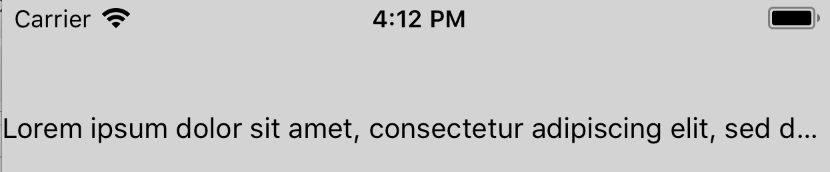
**Test Plan**
Tested that the inline view is hidden if it appears after the truncation point when `numberOfLines` is 1 and 2. Similarly, verified that the inline view is visible if it appears before the truncation point.
**Release Notes**
[IOS] [BUGFIX] [Text] - Fix case where inline view is visible even though it should have been truncated
Adam Comella
Microsoft Corp.
Pull Request resolved: https://github.com/facebook/react-native/pull/21456
Differential Revision: D10182991
Pulled By: shergin
fbshipit-source-id: a5bddddb1bb8672b61d4feaa04013a92c8224155
Summary:
I noticed that the _onBlur method was not exactly similar to the _onFocus one in the TextInput component.

After digging, I found that the blurTextInput method in the TextInputState.js file was call twice in a raw instead of once when the textinput component should blur.

By removing this line, I fix this unecessary multiple call.
Pull Request resolved: https://github.com/facebook/react-native/pull/22156

Reviewed By: TheSavior

Differential Revision: D13105396

Pulled By: RSNara

fbshipit-source-id: 8e83461d8b288d8ee4047bc4a33c4480e193c349
Summary:
This regression was caused by 199c918 - property values are initialized to true rather than a string that matches the property name now.
Pull Request resolved: https://github.com/facebook/react-native/pull/22262

Differential Revision: D13048839

Pulled By: hramos

fbshipit-source-id: 09471334c37f3930aae7e35066943f33f8e617e5
Summary:
@public
We're seeing a crash on line 191 when we do `CFRelease(self->_firstTimeReachability);`. My thinking is that there's a race condition between the deallocation coming from calling `getCurrentConnectivity` twice in a row and the callback coming back.

Reviewed By: PeteTheHeat

Differential Revision: D12982772

fbshipit-source-id: d3d882a074b67a5e547e7f480f561fcaf8d79ec4
Summary:
Changing the the this.props.visible if to be ` if (!!this.props.visible === false)` . So passing undefined, or other values wont set the modal to be visible. Granting that anything that is not true, will set the modal to null on the render.

I make this this PR, because on the company that im working, we used a lot of RN. At the moment, we arent using anything like flow or TS. But to grant that the modals will only show if they are set visible to true i have changed the if made.

_Pull requests that expand test coverage are more likely to get reviewed. Add a test case whenever possible!_
Pull Request resolved: https://github.com/facebook/react-native/pull/22072

Differential Revision: D12918086

Pulled By: TheSavior

fbshipit-source-id: 8f9c63ac6fd56d83949bb8428ad7c5b7bf805c49
Summary:
Adding the new `textContentType` options from iOS 12. `newPassword` helps the OS know to put a password field into the keychain, and `oneTimeCode` hints that the field will take input from an SMS one time code.
Pull Request resolved: https://github.com/facebook/react-native/pull/21079

Differential Revision: D9813328

Pulled By: TheSavior

fbshipit-source-id: d2c04b41121b32f185af38ea4c642924e261a043
Summary:
D8842691 split AccessibilityTraits into multiple RN properties.  However, the accessor code did not support REMOVING traits.
This results in buttons that were disabled (AccessibilityTraits & NotEnabled === true) never being enabled.

Fix the issue by making the split accessors properly mask in the bits, allowing you unset them without disturbing bits managed by the other accessor.

NOTE: setting AccessibilityTraits and AccessibilityRole or AccessibilityStates will still result in bugs.

Reviewed By: shergin

Differential Revision: D9661970

fbshipit-source-id: 77d70dd0754f2eaf8cbf895bfc13757c697a76d8
Summary: This change expands the limits to support a greater variety of scenarios.

Reviewed By: PeteTheHeat

Differential Revision: D12911841

fbshipit-source-id: a7c8eb6fece49dfe47b3ada98f55a02b43396ce8
Summary:
This PR increases the speed at which cached images are loaded and displayed on the screen. Images are currently cached in memory using RCTImageCache, but each time they are loaded, a round trip through RCTNetworking happens before RCTImageCache is even checked. This is likely so that RCTNetworking can handle the caching behavior required by the HTTP headers. However, this means that at the very least, images are read from disk each time they're loaded.

This PR makes RCTImageLoader check RCTImageCache _before_ sending a request to RCTNetworking. RCTImageCache stores a bit of information about the response headers so that it can respect Cache-Control fields without needing a roundtrip through RCTNetworking.

Here are a couple of graphs showing improved loading times before this change (blue) and after (red) with SDWebImage (yellow) as a baseline comparison. The increase is most evident when loading especially large (hi-res photo size) images, or loading multiple images at a time.
https://imgur.com/a/cnL47Z0

More performance gains can potentially be had by increasing the size limit of RCTImageCache: https://github.com/facebook/react-native/blob/1a6666a116fd8b9e8637956de2b41a1c315dd470/Libraries/Image/RCTImageCache.m#L39 but this comes at the tradeoff of being more likely to run into OOM crashes.
Pull Request resolved: https://github.com/facebook/react-native/pull/20356

Reviewed By: PeteTheHeat

Differential Revision: D12909121

Pulled By: alsun2001

fbshipit-source-id: 7f5e21928c53d7aa53f293b7f1b4ec5c99b5f0c2
Summary:
If a view inside of an inline view became dirty (e.g. its top/left prop changed), its position would not update on screen. This is because Yoga didn't know the view needed to be relaid out because Yoga's dirty signal didn't propagate all the way up to the root.

The problem is that inline views don't have a parent in the Yoga tree causing Yoga's dirtiness signal propagation to get cut off early. The fix is, when an inline views gets dirty, mark the parent Text's Yoga node as dirty. This will cause Yoga's dirtiness signal to propagate all the way up to the root node.

Yoga has a hook to inform you when your node is marked as dirty: `YGNodeSetDirtiedFunc`. We leverage this to find out when an inline view's Yoga node gets dirtied.

React Native almost handled this case. Everything worked fine as long as the inline view was nested inside of a virtual text node like this:

```
<Text>
  <Text>
    <InlineView />
  </Text>
</Text>
```

However, the bug repros when the inline view is nested in a non-virtual text node:

```
<Text>
  <InlineView />
</Text>
```

The fix is to move the special dirtiness propagation logic from `RCTVirtualTextShadowView` to `RCTBaseTextShadowView`.

**Test Plan**

Created an inline view. Tested the following kinds of updates on the inline view's content:
  - Moved the content
  - Removed the content
  - Added the content

Tested this for an inline view that is directly inside of a text node as well as one that is nested under a virtual text node.

Here's the code I used for the inline view that moved its content after 2 seconds:

```
const RN = require('react-native');
const React = require('react');

export default class InlineView extends React.Component {
  constructor(props, context) {
    super(props, context);
    this.state = { posBottom: false };
  }

  componentDidMount() {
    super.componentDidMount && super.componentDidMount();
    setTimeout(() => { this.setState({ posBottom: true }); }, 2000);
  }

  render() {
    const pos = this.state.posBottom ? 25 : 0;
    const color = this.state.posBottom ? 'pink' : 'green';
    return (
      <RN.View style={{ width: 50, height: 50, backgroundColor: 'steelblue'}}>
        <RN.View style={{ width: 25, height: 25, top: pos, left: pos, backgroundColor: color }} />
      </RN.View>
    );
  }
}
```

**Release Notes**

[IOS] [BUGFIX] [Text] - Fix case where content of inline views didn't get relaid out

Adam Comella
Microsoft Corp.
Pull Request resolved: https://github.com/facebook/react-native/pull/21968

Differential Revision: D12873795

Pulled By: shergin

fbshipit-source-id: bbc9f5d3ef25063b0015cec8c4aaf2e41ecd60a8
Summary: This function sometimes causes an "Unable to find node on an unmounted component" crash during pagination for reasons that still need to be investigated; in the meanwhile, wrap this in a try-catch block to mitigate the crash.

Reviewed By: sahrens

Differential Revision: D12829971

fbshipit-source-id: bc9fe5b9b8c03430ff890bfbb27c39aa270c9eb7
Summary:
Adds the displayName prop to `View` and `Text` components. Because these now use `React.forwardRef`, they were showing as `Component` instead of their actual names.
Thanks to ljharb for helping to pinpoint the source of the issue!
Fixes#21937
Pull Request resolved: https://github.com/facebook/react-native/pull/21950
Differential Revision: D12827060
Pulled By: TheSavior
fbshipit-source-id: d812cae14d53ad821ab5873e737db63ad1a989e3
Summary: When running a trace, reduce the noise from the `__DEV__`-only `ForwardRef(View)` elements.

Reviewed By: ejanzer

Differential Revision: D9445865

fbshipit-source-id: 7cfe87bab6dd62d3800d2ca239724b5063c55c89
Summary:
This diff fixes an issue that caused the problem with `regeneratorRuntime` last Friday (more info: https://fb.facebook.com/groups/frontendsupport/permalink/2427883350560427/).

The root issue is that both `InitializeCore` and `FBInitializeCore` are included in the same bundle, this fix just prevents the bundle from being invalid once this happens..

*copied from: https://our.intern.facebook.com/intern/diff/D10444264/?transaction_id=595485237532887*

The way that `regeneratorRuntime` is polyfilled is not correct:

```
polyfillGlobal('regeneratorRuntime', () => {
  // The require just sets up the global, so make sure when we first
  // invoke it the global does not exist
  delete global.regeneratorRuntime;
  require('regenerator-runtime/runtime');
  return global.regeneratorRuntime;
});
```

Since a `require`d module is only evaluated once (no matter how many times it's required), defining (and calling) a getter for `global.regeneratorRuntime` twice will end up storing `undefined` to `global.regeneratorRuntime`.

There were no issues before this diff because the ordering of requires made things work by coincidence, e.g the following code will work:

```
// Set up regenerator for the first time
polyfillGlobal('regeneratorRuntime', () => {
  delete global.regeneratorRuntime;
  require('regenerator-runtime/runtime');
  return global.regeneratorRuntime;
});

// Set up regenerator for the second time. This will just override the previous getter (which has not even got executed so
// the `regenerator-runtime/runtime` module has not been evaluated yet.
polyfillGlobal('regeneratorRuntime', () => {
  // The require just sets up the global, so make sure when we first
  // invoke it the global does not exist
  delete global.regeneratorRuntime;
  require('regenerator-runtime/runtime');
  return global.regeneratorRuntime;
});

// Now access regenerator
global.regeneratorRuntime;
```

But the following code won't work:

```
// Set up regenerator for the first time
polyfillGlobal('regeneratorRuntime', () => {
  delete global.regeneratorRuntime;
  require('regenerator-runtime/runtime');
  return global.regeneratorRuntime;
});

// Access regenerator. This will cause the previous getter to be called, and the `regenerator-runtime/runtime` module will get evaluated.
// Here, `global.regeneratorRuntime` will have a correct value.
global.regeneratorRuntime;

// Set up regenerator for the second time. This will define a new getter for `global.regeneratorRuntime`, which will delete `delete global.regeneratorRuntime`
// and return undefined (note that `require('regenerator-runtime/runtime');` is a noop since the module has been already evaluated).
polyfillGlobal('regeneratorRuntime', () => {
  // The require just sets up the global, so make sure when we first
  // invoke it the global does not exist
  delete global.regeneratorRuntime;
  require('regenerator-runtime/runtime');
  return global.regeneratorRuntime;
});
```

Reviewed By: fromcelticpark

Differential Revision: D10483975

fbshipit-source-id: 5b3ef6e11c4fc4f79e3857c1ade9e7bc2beb6a39
Summary:
@public
If you call NetInfo.getCurrentConnectivity multiple times in succession, we'll create a bunch of callbacks but lose them in the ether.
With this fix, we'll unschedule them before creating a new one, which should resolve some crashes we're seeing.

Reviewed By: PeteTheHeat

Differential Revision: D10409486

fbshipit-source-id: 6065b09fa626f7f06aed9bf0e278c0a6a6169f58
Summary: ListView is deprecated and SwipeableListView uses ListView. Thus, it is deprecated as well.

Reviewed By: RSNara

Differential Revision: D10437408

fbshipit-source-id: a08391d5b099e74b6ec179cd940ac404b2e702f4
Summary: This adds a callback for <Text> to get metrics about the rendered text. It's divided by line but that could be changed to "fragments" (which makes more sense for multi-lingual). Right now by line is convenient as you frequently want to know where the first and last line end (though we could make this work with fragments I suppose).

Reviewed By: shergin

Differential Revision: D9440914

fbshipit-source-id: bb011bb7a52438380d3f604ffe7019b98c18d978
Summary:
1. The user inserts a character ('0') at index 0. Because the range matches 0, 0, predictedText is set to that character that was inserted.
2. In textInputDidChange, it discovers a mismatch between the rendered text ('1234') and predicted text ('0')
3. This triggers textInputShouldChangeTextInRange to be called again with the 'new' text that it thinks was just added ('1234')
4. It goes to insert this text, but runs into the maxLength limit, so it gets truncated and then inserted.

(I'm not totally sure why only happens if maxLength is set - I need to look into that.)

One fix for this is to just get rid of the range check, but that'll regress #18374. I decided to just check and see if the rendered text is empty instead of checking the range where text could be inserted, since that seems like it should properly handle both cases.

Reviewed By: shergin

Differential Revision: D10392176

fbshipit-source-id: 84fb3b6cac9b0aa25b3c1a127d43f9cdc5a1c6a8
Summary:
Related to https://github.com/facebook/react-native/pull/21488
Disclaimer: I made this PR.

I think there's some requestAnimationFrame events that are not cleared on unmount because of bad use of `splice` method.

- All flow tests succeed.
- RNTester: iOS (this change should only affect iOS because calculateChildFrames is iOS only)
Show perf monitor, show ListView* screen, start scrolling. UI frame Rate is used at the beginning. When scrolling there is no drop in FPS rate.
- TODO: I'll write a load test for ListView

[GENERAL] [ENHANCEMENT] [ListView.js] - rm TimerMixin
Pull Request resolved: https://github.com/facebook/react-native/pull/21802

Differential Revision: D10391812

Pulled By: RSNara

fbshipit-source-id: 49f0b0a4641ec29bcb4cc04bd3bafb42b3842b69
Summary:
Related to #21485

- Remove TimerMixin from ListView

- All flow tests succeed.
- RNTester: <ListView> iOS (this change should only affect iOS because calculateChildFrames is iOS only)
Show perf monitor, show ListView* screen, start scrolling. UI frame Rate is used at the beginning. When scrolling there is no drop in FPS rate.

TODO: I think a load test would be more relevant:
- Update props multiple times and scroll

[GENERAL] [ENHANCEMENT] [ListView.js] - rm TimerMixin
Pull Request resolved: https://github.com/facebook/react-native/pull/21488

Differential Revision: D10219088

Pulled By: RSNara

fbshipit-source-id: 946e4fc1319324c5bf4947a2060b18bebb6fc493
Summary: Currently the pull to refresh icon on browse feed is super cut off on Android. Expose the progressViewOffset prop from FBPullToRefresh to support offsetting the PTR component to make the component more visible.

Reviewed By: yungsters

Differential Revision: D10274679

fbshipit-source-id: 1735c4d2d98523ccc3d1ec3733465028ae33df7b
Summary:
Thank you for sending the PR! We appreciate you spending the time to work on these changes.
Help us understand your motivation by explaining why you decided to make this change.

If this PR fixes an issue, type "Fixes #issueNumber" to automatically close the issue when the PR is merged.

_Pull requests that expand test coverage are more likely to get reviewed. Add a test case whenever possible!_
Pull Request resolved: https://github.com/facebook/react-native/pull/21396

Differential Revision: D10119630

Pulled By: RSNara

fbshipit-source-id: d0fe193eee976b9b18a2eb467b5f3af48bd7d2de
Summary:
This test is disabled internally and flaky in open source causing CI to fail. Skipping it for now.

Related to: https://github.com/facebook/react-native/issues/21517

Reviewed By: RSNara

Differential Revision: D10223498

fbshipit-source-id: 37a3798c0abb7de829bc5b59e02f23d8943da882
Summary: Fixes the runtime value of `ReactNativeStyleAttributes` to correctly map to `true` instead of strings (as returned by `keyMirror`).

Reviewed By: TheSavior

Differential Revision: D10057235

fbshipit-source-id: dc855cff3a114761098ed5176b2e6e25412481dc
 Lorenzo Sciandra
 Taylor123
 Ian Park
 hyochan
 Baldy Lukasz
 Igor Mandrigin
 Tim Yung
 Salil Apte
 Michael Blanchard
 Adam Comella
 gazoudoudou
 Brian Vaughn
 Brent Vatne
 Mehdi Mulani
 MateusAndrade
 Chris Williams
 Zack Gomez
 Juuso Heikkinen
 Albert Sun
 Eric Samelson
 Wen-Chien Chen
 Rajiv Shah
 Rafael Oleza
 Emily Janzer
 Janic Duplessis
 Stephen Cook
 Eli White
 Thomas BARRAS
 Andy Huang
 Andrey Lunyov
 Radovan Šmitala
 Hyunjong Lee


