Summary:
Experienced a `TouchableOpacity` releasing the `PanResponder` without invoking `onPress` due to a missing a direction key in the `hitSlop` prop; The missing key caused the corresponding pressExpand to become NaN which causes `isTouchWithinActive` to become falsey, when it should be truthy.

If defaulting to 0 is undesired behavior, I'm happy to take a different approach.
Pull Request resolved: https://github.com/facebook/react-native/pull/22281

Differential Revision: D13374335

Pulled By: cpojer

fbshipit-source-id: f9d28e51b9d9c45aed42bea2df3d844a799fa827
Summary:
Fixes#16304
The standard format for origin HTTP headers does not allow a trailing slash. In order to not get warnings when connecting a websocket, I removed the trailing slash when generating the default origin HTTP header for the websocket connect request.
Release Notes:
----------
[Android] [Fixed] - Fixed default origin header for websocket connections to match the standard format (https://developer.mozilla.org/en-US/docs/Web/HTTP/Headers/Origin) in WebSocketModule
Pull Request resolved: https://github.com/facebook/react-native/pull/22290
Differential Revision: D13374345
Pulled By: cpojer
fbshipit-source-id: 1173241f2b6912fd6df5e196053a950bb42ff01b
Summary:
Fixes#22530
As described in the issue, the previous behavior for the `RCTFatal` macro was to truncate the `reason` on the resulting `NSException` to 75 characters. This would ensure the reason would fit on a single line, but resulted in issues debugging errors that occurred in the wild, as many crash logging tools (like Sentry) discard the `name` value of the exception and use the `reason` as their primary identifier. At 75 characters, useful information like the location of the error would usually be truncated.
- [x] This extends the truncation threshold to 175 characters, which should be short enough to prevent full-screen-takeover length errors, but long enough to provide useful context to the error.
- [x] This adds a `userInfo` value to the resulting `NSException`. It copies over the `userInfo` from the `NSError` passed to the macro, and adds an "untruncated message" value that contains the untruncated version of the `NSException`'s reason.
[iOS] [Changed] - RCTFatalExceptions now include more information in their reason and a userInfo.
<!--
CATEGORY may be:
- [General]
- [iOS]
- [Android]
TYPE may be:
- [Added] for new features.
- [Changed] for changes in existing functionality.
- [Deprecated] for soon-to-be removed features.
- [Removed] for now removed features.
- [Fixed] for any bug fixes.
- [Security] in case of vulnerabilities.
For more detail, see https://keepachangelog.com/en/1.0.0/#how
MESSAGE may answer "what and why" on a feature level. Use this to briefly tell React Native users about notable changes.
EXAMPLES:
[General] [Added] - Add snapToOffsets prop to ScrollView component
[General] [Fixed] - Fix various issues in snapToInterval on ScrollView component
[iOS] [Fixed] - Fix crash in RCTImagePicker
-->
Pull Request resolved: https://github.com/facebook/react-native/pull/22532
Differential Revision: D13373469
Pulled By: cpojer
fbshipit-source-id: ac140d14ce76e1664869437c2c178bdd65ab6e0e
Summary: This diff ensures that Events delivered from the C++ side are actually processed. This is done forcing the execution of AsyncEventBeat.beat() in these cases

Reviewed By: shergin

Differential Revision: D13313955

fbshipit-source-id: b2785647913a640c2d557f4fa08d447845a540e9
Summary:
There is a problem that the `mediaPlaybackRequiresUserAction` property does not work in WKWebView(`useWebKit`) under iOS 10.

I fully know you are currently working to migrate the core's WebView to the standalone `react-native-webview` project. This has already been submitted to PR in `react-native-webview` and will be merged soon. I hope this fix applies to `react-native` before your migration is done.
Pull Request resolved: https://github.com/facebook/react-native/pull/22208

Differential Revision: D13334868

Pulled By: cpojer

fbshipit-source-id: f2a811a477054155ed5fe62ab31e4d63f70e7848
Summary:
`instance.hasOwnProperty` has potential danger because of some object could be eliminate own prototype chain. Update code be more reliable.
This PR is solution of #22308 issue. (Fixes#22308)
Pull Request resolved: https://github.com/facebook/react-native/pull/22348
Differential Revision: D13334882
Pulled By: cpojer
fbshipit-source-id: 9b9310a972e933af1962666d7b0c683ff43cc5b2
Summary:
iOS-specific.
For languages with complex input (such as Japanese or Chinese), a user has to type multiple characters that are then merged into a single one.
If `-[UITextView setAttributedString:]` is used while the user is still typing, it resets the input and characters are not being treated as typed together.
This PR avoids calling this method if possible, replacing it by just copying the attributes if the string has not been changed. That preserves the state and user can continue to type Korean or Chinese characters.
Fixes#19339
<!--
Required: Write your motivation here.
If this PR fixes an issue, type "Fixes #issueNumber" to automatically close the issue when the PR is merged.
-->
<!--
Required: Write your test plan here. If you changed any code, please provide us with
clear instructions on how you verified your changes work. Bonus points for screenshots and videos!
-->
Essentially, the steps to reproduce are described in [the issue](https://github.com/facebook/react-native/issues/19339):
1. Type some Korean characters in TextInput, such as "하늘" (buttons `ㅎ`,`ㅏ`,`ㄴ`,`ㅡ`,`ㄹ`).
2. Then move the cursor to the beginning of the text, type "파란" (buttons `ㅍ`,`ㅏ`,`ㄹ`,`ㅏ`,`ㄴ`) this time.
**Behaviour before this fix (broken)**
Actual text: `ㅍㅏㄹㅏㄴ하늘`.
Expected text: `파란하늘`.
Characters aren't combined properly.

**Behaviour after this fix (correct)**
Actual text: `파란하늘`.
Expected text: `파란하늘`.
Characters are combined, the same behaviour is in vanilla iOS `UITextView`.

<!--
Does this PR require a documentation change?
Create a PR at https://github.com/facebook/react-native-website and add a link to it here.
-->
<!--
Required.
Help reviewers and the release process by writing your own release notes. See below for an example.
-->
[IOS] [BUGFIX] [TextView] - Fix Korean/Chinese/Japanese input for multiline TextView on iOS.
<!--
**INTERNAL and MINOR tagged notes will not be included in the next version's final release notes.**
CATEGORY
[----------] TYPE
[ CLI ] [-------------] LOCATION
[ DOCS ] [ BREAKING ] [-------------]
[ GENERAL ] [ BUGFIX ] [ {Component} ]
[ INTERNAL ] [ ENHANCEMENT ] [ {Filename} ]
[ IOS ] [ FEATURE ] [ {Directory} ] |-----------|
[ ANDROID ] [ MINOR ] [ {Framework} ] - | {Message} |
[----------] [-------------] [-------------] |-----------|
EXAMPLES:
[IOS] [BREAKING] [FlatList] - Change a thing that breaks other things
[ANDROID] [BUGFIX] [TextInput] - Did a thing to TextInput
[CLI] [FEATURE] [local-cli/info/info.js] - CLI easier to do things with
[DOCS] [BUGFIX] [GettingStarted.md] - Accidentally a thing/word
[GENERAL] [ENHANCEMENT] [Yoga] - Added new yoga thing/position
[INTERNAL] [FEATURE] [./scripts] - Added thing to script that nobody will see
-->
Pull Request resolved: https://github.com/facebook/react-native/pull/19809
Differential Revision: D13326614
Pulled By: shergin
fbshipit-source-id: 6a5cab3f7290f0f623a6f4c29353a573eb321b0b
Summary:
Currently, if you load an animated gif using the standard `Image` component, it will not correctly respect the loop count property found in the Netscape App Extension block of the file. The issues are as follows:

1) If the App Extension isn't present, the animated gif loops indefinitely when it should not loop at all.
2) If the App Extension is present, the animated gif loops one less time than it should.

The other issue is that once the looping completes, the image doesn't pause at the last frame but instead, loops back to the beginning of the animation e.g. frame 1.

The fix does a few things:

1) If there is _no_ App Extension present, the image doesn't loop at all
2) If there _is_ an App Extension present, it loops the correct amount of times. For instance, if the loop count is 1, it means the gif should loop _once_ after it finishes playing, for a total of _two_ total loops.
3) Once the number of loops completes (assuming loop count isn't set to 0 which means infinite), the animation pauses on the last frame.
Pull Request resolved: https://github.com/facebook/react-native/pull/21999

Differential Revision: D13287005

Pulled By: hramos

fbshipit-source-id: f7210ad40e0e76c9ec454953b8a067569d3feaaa
Summary:
This diff fixes a NPE happening in StatusBarModule when the style passed by parameter is null.
Even if JS shoulnd't send a null value, this method should not crash with an NPE. I'm not changing behavior, only avoiding NPE when status is null

Reviewed By: RSNara

Differential Revision: D13287057

fbshipit-source-id: cc5ac4e97083d63f2bf65c03bac0dc9bce976423
Calling -[UIScrollView setContentOffset] with NaN values can cause a crash. That's not clear why exactly the computation returns NaN sometime, but the implemented sanitizing should help to detect this problem during development (and this also prevents the app from crashing).

See attached task for more details.

Reviewed By: fkgozali

Differential Revision: D13242729

fbshipit-source-id: 747bf1b42e02597e9f1300eee24547563ab29b27
Summary: On Android, `Switch` does not currently read its role as a "button". This fixes that and makes it consistent with iOS.

Reviewed By: sahrens

Differential Revision: D13136253

fbshipit-source-id: 0de5d54772d204168138cb2af7815cc458f72682
Summary: Set the default text radius to 0 so that text shadows aren't applied to every text node

Reviewed By: mdvacca

Differential Revision: D13027589

fbshipit-source-id: 4f7386059ac1654b8f77dddf9eb1b772f6049e23
Summary:
Similar to #21950, this adds displayName to `ActivityIndicator`, so it displays the correct component name in snapshots instead of `Component`.
Fixes#21937 (a little bit more than it was already fixed).
Pull Request resolved: https://github.com/facebook/react-native/pull/22417
Differential Revision: D13205376
Pulled By: TheSavior
fbshipit-source-id: 21e71d4980d159a1f33d32d83346b48257ec21d4
Summary:
If text is truncated and an inline view appears after the truncation point, the user should not see the inline view. Instead, we have a bug such that the inline view is always visible at the end of the visible text.
This commit fixes this by marking the inline view as hidden if it appears after the truncation point.
This appears to be a regression. React Native used to have logic similar to what this commit is adding: https://github.com/facebook/react-native/blob/1e2a924ba60001c6f0587c7561536f00b2922cbf/Libraries/Text/RCTShadowText.m#L186-L192
**Before fix**
Inline view (blue square) is visible even though it appears after the truncation point:

The full text being rendered was:
```
<Text numberOfLines={1}>
Lorem ipsum dolor sit amet, consectetur adipiscing elit,
sed do eiusmod tempor incididunt ut labore et dolore magna
<View style={{width: 50, height: 50, backgroundColor: 'steelblue'}} />
</Text>
```
**After fix**
Inline view is properly truncated:
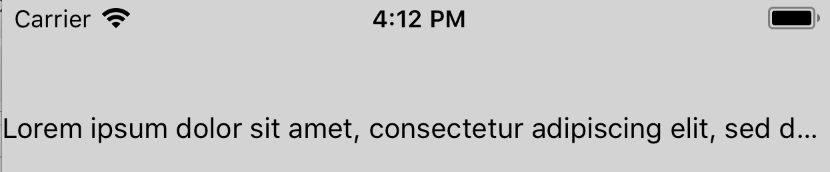
**Test Plan**
Tested that the inline view is hidden if it appears after the truncation point when `numberOfLines` is 1 and 2. Similarly, verified that the inline view is visible if it appears before the truncation point.
**Release Notes**
[IOS] [BUGFIX] [Text] - Fix case where inline view is visible even though it should have been truncated
Adam Comella
Microsoft Corp.
Pull Request resolved: https://github.com/facebook/react-native/pull/21456
Differential Revision: D10182991
Pulled By: shergin
fbshipit-source-id: a5bddddb1bb8672b61d4feaa04013a92c8224155
Summary:
I noticed that the _onBlur method was not exactly similar to the _onFocus one in the TextInput component.

After digging, I found that the blurTextInput method in the TextInputState.js file was call twice in a raw instead of once when the textinput component should blur.

By removing this line, I fix this unecessary multiple call.
Pull Request resolved: https://github.com/facebook/react-native/pull/22156

Reviewed By: TheSavior

Differential Revision: D13105396

Pulled By: RSNara

fbshipit-source-id: 8e83461d8b288d8ee4047bc4a33c4480e193c349
Summary:
This pull request silences build warnings like this in open-source:

```
{snip}/ReactCommon/cxxreact/CxxNativeModule.cpp:134:85: warning: lambda capture 'callId' is not used [-Wunused-lambda-capture]
  messageQueueThread_->runOnQueue([method, params=std::move(params), first, second, callId] () {
```

These are variables used by "fbsystrace", which is not open-sourced.

An  unused statement has been added to the affected files in the `#else` for the `#ifdef WITH_FBSYSTRACE` conditionals
Pull Request resolved: https://github.com/facebook/react-native/pull/22240

Differential Revision: D13031358

Pulled By: shergin

fbshipit-source-id: 8ccfc226b65e32abda6abb573f77a6589bd19dcd
Summary:
resizeMode applies to Image.defaultSource, because depending on screen resolution sometimes we see padding around defaultSource image while source loading. Now we can control scale of both source and defaultSource.

Changelog:
----------
[Android] [Fixed] - Image.resizeMode will apply to defaultSource, enhanced user experience. Previously, resizeMode didn't applied to defaultSource, therefore depending on screen resolution sometimes we see padding around defaultSource image while source loading.
Pull Request resolved: https://github.com/facebook/react-native/pull/22216

Differential Revision: D13088220

Pulled By: mdvacca

fbshipit-source-id: 92c66cf6228f3b7666b9ef2404d034f0005b5234
Summary:
This is a safe workaround to an issue in Android P: https://issuetracker.google.com/issues/112385925
It is based on a fact that even though `fling` receive a wrong sign in `velocityY`, `mOnScrollDispatchHelper.getYFlingVelocity()` still returns a fling direction.
Fixes#19434
Pull Request resolved: https://github.com/facebook/react-native/pull/21117
Differential Revision: D13082740
Pulled By: hramos
fbshipit-source-id: 1b28586d2c7bdcae4a111d3cead4a0455cebb99a
Summary: There are cases where we're trying to drop a view that is not associated with a ViewManager. This is likely caused by race conditions that can occur if we're dropping a view from JS (when it's no longer used) but at the same time dropping it from native (when layout animation ends, when the rootview gets unmounted). In either of those cases, it should be safe to ignore the drop operation because the view was likely dropped already.

Reviewed By: mdvacca

Differential Revision: D13036643

fbshipit-source-id: 260ffb56d32a0d670ad08f449b8df165b2533195
Summary:
This regression was caused by 199c918 - property values are initialized to true rather than a string that matches the property name now.
Pull Request resolved: https://github.com/facebook/react-native/pull/22262

Differential Revision: D13048839

Pulled By: hramos

fbshipit-source-id: 09471334c37f3930aae7e35066943f33f8e617e5
Summary:
When the remote server closes the websocket, the app doesn't get a 'close' event in Android, There is no issue on iOS.
Pull Request resolved: https://github.com/facebook/react-native/pull/22248

Differential Revision: D13047556

Pulled By: hramos

fbshipit-source-id: c5c56ea8418cfdf734fb51f863b3066856de6512
Summary:
@public
We're seeing a crash on line 191 when we do `CFRelease(self->_firstTimeReachability);`. My thinking is that there's a race condition between the deallocation coming from calling `getCurrentConnectivity` twice in a row and the callback coming back.

Reviewed By: PeteTheHeat

Differential Revision: D12982772

fbshipit-source-id: d3d882a074b67a5e547e7f480f561fcaf8d79ec4
Summary: This diff fixes an IllegalArgumentException when dismissing ReactModalHostView. I wasn't able to reproduce this error because this is likely created by a race condition.

Reviewed By: axe-fb

Differential Revision: D12916787

fbshipit-source-id: b071ffc4c251f2a613bb1270de005def56818376
Summary:
Changing the the this.props.visible if to be ` if (!!this.props.visible === false)` . So passing undefined, or other values wont set the modal to be visible. Granting that anything that is not true, will set the modal to null on the render.

I make this this PR, because on the company that im working, we used a lot of RN. At the moment, we arent using anything like flow or TS. But to grant that the modals will only show if they are set visible to true i have changed the if made.

_Pull requests that expand test coverage are more likely to get reviewed. Add a test case whenever possible!_
Pull Request resolved: https://github.com/facebook/react-native/pull/22072

Differential Revision: D12918086

Pulled By: TheSavior

fbshipit-source-id: 8f9c63ac6fd56d83949bb8428ad7c5b7bf805c49
Summary:
Adding the new `textContentType` options from iOS 12. `newPassword` helps the OS know to put a password field into the keychain, and `oneTimeCode` hints that the field will take input from an SMS one time code.
Pull Request resolved: https://github.com/facebook/react-native/pull/21079

Differential Revision: D9813328

Pulled By: TheSavior

fbshipit-source-id: d2c04b41121b32f185af38ea4c642924e261a043
Summary:
D8842691 split AccessibilityTraits into multiple RN properties.  However, the accessor code did not support REMOVING traits.
This results in buttons that were disabled (AccessibilityTraits & NotEnabled === true) never being enabled.

Fix the issue by making the split accessors properly mask in the bits, allowing you unset them without disturbing bits managed by the other accessor.

NOTE: setting AccessibilityTraits and AccessibilityRole or AccessibilityStates will still result in bugs.

Reviewed By: shergin

Differential Revision: D9661970

fbshipit-source-id: 77d70dd0754f2eaf8cbf895bfc13757c697a76d8
 Lorenzo Sciandra
 Sunny Luo
 Taylor123
 Lea Bärtschi
 Zack Sheppard
 Radovan Šmitala
 David Vacca
 ifsnow
 Ian Park
 hyochan
 Baldy Lukasz
 Igor Mandrigin
 Ivan Filenko
 Tim Yung
 Salil Apte
 Valentin Shergin
 Nicolas Gallagher
 Michael Blanchard
 Adam Comella
 gazoudoudou
 empyrical
 Dulmandakh
 Brian Vaughn
 Igor Mandrigin
 Eric Butler
 Andrew Chen (Eng)
 Brent Vatne
 Ranjan Shrestha
 Mehdi Mulani
 MateusAndrade
 Chris Williams
 Zack Gomez
 Keaton Greve
 Vladimir Timofeev
 Juuso Heikkinen
 Mike McCartney
 Héctor Ramos
 Héctor Ramos


