# OpenCombine
[](https://circleci.com/gh/broadwaylamb/OpenCombine/tree/master)
[](https://codecov.io/gh/broadwaylamb/OpenCombine)


[ ](https://join.slack.com/t/opencombine/shared_invite/enQtNzE2MjE5NzkxODI0LTYxMjkzNDUxZWViZWI1Njc2YjBhODgxNjRjOTdkZTcxOGU2ZjJjZjYxMGI3NWZkN2RkNGFmZTUzNmU3MGE2ZWM)
Open-source implementation of Apple's [Combine](https://developer.apple.com/documentation/combine) framework for processing values over time.
The main goal of this project is to provide a compatible, reliable and efficient implementation which can be used on Apple's operating systems before macOS 10.15 and iOS 13, as well as Linux and Windows.
The project is in early development.
### Installation
`OpenCombine` contains two public targets: `OpenCombine` and `OpenCombineDispatch` (the third one, `COpenCombineHelpers`, is considered private. Don't import it in your projects).
OpenCombine itself does not have any dependencies. Not even Foundation or Dispatch. If you want to use OpenCombine with Dispatch (for example for using `DispatchQueue` as `Scheduler` for operators like `debounce`, `receive(on:)` etc.), you will need to import both `OpenCombine` and `OpenCombineDispatch`.
##### Swift Package Manager
###### Swift Package
To add `OpenCombine` to your [SPM](https://swift.org/package-manager/) package, add the `OpenCombine` package to the list of package and target dependencies in your `Package.swift` file.
```swift
dependencies: [
.package(url: "https://github.com/broadwaylamb/OpenCombine.git", from: "0.5.0")
],
targets: [
.target(name: "MyAwesomePackage", dependencies: ["OpenCombine", "OpenCombineDispatch"])
]
```
###### Xcode
`OpenCombine` can also be added as a SPM dependency directly in your Xcode project *(requires Xcode 11 upwards)*.
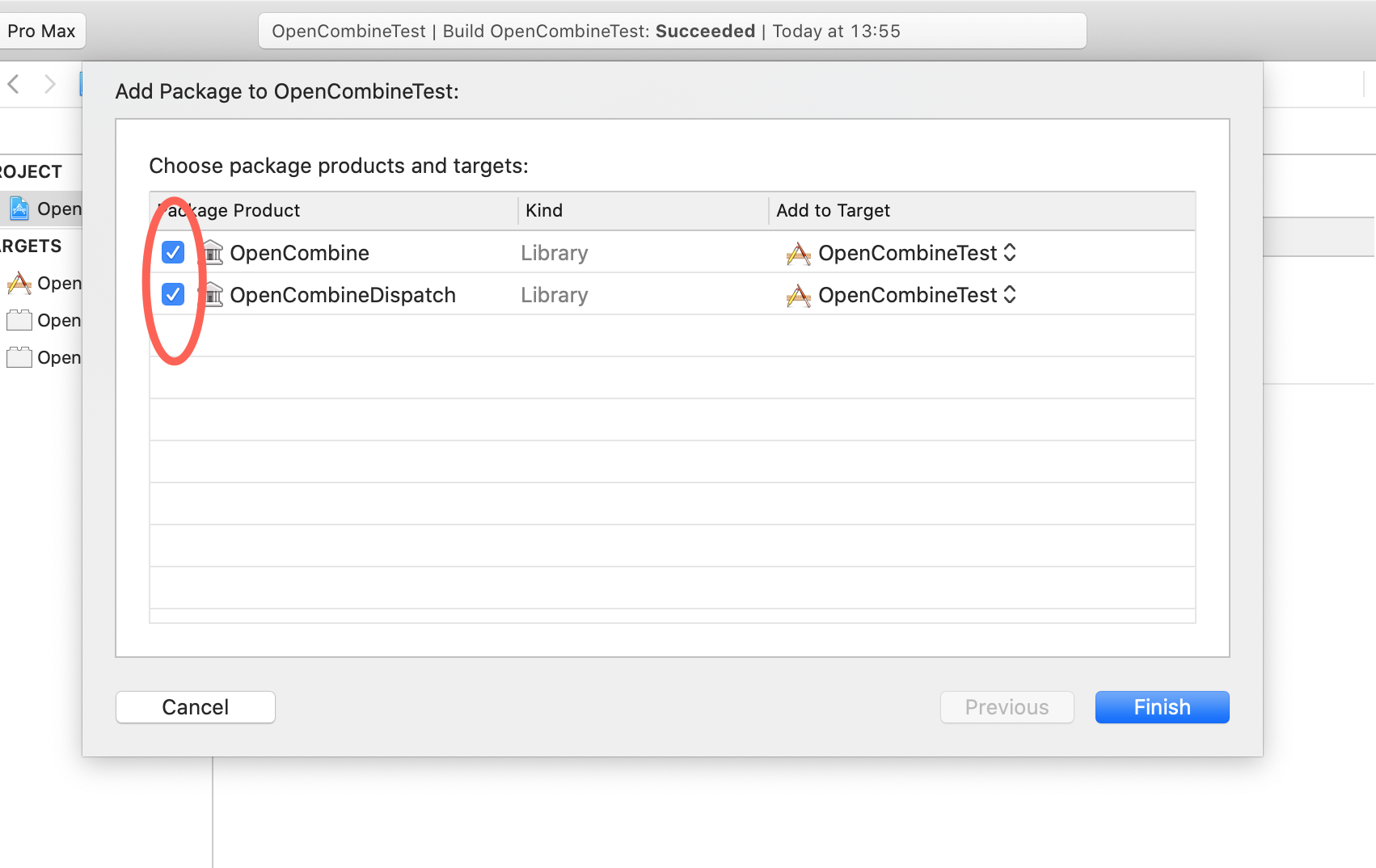
To do so, open Xcode, use **File** → **Swift Packages** → **Add Package Dependency…**, enter the [repository URL](https://github.com/broadwaylamb/OpenCombine.git), choose the latest available version, and activate the checkboxes:
](https://join.slack.com/t/opencombine/shared_invite/enQtNzE2MjE5NzkxODI0LTYxMjkzNDUxZWViZWI1Njc2YjBhODgxNjRjOTdkZTcxOGU2ZjJjZjYxMGI3NWZkN2RkNGFmZTUzNmU3MGE2ZWM)
Open-source implementation of Apple's [Combine](https://developer.apple.com/documentation/combine) framework for processing values over time.
The main goal of this project is to provide a compatible, reliable and efficient implementation which can be used on Apple's operating systems before macOS 10.15 and iOS 13, as well as Linux and Windows.
The project is in early development.
### Installation
`OpenCombine` contains two public targets: `OpenCombine` and `OpenCombineDispatch` (the third one, `COpenCombineHelpers`, is considered private. Don't import it in your projects).
OpenCombine itself does not have any dependencies. Not even Foundation or Dispatch. If you want to use OpenCombine with Dispatch (for example for using `DispatchQueue` as `Scheduler` for operators like `debounce`, `receive(on:)` etc.), you will need to import both `OpenCombine` and `OpenCombineDispatch`.
##### Swift Package Manager
###### Swift Package
To add `OpenCombine` to your [SPM](https://swift.org/package-manager/) package, add the `OpenCombine` package to the list of package and target dependencies in your `Package.swift` file.
```swift
dependencies: [
.package(url: "https://github.com/broadwaylamb/OpenCombine.git", from: "0.5.0")
],
targets: [
.target(name: "MyAwesomePackage", dependencies: ["OpenCombine", "OpenCombineDispatch"])
]
```
###### Xcode
`OpenCombine` can also be added as a SPM dependency directly in your Xcode project *(requires Xcode 11 upwards)*.
To do so, open Xcode, use **File** → **Swift Packages** → **Add Package Dependency…**, enter the [repository URL](https://github.com/broadwaylamb/OpenCombine.git), choose the latest available version, and activate the checkboxes:
##### CocoaPods
To add `OpenCombine` to a project using [CocoaPods](https://cocoapods.org/), add `OpenCombine` and `OpenCombineDispatch` to the list of target dependencies in your `Podfile`.
```ruby
pod 'OpenCombine', '~> 0.5.0'
pod 'OpenCombineDispatch', '~> 0.5.0'
```
### Contributing
In order to work on this project you will need Xcode 10.2 and Swift 5.0 or later.
Please refer to the [issue #1](https://github.com/broadwaylamb/OpenCombine/issues/1) for the list of operators that remain unimplemented, as well as the [RemainingCombineInterface.swift](https://github.com/broadwaylamb/OpenCombine/blob/master/RemainingCombineInterface.swift) file. The latter contains the generated interface of Apple's Combine from the latest Xcode 11 version. When the functionality is implemented in OpenCombine, it should be removed from the RemainingCombineInterface.swift file.
You can refer to [this gist](https://gist.github.com/broadwaylamb/c2c8550d76b3ff851c4c1dbf0a872e26) to observe Apple's Combine API changes between different Xcode (beta) versions, or to [this gist](https://gist.github.com/broadwaylamb/82dc2ce4ffbe06527c2c352b8f10910f) to see the relevant contents of the .swiftinterface file for Combine.
You can run compatibility tests against Apple's Combine. In order to do that you will need either macOS 10.14 with iOS 13 simulator installed (since the only way we can get Apple's Combine on macOS 10.14 is using the simulator), or macOS 10.15 (Apple's Combine is bundled with the OS). Execute the following command from the root of the package:
```
$ make test-compatibility
```
Or enable the `-DOPENCOMBINE_COMPATIBILITY_TEST` compiler flag in Xcode's build settings. Note that on iOS only the latter will work.
> NOTE: Before starting to work on some feature, please consult the [GitHub project](https://github.com/broadwaylamb/OpenCombine/projects/2) to make sure that nobody's already making progress on the same feature! If not, then please create a draft PR to indicate that you're beginning your work.
#### GYB
Some publishers in OpenCombine (like `Publishers.MapKeyPath`, `Publishers.Merge`) exist in several
different flavors in order to support several arities. For example, there are also `Publishers.MapKeyPath2`
and `Publishers.MapKeyPath3`, which are very similar but different enough that Swift's type system
can't help us here (because there's no support for variadic generics). Maintaining multiple instances of
those generic types is tedious and error-prone (they can get out of sync), so we use the GYB tool for
generating those instances from a template.
GYB is a Python script that evaluates Python code written inside a template file, so it's very flexible —
templates can be arbitrarily complex. There is a good article about GYB on
[NSHipster](https://nshipster.com/swift-gyb/).
GYB is part of the [Swift Open Source Project](https://github.com/apple/swift/blob/master/utils/gyb.py)
and can be distributed under the same license as Swift itself.
GYB template files have the `.gyb` extension. Run `make gyb` to generate Swift code from those
templates. The generated files are prefixed with `GENERATED-` and are checked into source control. Those
files should never be edited directly. Instead, the `.gyb` template should be edited, and after that the files
should be regenerated using `make gyb`.