mirror of
https://github.com/facebook/react-native.git
synced 2025-11-01 09:14:26 +00:00
 Janic Duplessis
cc068b0551
Janic Duplessis
cc068b0551
Summary: I wanted to configure the RN dev menu without having to write native code. This is pretty useful in a greenfield app since it avoids having to write a custom native module for both platforms (and might enable the feature for expo too). This ended up a bit more involved than planned since callbacks can only be called once. I needed to convert the `DevSettings` module to a `NativeEventEmitter` and use events when buttons are clicked. This means creating a JS wrapper for it. Currently it does not export all methods, they can be added in follow ups as needed. ## Changelog [General] [Added] - Export the DevSettings module, add `addMenuItem` method Pull Request resolved: https://github.com/facebook/react-native/pull/25848 Test Plan: Tested in an app using the following code. ```js if (__DEV__) { DevSettings.addMenuItem('Show Dev Screen', () => { dispatchNavigationAction( NavigationActions.navigate({ routeName: 'dev', }), ); }); } ``` Added an example in RN tester 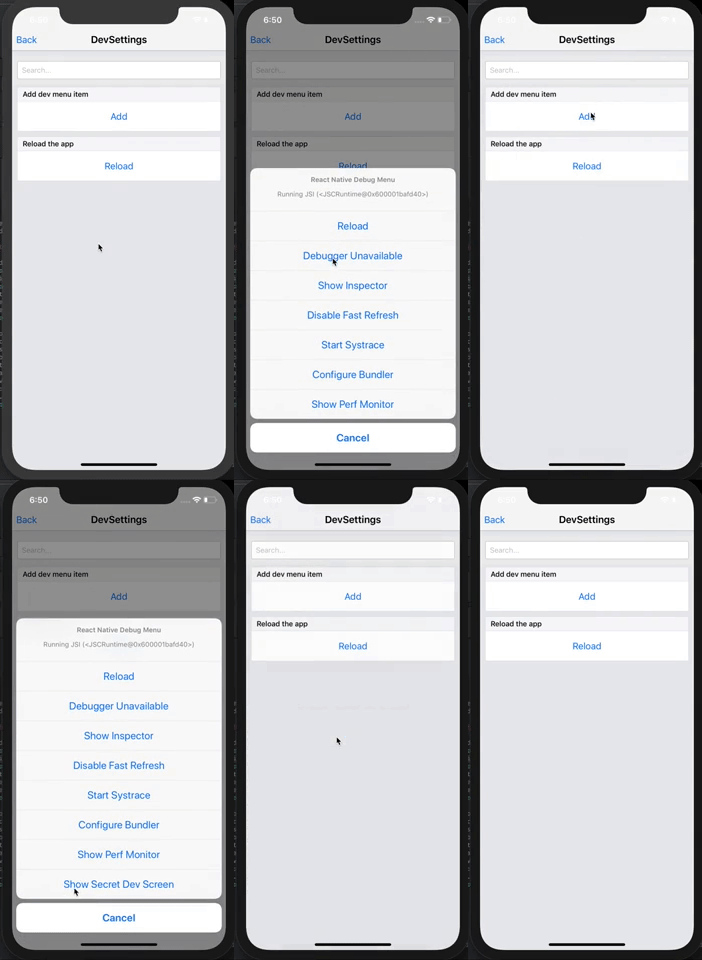 Differential Revision: D17394916 Pulled By: cpojer fbshipit-source-id: f9d2c548b09821c594189d1436a27b97cf5a5737

48 lines
1002 B
JavaScript
48 lines
1002 B
JavaScript
/**
|
|
* Copyright (c) Facebook, Inc. and its affiliates.
|
|
*
|
|
* This source code is licensed under the MIT license found in the
|
|
* LICENSE file in the root directory of this source tree.
|
|
*
|
|
* @format
|
|
* @flow
|
|
*/
|
|
|
|
'use strict';
|
|
|
|
import * as React from 'react';
|
|
import {Alert, Button, DevSettings} from 'react-native';
|
|
|
|
exports.title = 'DevSettings';
|
|
exports.description = 'Customize the development settings';
|
|
exports.examples = [
|
|
{
|
|
title: 'Add dev menu item',
|
|
render(): React.Element<any> {
|
|
return (
|
|
<Button
|
|
title="Add"
|
|
onPress={() => {
|
|
DevSettings.addMenuItem('Show Secret Dev Screen', () => {
|
|
Alert.alert('Showing secret dev screen!');
|
|
});
|
|
}}
|
|
/>
|
|
);
|
|
},
|
|
},
|
|
{
|
|
title: 'Reload the app',
|
|
render(): React.Element<any> {
|
|
return (
|
|
<Button
|
|
title="Reload"
|
|
onPress={() => {
|
|
DevSettings.reload();
|
|
}}
|
|
/>
|
|
);
|
|
},
|
|
},
|
|
];
|