mirror of
https://github.com/facebook/react-native.git
synced 2025-11-01 09:14:26 +00:00
 Kudo Chien
3d7e1380b4
Kudo Chien
3d7e1380b4
Summary:
when specifying dev server without port, e.g. http://www.example.com/, there are some issues.

1. redbox error
<img src="https://user-images.githubusercontent.com/46429/190540390-8ee420f2-7642-427b-9f2e-e0c6d31015f8.png" width="30%">

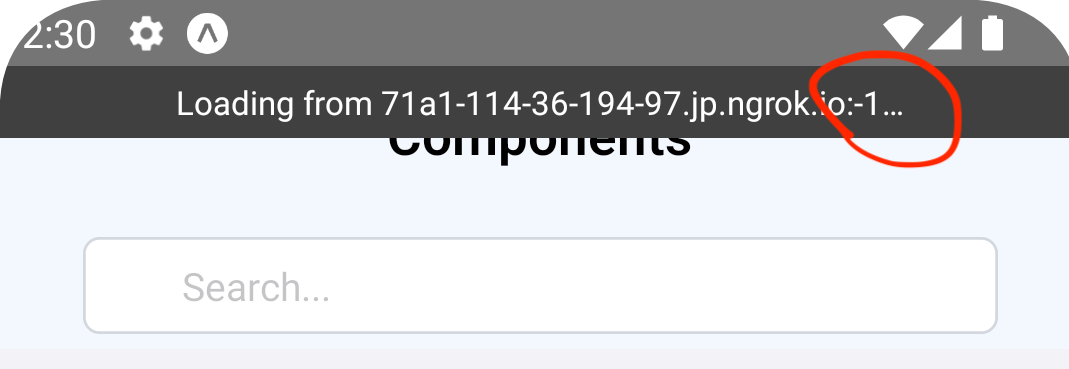
2. showing -1 in loading view

<img src="https://user-images.githubusercontent.com/46429/190540727-158f35ad-359f-443a-a4b0-768dd2f7e400.png" width="50%">

the root cause is coming from [`java.net.URL.getPort()` will return -1 when the url doesn't have a port](https://developer.android.com/reference/java/net/URL#getPort()). this pr replaces the parser to [`okhttp3.HttpUrl`](https://square.github.io/okhttp/4.x/okhttp/okhttp3/-http-url/#port) that it will have default port 80 for http or port 443 for https. the two call paths should only serve http/https address, not file:// address. it should be safe to change from java.net.URL to okhttp3.HttpUrl.

not fully related, in the case above, android will connect to `ws://www.example.com/:8097` for react-devtools
we should strip the trailing slash in *setUpReactDevTools.js*

## Changelog

[Android] [Fixed] - Fix port as -1 if dev server without specifying port on Android

Pull Request resolved: https://github.com/facebook/react-native/pull/34705

Test Plan:
test on rn-tester with the following steps

1. `yarn start`
2. open another terminal and run `ngrok http 8081` and it will return a tunnel url, e.g. `71a1-114-36-194-97.jp.ngrok.io`
3. open dev setting in app and change the dev server to `71a1-114-36-194-97.jp.ngrok.io`
5. reload the app

Reviewed By: cipolleschi

Differential Revision: D39573988

Pulled By: cortinico

fbshipit-source-id: 397df90ab30533207bd87a3f069132d97c22c7fd

Building React Native for Android
See the Building from Source guide on the React Native website.
Running tests
When you submit a pull request CircleCI will automatically run all tests. To run tests locally, see Testing guide on the React Native website.