mirror of
https://github.com/facebook/react-native.git
synced 2025-11-01 09:14:26 +00:00
 Guilherme Iscaro
14b0ed4c5d
Guilherme Iscaro
14b0ed4c5d
Summary: The activityIndicatorViewStyle property overrides the previous set color if it's changed. Depending on the property set order you may end in a state that the color property will never be respected since it first sets the color and then the activityIndicatorViewStyle property (which overrides the color property). In order to prevent this problem before setting the new activityIndicatorViewStyle save the old color and override it after activityIndicatorViewStyle is set. Thus always respecting the user's color. ## Changelog [iOS] [Fixed] - Do not override ActivityIndicator color when setting its size Pull Request resolved: https://github.com/facebook/react-native/pull/25849 Test Plan: Using the code below on iOS notice that the last ActivityIndicator will always have its color set to white while te testID is provided ### Without the patch Notice the white -> blue transition when disabling the testID  ### With the patch Color remains unchanged 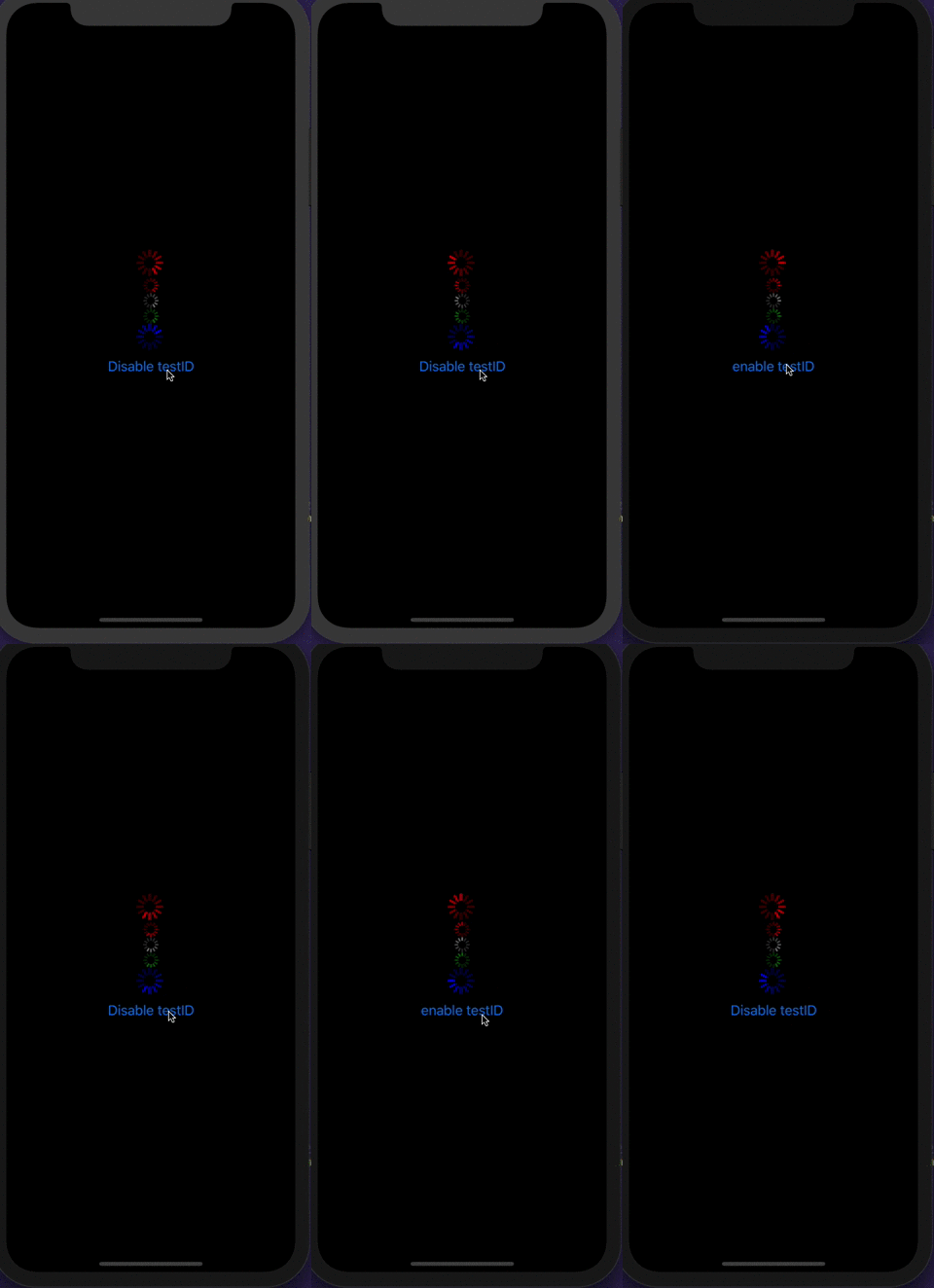 ```javascript import React from "react"; import { View, StyleSheet, ActivityIndicator, Button } from "react-native"; const App = () => { const [enableTestID, onSetEnableTestID] = React.useState(true); const onPress = React.useCallback(() => { onSetEnableTestID(!enableTestID); }, [enableTestID]); return ( <View style={styles.container}> <ActivityIndicator size="large" color="red" /> <ActivityIndicator size="small" color="red" /> <ActivityIndicator size="small" /> <ActivityIndicator color="green" /> <ActivityIndicator key={enableTestID.toString()} size="large" color="blue" testID={enableTestID ? 'please work' : undefined} /> <Button title={enableTestID ? 'Disable testID' : 'enable testID'} onPress={onPress} /> </View> ); }; export default App; const styles = StyleSheet.create({ container: { flex: 1, alignItems: "center", justifyContent: "center", backgroundColor: "black" }, }); ``` Closes https://github.com/facebook/react-native/issues/25319 Reviewed By: cpojer Differential Revision: D16559929 Pulled By: sammy-SC fbshipit-source-id: ac6fd572b9f91ee5a2cbe46f8c46c1f46a1ba8b3


60 lines
1.6 KiB
Objective-C
60 lines
1.6 KiB
Objective-C
/**
|
|
* Copyright (c) Facebook, Inc. and its affiliates.
|
|
*
|
|
* This source code is licensed under the MIT license found in the
|
|
* LICENSE file in the root directory of this source tree.
|
|
*/
|
|
|
|
#import "RCTActivityIndicatorViewManager.h"
|
|
|
|
#import "RCTActivityIndicatorView.h"
|
|
#import "RCTConvert.h"
|
|
|
|
@implementation RCTConvert (UIActivityIndicatorView)
|
|
|
|
// NOTE: It's pointless to support UIActivityIndicatorViewStyleGray
|
|
// as we can set the color to any arbitrary value that we want to
|
|
|
|
RCT_ENUM_CONVERTER(UIActivityIndicatorViewStyle, (@{
|
|
@"large": @(UIActivityIndicatorViewStyleWhiteLarge),
|
|
@"small": @(UIActivityIndicatorViewStyleWhite),
|
|
}), UIActivityIndicatorViewStyleWhiteLarge, integerValue)
|
|
|
|
@end
|
|
|
|
@implementation RCTActivityIndicatorViewManager
|
|
|
|
RCT_EXPORT_MODULE()
|
|
|
|
- (UIView *)view
|
|
{
|
|
return [RCTActivityIndicatorView new];
|
|
}
|
|
|
|
RCT_EXPORT_VIEW_PROPERTY(color, UIColor)
|
|
RCT_EXPORT_VIEW_PROPERTY(hidesWhenStopped, BOOL)
|
|
RCT_CUSTOM_VIEW_PROPERTY(size, UIActivityIndicatorViewStyle, UIActivityIndicatorView)
|
|
{
|
|
/*
|
|
Setting activityIndicatorViewStyle overrides the color, so restore the original color
|
|
after setting the indicator style.
|
|
*/
|
|
UIColor *oldColor = view.color;
|
|
view.activityIndicatorViewStyle = json ? [RCTConvert UIActivityIndicatorViewStyle: json] : defaultView.activityIndicatorViewStyle;
|
|
view.color = oldColor;
|
|
}
|
|
|
|
RCT_CUSTOM_VIEW_PROPERTY(animating, BOOL, UIActivityIndicatorView)
|
|
{
|
|
BOOL animating = json ? [RCTConvert BOOL:json] : [defaultView isAnimating];
|
|
if (animating != [view isAnimating]) {
|
|
if (animating) {
|
|
[view startAnimating];
|
|
} else {
|
|
[view stopAnimating];
|
|
}
|
|
}
|
|
}
|
|
|
|
@end
|