mirror of
https://github.com/facebook/react-native.git
synced 2025-11-01 09:14:26 +00:00
 Janic Duplessis
69b22c9799
Janic Duplessis
69b22c9799
Summary: `maintainVisibleContentPosition` is broken when using virtualization and the new content pushes visible content outside its "window". This can be reproduced in the example from this diff. When using a large page size it will always push visible content outside of the list "window" which will cause currently visible views to be unmounted so the implementation of `maintainVisibleContentPosition` can't adjust the content inset since the visible views no longer exist. The first illustration shows the working case, when the new content doesn't push visible content outside the window. The red box represents the window, all views outside the box are not mounted, which means the native implementation of `maintainVisibleContentPosition` has no way to know it exists. In that case the first visible view is https://github.com/facebook/react-native/issues/2, after new content is added https://github.com/facebook/react-native/issues/2 is still inside the window so there's not problem adjusting content offset to maintain position. As you can see Step 1 and 3 result in the same position for all initial views. The second illustation shows the broken case, when new content is added and pushes the first visible view outside the window. As you can see in step 2 the view https://github.com/facebook/react-native/issues/2 is no longer rendered so there's no way to maintain its position. #### Illustration 1 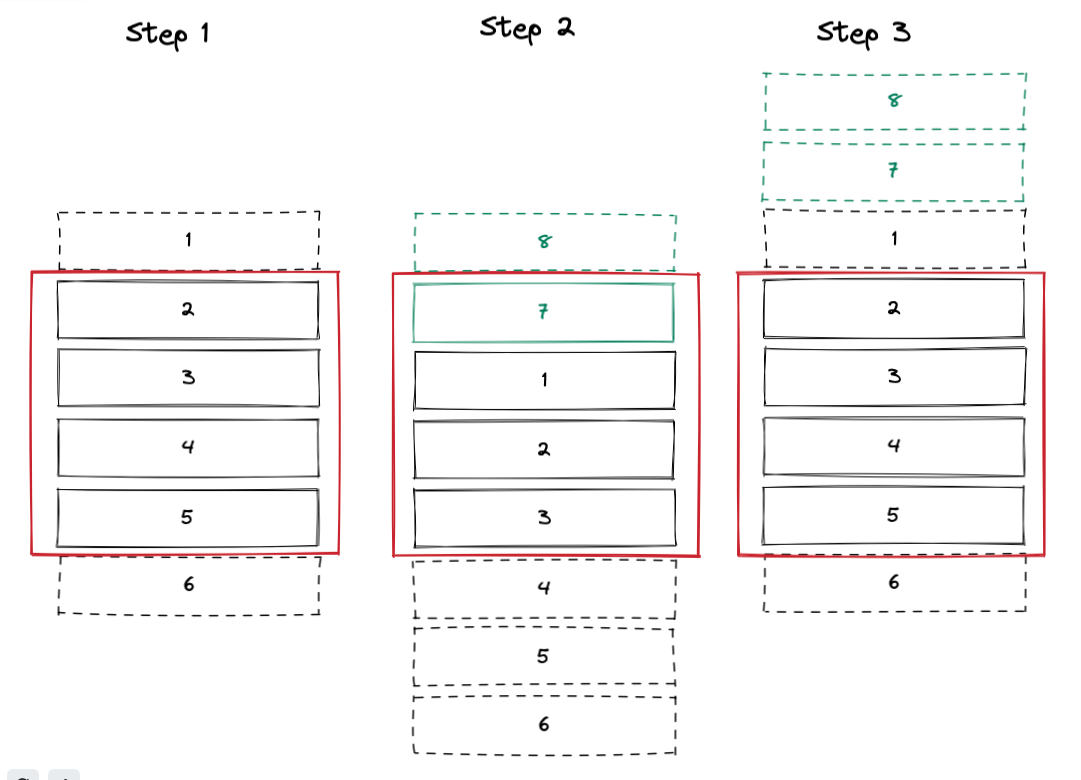 #### Illustration 2 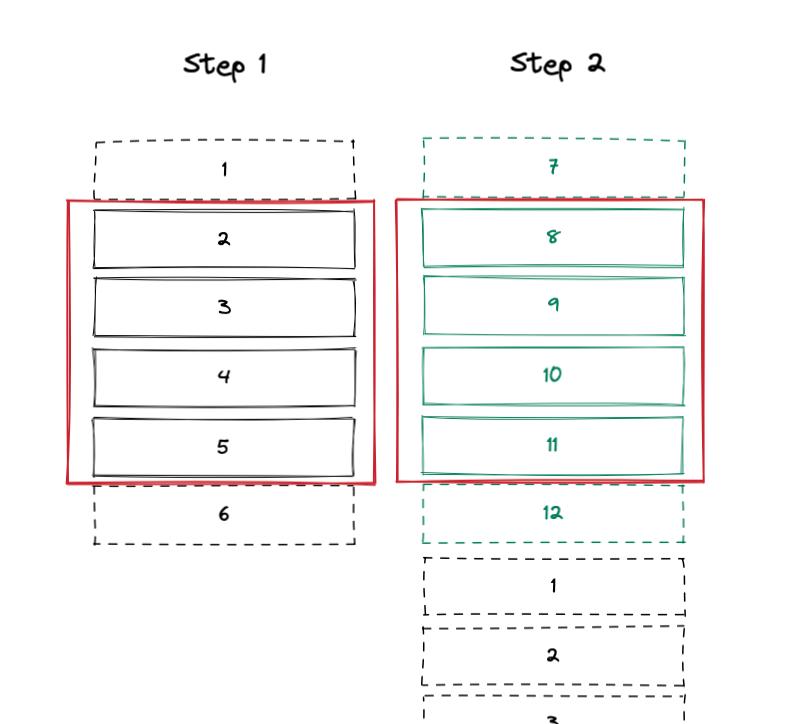 To fix `maintainVisibleContentPosition` when using `VirtualizedList` we need to make sure the visible items stay rendered when new items are added at the start of the list. In order to do that we need to do the following: - Detect new items that will cause content to be adjusted - Add cells to render mask so that previously visible cells stay rendered - Ignore certain updates while scroll metrics are invalid ### Detect new items that will cause content to be adjusted The goal here is to know that scroll position will be updated natively by the `maintainVisibleContentPosition` implementation. The problem is that the native code uses layout heuristics which are not easily available to JS to do so. In order to approximate the native heuristic we can assume that if new items are added at the start of the list, it will cause `maintainVisibleContentPosition` to be triggered. This simplifies JS logic a lot as we don't have to track visible items. In the worst case if for some reason our JS heuristic is wrong, it will cause extra cells to be rendered until the next scroll event, or content position will not be maintained (what happens all the time currently). I think this is a good compromise between complexity and accuracy. We need to find how many items have been added before the first one. To do that we save the key of the first item in state `firstItemKey`. When data changes we can find the index of `firstItemKey` in the new data and that will be the amount we need to adjust the window state by. Note that this means that keys need to be stable, and using index won't work. ### Add cells to render mask so that previously visible cells stay rendered Once we have the adjusted number we can save this in a new state value `maintainVisibleContentPositionAdjustment` and add the adjusted cells to the render mask. This state is then cleared when we receive updated scroll metrics, once the native implementation is done adding the new items and adjusting the content offset. This value is also only set when `maintainVisibleContentPosition` is set so this makes sure this maintains the currently behavior when that prop is not set. ### Ignore certain updates while scroll metrics are invalid While the `maintainVisibleContentPositionAdjustment` state is set we know that the current scroll metrics are invalid since they will be updated in the native `ScrollView` implementation. In that case we want to prevent certain code from running. One example is `onStartReached` that will be called incorrectly while we are waiting for updated scroll metrics. ## Changelog [General] [Fixed] - Fix VirtualizedList with maintainVisibleContentPosition Pull Request resolved: https://github.com/facebook/react-native/pull/35993 Test Plan: Added bidirectional paging to RN tester FlatList example. Note that for this to work RN tester need to be run using old architecture on iOS, to use new architecture it requires https://github.com/facebook/react-native/pull/35319 Using debug mode we can see that virtualization is still working properly, and content position is being maintained. https://user-images.githubusercontent.com/2677334/163294404-e2eeae5b-e079-4dba-8664-ad280c171ae6.mov Reviewed By: yungsters Differential Revision: D45294060 Pulled By: NickGerleman fbshipit-source-id: 8e5228318886aa75da6ae397f74d1801d40295e8


365 lines
9.9 KiB
JavaScript
365 lines
9.9 KiB
JavaScript
/**
|
|
* Copyright (c) Meta Platforms, Inc. and affiliates.
|
|
*
|
|
* This source code is licensed under the MIT license found in the
|
|
* LICENSE file in the root directory of this source tree.
|
|
*
|
|
* @format
|
|
* @flow
|
|
*/
|
|
|
|
'use strict';
|
|
import type {Item} from '../../components/ListExampleShared';
|
|
const RNTesterPage = require('../../components/RNTesterPage');
|
|
const React = require('react');
|
|
|
|
const infoLog = require('react-native/Libraries/Utilities/infoLog');
|
|
|
|
const {
|
|
HeaderComponent,
|
|
FooterComponent,
|
|
ItemComponent,
|
|
PlainInput,
|
|
SeparatorComponent,
|
|
Spindicator,
|
|
genNewerItems,
|
|
pressItem,
|
|
renderSmallSwitchOption,
|
|
renderStackedItem,
|
|
} = require('../../components/ListExampleShared');
|
|
const {
|
|
Alert,
|
|
Animated,
|
|
Button,
|
|
StyleSheet,
|
|
Text,
|
|
View,
|
|
SectionList,
|
|
} = require('react-native');
|
|
|
|
const VIEWABILITY_CONFIG = {
|
|
minimumViewTime: 3000,
|
|
viewAreaCoveragePercentThreshold: 100,
|
|
waitForInteraction: true,
|
|
};
|
|
|
|
const CONSTANT_SECTION_EXAMPLES = [
|
|
{
|
|
key: 'empty section',
|
|
data: [],
|
|
},
|
|
{
|
|
renderItem: renderStackedItem,
|
|
key: 's1',
|
|
data: [
|
|
{
|
|
title: 'Item In Header Section',
|
|
text: 'Section s1',
|
|
key: 'header item',
|
|
},
|
|
],
|
|
},
|
|
{
|
|
key: 's2',
|
|
data: [
|
|
{
|
|
noImage: true,
|
|
title: '1st item',
|
|
text: 'Section s2',
|
|
key: 'noimage0',
|
|
},
|
|
{
|
|
noImage: true,
|
|
title: '2nd item',
|
|
text: 'Section s2',
|
|
key: 'noimage1',
|
|
},
|
|
],
|
|
},
|
|
];
|
|
|
|
/* $FlowFixMe[missing-local-annot] The type annotation(s) required by Flow's
|
|
* LTI update could not be added via codemod */
|
|
const renderSectionHeader = ({section}) => (
|
|
<View style={styles.header}>
|
|
<Text style={styles.headerText}>SECTION HEADER: {section.key}</Text>
|
|
<SeparatorComponent />
|
|
</View>
|
|
);
|
|
|
|
/* $FlowFixMe[missing-local-annot] The type annotation(s) required by Flow's
|
|
* LTI update could not be added via codemod */
|
|
const renderSectionFooter = ({section}) => (
|
|
<View style={styles.header}>
|
|
<Text style={styles.headerText}>SECTION FOOTER: {section.key}</Text>
|
|
<SeparatorComponent />
|
|
</View>
|
|
);
|
|
|
|
/* $FlowFixMe[missing-local-annot] The type annotation(s) required by Flow's
|
|
* LTI update could not be added via codemod */
|
|
const CustomSeparatorComponent = ({highlighted, text}) => (
|
|
<View
|
|
style={[
|
|
styles.customSeparator,
|
|
highlighted && {backgroundColor: 'rgb(217, 217, 217)'},
|
|
]}>
|
|
<Text style={styles.separatorText}>{text}</Text>
|
|
</View>
|
|
);
|
|
|
|
const EmptySectionList = () => (
|
|
<View style={{alignItems: 'center'}}>
|
|
<Text style={{fontSize: 20}}>This is rendered when the list is empty</Text>
|
|
</View>
|
|
);
|
|
|
|
const renderItemComponent =
|
|
(setItemState: (item: Item) => void) =>
|
|
/* $FlowFixMe[missing-local-annot] The type annotation(s) required by Flow's
|
|
* LTI update could not be added via codemod */
|
|
({item, separators}) => {
|
|
if (isNaN(item.key)) {
|
|
return;
|
|
}
|
|
const onPress = () => {
|
|
const updatedItem = pressItem(item);
|
|
setItemState(updatedItem);
|
|
};
|
|
|
|
return (
|
|
<ItemComponent
|
|
item={item}
|
|
onPress={onPress}
|
|
onHideUnderlay={separators.unhighlight}
|
|
onShowUnderlay={separators.highlight}
|
|
/>
|
|
);
|
|
};
|
|
|
|
const onScrollToIndexFailed = (info: {
|
|
index: number,
|
|
c: number,
|
|
averageItemLength: number,
|
|
}) => {
|
|
console.warn('onScrollToIndexFailed. See comment in callback', info);
|
|
/**
|
|
* scrollToLocation() can only scroll to viewable area.
|
|
* For any failure cases this callback will get triggered with `info` object
|
|
*
|
|
* The idea is to calculate a yPosition from `info` to call scrollResponder.scrollTo on.
|
|
*
|
|
* const scrollResponder = ref.current?.getScrollResponder();
|
|
* const positionY = some value we calculate from `info`;
|
|
* if (scrollResponder != null) {
|
|
* scrollResponder.scrollTo({x, y:positionY, animated: true});
|
|
* }
|
|
*/
|
|
};
|
|
|
|
export function SectionList_scrollable(Props: {
|
|
...
|
|
}): React.Element<typeof RNTesterPage> {
|
|
const scrollPos = new Animated.Value(0);
|
|
const scrollSinkY = Animated.event(
|
|
[{nativeEvent: {contentOffset: {y: scrollPos}}}],
|
|
{useNativeDriver: true},
|
|
);
|
|
const [filterText, setFilterText] = React.useState('');
|
|
const [virtualized, setVirtualized] = React.useState(true);
|
|
const [logViewable, setLogViewable] = React.useState(false);
|
|
const [debug, setDebug] = React.useState(false);
|
|
const [inverted, setInverted] = React.useState(false);
|
|
const [data, setData] = React.useState(genNewerItems(1000));
|
|
|
|
const filterRegex = new RegExp(String(filterText), 'i');
|
|
const filter = (item: Item) =>
|
|
filterRegex.test(item.text) || filterRegex.test(item.title);
|
|
const filteredData = data.filter(filter);
|
|
const filteredSectionData = [...CONSTANT_SECTION_EXAMPLES];
|
|
|
|
let startIndex = 0;
|
|
const endIndex = filteredData.length - 1;
|
|
for (let ii = 10; ii <= endIndex + 10; ii += 10) {
|
|
// $FlowFixMe[incompatible-call]
|
|
filteredSectionData.push({
|
|
key: `${filteredData[startIndex].key} - ${
|
|
filteredData[Math.min(ii - 1, endIndex)].key
|
|
}`,
|
|
data: filteredData.slice(startIndex, ii),
|
|
});
|
|
startIndex = ii;
|
|
}
|
|
|
|
const setItemPress = (item: Item) => {
|
|
if (isNaN(item.key)) {
|
|
return;
|
|
}
|
|
const index = Number(item.key);
|
|
setData([...data.slice(0, index), item, ...data.slice(index + 1)]);
|
|
};
|
|
|
|
const ref = React.useRef<?React.ElementRef<typeof SectionList>>(null);
|
|
const scrollToLocation = (sectionIndex: number, itemIndex: number) => {
|
|
// $FlowFixMe[method-unbinding] added when improving typing for this parameters
|
|
if (ref != null && ref.current?.scrollToLocation != null) {
|
|
ref.current.scrollToLocation({sectionIndex, itemIndex});
|
|
}
|
|
};
|
|
|
|
const onViewableItemsChanged = (info: {
|
|
changed: Array<{
|
|
key: string,
|
|
isViewable: boolean,
|
|
item: {columns: Array<any>, ...},
|
|
index: ?number,
|
|
section?: any,
|
|
...
|
|
}>,
|
|
...
|
|
}) => {
|
|
// Impressions can be logged here
|
|
if (logViewable) {
|
|
infoLog(
|
|
'onViewableItemsChanged: ',
|
|
info.changed.map((v: Object) => ({
|
|
...v,
|
|
item: '...',
|
|
section: v.section.key,
|
|
})),
|
|
);
|
|
}
|
|
};
|
|
|
|
return (
|
|
<RNTesterPage noScroll={true}>
|
|
<View style={styles.searchRow}>
|
|
<PlainInput
|
|
onChangeText={text => setFilterText(text)}
|
|
placeholder="Search..."
|
|
value={filterText}
|
|
/>
|
|
<View style={styles.optionSection}>
|
|
{renderSmallSwitchOption('Virtualized', virtualized, setVirtualized)}
|
|
{renderSmallSwitchOption('Log Viewable', logViewable, setLogViewable)}
|
|
{renderSmallSwitchOption('Debug', debug, setDebug)}
|
|
{renderSmallSwitchOption('Inverted', inverted, setInverted)}
|
|
<Spindicator value={scrollPos} />
|
|
</View>
|
|
<View style={styles.scrollToColumn}>
|
|
<Text>scroll to:</Text>
|
|
<View style={styles.button}>
|
|
<Button
|
|
title="Top"
|
|
onPress={() => scrollToLocation(Math.max(0, 2), 0)}
|
|
/>
|
|
</View>
|
|
<View style={styles.button}>
|
|
<Button
|
|
title="3rd Section"
|
|
onPress={() => scrollToLocation(Math.max(0, 3), 0)}
|
|
/>
|
|
</View>
|
|
<View style={styles.button}>
|
|
<Button
|
|
title="6th Section"
|
|
onPress={() => scrollToLocation(Math.max(0, 6), 0)}
|
|
/>
|
|
</View>
|
|
<View style={styles.button}>
|
|
<Button
|
|
title="Out of Viewable Area (See warning) "
|
|
onPress={() =>
|
|
scrollToLocation(filteredSectionData.length - 1, 0)
|
|
}
|
|
/>
|
|
</View>
|
|
</View>
|
|
</View>
|
|
<SeparatorComponent />
|
|
<Animated.SectionList
|
|
ref={ref}
|
|
ListHeaderComponent={HeaderComponent}
|
|
ListFooterComponent={FooterComponent}
|
|
// $FlowFixMe[missing-local-annot]
|
|
SectionSeparatorComponent={info => (
|
|
<CustomSeparatorComponent {...info} text="SECTION SEPARATOR" />
|
|
)}
|
|
// $FlowFixMe[missing-local-annot]
|
|
ItemSeparatorComponent={info => (
|
|
<CustomSeparatorComponent {...info} text="ITEM SEPARATOR" />
|
|
)}
|
|
accessibilityRole="list"
|
|
debug={debug}
|
|
inverted={inverted}
|
|
disableVirtualization={!virtualized}
|
|
onRefresh={() => Alert.alert('onRefresh: nothing to refresh :P')}
|
|
onScroll={scrollSinkY}
|
|
onViewableItemsChanged={onViewableItemsChanged}
|
|
onScrollToIndexFailed={onScrollToIndexFailed}
|
|
refreshing={false}
|
|
renderItem={renderItemComponent(setItemPress)}
|
|
renderSectionHeader={renderSectionHeader}
|
|
renderSectionFooter={renderSectionFooter}
|
|
stickySectionHeadersEnabled
|
|
initialNumToRender={10}
|
|
ListEmptyComponent={EmptySectionList}
|
|
onEndReached={() =>
|
|
Alert.alert(
|
|
'onEndReached called',
|
|
'You have reached the end of this list',
|
|
)
|
|
}
|
|
onEndReachedThreshold={0}
|
|
sections={filteredSectionData}
|
|
style={styles.list}
|
|
viewabilityConfig={VIEWABILITY_CONFIG}
|
|
/>
|
|
</RNTesterPage>
|
|
);
|
|
}
|
|
|
|
const styles = StyleSheet.create({
|
|
button: {
|
|
marginTop: 5,
|
|
},
|
|
customSeparator: {
|
|
backgroundColor: 'rgb(200, 199, 204)',
|
|
},
|
|
header: {
|
|
backgroundColor: '#e9eaed',
|
|
},
|
|
headerText: {
|
|
padding: 4,
|
|
fontWeight: '600',
|
|
},
|
|
list: {
|
|
backgroundColor: 'white',
|
|
},
|
|
optionSection: {
|
|
flexDirection: 'row',
|
|
flexWrap: 'wrap',
|
|
alignItems: 'center',
|
|
},
|
|
searchRow: {
|
|
paddingHorizontal: 10,
|
|
},
|
|
scrollToColumn: {
|
|
flexDirection: 'column',
|
|
paddingHorizontal: 8,
|
|
},
|
|
separatorText: {
|
|
color: 'gray',
|
|
alignSelf: 'center',
|
|
fontSize: 7,
|
|
},
|
|
});
|
|
|
|
export default {
|
|
title: 'SectionList scrollable',
|
|
name: 'SectionList-scrollable',
|
|
render: function (): React.MixedElement {
|
|
return <SectionList_scrollable />;
|
|
},
|
|
};
|