Summary:
Fixes#21086.
Fixes#6117.
This PR fixes a crash caused by a race condition when `webSocket` deallocated and `NSStream` delegate callback, because `NSStream`'s delegate callback be called on `RCTSR_networkRunLoop`.
This PR mainly changes:
* Remove unnecessary `nil` operation in `dealloc` method.
* Add a new method `_scheduleCleanUp` to schedule `webSocket` cleanup also on `RCTSR_networkRunLoop`.
* In `stream:(NSStream *)aStream handleEvent:(NSStreamEvent)eventCode` delegate method, add a `wself` to make safe further.
Pull Request resolved: https://github.com/facebook/react-native/pull/22439
Differential Revision: D13564247
Pulled By: cpojer
fbshipit-source-id: 675c1b2805aa45c54d7708d796f5843ef7ea34e2
Summary:
Fixes#21243.
Fixes#20908.
Credit goes to superandrew213 who provided the patch based on 0.56; this commit merges and resolved the conflict introduced in 0.57.
Pull Request resolved: https://github.com/facebook/react-native/pull/21951
Differential Revision: D13980799
Pulled By: cpojer
fbshipit-source-id: 6b9f1a1ae54ad9dba043005d683d6a221472c729
Summary:
Fixes#14161
Android crashes in some cases if an animated transform config contains a string value, like a rotation.
This PR fixes that by ensuring all values sent to the native side are doubles. It adds `__transformDataType` to AnimatedTransform.js.
Added integration test `ReactAndroid/src/androidText/js/AnimatedTransformTestModule.js` This test fails with the following error `INSTRUMENTATION_RESULT: longMsg=java.lang.ClassCastException: java.lang.String cannot be cast to java.lang.Double`, if the changes to AnimatedTransform.js are reverted.
[Android] [Fixed] - Fixes Android crash on animated style with string rotation
Pull Request resolved: https://github.com/facebook/react-native/pull/18872
Differential Revision: D13894676
Pulled By: cpojer
fbshipit-source-id: 297e8132563460802e53f3ac551c3ba9ed943736
Summary:
Changelog:
----------

Help reviewers and the release process by writing your own changelog entry. See http://facebook.github.io/react-native/docs/contributing#changelog for an example.

[General] [Deprecated] - Deprecation warning for WebView as it has been extracted from core.
Pull Request resolved: https://github.com/facebook/react-native/pull/22980

Differential Revision: D13664505

Pulled By: hramos

fbshipit-source-id: 0cfc06015e77c52bed9eeebd97c8cbca6eacd8ce
Summary:
Currently, if you load an animated gif using the standard `Image` component, it will not correctly respect the loop count property found in the Netscape App Extension block of the file. The issues are as follows:

1) If the App Extension isn't present, the animated gif loops indefinitely when it should not loop at all.
2) If the App Extension is present, the animated gif loops one less time than it should.

The other issue is that once the looping completes, the image doesn't pause at the last frame but instead, loops back to the beginning of the animation e.g. frame 1.

The fix does a few things:

1) If there is _no_ App Extension present, the image doesn't loop at all
2) If there _is_ an App Extension present, it loops the correct amount of times. For instance, if the loop count is 1, it means the gif should loop _once_ after it finishes playing, for a total of _two_ total loops.
3) Once the number of loops completes (assuming loop count isn't set to 0 which means infinite), the animation pauses on the last frame.
Pull Request resolved: https://github.com/facebook/react-native/pull/21999

Differential Revision: D13287005

Pulled By: hramos

fbshipit-source-id: f7210ad40e0e76c9ec454953b8a067569d3feaaa
Summary:
iOS-specific.
For languages with complex input (such as Japanese or Chinese), a user has to type multiple characters that are then merged into a single one.
If `-[UITextView setAttributedString:]` is used while the user is still typing, it resets the input and characters are not being treated as typed together.
This PR avoids calling this method if possible, replacing it by just copying the attributes if the string has not been changed. That preserves the state and user can continue to type Korean or Chinese characters.
Fixes#19339
<!--
Required: Write your motivation here.
If this PR fixes an issue, type "Fixes #issueNumber" to automatically close the issue when the PR is merged.
-->
<!--
Required: Write your test plan here. If you changed any code, please provide us with
clear instructions on how you verified your changes work. Bonus points for screenshots and videos!
-->
Essentially, the steps to reproduce are described in [the issue](https://github.com/facebook/react-native/issues/19339):
1. Type some Korean characters in TextInput, such as "하늘" (buttons `ㅎ`,`ㅏ`,`ㄴ`,`ㅡ`,`ㄹ`).
2. Then move the cursor to the beginning of the text, type "파란" (buttons `ㅍ`,`ㅏ`,`ㄹ`,`ㅏ`,`ㄴ`) this time.
**Behaviour before this fix (broken)**
Actual text: `ㅍㅏㄹㅏㄴ하늘`.
Expected text: `파란하늘`.
Characters aren't combined properly.

**Behaviour after this fix (correct)**
Actual text: `파란하늘`.
Expected text: `파란하늘`.
Characters are combined, the same behaviour is in vanilla iOS `UITextView`.

<!--
Does this PR require a documentation change?
Create a PR at https://github.com/facebook/react-native-website and add a link to it here.
-->
<!--
Required.
Help reviewers and the release process by writing your own release notes. See below for an example.
-->
[IOS] [BUGFIX] [TextView] - Fix Korean/Chinese/Japanese input for multiline TextView on iOS.
<!--
**INTERNAL and MINOR tagged notes will not be included in the next version's final release notes.**
CATEGORY
[----------] TYPE
[ CLI ] [-------------] LOCATION
[ DOCS ] [ BREAKING ] [-------------]
[ GENERAL ] [ BUGFIX ] [ {Component} ]
[ INTERNAL ] [ ENHANCEMENT ] [ {Filename} ]
[ IOS ] [ FEATURE ] [ {Directory} ] |-----------|
[ ANDROID ] [ MINOR ] [ {Framework} ] - | {Message} |
[----------] [-------------] [-------------] |-----------|
EXAMPLES:
[IOS] [BREAKING] [FlatList] - Change a thing that breaks other things
[ANDROID] [BUGFIX] [TextInput] - Did a thing to TextInput
[CLI] [FEATURE] [local-cli/info/info.js] - CLI easier to do things with
[DOCS] [BUGFIX] [GettingStarted.md] - Accidentally a thing/word
[GENERAL] [ENHANCEMENT] [Yoga] - Added new yoga thing/position
[INTERNAL] [FEATURE] [./scripts] - Added thing to script that nobody will see
-->
Pull Request resolved: https://github.com/facebook/react-native/pull/19809
Differential Revision: D13326614
Pulled By: shergin
fbshipit-source-id: 6a5cab3f7290f0f623a6f4c29353a573eb321b0b
Summary:
`instance.hasOwnProperty` has potential danger because of some object could be eliminate own prototype chain. Update code be more reliable.
This PR is solution of #22308 issue. (Fixes#22308)
Pull Request resolved: https://github.com/facebook/react-native/pull/22348
Differential Revision: D13334882
Pulled By: cpojer
fbshipit-source-id: 9b9310a972e933af1962666d7b0c683ff43cc5b2
Summary: This change attempts to fix a crash within RCTImageCache's new dateWithHeaderString method. This is a speculative fix as there aren't any concrete repro steps.

Reviewed By: hramos

Differential Revision: D13278666

fbshipit-source-id: cdb69b1296c946d89e14c074329280994d87ddcd
Summary:
This PR adds e2e tests for the Picker and DatePicker components.

While writing these tests, I also found and fixed two bugs where we wern't passing the `testID` down to the native components, so detox couldn't look them up. This confirms what was mentioned by rotemmiz [here](https://github.com/wix/Detox/issues/798#issuecomment-401412276)
Pull Request resolved: https://github.com/facebook/react-native/pull/22537

Reviewed By: cpojer

Differential Revision: D13371307

Pulled By: rickhanlonii

fbshipit-source-id: a4dfcdb5913645bceca0c7353328eeb9ad0f6558
Summary:
Similar to #21950, this adds displayName to `ActivityIndicator`, so it displays the correct component name in snapshots instead of `Component`.
Fixes#21937 (a little bit more than it was already fixed).
Pull Request resolved: https://github.com/facebook/react-native/pull/22417
Differential Revision: D13205376
Pulled By: TheSavior
fbshipit-source-id: 21e71d4980d159a1f33d32d83346b48257ec21d4
Summary:
Related to #22100

Enhance Flow types for TouchableOpacity specifying underlay functions and TvParallaxPropertiesType.
I had to export and enhance TvParallaxPropertiesType from TVViewPropTypes file. This does not break this other PR also using this exported type. #22146

There is still some work to do in order to turn flow to strict mode.

- All flow tests succeed.

[GENERAL] [ENHANCEMENT] [TouchableHighlight.js] - Flow types
[GENERAL] [ENHANCEMENT] [TVViewPropTypes.js] - Export and enhance type
Pull Request resolved: https://github.com/facebook/react-native/pull/22173

Differential Revision: D13033441

Pulled By: RSNara

fbshipit-source-id: 26a38970923dc7e6c02c03da5d08483a3f1fbd36
Summary:
Some of the flow types were incomplete. So, I referenced the code in  `~/fbsource/xplat/js/react-native-github/ReactAndroid/src/main/java/com/facebook/react/views/textinput/` and in `~/fbsource/xplat/js/react-native-github/Libraries/Text/TextInput/` to make the flow types more specific.

I also fixed internal breakages. To avoid having to sprinkle `$FlowFixMe`s everywhere, I had to refactor some types, and some code.

Reviewed By: TheSavior

Differential Revision: D13121871

fbshipit-source-id: 9796aafc861544baf52d7ade823ab1be2d3f12d1
Summary:
Related to #22100

Enhance TextInput with callback event types.
This is a first draft and I will need more help on this one. Flow checks are successful now but I am not sure types are accurate though.
Moreover I find my separation approach kind of dirty for callback event types.

- All flow tests succeed.

[GENERAL] [ENHANCEMENT] [TextInput.js] - Flow types
[GENERAL] [ENHANCEMENT] [TextInputExample.android.js] - Fixing Flow types
[GENERAL] [ENHANCEMENT] [TextInputExample.ios.js] - Fixing Flow types
[GENERAL] [ENHANCEMENT] [XHRExampleFetch.js] - Fixing Flow types
Pull Request resolved: https://github.com/facebook/react-native/pull/22250

Reviewed By: TheSavior

Differential Revision: D13104820

Pulled By: RSNara

fbshipit-source-id: 3fbb98d0ec2b62be676f71ae1053933d9c78485e
Summary:
Related to #22100

Turn on Flow strict mode for TextProps.
I used ResponseHandlers type definition defined in Text.js.

I wanted to move ResponseHandlers type to TextProps and reuse it inside the file.
I know I could use $Shape<> to maybe keys but how do I elegantly maybe every values ?
Unless having a straightforward solution, I found it clearer to copy paste these types.

- All flow tests succeed.

[GENERAL] [ENHANCEMENT] [TextProps.js] - Flow strict mode
Pull Request resolved: https://github.com/facebook/react-native/pull/22122

Reviewed By: TheSavior

Differential Revision: D13055759

Pulled By: RSNara

fbshipit-source-id: 230b43c7c94d7f82f5727ad11541b0cb98bc5e3a
Summary:
Related to #22100

Enhance TouchableBounce with press event types, callback and hitslop types.

There is still some work to do in order to turn flow to strict mode. (requireNativeComponent and render function)

- All flow tests succeed.

[GENERAL] [ENHANCEMENT] [TouchableBounce.js] - Flow types
Pull Request resolved: https://github.com/facebook/react-native/pull/22197

Reviewed By: TheSavior

Differential Revision: D13032452

Pulled By: RSNara

fbshipit-source-id: b21140722ce924698aa15323602e2e3fc663dbb6
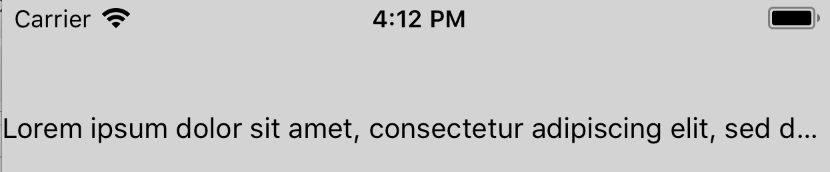
Summary:
If text is truncated and an inline view appears after the truncation point, the user should not see the inline view. Instead, we have a bug such that the inline view is always visible at the end of the visible text.
This commit fixes this by marking the inline view as hidden if it appears after the truncation point.
This appears to be a regression. React Native used to have logic similar to what this commit is adding: https://github.com/facebook/react-native/blob/1e2a924ba60001c6f0587c7561536f00b2922cbf/Libraries/Text/RCTShadowText.m#L186-L192
**Before fix**
Inline view (blue square) is visible even though it appears after the truncation point:

The full text being rendered was:
```
<Text numberOfLines={1}>
Lorem ipsum dolor sit amet, consectetur adipiscing elit,
sed do eiusmod tempor incididunt ut labore et dolore magna
<View style={{width: 50, height: 50, backgroundColor: 'steelblue'}} />
</Text>
```
**After fix**
Inline view is properly truncated:
**Test Plan**
Tested that the inline view is hidden if it appears after the truncation point when `numberOfLines` is 1 and 2. Similarly, verified that the inline view is visible if it appears before the truncation point.
**Release Notes**
[IOS] [BUGFIX] [Text] - Fix case where inline view is visible even though it should have been truncated
Adam Comella
Microsoft Corp.
Pull Request resolved: https://github.com/facebook/react-native/pull/21456
Differential Revision: D10182991
Pulled By: shergin
fbshipit-source-id: a5bddddb1bb8672b61d4feaa04013a92c8224155
Summary:
I noticed that the _onBlur method was not exactly similar to the _onFocus one in the TextInput component.

After digging, I found that the blurTextInput method in the TextInputState.js file was call twice in a raw instead of once when the textinput component should blur.

By removing this line, I fix this unecessary multiple call.
Pull Request resolved: https://github.com/facebook/react-native/pull/22156

Reviewed By: TheSavior

Differential Revision: D13105396

Pulled By: RSNara

fbshipit-source-id: 8e83461d8b288d8ee4047bc4a33c4480e193c349


