Summary:
This diff fixes a crash when using TextInput.FontVariant prop in Android API level < 26

Changelog: Fix TextInput.FontVariant prop in Android API level < 26 (related to PR https://github.com/facebook/react-native/pull/27006)

Reviewed By: JoshuaGross

Differential Revision: D18331807

fbshipit-source-id: 5eac4d9e38eb099fae1287d128f3f8c249b0b8bc
Summary:
As part of `T54997838` we're auditing where removeView could possibly be called in a background thread, and adding annotations to indicate places where we don't think it's possible.

Changelog: [internal]

Reviewed By: makovkastar

Differential Revision: D18320461

fbshipit-source-id: 84b6b9e293d903f835fc42bc98614efb54158986
Summary:
Text paddings in Fabric are managed by LayoutMetrics, the current implementation of Fabric is incorrectly using padding data from Text Props to set the padding in the view.
This diff refactors the update of Text in Fabric in order to avoid using padding prop data

Changelog: [Internal]

Reviewed By: JoshuaGross

Differential Revision: D18211638

fbshipit-source-id: de05e7daa6185d854ce1b6580a1e44ae55d3176e
Summary:
This PR https://github.com/facebook/react-native/pull/22723 cached selections, so if you had a cached selection indicies, but updated the text to be an empty string, then this would crash.

As reported in https://github.com/facebook/react-native/issues/25265 and other issues of `setSpan(4 ... 4) ends beyond length`

## Changelog

[Android] [fixed] - Crash in TextInput
Pull Request resolved: https://github.com/facebook/react-native/pull/26680

Test Plan:
```
input.setNativeProps({ text: "xxx", selection: {"begin": 0, "end": 3}});
input.setNativeProps({ text: ""});
```

Differential Revision: D18189703

Pulled By: cpojer

fbshipit-source-id: 67d9615a863fd22598be8d6d4553dec5ac8837ed
Summary:
This diff extends the rendering on Text on Android to support textBreakStrategy prop.

Changelog: Add support for Text.textBreakStrategy prop into RN Android for Fabric

Reviewed By: JoshuaGross

Differential Revision: D18101403

fbshipit-source-id: c7f0b1cdc0de05172f0978d4dd3493620dcd941a
Summary:
In D18032458 we introduce getReactApplicationContextIfActiveOrWarn. In this diff, modules that access a JS or Native module through ReactApplicationContext need to check if the CatalystInstance is still alive before continuing.

Modules that don't derive from `ReactContextBaseJavaModule` manually check for the catalyst impl and log their own SoftExceptions.

In this diff we also introduce SoftExceptions that by contract never cause crashes, even in debug mode.

Changelog: [Internal]

Reviewed By: mdvacca

Differential Revision: D18112989

fbshipit-source-id: 868f01f388aa2db3518db9f873f2afc2a62eed45
Summary:
Text font size should not be negative, this diff throws an exception if TextView uses negative of zero font size

Changelog: [[internal]]

Reviewed By: shergin

Differential Revision: D18068071

fbshipit-source-id: 4074dca2019b6223eef68a407570258adbceaa43
Summary:
Text didn't support horizontal textAlign in Fabric for Android, this diff fixes that

Changelog: Add support for TextAlign prop in Fabric

Reviewed By: makovkastar

Differential Revision: D18068072

fbshipit-source-id: 3f8b1ba46989b55197fe9aa60ba2fb055b003d67
Summary:
This diff adds support for negative letterspacing values in Fabric android
Changelog: add support fot negative letterspacing values in Fabric android

Reviewed By: JoshuaGross

Differential Revision: D18054648

fbshipit-source-id: de1b906e6b8c0b021ffdc2e4bdad243075230667
Summary:
This diff changes updateState method to support null stateWrappers, before this method would crash with a NullPointerException, now it allows the null object to reach the view manager.

Changelog: Add support for update of nullable localState in Fabric

Reviewed By: JoshuaGross

Differential Revision: D17939651

fbshipit-source-id: c62555905e39f9e0db75b9e1d1b93f33d0560266
Summary: This PR caused a regression with shadows, see https://github.com/facebook/react-native/issues/26544.

Reviewed By: JoshuaGross, mdvacca

Differential Revision: D17809320

fbshipit-source-id: 0c83cd211425622ada0fd8c492f43df0536a4b8a
Summary:
This PR addresses issue https://github.com/facebook/react-native/issues/23870 (`View.getGlobalVisibleRect()` is broken in some use cases)
The issue affects the following Android APIs:
- ViewGroup.getChildVisibleRect()
- View.getGlobalVisibleRect() (Which calls into ViewGroup.getChildVisibleRect)
- View.getLocalVisibleRect() (Which calls into View.getGlobalVisibleRect())
According to Android documentation, View.getGlobalVisibleRect() should provide a rect for a given view that has been clipped by the bounds of all of its parent views up the view hierarchy. It does so through the use of the recursive function ViewGroup.getChildVisibleRect().
Since React Native has a separate clipping mechanism that does not rely on Android UI's clipping implementation, ViewGroup.getChildVisibleRect() is unable to determine that a rect should be clipped if the clipping view is a ReactClippingViewGroup. This resultantly breaks some important use cases for things like testing with Detox, which relies on this functionality to tell when a component is on-screen, as explained in the above referenced issue.
The rationale of the fix is essentially to implement logic analogous to [ViewGroup.getChildVisibleRect()](https://android.googlesource.com/platform/frameworks/base/+/master/core/java/android/view/ViewGroup.java#6176), discarding irrelevant Android clipping modes, and instead testing against the 'overflow' property, restoring the originally intended functionality. This is implemented as an override to ViewGroup.getChildVisibleRect() in the following classes:
- ReactViewGroup
- ReactScrollView
- ReactHorizontalScrollView
Unfortunately, since the public ViewGroup.getChildVisibleRect() API recurses into a `hide` annotated API which cannot be overridden, it was necessary to provide this override in each of the above React Native classes to ensure the superclass implementation would not be called, which would break the recursion.
## Changelog
[Android] [Fixed] - View.getGlobalVisibleRect() clips result rect properly when overflow is 'hidden'
Pull Request resolved: https://github.com/facebook/react-native/pull/26334
Test Plan:
The functionality in question is neither used internally nor exposed by React Native, and thus only affects Android native modules that use the above referenced APIs.
As such, I have primarily performed testing with a forked example project that had been submitted with issue https://github.com/facebook/react-native/issues/23870, originally by d4vidi.
The example project can be found here:
- [Configured to build against RN Master](https://github.com/davidbiedenbach/RNClipVisibilityBugDemo/tree/rn-master)
- [Configured to build against PR branch](https://github.com/davidbiedenbach/RNClipVisibilityBugDemo/tree/fix-23870)
(Original project here: https://github.com/d4vidi/RNClipVisibilityBugDemo)
### Bug in effect:
When built against RN master, it can be observed that fully clipped views are reported as visible, as in the below screenshots.
#### Views inside a ReactViewGroup do not report as clipped

#### Views inside a ReactScrollView do not report as clipped

#### Views inside a ReactHorizontalScrollView do not report clipping properly

### Bug fixed
When built against the PR branch, fully-clipped views no longer report visible.
#### Views inside a ReactViewGroup report clipping properly

#### Views inside a ReactScrollView report clipping properly

#### Views inside a ReactHorizontalScrollView report clipping properly

Reviewed By: mdvacca
Differential Revision: D17782658
Pulled By: yungsters
fbshipit-source-id: 0cd0d385898579a7a8a3e453f6ba681679ebe496
Summary: Fabric doesn't support setNativeProps, so we have to use commands instead to set the value of the native component.

Reviewed By: JoshuaGross

Differential Revision: D17736274

fbshipit-source-id: 18c47365926c3c2cfc3551f4b5b6cc72e4162367
Summary:
Currently, horizontal `ScrollViews` don't properly support `removeClippedSubviews`.

This is because the container view, `ReactHorizontalScrollContainerView` extends from regular `ViewGroup` instead of `ReactViewGroup` so doesn't have all the logic around clipping children.

Moreover, the `ReactHorizontalScrollContainerViewManager` doesn't actually support the `removeClippedSubviews` prop

This change:
- Makes  `ReactHorizontalScrollContainerView` extend from `ReactViewGroup` while maintaining the special logic around RTL scrolling
- Factors out a common `ReactClippingViewManager` which will be used to bridge all components which extend `ReactViewGroup` and support clipping. It has the logic for adding/removing children and getting child counts while considering clipped subviews
- `ReactViewManager` now extends this new `ReactClippingViewManager`
- `ReactHorizontalScrollContainerViewManager` also extends `ReactClippingViewManager`

Reviewed By: JoshuaGross

Differential Revision: D17708630

fbshipit-source-id: d257566ee54ad46f6d62f176a657c596bba96aa4
Summary:
Fabric expects the measure method to return the size in density-independent pixels, but getMeasuredWidth and getMeasuredHeight return pixels on Android, so we have to convert these values before returning to C++.

Check the method createUpdateLayoutMountItem in Binding.cpp:

```
local_ref<JMountItem::javaobject> createUpdateLayoutMountItem(
    const jni::global_ref<jobject> &javaUIManager,
    const ShadowViewMutation &mutation) {
     ...

    int x = round(frame.origin.x * pointScaleFactor);
    int y = round(frame.origin.y * pointScaleFactor);
    int w = round(frame.size.width * pointScaleFactor);
    int h = round(frame.size.height * pointScaleFactor);
    auto layoutDirection = toInt(newChildShadowView.layoutMetrics.layoutDirection);
    return updateLayoutInstruction(
        javaUIManager, newChildShadowView.tag, x, y, w, h, layoutDirection);
  }

  return nullptr;
}
```

We are interested in the next two lines:
```
int w = round(frame.size.width * pointScaleFactor);
int h = round(frame.size.height * pointScaleFactor);
```

`frame.size.width` and `frame.size.height` are the values returned from the measure method in Java and they are multiplied by the screen density to get the size in pixels, which means Fabric expects these values to be DIPs.

Reviewed By: shergin

Differential Revision: D17626834

fbshipit-source-id: f9856b5d0796c75c26c84adf11e1652b22a1ddef
Summary:
In this diff we integrate the Switch component on Android in Fabric. Since the component has a custom measure function, we need to write some C++ to call the measure method in Java.

The component isn't fully functional yet (setNativeProps isn't supported in Fabric) and has some problems with measuring itself. I will fix the component in the next diffs in this stack.

Reviewed By: JoshuaGross

Differential Revision: D17571258

fbshipit-source-id: be4e201495b9b197ddec44ee3484357bfb6225a8
Summary: This diff fixes the issue with view paddings in Fabric introduced in D17081799. In Paper setting padding on a view was only supported for Text and TextInput components (see https://fburl.com/codesearch/6r6lu5vd). We want to keep Fabric backwards compatible, so we delegate setting the padding to the view manager instead of setting it directly on the view. In this way we can have a no-op implementation in the base view manager and implement this method only in view managers that support setting padding (ReactTextInputManager and ReactTextViewManager at the moment).

Reviewed By: JoshuaGross

Differential Revision: D17665011

fbshipit-source-id: 38bc56278e002bd34881cfcb9ed79df579f79e28
Summary: This diff fixes the height of the Slider component in Fabric on Android. Note that the layout is still broken (no padding and the seek bar is misaligned, but it's another issue).

Reviewed By: JoshuaGross

Differential Revision: D17629798

fbshipit-source-id: af8cae909279dc92ee1c80b9be2f5c578972eafc
Summary:
When sliders are adjusted via accessibility, no onSlidingComplete callback is
generated. This causes problems for components which perform behavior in this
callback, and means that such components don't behave properly when adjusted via
accessibility. For example, if an app hosting a volume control slider only commits the volume change to the hardware on onSlidingComplete, it is impossible for a screen reader user to ever actually adjust the volume.

Ensure that sliders call the onSlidingComplete callback after adjusted via
accessibility.

## Changelog

[General] [Fix] - Add onSlidingComplete callbacks when sliders adjusted via a11y.

[CATEGORY] [TYPE] - Message
Pull Request resolved: https://github.com/facebook/react-native/pull/26600

Test Plan: Prior to this change, using the RNTester slider example with a screen reader, the onSlidingComplete callback tests never shows any callbacks when the slider is adjusted. With this change applied, the callback test will show a number of callbacks corresponding to the number of times the slider was adjusted via the screen reader.

Differential Revision: D17661157

Pulled By: cpojer

fbshipit-source-id: a6eedef099c6c1b571b290c329059ac9b69b53dd
Summary:
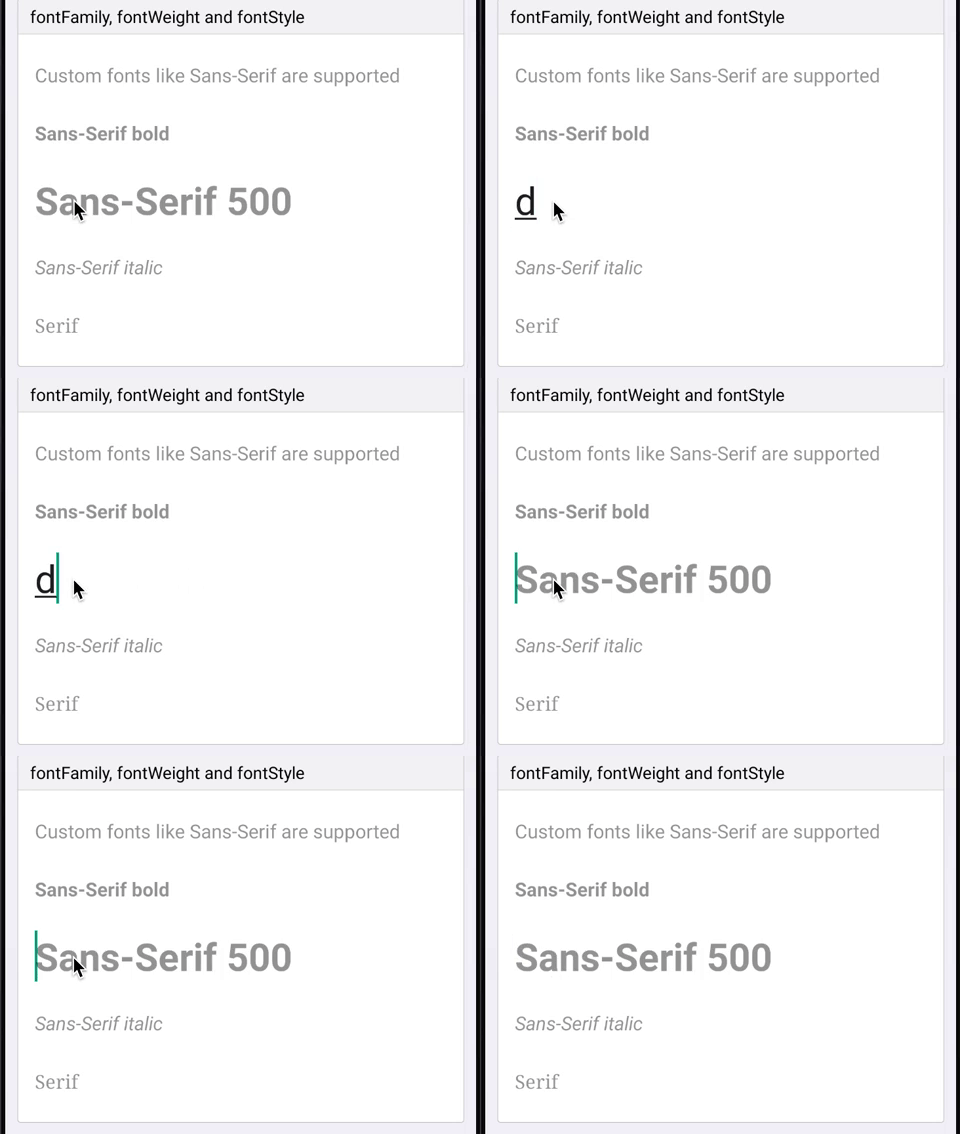
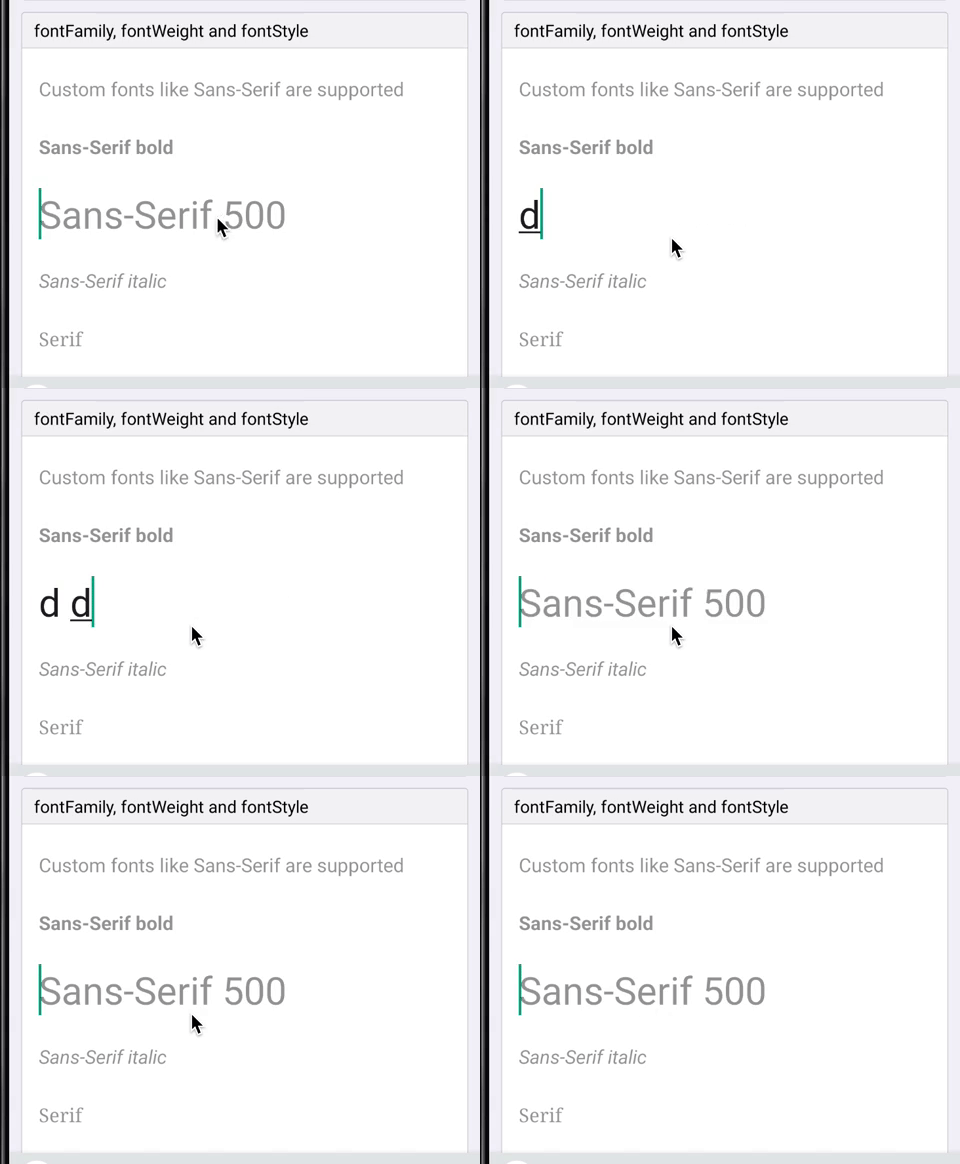
When using a medium (500) font weight on Android the wrong weight is used for the placeholder and for the first few seconds of input (before it gets text back from JS). To fix it I refactored the way we handle text styles (family, weight, style) to create a typeface to be more like the `Text` component.
Since all these 3 props are linked and used to create the typeface object it makes more sense to do it at the end of setting props instead of in each prop handler and trying to recreate the object without losing styles set by other prop handlers. Do do that we now store fontFamily, fontStyle and fontWeight as ivar of the ReactEditText class. At the end of updating prop if any of those changed we recreate the typeface object.
This doesn't actually fix the bug but was a first step towards it. There were a bunch of TODOs in the code to remove duplication between `Text` and `TextInput` for parsing and creating the typeface object. To do that I simply moved the code to util functions in a static class. Once the duplication was removed the bug was fixed! I assume proper support for medium font weights was added for `Text` but not in the duplicated code for `TextInput`.
## Changelog
[Android] [Fixed] - Fix medium font weights for TextInput on Android
Pull Request resolved: https://github.com/facebook/react-native/pull/26434
Test Plan:
Tested in my app and in RNTester that custom styles for both text and textinput all seem to work.
Repro in RNTester:
```js
function Bug() {
const [value, setValue] = React.useState('');
return (
<TextInput
style={[
styles.singleLine,
{fontFamily: 'sans-serif', fontWeight: '500', fontSize: 32},
]}
placeholder="Sans-Serif 500"
value={value}
onChangeText={setValue}
/>
);
}
```
Before:
After:
Reviewed By: mmmulani
Differential Revision: D17468825
Pulled By: JoshuaGross
fbshipit-source-id: bc2219facb94668551a06a68b0ee4690e5474d40
Summary: This diff migrates `ReactSwtichManager` to use the generated `ReactSwtichManagerDelegate` for setting its properties.

Reviewed By: TheSavior

Differential Revision: D17395067

fbshipit-source-id: 1489c5d08cef860030ecbd23ef19bd8de1328d71
Summary: This diff migrates `ReactDrawerLayoutManager` to use the generated `AndroidDrawerLayoutManagerDelegate` for setting its properties.

Reviewed By: mdvacca

Differential Revision: D17343383

fbshipit-source-id: 85cd7ee3531b152da2601048f5e458f5dad73ad6
Summary: This diff migrates `ReactProgressBarViewManager` to use the generated `AndroidProgressBarManagerDelegate` for setting its properties.

Reviewed By: JoshuaGross, mdvacca

Differential Revision: D17315619

fbshipit-source-id: 6293c6fc18567a934b6f3dce9b77abcc408052d8
Summary: This diff migrates `SwipeRefreshLayoutManager` to use the generated `AndroidSwipeRefreshLayoutManagerDelegate`.

Reviewed By: JoshuaGross, mdvacca

Differential Revision: D17225894

fbshipit-source-id: e659d2a9cb5dba42c589559f61a0e98330e21612
Summary: This diff migrates `ReactModalHostManager` to use the generated `ModalHostViewManagerDelegate` for setting its properties.

Reviewed By: mdvacca

Differential Revision: D17205817

fbshipit-source-id: 6724302fd4301f9df92df04fcfb41f0c2c939d9f
Summary: This diff migrates `ReactSliderManager` to use the generated `SliderManagerDelegate` for setting its properties.

Reviewed By: mdvacca

Differential Revision: D17203078

fbshipit-source-id: 726736ef275074ecb799b334342ac64976153e2b
Summary:
This PR removes Java reflection use in ReactDrawerLayoutManager.java because we all use AndroidX and setDrawerElevation is available. Also adds NonNull annotations

## Changelog

[Android] [Changed] - cleanup DrawerLayoutAndroid
Pull Request resolved: https://github.com/facebook/react-native/pull/26497

Test Plan: RNTester is working as expected.

Differential Revision: D17488727

Pulled By: mdvacca

fbshipit-source-id: fd626e3e7aca3965f62c4c82a55c69e81facc61d
Summary: Today, View Managers are all initialized as soon as we start up the app. Making them lazy, so that we only intantiate them when they are really needed

Differential Revision: D17329940

fbshipit-source-id: 821bf121f04d58c7b871c7923fed81d8c735f8b4
Summary: Support existing, backwards-compatible AndroidTextInput component for minimal support of TextInput on Android.

Reviewed By: shergin, mdvacca

Differential Revision: D17086758

fbshipit-source-id: 25726f22229e0d5dfe96eb36b386a5317601283d
Summary:
After some thought, we decided we don't need the flexibility of
separate horizontal and vertical props - it would be much nicer
to just have a single prop for the edge length and then the native
code can enable the booleans as appropriate.

Original PR: https://github.com/facebook/react-native/pull/26163

Original commit changeset: f72a9a890d90

Reviewed By: TheSavior

Differential Revision: D16997468

fbshipit-source-id: 7973262287a7ec2cee5957f8dc1806a0f28c1432
Summary:
Changing showSoftKeyboard and hideSoftKeyboard to be protected, as we need this change for an internal control that extends ReactEditText.

## Changelog

[Android] [Changed] - part of our react native platform, we have a control that extends ReactEditText and we need to be able to override these 2 methods.
Pull Request resolved: https://github.com/facebook/react-native/pull/25964

Test Plan: The change has been in Microsoft's branch of RN for almost 2 years, and since it's a relatively small change we've done a quick sanity check in RNTester prior to this PR, making sure the TextInput page loads fine and it's functional.

Differential Revision: D16686878

Pulled By: cpojer

fbshipit-source-id: 63035ee9c58e93bc0fa40e5bec318df05322c6c5
Summary:
Since the Android's Picker implementation uses an ArrayAdapter,
it means that the views that were created may be reused for other items
in order to save memory. With this in mind, if one sets the Picker.Item
prop color for only certain items there might be an state that
some items that does not have the color set will end up appearing
with the wrong color. This happens because, this new item is
reusing a view of an item that had the color prop set.
In order to avoid this problem, once a new view is created
the ReactPickerAdapter will save the original color and
re-apply if the item does not have the color prop.
## Changelog
[Android] [Fixed] - Picker.Item displays wrong colors
Pull Request resolved: https://github.com/facebook/react-native/pull/25750
Test Plan:
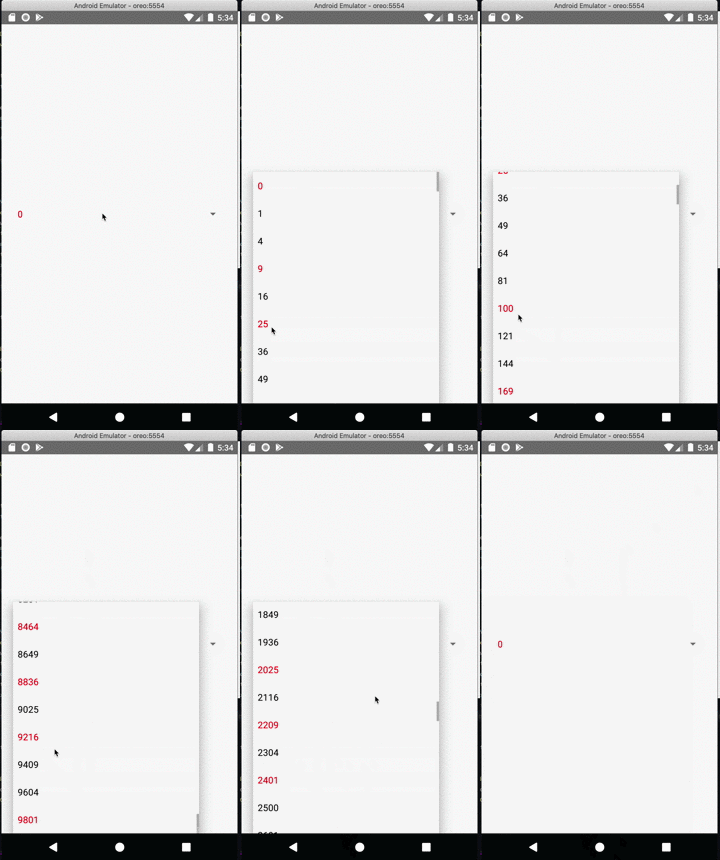
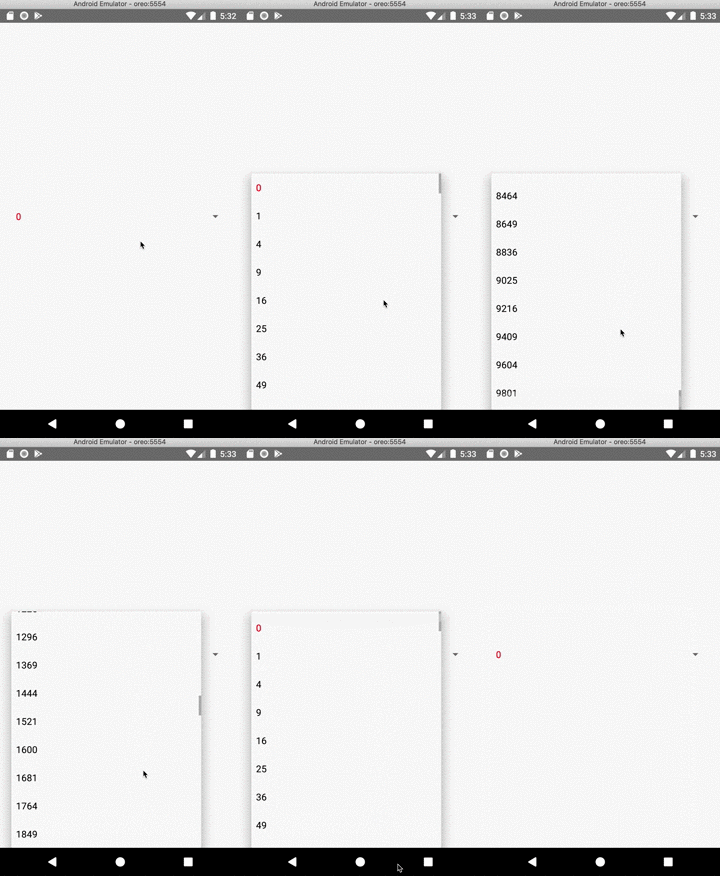
On android execute the code below. Only the FIRST item should be red.
```javascript
import React from 'react';
import { StyleSheet, View, Picker } from 'react-native';
const values = new Array(100);
for (let i = 0; i < values.length; i += 1) {
values[i] = (i * i).toString();
}
const App = () => {
const [selected, setSelected] = React.useState(0);
const onValueChange = React.useCallback((_, idx) => {
setSelected(idx);
}, []);
return (
<View style={styles.container}>
<Picker onValueChange={onValueChange} selectedValue={values[selected]}>
{values.map((v, i) => (
<Picker.Item
key={v}
value={v}
label={v}
{...(!i ? { color: 'red' } : {})}
/>
))}
</Picker>
</View>
);
};
export default App;
const styles = StyleSheet.create({
container: {
flex: 1,
justifyContent: 'center',
paddingHorizontal: 20,
},
});
```
### Without the patch
You should see various items with the red color (when only the first one should be red)
### With the patch
Only the first item is red.
Closes https://github.com/facebook/react-native/issues/25456
Differential Revision: D16430961
Pulled By: mdvacca
fbshipit-source-id: 48b41845d465df2e3dd34fc4a76950ddc75a010a
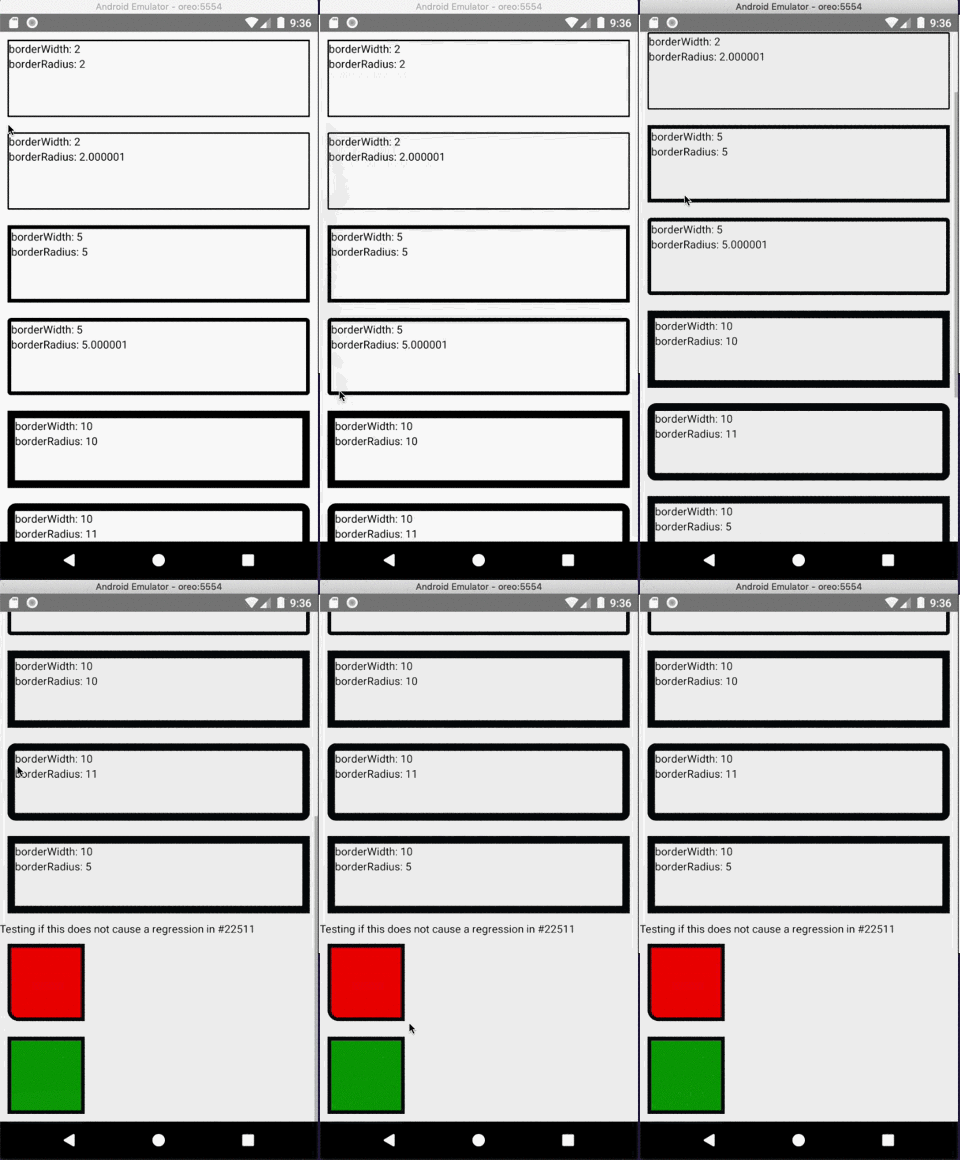
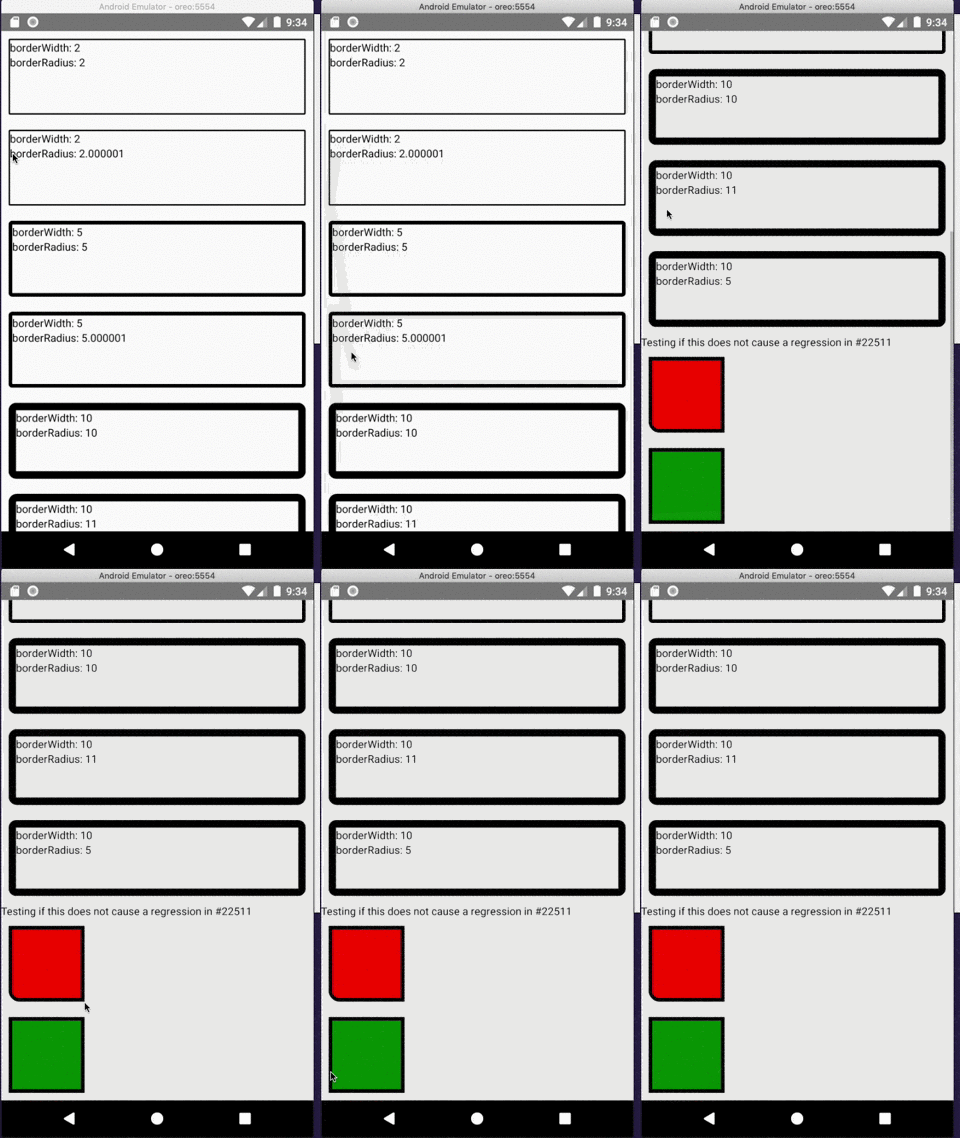
Summary:
In order to properly set the view's borderRadius the inner*RadiusX/inner*RadiusY should not
be used, since their values are obtained via the following formula:
int innerTopLeftRadiusX = Math.max(topLeftRadius - borderWidth.left, 0);
If topLeftRadius and borderWidth.left have the same value innerTopLeftRadiusX will
be zero and it will cause the top left radius to never be set since
"(innerTopLeftRadiusX > 0 ? extraRadiusForOutline : 0)" will evaluate to zero.
In order to prevent this issue the condition will only consider topLeftRadius, topRightRadius, and etc.
I took a closer look to see if this fix does not causes a regression in https://github.com/facebook/react-native/issues/22511
## Changelog
[Android] [FIX] - Correctly set the border radius on android
Pull Request resolved: https://github.com/facebook/react-native/pull/25626
Test Plan:
Using the following code and Android certify that the border radius is correctly applied.
```javascript
import React from "react";
import { ScrollView, StyleSheet, Text, View } from "react-native";
export default class App extends React.Component<Props> {
render() {
return (
<ScrollView style={styles.container}>
<View style={styles.box1}>
<Text>borderWidth: 2</Text>
<Text>borderRadius: 2</Text>
</View>
<View style={styles.box2}>
<Text>borderWidth: 2</Text>
<Text>borderRadius: 2.000001</Text>
</View>
<View style={styles.box3}>
<Text>borderWidth: 5</Text>
<Text>borderRadius: 5</Text>
</View>
<View style={styles.box4}>
<Text>borderWidth: 5</Text>
<Text>borderRadius: 5.000001</Text>
</View>
<View style={styles.box5}>
<Text>borderWidth: 10</Text>
<Text>borderRadius: 10</Text>
</View>
<View style={styles.box6}>
<Text>borderWidth: 10</Text>
<Text>borderRadius: 11</Text>
</View>
<View style={styles.box7}>
<Text>borderWidth: 10</Text>
<Text>borderRadius: 5</Text>
</View>
<Text>Testing if this does not cause a regression in https://github.com/facebook/react-native/issues/22511</Text>
<View style={{
margin: 10,
backgroundColor: 'red',
width: 100,
height: 100,
borderWidth: 5,
borderBottomLeftRadius: 15,
}} />
<View style={{
margin: 10,
backgroundColor: 'green',
borderWidth: 5,
width: 100,
height: 100,
}} />
</ScrollView>
);
}
}
const styles = StyleSheet.create({
container: {
flex: 1
},
box1: {
margin: 10,
height: 100,
borderRadius: 2,
borderWidth: 2,
borderColor: "#000000"
},
box2: {
margin: 10,
height: 100,
borderRadius: 2.000001,
borderWidth: 2,
borderColor: "#000000"
},
box3: {
margin: 10,
height: 100,
borderRadius: 5,
borderWidth: 5,
borderColor: "#000000"
},
box4: {
margin: 10,
height: 100,
borderRadius: 5.000001,
borderWidth: 5,
borderColor: "#000000"
},
box5: {
margin: 10,
height: 100,
borderRadius: 10,
borderWidth: 10,
borderColor: "#000000"
},
box6: {
margin: 10,
height: 100,
borderRadius: 11,
borderWidth: 10,
borderColor: "#000000"
},
box7: {
margin: 10,
height: 100,
borderRadius: 5,
borderWidth: 10,
borderColor: "#000000"
}
});
```
### Without the fix
### With the fix
Closes https://github.com/facebook/react-native/issues/25591
Reviewed By: osdnk
Differential Revision: D16243602
Pulled By: mdvacca
fbshipit-source-id: 1e16572fdf6936aa19c3d4c01ff6434028652942
Summary:
This commit fixes an issue where ripple touch feedback extends beyond the border radius of a view.

### Before

<img src="https://user-images.githubusercontent.com/590904/59892832-9cb19180-938f-11e9-8239-b2d5f0e1ce56.png" width="300" />

### After

<img src="https://user-images.githubusercontent.com/590904/59925227-766e0f00-93ec-11e9-9efe-c41e696f8c3c.gif" width="300" />

### The fix

It achieves this by adding a mask to the RippleDrawable background, collecting that information from two new methods on ReactViewGroup:

1. getBorderRadiusMask() returns a drawable rounded rectangle matching the view's border radius properties
2. getBorderRadius() produces a float[] with the border radius information required to build a RoundedRectShape in getBorderRadiusMask()

Additionally, this commit updates setBorderRadius in ReactViewManager to re-apply the background whenever it is set, which is necessary to update the mask on the RippleDrawable background image as the border radius changes.

Related issues:
https://github.com/facebook/react-native/issues/6480

## Changelog

[Android][fixed] - Adding border radius styles to TouchableNative react-native run-android --port <x> correctly connects to dev server and related error messages display the correct port
Pull Request resolved: https://github.com/facebook/react-native/pull/25342

Test Plan:
Link this branch to a new React native project with the following App.js class:

```
import React, { Component } from "react";
import { StyleSheet, Text, View, TouchableNativeFeedback } from "react-native";

export default class App extends Component {
  render() {
    const ripple = TouchableNativeFeedback.Ripple("#ff0000");

    return (
      <View style={styles.container}>
        <TouchableNativeFeedback background={ripple}>
          <View
            style={{
              width: 96,
              borderRadius: 12,
              borderTopLeftRadius: 10,
              borderBottomRightRadius: 37,
              height: 96,
              alignItems: "center",
              justifyContent: "center",
              borderColor: "black",
              borderWidth: 2
            }}
          >
            <Text>{"CLICK CLICK"}</Text>
          </View>
        </TouchableNativeFeedback>
      </View>
    );
  }
}

const styles = StyleSheet.create({
  container: {
    flex: 1,
    justifyContent: "center",
    alignItems: "center",
    backgroundColor: "#F5FCFF"
  }
});
```

It's important to ensure that updates to border radius are accounted for. I did this by enabling hot module reloading and updating the border radius styles to verify that the ripple remains correct.

Reviewed By: cpojer

Differential Revision: D16221213

Pulled By: makovkastar

fbshipit-source-id: 168379591e79f9eca9d184b1607ebb564c2d83dd
Summary:
Drawing the border in one pass should only be done with the borderWidth and
borderColor are the same for all directions (top, left, bottom and right),
otherwise React may draw wrong colors.
This commit adds a check to verify if all the colors are the same,
otherwise it will draw each quadrilateral independently.
## Changelog
[Android] [Fix] - Properly paint the border colors and there are round borders
Pull Request resolved: https://github.com/facebook/react-native/pull/25649
Test Plan:
Using the code below one must see the correct border colors just like the example below:
### Without the fix

Notice that the first rectangle does not have a transparent top bar and the third rectangle have all borders black
### With the fix

All borders are properly colored.
```javascript
import React from "react";
import { ScrollView, StyleSheet, Text, View } from "react-native";
export default class App extends React.Component<Props> {
render() {
return (
<ScrollView style={styles.container}>
<View style={styles.react1}>
<Text>Top border transparent</Text>
</View>
<View style={styles.react5}>
<Text>Top border transparent - no round corners</Text>
</View>
<View style={styles.react2}>
<Text>all borders green</Text>
</View>
<View style={styles.react3}>
<Text>Green, Red, Blue, Purple colors</Text>
</View>
<View style={styles.react4}>
<Text>Green, Red, Blue, Purple colors - no round corners</Text>
</View>
</ScrollView>
);
}
}
const styles = StyleSheet.create({
container: {
flex: 1,
},
react1: {
alignItems: 'center',
borderWidth: 1,
borderColor: 'red',
borderTopColor: 'transparent',
borderBottomLeftRadius: 15,
borderBottomRightRadius: 15,
paddingVertical: 10,
margin: 10,
marginBottom: 20,
},
react5: {
alignItems: 'center',
borderWidth: 1,
borderColor: 'red',
borderTopColor: 'transparent',
paddingVertical: 10,
margin: 10,
marginBottom: 20,
},
react2: {
alignItems: 'center',
borderWidth: 1,
borderColor: 'green',
borderRadius: 20,
paddingVertical: 10,
margin: 10,
marginBottom: 20,
},
react3: {
alignItems: 'center',
borderWidth: 1,
borderTopColor: 'green',
borderLeftColor: 'red',
borderBottomColor: 'blue',
borderRightColor: 'purple',
borderBottomLeftRadius: 15,
borderBottomRightRadius: 15,
borderTopLeftRadius: 30,
borderTopRightRadius: 30,
paddingVertical: 10,
margin: 10,
marginBottom: 20,
},
react4: {
alignItems: 'center',
borderWidth: 1,
borderTopColor: 'green',
borderLeftColor: 'red',
borderBottomColor: 'blue',
borderRightColor: 'purple',
paddingVertical: 10,
margin: 10,
marginBottom: 20,
},
});
```
Closes https://github.com/facebook/react-native/issues/25643
Differential Revision: D16258526
Pulled By: mdvacca
fbshipit-source-id: 2d43eade23a5a78ccfda8693cc4e2e336ccec156
Summary:
I believe there's a mismatch between the type definitions and the expected prop in Android for `TextInput`'s `autoComplete` prop.

* Android is expecting `autoComplete`.
* JS types are expecting `autoCompleteType`.
* Latest documentation documents `autoCompleteType`.

Prop added here: https://github.com/facebook/react-native/commit/179d490607620a988a53aacb01031ed300d4ac66

This change updates the JS types to match what Android is expecting (`autoComplete`). Can update documentation if this is the approach we'd prefer (rather than updating Android to expect `autoCompleteType`).

## Changelog

[Javascript] [Fixed] - Update types for `TextInput`'s `autoComplete` prop.
Pull Request resolved: https://github.com/facebook/react-native/pull/25549

Test Plan:
Before:

* Pass invalid value to `TextInput`'s `autoComplete` prop, see no type errors on JS side, and Android blows up with:

```sh
Invalid autocomplete option: foobar
updateViewProp
    ViewManagersPropertyCache.java:95
setProperty
    ViewManagerPropertyUpdater.java:132
updateProps
    ViewManagerPropertyUpdater.java:51
updateProperties
    ViewManager.java:37
```

After:

* Pass invalid value to `TextInput`'s `autoComplete` prop, see PropType warning for `autoComplete` prop.

Differential Revision: D16220809

Pulled By: mdvacca

fbshipit-source-id: e25e198cbcbe721c8d71f069bba293856bf5f36d
Summary:
This diff migrates the usages Nullable and NonNull annotations to AndroidX instead of javax.

The purpose of this change is to bring consistency in the annotations used by the core of RN

Reviewed By: makovkastar

Differential Revision: D16054504

fbshipit-source-id: 21d888854da088d2a14615a90d4dc058e5286b91
Summary:
This diff fixes a crash caused by an IllegalStateException thrown from the `TextView.onEditorAction()`. This could happen if we don't return false from the `OnEditorActionListener.onEditorAction()` and Android will fallback to the default behaviour, which will try to search and focus the next/previous view in case of `EditorInfo.IME_ACTION_NEXT` or `EditorInfo.IME_ACTION_PREVIOUS` accordingly. Because ReactEditText prevents requesting focus from Android (`ReactEditText.requestFocus()` returns false), the following piece of code from `TextView.onEditorAction()` will crash the app:

```
} else if (actionCode == EditorInfo.IME_ACTION_PREVIOUS) {
    View v = focusSearch(FOCUS_BACKWARD);
    if (v != null) {
        if (!v.requestFocus(FOCUS_BACKWARD)) {
            throw new IllegalStateException("focus search returned a view "
                    + "that wasn't able to take focus!");
        }
    }
    return;

} else if (actionCode == EditorInfo.IME_ACTION_DONE) {
    InputMethodManager imm = InputMethodManager.peekInstance();
    if (imm != null && imm.isActive(this)) {
        imm.hideSoftInputFromWindow(getWindowToken(), 0);
    }
    return;
}
```

To prevent this we have to catch `EditorInfo.IME_ACTION_NEXT` and `EditorInfo.IME_ACTION_PREVIOUS` inside `OnEditorActionListener.onEditorAction()` and prevent the default Android behaviour.

Reviewed By: mdvacca

Differential Revision: D16180306

fbshipit-source-id: 6118257c16a7a4a205ae05da671cd76d3a18d565
Summary:
All props to Eric Lewis! cc ericlewis

This revert of revert of land of changes originally published in #24873 (with some slight fixes). The change removes usage of LocalData from the `<Text>` component.

After this change we only have ---one (maybe two)--- three components left using LocalData.

Reviewed By: mdvacca

Differential Revision: D15962376

fbshipit-source-id: 19f41109ce9d71ce30d618a45eb2b547a11f29a2
 David Vacca
 Joshua Gross
 Maurus Cuelenaere
 Marco Munizaga
 Andres Suarez
 Pavol Fulop
 Oleksandr Melnykov
 David Biedenbach
 Alexander Kawrykow
 Marc Mulcahy
 Janic Duplessis
 Dulmandakh
 Ram N
Ram N
 André Krüger
 Spencer Ahrens
 Onti Vals
 Guilherme Iscaro
 Stepan Furdei
 Min ho Kim
 Nate
Nate
 Dan Gilbert
 Valentin Shergin












