Summary:
UIRefreshControl has a tight integration with iOS in terms of UINavigationBar/UIScrollView. In this regard, whenever there's a UIScrollView with a UINavigationBar on top, the OS automatically adjusts the contentInset of the UIScrollView to reflect that (something that is exposed to React Native). In a similar manner, UIScrollView passes this along to the attached UIRefreshControl.
By setting the frame manually, the RCTRefreshControl component was preventing this behavior. Although having the option is desired, it should not be done by default. In the past it was possible to adjust for this by manually setting the correct value, calculating the statusBar's height/safeAreaInsets.top and appending 44pt (the UINavigationBar height). However, due to changes related to the Dynamic Island (see [here](https://useyourloaf.com/blog/iphone-14-screen-sizes)), the safe area and the status bar size no longer align, making this calculation more tricky.
In summary: this changes allows `progressViewOffset` to exist (in order to maintain feature parity with Android) but provides the opportunity for the OSs default behavior to kick in when applicable.
| Applying by default | Not applying by default (this change) |
:-------------------------:|:-------------------------:
 | 
## Changelog
<!-- Help reviewers and the release process by writing your own changelog entry. For an example, see:
https://reactnative.dev/contributing/changelogs-in-pull-requests
-->
[iOS] [Fixed] - Fix application of _progressViewOffset in RCTRefreshControl to not occur by default (when value is unset)
Pull Request resolved: https://github.com/facebook/react-native/pull/35281
Test Plan: The GIFs attached display the behavior as expected/unexpected. I'm unaware of any tests written for RCTRefreshControl that could be improved to cover this change. Notes appreciated.
Reviewed By: sammy-SC
Differential Revision: D41302080
Pulled By: cipolleschi
fbshipit-source-id: a2a8e6ef1dcc2e73220c2a182b4516f3bbd94f60
Summary:
Pull Request resolved: https://github.com/facebook/react-native/pull/35315

These headers are needed on react-native-macOS, but not explicitly imported all the time.

It seems that some UIKit header will implicitly import them.

We have other use case in react-native(-iOS) in which we also explicitly importing them - https://github.com/facebook/react-native/search?q=QuartzCore- , hence use following 'that' practice 'here'.

Changelog: [Internal]

Reviewed By: javache

Differential Revision: D41229835

fbshipit-source-id: b0182bf4f7905e8e157b341eb62cadec6ba354ca
Summary:
D38121921 (https://github.com/facebook/react-native/commit/5ddb9977e662a1b41dd7203605ca8480432fc06a) added a grid accessibilityRole to Flow typings and RNTester example shared with iOS. It it forwarded on Android, but doesn't have an equivalent UIAccessibilityTrait mapping.`RNTesterSnapshotTests/testScrollViewExample` reports an error:
```
Failure: RedBox errors: (
    "Error setting property 'accessibilityRole' of RCTScrollView with tag #125: Invalid UIAccessibilityTraits 'grid'. should be one of: (
    adjustable,
====================== 38 lines skipped ======================
) (NSInternalInconsistencyException)
Path: <unknown>
Line: 0
```

This adds the grid mapping, which I think should fix this error.

Changelog:
[ios][Fixed] - Map `accessibilityRole: grid` to `UIAccessibilityTraitNone`

Reviewed By: christophpurrer

Differential Revision: D40848904

fbshipit-source-id: 80f72bcd4e4826cc0d535693117a6c1e5fbd1d7d
Summary:
This PR adds React native binding for https://github.com/facebook/yoga/pull/1116

## Changelog

[General] [Added] - Flex gap yoga bindings

<!-- Help reviewers and the release process by writing your own changelog entry. For an example, see:
https://reactnative.dev/contributing/changelogs-in-pull-requests
-->

Pull Request resolved: https://github.com/facebook/react-native/pull/34974

Test Plan:
Run rn tester app and go to view example. You'll find a flex gap example. Example location - `packages/rn-tester/js/examples/View/ViewExample.js`

### Tested on
- [x] iOS Fabric
- [x] iOS non-fabric
- [x] Android Fabric
- [x] Android non-fabric

To test on non-fabric Android, I just switched these booleans. Let me know if there's anything else I might have missed.

<img width="674" alt="Screenshot 2022-10-14 at 3 30 48 AM" src="https://user-images.githubusercontent.com/23293248/195718971-7aee4e7e-dbf0-4452-9d47-7925919c61dc.png">

Reviewed By: mdvacca

Differential Revision: D40527474

Pulled By: NickGerleman

fbshipit-source-id: 81c2c97c76f58fad3bb40fb378aaf8b6ebd30d63
Summary:
Changelog: [Internal] Move Bridge-only constants into a separate file

- Move Bridge only constants from RCTBridge.h into  RCTBridgeConstants.h.
- Move shared constants from RCTBridge.h into RCTConstants.h.

This way, new architecture does not need to import RCTBridge.h just for the constants.

Reviewed By: sammy-SC

Differential Revision: D39085713

fbshipit-source-id: 40177cbed72a326b40ec448c98751d1dd3464504
Summary:
There are many files across fbobjc relying on -include_pch and therefore they miss Foundation.h and UIKit.h includes. This diff was generated by a codemod and fixes these missing includes.
More details on the missing imports https://fb.workplace.com/groups/929548250966094/permalink/981237982463787/

Changelog: [Internal]

Reviewed By: yannickl

Differential Revision: D37282740

fbshipit-source-id: 0f419025b3cf2f811e96ff464cb19e8e5a25aa09
Summary:
Changelog: [Internal][iOS] Minor: Rename RCTNotAllowedInAppWideFabric to RCTNotAllowedInFabricWithoutLegacy

`RCTNewArchitectureValidationPlaceholder(RCTNotAllowedInBridgeless` is to track Bridge APIs that are okay in Fabric but not in Bridgeless.

`RCTNewArchitectureValidationPlaceholder(RCTNotAllowedInFabricWithoutLegacy` is to track legacy APIs that should not exist if the app was using Fabric **without any legacy architecture**. e.g. RCTBridgeModule, legacy interop view components.

Reviewed By: fkgozali

Differential Revision: D37659105

fbshipit-source-id: aee4e083820e83a8dac19eb3b5efc49b37d90039
Summary:
Changelog: [Internal]

Add `RCTNewArchitectureValidationPlaceholder(RCTNotAllowedInAppWideFabric)` to track RCTViewManagers used in Fabric using the legacy interop layer. They work for now in the interop layer, but they need to be migrated to Fabric to remove potential issues with using the legacy architecture and the new architecture simultaneously. RCTNewArchitectureValidationPlaceholder is a no-op used for tracking unmigrated callsites that may be used often.

`RCTNewArchitectureValidationPlaceholder(RCTNotAllowedInBridgeless` is to track Bridge APIs that are okay in Fabric but not in Bridgeless.

This diff adds the validation placeholder to legacy components registered in [RCTLegacyViewManagerInteropComponentView.mm](https://github.com/facebook/react-native/blob/743d0706e2099514b4603855bfc2b6505fcc10a5/React/Fabric/Mounting/ComponentViews/LegacyViewManagerInterop/RCTLegacyViewManagerInteropComponentView.mm#L92-L99).

Reviewed By: fkgozali

Differential Revision: D37635613

fbshipit-source-id: 5399dad822c8f5c11ef3b32297bf25214fd857dd
Summary: Changelog: [Internal] - We can now remove the '2' suffix as we had an internal implementation that was not truly aligned with W3C pointers but used the same name. We have aligned the internal types to match w3c so we can now remove the suffix that differentiates them.

Reviewed By: vincentriemer

Differential Revision: D37545813

fbshipit-source-id: 6f2336ae9e314066c340161113268c1f28621a71
Summary:
Apple suggested to this new API on iOS 10+.

> // Any new bitmap drawing code is encouraged to use UIGraphicsImageRenderer in lieu of this API.

WWDC18 Reference: https://developer.apple.com/videos/play/wwdc2018/219/
> Use UIGraphicsImageRenderer to create and draw to an image buffer
Supports Wide Color, unlike UIGraphicsBeginImageContext()
Combine with UIImageView for efficient offscreen rendering

Per https://nshipster.com/image-resizing/#performance-benchmarks, the new API runs even faster than the C version, probably due to more smart context reuses/management.

Changelog:
[iOS][Changed] - Adopt UIGraphicsImageRenderer API

Reviewed By: philIip

Differential Revision: D35699584

fbshipit-source-id: 7a1e2109d5e121fb396c1014f4ed0a892211b0cc
Summary:
Changelog: [Internal][iOS] Add validation reporting APIs for unexpected uses of Paper when Fabric is enabled

## RCTNotAllowedInBridgeless
Previously, we only had violation reporting APIs for when **Bridge APIs** are used in **Bridgeless mode**, which was only enabled in Bridgeless mode.

## RCTNotAllowedInFabric
This diff adds violation reporting APIs to use when **pre-Fabric Bridge APIs** are used in **Bridge or Bridgeless mode**. This allows us to add RCTAssert/RCTError/RCTLog to more APIs in Bridge mode. The main purpose is to distinguish between Bridge APIs that still work in Fabric, versus Bridge APIs that are no longer used in Fabric, so that the latter can be removed.

Reviewed By: philIip

Differential Revision: D35015758

fbshipit-source-id: 35366bc5143a59ee9a16d75da4de546ebfe250e6
Summary:
We're seeing a red box that `Component 'RCTModalHostView' re-registered bubbling event 'topDismiss' as a direct event moduleConstantsForComponent` in some downstream react-native-macOS builds.

Looking at other usage of this object, we treat it as a direct event block everywhere else, just this one spot it's a bubbling event block. It was added with [this PR](https://github.com/facebook/react-native/commit/7bf78eae5e2d53438bc333d3b9995b218f74c84b) which doesn't explicitly address the desire for the prop to bubble up through the view hierarchy or not, so I'm guessing it was just mislabeled and should be direct like the other usages.

## Changelog

[iOS] [Bug] - Fix modal redbox for onDismiss

Pull Request resolved: https://github.com/facebook/react-native/pull/33222

Test Plan: We don't redbox downstream anymore

Reviewed By: p-sun, RSNara

Differential Revision: D34628759

Pulled By: philIip

fbshipit-source-id: bb3cc78fa43d20808579c614e25716880d002d88
Summary:
Changelog: [iOS][Internal] Use synthesize viewRegistry_DEPRECATED for Keyframes to remove RCTWeakViewHolder

Remove the `RCTWeakViewHolder` hack, since it can be replaced with `viewRegistry_DEPRECATED viewForReactTag`.

Reviewed By: RSNara

Differential Revision: D34468082

fbshipit-source-id: be41ed2df6ee195409724f6069fd99a793dca01a
Summary:
Changelog: [Internal]

# Diff Changes
- Set `RCTEnableNewArchitectureViolationReporting` to YES in app-wide Bridgeless mode.
- Rename `RCTWarnNotAllowedForNewArchitecture` to `RCTErrorNotAllowedForNewArchitecture`, and use `RCTLogError` instead of `RCTLogWarn` so the error goes to Logview.

Reviewed By: RSNara

Differential Revision: D34202682

fbshipit-source-id: 471486c65f7a42f8f11140e61ff60592dc826f61
Summary:
The views with touch event props are currently flattened by Fabric core, as we don't take event listeners into account when calculating whether the view should be flattened. This results in a confusing situation when components with touch event listeners (e.g. `<View onTouchStart={() => {}} /> `) or ones using `PanResponder` are either ignored (iOS) or cause a crash (Android).

This change passes touch event props to C++ layer and uses them to calculate whether the view node should be flattened or not. It also refactors events to be kept as a singular bitset with 32 bit (~`uint32_t`).

Changelog: [Changed][General] Avoid flattening nodes with event props

Reviewed By: sammy-SC

Differential Revision: D34005536

fbshipit-source-id: 96255b389a7bfff4aa208a96fd0c173d9edf1512
Summary:
https://github.com/facebook/react-native/commit/c974cbff04a8d90ac0f856dbada3fc5a75c75b49 changed the border colors to be of UIColor instead of CGColor. This allowed working with dark mode to switch the border colors automatically. However, in certain situation the system can't resolve the current trait collection (see https://stackoverflow.com/a/57177411/2525941). This commit resolves the colors with the current trait collection to ensure the right colors are selected. This matches with the behavior of how the background color is resolved (also in displayLayer:).

## Changelog

[iOS] [Fixed] - Resolve border platform color based on current trait collection

Pull Request resolved: https://github.com/facebook/react-native/pull/32492

Test Plan: Same test plan as https://github.com/facebook/react-native/pull/29728

Reviewed By: sammy-SC

Differential Revision: D33819225

Pulled By: cortinico

fbshipit-source-id: 2f8024be7ee7b32d1852373b47fa1437cc569391
Summary:
Before https://github.com/facebook/react-native/commit/f951da912dd8b4dc2b0d674f8f37f9d982a03c48 finding a system font used to return early. In order to allow variants, the referenced patch removed the early return so that variants could be applied later. However, there is no need to find the closest font as we already selected the proper system font. This also fixes a bug with setting a custom font handler via RCTSetDefaultFontHandler whos return could get overwritten by the closest font search.

## Changelog

<!-- Help reviewers and the release process by writing your own changelog entry. For an example, see:
https://github.com/facebook/react-native/wiki/Changelog
-->

[iOS] [Fixed] - Respect RCTSetDefaultFontHandler chosen font

Pull Request resolved: https://github.com/facebook/react-native/pull/32482

Reviewed By: ShikaSD

Differential Revision: D33844138

Pulled By: cortinico

fbshipit-source-id: 05c01fc358cd19f8be342218cdba944b303073ed
Summary:
…ansforms
On iOS, if a View is rotated with the a transform (e.g. <View style={{transform: {rotationZ: 5}}} />), the view has aliasing (see screenshot). Same for a skew transformation. We don't have the issue on Android
This behavior had originally being fixed by this PR https://github.com/facebook/react-native/pull/1999
However a new PR was merge ( https://github.com/facebook/react-native/pull/19360 ) that broke this. I think it was made to add antialiasing during perspective transforms but seems to have broken the antialiasing when rotationZ transforms
This PR adds back the antialising during rotation transform , while keeping it during perspective transform.
## Changelog
I changed the allowsEdgeAntialiasing condition, making it "true" when the m12 or m21 is not 0. From this article https://medium.com/swlh/understanding-3d-matrix-transforms-with-pixijs-c76da3f8bd8 , I've understood that in all rotation or skew transformations, m12 or m21 is different than 0 . In the other transformation (e.g. scale or translate) it stays at 0.
Although, I'm not a matrix transformation expert so I may be mistaken
Pull Request resolved: https://github.com/facebook/react-native/pull/32920
Test Plan:
I've written several views with all rotateX/Y/Z , skewX,Y and perpective transformation. Before the PR some transformation was showing aliasing on iOS (e.g. top-left view in the screenshot, don't hesitate to zoom in the image if you don't see it) and with this PR it does not have anymore
Before
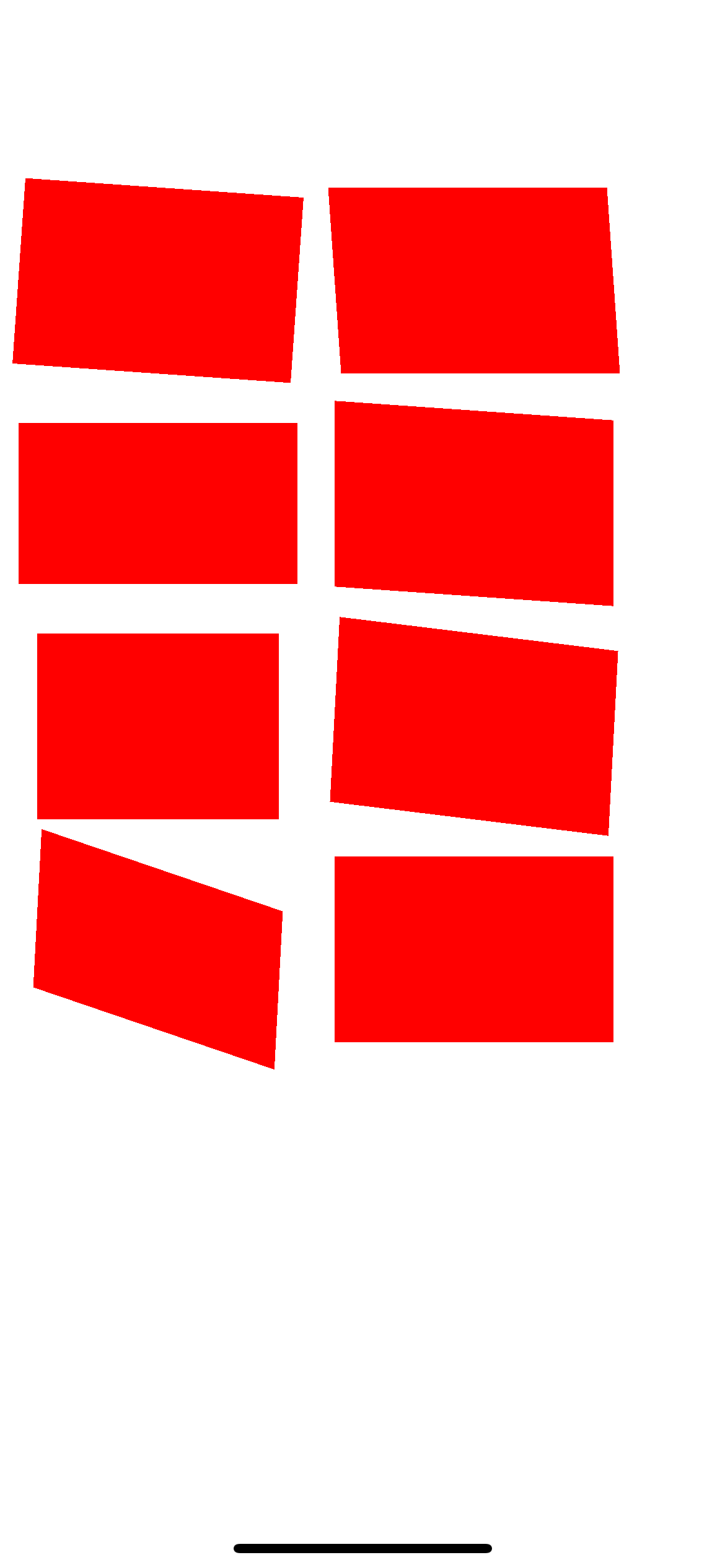
After
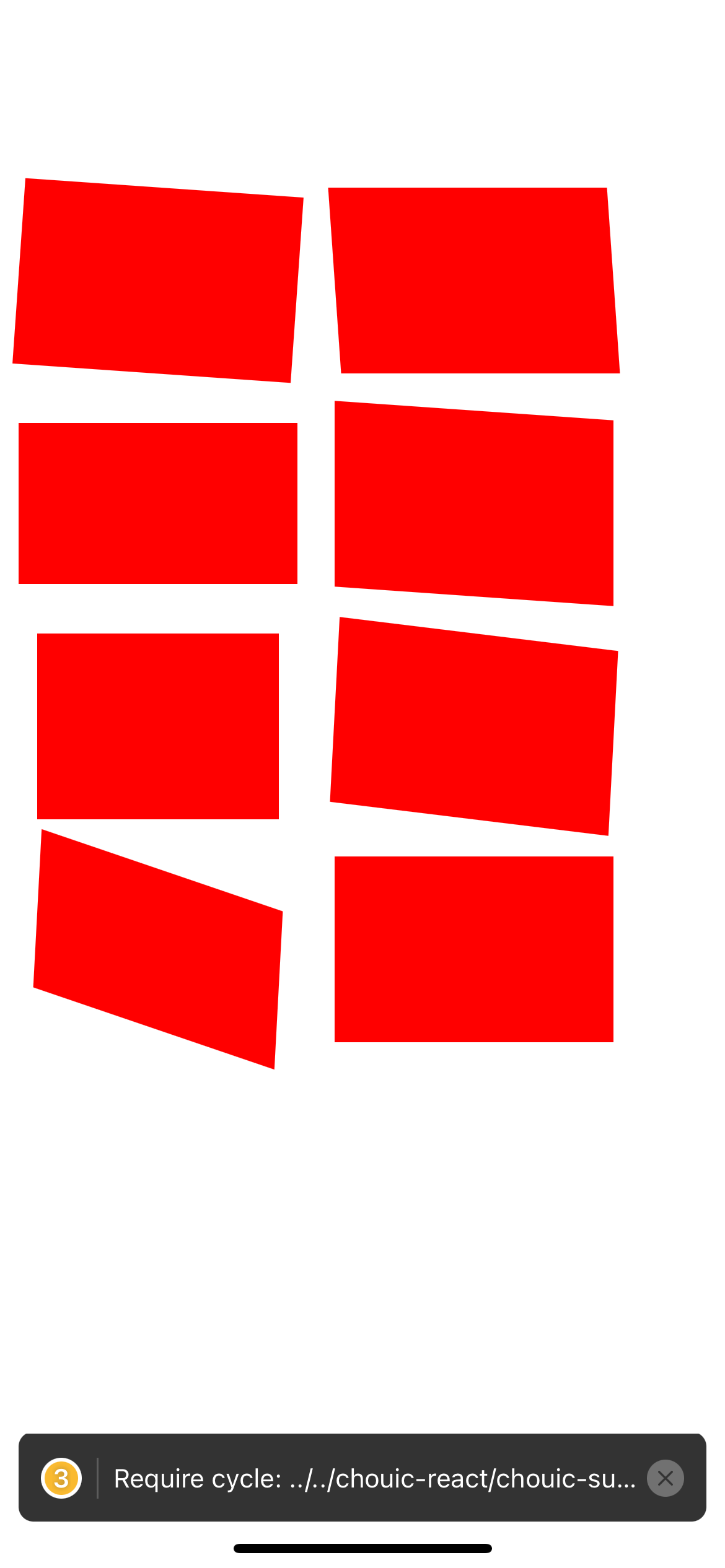
Code I used to test
```
const commonStyle = {
width: 150,
height: 100,
backgroundColor: "red",
margin: 10,
}
const Test = () => (
<View style={{ flexDirection: "row" }}>
<View>
<View
style={[
commonStyle,
{
transform: [{ rotateZ: "4deg" }],
},
]}
/>
<View
style={[
commonStyle,
{
transform: [{ rotateX: "30deg" }],
},
]}
/>
<View
style={[
commonStyle,
{
transform: [{ rotateY: "30deg" }],
},
]}
/>
<View
style={[
commonStyle,
{
transform: [{ rotateX: "30deg" }, { rotateY: "30deg" }, { rotateZ: "3deg" }],
},
]}
/>
</View>
<View>
<View
style={[
commonStyle,
{
transform: [{ skewX: "4deg" }],
},
]}
/>
<View
style={[
commonStyle,
{
transform: [{ skewY: "4deg" }],
},
]}
/>
<View
style={[
commonStyle,
{
transform: [{ skewY: "4deg" }, { rotateZ: "3deg" }],
},
]}
/>
<View
style={[
commonStyle,
{
transform: [{ perspective: 1000 }],
},
]}
/>
</View>
</View>
)
```
Reviewed By: lunaleaps
Differential Revision: D33665910
Pulled By: sshic
fbshipit-source-id: 91163ec2a0897a73ddf0310d86afacea04b89bc7
Summary:
For every direct and bubbling event, RCTComponentData (iOS-only) creates a {eventName}: true entry in the component's ViewConfig validAttributes. This entry is unnecessary, and creates a discrepancy between ViewConfigs on iOS vs Android.

This diff removes this entry for all events to:
1. Reduce bloat in native ViewConfigs
2. Create consistency betweeen Android and iOS.

Changelog: [Internal]

Reviewed By: yungsters

Differential Revision: D33303950

fbshipit-source-id: 870c8a2a6d41156ac89bd8554eb09f292bb6108e
Summary:
Retrying D30015799 (https://github.com/facebook/react-native/commit/6e903b07fa8e8d9b78cae0e031bb8022f7a63195) with a fix where ScrollViewNativeComponent was missing the automaticallyAdjustKeyboardInsets prop.
----- Original Summary
Currently, ScrollViews provide the prop `keyboardDismissMode` which lets you choose `"interactive"`. However when the keyboard is shown, it will be rendered above the ScrollView, potentially blocking content.
With the `automaticallyAdjustKeyboardInsets` prop the ScrollView will automatically adjust it's `contentInset`, `scrollIndicatorInsets` and `contentOffset` (scroll Y) props to push the content up so nothing gets blocked.
* The animation curve and duration of the Keyboard is exactly matched.
* The absolute position of the ScrollView is respected, so if the Keyboard only overlaps 10 pixels of the ScrollView, it will only get inset by 10 pixels.
* By respecting the absolute position on screen, this automatically makes it fully compatible with phones with notches (custom safe areas)
* By using the keyboard frame, this also works for different sized keyboards and even `<InputAccessoryView>`s
* This also supports `maintainVisibleContentPosition` and `autoscrollToTopThreshold`.
* I also fixed an issue with the `maintainVisibleContentPosition` (`autoscrollToTopThreshold`) prop(s), so they behave more reliably when `contentInset`s are applied. (This makes automatically scrolling to new items fully compatible with `automaticallyAdjustKeyboardInsets`)
## Changelog
* [iOS] [Added] - ScrollView: `automaticallyAdjustKeyboardInsets` prop: Automatically animate `contentInset`, `scrollIndicatorInsets` and `contentOffset` (scroll Y) to avoid the Keyboard. (respecting absolute position on screen and safe-areas)
* [iOS] [Fixed] - ScrollView: Respect `contentInset` when animating new items with `autoscrollToTopThreshold`, make `automaticallyAdjustKeyboardInsets` work with `autoscrollToTopThreshold` (includes vertical, vertical-inverted, horizontal and horizontal-inverted ScrollViews)
Pull Request resolved: https://github.com/facebook/react-native/pull/31402
Test Plan:
<table>
<tr>
<th>Before</th>
<th>After</th>
</tr>
<tr>
<td>
https://user-images.githubusercontent.com/15199031/115708680-9700aa80-a370-11eb-8016-e75d81a92cd7.MP4
</td>
<td>
https://user-images.githubusercontent.com/15199031/115708699-9b2cc800-a370-11eb-976f-c4010cd96d55.MP4
</td>
</table>
### "Why not just use `<KeyboardAvoidingView>`?"
<table>
<tr>
<th>Before (with <code><KeyboardAvoidingView></code>)</th>
<th>After (with <code>automaticallyAdjustKeyboardInsets</code>)</th>
</tr>
<tr>
<td>
https://user-images.githubusercontent.com/15199031/115708749-abdd3e00-a370-11eb-8e09-a27ffaef12b8.MP4
</td>
<td>
https://user-images.githubusercontent.com/15199031/115708777-b3044c00-a370-11eb-9b7a-e040ccb3ef8c.MP4
</td>
</table>
> Also notice how the `<KeyboardAvoidingView>` does not match the animation curve of the Keyboard
### Usage
```jsx
export const ChatPage = ({
flatListProps,
textInputProps
}: Props): React.ReactElement => (
<>
<FlatList
{...flatListProps}
keyboardDismissMode="interactive"
automaticallyAdjustContentInsets={false}
contentInsetAdjustmentBehavior="never"
maintainVisibleContentPosition={{ minIndexForVisible: 0, autoscrollToTopThreshold: 100 }}
automaticallyAdjustKeyboardInsets={true}
/>
<InputAccessoryView backgroundColor={colors.white}>
<ChatInput {...textInputProps} />
</InputAccessoryView>
</>
);
```
## Related Issues
* Fixes https://github.com/facebook/react-native/issues/31394
* Fixes https://github.com/facebook/react-native/issues/13073
Reviewed By: yungsters
Differential Revision: D32578661
Pulled By: sota000
fbshipit-source-id: 45985e2844275fe96304eccfd1901907dc4f9279
Summary:
This pull request aims to remove iOS 11 availability check which is no longer needed.

The minimum iOS deployment target for React Native is iOS 11 but we still have iOS 11 version check like below.

```
if (available(iOS 11.0, *)) {
```

This is a continuation pull request of https://github.com/facebook/react-native/pull/32151

## Changelog

<!-- Help reviewers and the release process by writing your own changelog entry. For an example, see:
https://github.com/facebook/react-native/wiki/Changelog
-->

[iOS] [Changed] - Remove iOS 11 availability check

Pull Request resolved: https://github.com/facebook/react-native/pull/32488

Reviewed By: yungsters

Differential Revision: D32006312

Pulled By: ryancat

fbshipit-source-id: 0ee6579e433a15d3d220a52d2ccd6931b0513971
Summary:
i saw this a lot in the codebase, it's not optimal bc we're using two selectors when we only need one.

  fastmod --extensions m,mm '\[\[(.*) alloc] init]' '[${1} new]' --dir xplat/js/react-native-github/*

i manually updated the callsites that this codemod couldn't handle (e.g., where there were more than one of these instances in a single line)

Changelog: [Internal]

Reviewed By: RSNara

Differential Revision: D31776561

fbshipit-source-id: 1b16da240e8a79b54da67383d548921b82b05a9f
Summary:
Original commit changeset: 9ccfb4b6d477 / D30015799 (https://github.com/facebook/react-native/commit/6e903b07fa8e8d9b78cae0e031bb8022f7a63195)

The diff caused a redbox/error in some products. Reverting now and will try it again.

Changelog: Backing out PR: 31402

Differential Revision: D31238961

fbshipit-source-id: b2ccd3d3ab9d7e764e41fb54d8a7e60882d1405f
Summary:
Currently, ScrollViews provide the prop `keyboardDismissMode` which lets you choose `"interactive"`. However when the keyboard is shown, it will be rendered above the ScrollView, potentially blocking content.
With the `automaticallyAdjustKeyboardInsets` prop the ScrollView will automatically adjust it's `contentInset`, `scrollIndicatorInsets` and `contentOffset` (scroll Y) props to push the content up so nothing gets blocked.
* The animation curve and duration of the Keyboard is exactly matched.
* The absolute position of the ScrollView is respected, so if the Keyboard only overlaps 10 pixels of the ScrollView, it will only get inset by 10 pixels.
* By respecting the absolute position on screen, this automatically makes it fully compatible with phones with notches (custom safe areas)
* By using the keyboard frame, this also works for different sized keyboards and even `<InputAccessoryView>`s
* This also supports `maintainVisibleContentPosition` and `autoscrollToTopThreshold`.
* I also fixed an issue with the `maintainVisibleContentPosition` (`autoscrollToTopThreshold`) prop(s), so they behave more reliably when `contentInset`s are applied. (This makes automatically scrolling to new items fully compatible with `automaticallyAdjustKeyboardInsets`)
## Changelog
* [iOS] [Added] - ScrollView: `automaticallyAdjustKeyboardInsets` prop: Automatically animate `contentInset`, `scrollIndicatorInsets` and `contentOffset` (scroll Y) to avoid the Keyboard. (respecting absolute position on screen and safe-areas)
* [iOS] [Fixed] - ScrollView: Respect `contentInset` when animating new items with `autoscrollToTopThreshold`, make `automaticallyAdjustKeyboardInsets` work with `autoscrollToTopThreshold` (includes vertical, vertical-inverted, horizontal and horizontal-inverted ScrollViews)
Pull Request resolved: https://github.com/facebook/react-native/pull/31402
Test Plan:
<table>
<tr>
<th>Before</th>
<th>After</th>
</tr>
<tr>
<td>
https://user-images.githubusercontent.com/15199031/115708680-9700aa80-a370-11eb-8016-e75d81a92cd7.MP4
</td>
<td>
https://user-images.githubusercontent.com/15199031/115708699-9b2cc800-a370-11eb-976f-c4010cd96d55.MP4
</td>
</table>
### "Why not just use `<KeyboardAvoidingView>`?"
<table>
<tr>
<th>Before (with <code><KeyboardAvoidingView></code>)</th>
<th>After (with <code>automaticallyAdjustKeyboardInsets</code>)</th>
</tr>
<tr>
<td>
https://user-images.githubusercontent.com/15199031/115708749-abdd3e00-a370-11eb-8e09-a27ffaef12b8.MP4
</td>
<td>
https://user-images.githubusercontent.com/15199031/115708777-b3044c00-a370-11eb-9b7a-e040ccb3ef8c.MP4
</td>
</table>
> Also notice how the `<KeyboardAvoidingView>` does not match the animation curve of the Keyboard
### Usage
```jsx
export const ChatPage = ({
flatListProps,
textInputProps
}: Props): React.ReactElement => (
<>
<FlatList
{...flatListProps}
keyboardDismissMode="interactive"
automaticallyAdjustContentInsets={false}
contentInsetAdjustmentBehavior="never"
maintainVisibleContentPosition={{ minIndexForVisible: 0, autoscrollToTopThreshold: 100 }}
automaticallyAdjustKeyboardInsets={true}
/>
<InputAccessoryView backgroundColor={colors.white}>
<ChatInput {...textInputProps} />
</InputAccessoryView>
</>
);
```
## Related Issues
* Fixes https://github.com/facebook/react-native/issues/31394
* Fixes https://github.com/facebook/react-native/issues/13073
Reviewed By: yungsters
Differential Revision: D30015799
Pulled By: sota000
fbshipit-source-id: 9ccfb4b6d477da192a96db4cfa07c31a2d2cefcb
Summary:
This pull request aims to remove iOS 11 version check which is no longer needed.

The minimum iOS deployment target for React Native is `iOS 11` but we still have iOS 11 version check like below.

```
#if __IPHONE_OS_VERSION_MAX_ALLOWED >= 110000 /* __IPHONE_11_0 */
        if (available(iOS 11.0, *)) {
```

> React Native apps may target iOS 11.0 and Android 5.0 (API 21) or newer.

ref: https://github.com/facebook/react-native#-requirements

------

If there is a team motivation to remove the deprecated methods and classes before iOS 10, I can continue the work in this pull request or in the continuing pull requests.

We have deprecated warnings for these in the project.

- `UIUserNotificationSettings`
- `UILocalNotification`
- `topLayoutGuide` and `bottomLayoutGuide`
- `automaticallyAdjustsScrollViewInsets`

## Changelog

[iOS] [Changed] - Remove iOS 11 version check

Pull Request resolved: https://github.com/facebook/react-native/pull/32151

Reviewed By: sammy-SC

Differential Revision: D30877917

Pulled By: yungsters

fbshipit-source-id: d903ea5d557beeb65ef87bfce572e4db3532b3c5
 Rafael
 Christoph Purrer
 Ruslan Lesiutin
 fabriziobertoglio1987
 Nick Gerleman
 Nishan
 Paige Sun
 Thuong Tran
 Michael Sokolnicki
 Eric Edouard
 Ruslan Latypov
 Luna Wei
 Dusan Klinec
 Vincent Riemer
 Ken Tominaga
 Chaoshuai Lu
 Diego Pasquali
 HeyImChris
 Danilo Bürger
 Phillip Pan
 Andrei Shikov
 CodemodService FBSourceClangFormatLinterBot
 Mattéo Martin
 Ramanpreet Nara
 Andres Suarez
 Marc Rousavy
 Sota Ogo



