Summary:
Changelog: [Internal][iOS] Minor: Rename RCTNotAllowedInAppWideFabric to RCTNotAllowedInFabricWithoutLegacy

`RCTNewArchitectureValidationPlaceholder(RCTNotAllowedInBridgeless` is to track Bridge APIs that are okay in Fabric but not in Bridgeless.

`RCTNewArchitectureValidationPlaceholder(RCTNotAllowedInFabricWithoutLegacy` is to track legacy APIs that should not exist if the app was using Fabric **without any legacy architecture**. e.g. RCTBridgeModule, legacy interop view components.

Reviewed By: fkgozali

Differential Revision: D37659105

fbshipit-source-id: aee4e083820e83a8dac19eb3b5efc49b37d90039
Summary:
Changelog: [Internal]

Add `RCTNewArchitectureValidationPlaceholder(RCTNotAllowedInAppWideFabric)` to track RCTViewManagers used in Fabric using the legacy interop layer. They work for now in the interop layer, but they need to be migrated to Fabric to remove potential issues with using the legacy architecture and the new architecture simultaneously. RCTNewArchitectureValidationPlaceholder is a no-op used for tracking unmigrated callsites that may be used often.

`RCTNewArchitectureValidationPlaceholder(RCTNotAllowedInBridgeless` is to track Bridge APIs that are okay in Fabric but not in Bridgeless.

This diff adds the validation placeholder to legacy components registered in [RCTLegacyViewManagerInteropComponentView.mm](https://github.com/facebook/react-native/blob/743d0706e2099514b4603855bfc2b6505fcc10a5/React/Fabric/Mounting/ComponentViews/LegacyViewManagerInterop/RCTLegacyViewManagerInteropComponentView.mm#L92-L99).

Reviewed By: fkgozali

Differential Revision: D37635613

fbshipit-source-id: 5399dad822c8f5c11ef3b32297bf25214fd857dd
Summary: Changelog: [Internal] - We can now remove the '2' suffix as we had an internal implementation that was not truly aligned with W3C pointers but used the same name. We have aligned the internal types to match w3c so we can now remove the suffix that differentiates them.

Reviewed By: vincentriemer

Differential Revision: D37545813

fbshipit-source-id: 6f2336ae9e314066c340161113268c1f28621a71
Summary:
Apple suggested to this new API on iOS 10+.

> // Any new bitmap drawing code is encouraged to use UIGraphicsImageRenderer in lieu of this API.

WWDC18 Reference: https://developer.apple.com/videos/play/wwdc2018/219/
> Use UIGraphicsImageRenderer to create and draw to an image buffer
Supports Wide Color, unlike UIGraphicsBeginImageContext()
Combine with UIImageView for efficient offscreen rendering

Per https://nshipster.com/image-resizing/#performance-benchmarks, the new API runs even faster than the C version, probably due to more smart context reuses/management.

Changelog:
[iOS][Changed] - Adopt UIGraphicsImageRenderer API

Reviewed By: philIip

Differential Revision: D35699584

fbshipit-source-id: 7a1e2109d5e121fb396c1014f4ed0a892211b0cc
Summary:
Changelog: [Internal][iOS] Add validation reporting APIs for unexpected uses of Paper when Fabric is enabled

## RCTNotAllowedInBridgeless
Previously, we only had violation reporting APIs for when **Bridge APIs** are used in **Bridgeless mode**, which was only enabled in Bridgeless mode.

## RCTNotAllowedInFabric
This diff adds violation reporting APIs to use when **pre-Fabric Bridge APIs** are used in **Bridge or Bridgeless mode**. This allows us to add RCTAssert/RCTError/RCTLog to more APIs in Bridge mode. The main purpose is to distinguish between Bridge APIs that still work in Fabric, versus Bridge APIs that are no longer used in Fabric, so that the latter can be removed.

Reviewed By: philIip

Differential Revision: D35015758

fbshipit-source-id: 35366bc5143a59ee9a16d75da4de546ebfe250e6
Summary:
We're seeing a red box that `Component 'RCTModalHostView' re-registered bubbling event 'topDismiss' as a direct event moduleConstantsForComponent` in some downstream react-native-macOS builds.

Looking at other usage of this object, we treat it as a direct event block everywhere else, just this one spot it's a bubbling event block. It was added with [this PR](https://github.com/facebook/react-native/commit/7bf78eae5e2d53438bc333d3b9995b218f74c84b) which doesn't explicitly address the desire for the prop to bubble up through the view hierarchy or not, so I'm guessing it was just mislabeled and should be direct like the other usages.

## Changelog

[iOS] [Bug] - Fix modal redbox for onDismiss

Pull Request resolved: https://github.com/facebook/react-native/pull/33222

Test Plan: We don't redbox downstream anymore

Reviewed By: p-sun, RSNara

Differential Revision: D34628759

Pulled By: philIip

fbshipit-source-id: bb3cc78fa43d20808579c614e25716880d002d88
Summary:
Changelog: [iOS][Internal] Use synthesize viewRegistry_DEPRECATED for Keyframes to remove RCTWeakViewHolder

Remove the `RCTWeakViewHolder` hack, since it can be replaced with `viewRegistry_DEPRECATED viewForReactTag`.

Reviewed By: RSNara

Differential Revision: D34468082

fbshipit-source-id: be41ed2df6ee195409724f6069fd99a793dca01a
Summary:
Changelog: [Internal]

# Diff Changes
- Set `RCTEnableNewArchitectureViolationReporting` to YES in app-wide Bridgeless mode.
- Rename `RCTWarnNotAllowedForNewArchitecture` to `RCTErrorNotAllowedForNewArchitecture`, and use `RCTLogError` instead of `RCTLogWarn` so the error goes to Logview.

Reviewed By: RSNara

Differential Revision: D34202682

fbshipit-source-id: 471486c65f7a42f8f11140e61ff60592dc826f61
Summary:
The views with touch event props are currently flattened by Fabric core, as we don't take event listeners into account when calculating whether the view should be flattened. This results in a confusing situation when components with touch event listeners (e.g. `<View onTouchStart={() => {}} /> `) or ones using `PanResponder` are either ignored (iOS) or cause a crash (Android).

This change passes touch event props to C++ layer and uses them to calculate whether the view node should be flattened or not. It also refactors events to be kept as a singular bitset with 32 bit (~`uint32_t`).

Changelog: [Changed][General] Avoid flattening nodes with event props

Reviewed By: sammy-SC

Differential Revision: D34005536

fbshipit-source-id: 96255b389a7bfff4aa208a96fd0c173d9edf1512
Summary:
https://github.com/facebook/react-native/commit/c974cbff04a8d90ac0f856dbada3fc5a75c75b49 changed the border colors to be of UIColor instead of CGColor. This allowed working with dark mode to switch the border colors automatically. However, in certain situation the system can't resolve the current trait collection (see https://stackoverflow.com/a/57177411/2525941). This commit resolves the colors with the current trait collection to ensure the right colors are selected. This matches with the behavior of how the background color is resolved (also in displayLayer:).

## Changelog

[iOS] [Fixed] - Resolve border platform color based on current trait collection

Pull Request resolved: https://github.com/facebook/react-native/pull/32492

Test Plan: Same test plan as https://github.com/facebook/react-native/pull/29728

Reviewed By: sammy-SC

Differential Revision: D33819225

Pulled By: cortinico

fbshipit-source-id: 2f8024be7ee7b32d1852373b47fa1437cc569391
Summary:
Before https://github.com/facebook/react-native/commit/f951da912dd8b4dc2b0d674f8f37f9d982a03c48 finding a system font used to return early. In order to allow variants, the referenced patch removed the early return so that variants could be applied later. However, there is no need to find the closest font as we already selected the proper system font. This also fixes a bug with setting a custom font handler via RCTSetDefaultFontHandler whos return could get overwritten by the closest font search.

## Changelog

<!-- Help reviewers and the release process by writing your own changelog entry. For an example, see:
https://github.com/facebook/react-native/wiki/Changelog
-->

[iOS] [Fixed] - Respect RCTSetDefaultFontHandler chosen font

Pull Request resolved: https://github.com/facebook/react-native/pull/32482

Reviewed By: ShikaSD

Differential Revision: D33844138

Pulled By: cortinico

fbshipit-source-id: 05c01fc358cd19f8be342218cdba944b303073ed
Summary:
…ansforms
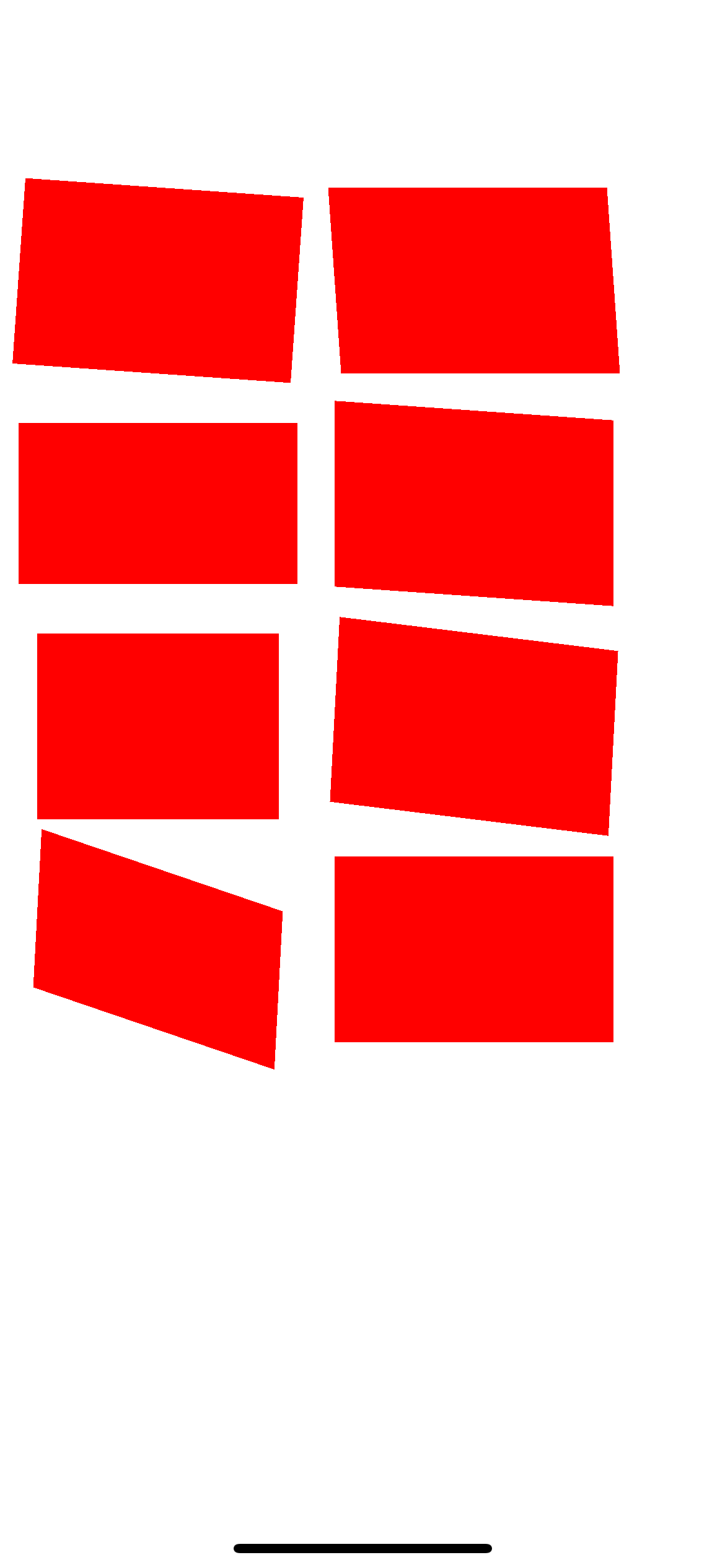
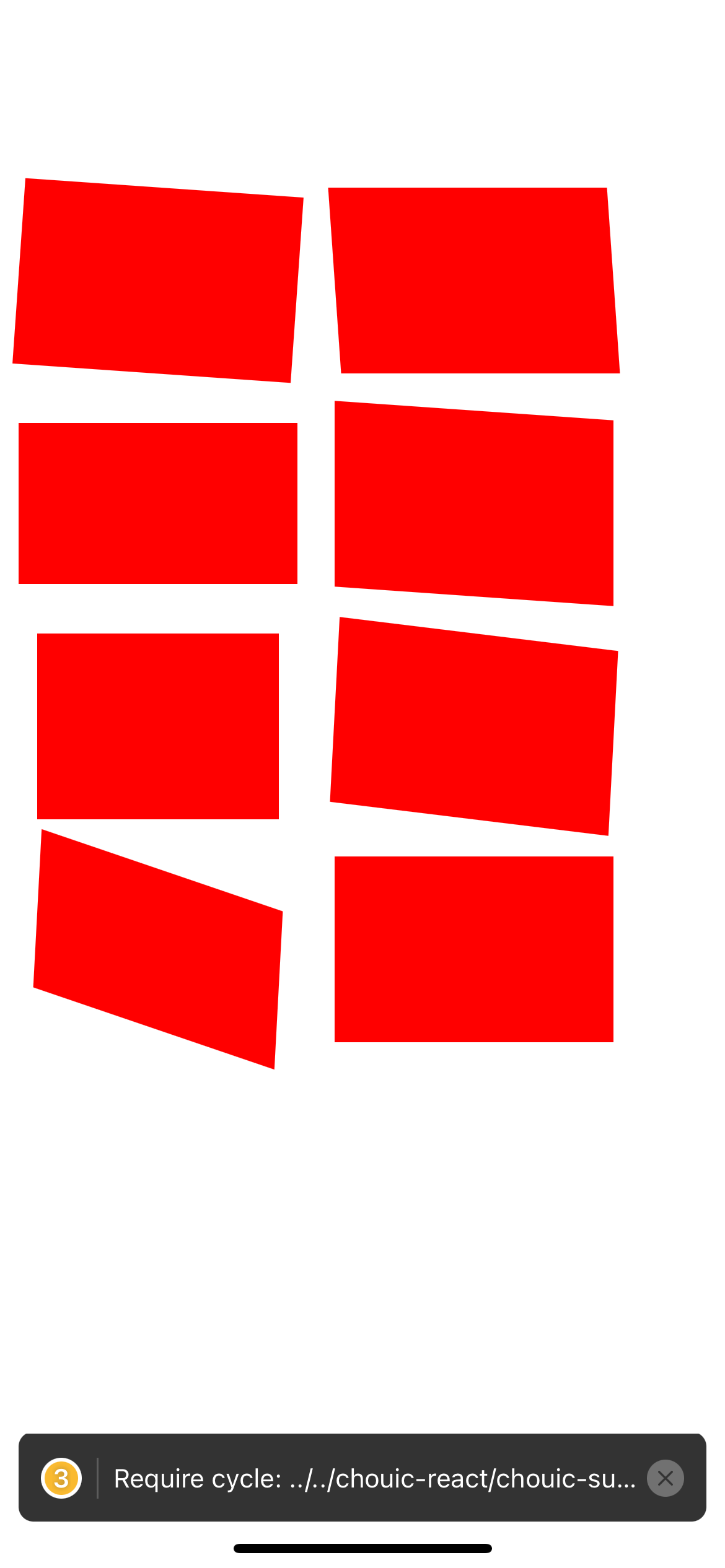
On iOS, if a View is rotated with the a transform (e.g. <View style={{transform: {rotationZ: 5}}} />), the view has aliasing (see screenshot). Same for a skew transformation. We don't have the issue on Android
This behavior had originally being fixed by this PR https://github.com/facebook/react-native/pull/1999
However a new PR was merge ( https://github.com/facebook/react-native/pull/19360 ) that broke this. I think it was made to add antialiasing during perspective transforms but seems to have broken the antialiasing when rotationZ transforms
This PR adds back the antialising during rotation transform , while keeping it during perspective transform.
## Changelog
I changed the allowsEdgeAntialiasing condition, making it "true" when the m12 or m21 is not 0. From this article https://medium.com/swlh/understanding-3d-matrix-transforms-with-pixijs-c76da3f8bd8 , I've understood that in all rotation or skew transformations, m12 or m21 is different than 0 . In the other transformation (e.g. scale or translate) it stays at 0.
Although, I'm not a matrix transformation expert so I may be mistaken
Pull Request resolved: https://github.com/facebook/react-native/pull/32920
Test Plan:
I've written several views with all rotateX/Y/Z , skewX,Y and perpective transformation. Before the PR some transformation was showing aliasing on iOS (e.g. top-left view in the screenshot, don't hesitate to zoom in the image if you don't see it) and with this PR it does not have anymore
Before
After
Code I used to test
```
const commonStyle = {
width: 150,
height: 100,
backgroundColor: "red",
margin: 10,
}
const Test = () => (
<View style={{ flexDirection: "row" }}>
<View>
<View
style={[
commonStyle,
{
transform: [{ rotateZ: "4deg" }],
},
]}
/>
<View
style={[
commonStyle,
{
transform: [{ rotateX: "30deg" }],
},
]}
/>
<View
style={[
commonStyle,
{
transform: [{ rotateY: "30deg" }],
},
]}
/>
<View
style={[
commonStyle,
{
transform: [{ rotateX: "30deg" }, { rotateY: "30deg" }, { rotateZ: "3deg" }],
},
]}
/>
</View>
<View>
<View
style={[
commonStyle,
{
transform: [{ skewX: "4deg" }],
},
]}
/>
<View
style={[
commonStyle,
{
transform: [{ skewY: "4deg" }],
},
]}
/>
<View
style={[
commonStyle,
{
transform: [{ skewY: "4deg" }, { rotateZ: "3deg" }],
},
]}
/>
<View
style={[
commonStyle,
{
transform: [{ perspective: 1000 }],
},
]}
/>
</View>
</View>
)
```
Reviewed By: lunaleaps
Differential Revision: D33665910
Pulled By: sshic
fbshipit-source-id: 91163ec2a0897a73ddf0310d86afacea04b89bc7
Summary:
For every direct and bubbling event, RCTComponentData (iOS-only) creates a {eventName}: true entry in the component's ViewConfig validAttributes. This entry is unnecessary, and creates a discrepancy between ViewConfigs on iOS vs Android.

This diff removes this entry for all events to:
1. Reduce bloat in native ViewConfigs
2. Create consistency betweeen Android and iOS.

Changelog: [Internal]

Reviewed By: yungsters

Differential Revision: D33303950

fbshipit-source-id: 870c8a2a6d41156ac89bd8554eb09f292bb6108e
Summary:
Retrying D30015799 (https://github.com/facebook/react-native/commit/6e903b07fa8e8d9b78cae0e031bb8022f7a63195) with a fix where ScrollViewNativeComponent was missing the automaticallyAdjustKeyboardInsets prop.
----- Original Summary
Currently, ScrollViews provide the prop `keyboardDismissMode` which lets you choose `"interactive"`. However when the keyboard is shown, it will be rendered above the ScrollView, potentially blocking content.
With the `automaticallyAdjustKeyboardInsets` prop the ScrollView will automatically adjust it's `contentInset`, `scrollIndicatorInsets` and `contentOffset` (scroll Y) props to push the content up so nothing gets blocked.
* The animation curve and duration of the Keyboard is exactly matched.
* The absolute position of the ScrollView is respected, so if the Keyboard only overlaps 10 pixels of the ScrollView, it will only get inset by 10 pixels.
* By respecting the absolute position on screen, this automatically makes it fully compatible with phones with notches (custom safe areas)
* By using the keyboard frame, this also works for different sized keyboards and even `<InputAccessoryView>`s
* This also supports `maintainVisibleContentPosition` and `autoscrollToTopThreshold`.
* I also fixed an issue with the `maintainVisibleContentPosition` (`autoscrollToTopThreshold`) prop(s), so they behave more reliably when `contentInset`s are applied. (This makes automatically scrolling to new items fully compatible with `automaticallyAdjustKeyboardInsets`)
## Changelog
* [iOS] [Added] - ScrollView: `automaticallyAdjustKeyboardInsets` prop: Automatically animate `contentInset`, `scrollIndicatorInsets` and `contentOffset` (scroll Y) to avoid the Keyboard. (respecting absolute position on screen and safe-areas)
* [iOS] [Fixed] - ScrollView: Respect `contentInset` when animating new items with `autoscrollToTopThreshold`, make `automaticallyAdjustKeyboardInsets` work with `autoscrollToTopThreshold` (includes vertical, vertical-inverted, horizontal and horizontal-inverted ScrollViews)
Pull Request resolved: https://github.com/facebook/react-native/pull/31402
Test Plan:
<table>
<tr>
<th>Before</th>
<th>After</th>
</tr>
<tr>
<td>
https://user-images.githubusercontent.com/15199031/115708680-9700aa80-a370-11eb-8016-e75d81a92cd7.MP4
</td>
<td>
https://user-images.githubusercontent.com/15199031/115708699-9b2cc800-a370-11eb-976f-c4010cd96d55.MP4
</td>
</table>
### "Why not just use `<KeyboardAvoidingView>`?"
<table>
<tr>
<th>Before (with <code><KeyboardAvoidingView></code>)</th>
<th>After (with <code>automaticallyAdjustKeyboardInsets</code>)</th>
</tr>
<tr>
<td>
https://user-images.githubusercontent.com/15199031/115708749-abdd3e00-a370-11eb-8e09-a27ffaef12b8.MP4
</td>
<td>
https://user-images.githubusercontent.com/15199031/115708777-b3044c00-a370-11eb-9b7a-e040ccb3ef8c.MP4
</td>
</table>
> Also notice how the `<KeyboardAvoidingView>` does not match the animation curve of the Keyboard
### Usage
```jsx
export const ChatPage = ({
flatListProps,
textInputProps
}: Props): React.ReactElement => (
<>
<FlatList
{...flatListProps}
keyboardDismissMode="interactive"
automaticallyAdjustContentInsets={false}
contentInsetAdjustmentBehavior="never"
maintainVisibleContentPosition={{ minIndexForVisible: 0, autoscrollToTopThreshold: 100 }}
automaticallyAdjustKeyboardInsets={true}
/>
<InputAccessoryView backgroundColor={colors.white}>
<ChatInput {...textInputProps} />
</InputAccessoryView>
</>
);
```
## Related Issues
* Fixes https://github.com/facebook/react-native/issues/31394
* Fixes https://github.com/facebook/react-native/issues/13073
Reviewed By: yungsters
Differential Revision: D32578661
Pulled By: sota000
fbshipit-source-id: 45985e2844275fe96304eccfd1901907dc4f9279
Summary:
This pull request aims to remove iOS 11 availability check which is no longer needed.

The minimum iOS deployment target for React Native is iOS 11 but we still have iOS 11 version check like below.

```
if (available(iOS 11.0, *)) {
```

This is a continuation pull request of https://github.com/facebook/react-native/pull/32151

## Changelog

<!-- Help reviewers and the release process by writing your own changelog entry. For an example, see:
https://github.com/facebook/react-native/wiki/Changelog
-->

[iOS] [Changed] - Remove iOS 11 availability check

Pull Request resolved: https://github.com/facebook/react-native/pull/32488

Reviewed By: yungsters

Differential Revision: D32006312

Pulled By: ryancat

fbshipit-source-id: 0ee6579e433a15d3d220a52d2ccd6931b0513971
Summary:
i saw this a lot in the codebase, it's not optimal bc we're using two selectors when we only need one.

  fastmod --extensions m,mm '\[\[(.*) alloc] init]' '[${1} new]' --dir xplat/js/react-native-github/*

i manually updated the callsites that this codemod couldn't handle (e.g., where there were more than one of these instances in a single line)

Changelog: [Internal]

Reviewed By: RSNara

Differential Revision: D31776561

fbshipit-source-id: 1b16da240e8a79b54da67383d548921b82b05a9f
Summary:
Original commit changeset: 9ccfb4b6d477 / D30015799 (https://github.com/facebook/react-native/commit/6e903b07fa8e8d9b78cae0e031bb8022f7a63195)

The diff caused a redbox/error in some products. Reverting now and will try it again.

Changelog: Backing out PR: 31402

Differential Revision: D31238961

fbshipit-source-id: b2ccd3d3ab9d7e764e41fb54d8a7e60882d1405f
Summary:
Currently, ScrollViews provide the prop `keyboardDismissMode` which lets you choose `"interactive"`. However when the keyboard is shown, it will be rendered above the ScrollView, potentially blocking content.
With the `automaticallyAdjustKeyboardInsets` prop the ScrollView will automatically adjust it's `contentInset`, `scrollIndicatorInsets` and `contentOffset` (scroll Y) props to push the content up so nothing gets blocked.
* The animation curve and duration of the Keyboard is exactly matched.
* The absolute position of the ScrollView is respected, so if the Keyboard only overlaps 10 pixels of the ScrollView, it will only get inset by 10 pixels.
* By respecting the absolute position on screen, this automatically makes it fully compatible with phones with notches (custom safe areas)
* By using the keyboard frame, this also works for different sized keyboards and even `<InputAccessoryView>`s
* This also supports `maintainVisibleContentPosition` and `autoscrollToTopThreshold`.
* I also fixed an issue with the `maintainVisibleContentPosition` (`autoscrollToTopThreshold`) prop(s), so they behave more reliably when `contentInset`s are applied. (This makes automatically scrolling to new items fully compatible with `automaticallyAdjustKeyboardInsets`)
## Changelog
* [iOS] [Added] - ScrollView: `automaticallyAdjustKeyboardInsets` prop: Automatically animate `contentInset`, `scrollIndicatorInsets` and `contentOffset` (scroll Y) to avoid the Keyboard. (respecting absolute position on screen and safe-areas)
* [iOS] [Fixed] - ScrollView: Respect `contentInset` when animating new items with `autoscrollToTopThreshold`, make `automaticallyAdjustKeyboardInsets` work with `autoscrollToTopThreshold` (includes vertical, vertical-inverted, horizontal and horizontal-inverted ScrollViews)
Pull Request resolved: https://github.com/facebook/react-native/pull/31402
Test Plan:
<table>
<tr>
<th>Before</th>
<th>After</th>
</tr>
<tr>
<td>
https://user-images.githubusercontent.com/15199031/115708680-9700aa80-a370-11eb-8016-e75d81a92cd7.MP4
</td>
<td>
https://user-images.githubusercontent.com/15199031/115708699-9b2cc800-a370-11eb-976f-c4010cd96d55.MP4
</td>
</table>
### "Why not just use `<KeyboardAvoidingView>`?"
<table>
<tr>
<th>Before (with <code><KeyboardAvoidingView></code>)</th>
<th>After (with <code>automaticallyAdjustKeyboardInsets</code>)</th>
</tr>
<tr>
<td>
https://user-images.githubusercontent.com/15199031/115708749-abdd3e00-a370-11eb-8e09-a27ffaef12b8.MP4
</td>
<td>
https://user-images.githubusercontent.com/15199031/115708777-b3044c00-a370-11eb-9b7a-e040ccb3ef8c.MP4
</td>
</table>
> Also notice how the `<KeyboardAvoidingView>` does not match the animation curve of the Keyboard
### Usage
```jsx
export const ChatPage = ({
flatListProps,
textInputProps
}: Props): React.ReactElement => (
<>
<FlatList
{...flatListProps}
keyboardDismissMode="interactive"
automaticallyAdjustContentInsets={false}
contentInsetAdjustmentBehavior="never"
maintainVisibleContentPosition={{ minIndexForVisible: 0, autoscrollToTopThreshold: 100 }}
automaticallyAdjustKeyboardInsets={true}
/>
<InputAccessoryView backgroundColor={colors.white}>
<ChatInput {...textInputProps} />
</InputAccessoryView>
</>
);
```
## Related Issues
* Fixes https://github.com/facebook/react-native/issues/31394
* Fixes https://github.com/facebook/react-native/issues/13073
Reviewed By: yungsters
Differential Revision: D30015799
Pulled By: sota000
fbshipit-source-id: 9ccfb4b6d477da192a96db4cfa07c31a2d2cefcb
Summary:
This pull request aims to remove iOS 11 version check which is no longer needed.

The minimum iOS deployment target for React Native is `iOS 11` but we still have iOS 11 version check like below.

```
#if __IPHONE_OS_VERSION_MAX_ALLOWED >= 110000 /* __IPHONE_11_0 */
        if (available(iOS 11.0, *)) {
```

> React Native apps may target iOS 11.0 and Android 5.0 (API 21) or newer.

ref: https://github.com/facebook/react-native#-requirements

------

If there is a team motivation to remove the deprecated methods and classes before iOS 10, I can continue the work in this pull request or in the continuing pull requests.

We have deprecated warnings for these in the project.

- `UIUserNotificationSettings`
- `UILocalNotification`
- `topLayoutGuide` and `bottomLayoutGuide`
- `automaticallyAdjustsScrollViewInsets`

## Changelog

[iOS] [Changed] - Remove iOS 11 version check

Pull Request resolved: https://github.com/facebook/react-native/pull/32151

Reviewed By: sammy-SC

Differential Revision: D30877917

Pulled By: yungsters

fbshipit-source-id: d903ea5d557beeb65ef87bfce572e4db3532b3c5
Summary:
We observed that in certain production scenarios, `[UIFont fontNamesForFamilyName:familyName]` returns `nil`.

This is problematic because we cannot insert `nil` (which is not an object type) into `NSCache`. Currently, this is causing `NSInvalidArgumentException` to be thrown.

This fix works around the problem by guarding against `nil`.

Changelog:
[iOS][Fixed] - Fix NSInvalidArgumentException for invalid font family names.

Reviewed By: fkgozali

Differential Revision: D31011394

fbshipit-source-id: a9eb9ce69efd832acca65787c665fcbb7b42a795
Summary:
Changelog:
Add UIAccessibilityTraitUpdatesFrequently when the AccessibilityRole is set to progressBar. This trait tells the accessibility system where content may change with every percentage point, but without annoying the user with constant announcements.

Reviewed By: ikenwoo

Differential Revision: D30510587

fbshipit-source-id: e75690a2a56ce42476dc999383cf58c0811fcbdf
Summary:
Changelog:
Add the capability to set tabbar accessibilityRole which maps to the iOS's UIAccessibilityTraitsTabBar

Reviewed By: yungsters

Differential Revision: D30490752

fbshipit-source-id: f7561a8932306e133d2f65a5ab40ba0be3899ec3
Summary:
This PR aims to resolve iOS can't dismiss Modal on swipe gesture.
https://github.com/facebook/react-native/issues/29319

When modal presentationStyle is pageSheet, iOS allows to dismiss the modal using swipe gesture. This PR adds support for that feature
## Changelog

<!-- Help reviewers and the release process by writing your own changelog entry. For an example, see:
https://github.com/facebook/react-native/wiki/Changelog
-->

[iOS] [Added] - Support for onRequestClose for iOS Modal component.

Pull Request resolved: https://github.com/facebook/react-native/pull/31500

Test Plan:
- If onRequestClose updates the visibility state, modal will be closed.

```
<Modal
    visible={visible}
    animationType="slide"
    presentationStyle="pageSheet"
    onRequestClose={dismiss}>
</Modal>
```

https://user-images.githubusercontent.com/23293248/117590263-36cd7f00-b14c-11eb-940c-86e700c0b8e7.mov

## Notes
- In this PR, only support for partial drag is added. i.e. user can't drag the modal up and down completely. I added full user dragging but reverted in this [commit](https://github.com/facebook/react-native/commit/bb65b9a60d54b61652d608661eba876b49be3b17) to support controllable onRequestClose. If someone has any suggestion to have full draggable support + controllable onRequestClose, please let me know.

<!--

 the code is solid. Example: The exact commands you ran and their output, screenshots / videos if the pull request changes the user interface. -->

Reviewed By: p-sun

Differential Revision: D30041625

Pulled By: sammy-SC

fbshipit-source-id: 9675da760bd5c070c4f0e1d30271c8af5c50b998
Summary:
Issue https://github.com/facebook/react-native/issues/30964 .When using a screen reader, flatlist does not announce entrance/ exit from the flat list.

## Changelog

[Android] [Changed] - Added support for accessibility role of "list" for flatlist and sectioned list

Pull Request resolved: https://github.com/facebook/react-native/pull/31630

Test Plan: I have added accessibility role prop in flatlist and sectioned list in rntester app, that will announce entrance/ exit from flatlist and sectioned list.

Reviewed By: kacieb

Differential Revision: D29599351

Pulled By: blavalla

fbshipit-source-id: e16ec69a694780d12f15f88a1e6bb5d7d77ac15f
Summary:
iOS 13 added a new property to `UIScrollView`: `automaticallyAdjustsScrollIndicatorInsets`, which is `YES` by default. The property changes the meaning of the `scrollIndicatorInsets` property. When `YES`, any such insets are **in addition to** whatever insets would be applied by the device's safe area. When `NO`, the iOS <13 behavior is restored, which is for such insets to not account for safe area.
In other words, this effects ScrollViews that underlay the device's safe area (i.e. under the notch). When `YES`, the OS "automatically" insets the scroll indicators, when `NO` it does not.
There are two problems with the default `YES` setting:
1. It means applying `scrollIndicatorInsets` to a `ScrollView` has a different effect on iOS 13 versus iOS 12.
2. It limits developers' control over `scrollIndicatorInsets`. Since negative insets are not supported, if the insets the OS chooses are too large for your app, you cannot fix it.
Further explanation & sample code is available in issue https://github.com/facebook/react-native/issues/28140 .
This change sets the default for this property to `NO`, making the behavior consistent across iOS versions, and allowing developers full control.
## Changelog
<!-- Help reviewers and the release process by writing your own changelog entry. For an example, see:
https://github.com/facebook/react-native/wiki/Changelog
-->
[iOS] [Changed] - ScrollView scrollIndicatorInsets to not automatically add safe area on iOS13+
Pull Request resolved: https://github.com/facebook/react-native/pull/29809
Test Plan:
Updated the RNTester example to explain what to expect. Also removed the `pageScreen` modal example for now as mentioned in my Github comment.
{F628636466}
Here are screenshots of the demo app (from the original bug) before (with safe area applied to insets) & after (without safe area applied to insets):


Reviewed By: p-sun
Differential Revision: D28229603
Pulled By: lunaleaps
fbshipit-source-id: 2e774ae150b1dc41680b8b7886c7ceac8808136a
Summary:
# See PR
https://github.com/facebook/react-native/pull/29728

# From PR Author
Using `PlatformColor` with border colors doesn't work currently when switching dark mode as the information is lost when converting to `CGColor`. This change keeps the border colors around as `UIColor` so switching to dark mode works.

```ts
<View
  style={{
    borderColor: DynamicColorIOS({ dark: "yellow", light: "red" }),
    borderWidth: 1,
  }}
>
...
</View>
```
This view will start with a red border (assuming light mode when started), but will not change to a yellow border when switching to dark mode. With this PR, the border color will be correctly set to yellow.

## Changelog

[iOS] [Fixed] - Allow PlatformColor to work with border colors

Pull Request resolved: https://github.com/facebook/react-native/pull/29728

Test Plan:
1. Assign a `PlatformColor` or `DynamicColorIOS` to a view border color.
2. Toggle between dark / light mode. See the colors change.

Reviewed By: lunaleaps

Differential Revision: D29268376

Pulled By: p-sun

fbshipit-source-id: 586545b05be0beb0e6e5ace6e3f74b304620ad94
Summary:
Changelog: [internal]

collapsable was not passed to Fabric because view configs are built using Paper' ViewManagers.

Reviewed By: p-sun

Differential Revision: D27944688

fbshipit-source-id: 73a5646e25b3dd7a1a9dfc1079406047ab483d88
 Paige Sun
 Luna Wei
 Dusan Klinec
 Vincent Riemer
 Ken Tominaga
 Chaoshuai Lu
 Diego Pasquali
 HeyImChris
 Danilo Bürger
 Phillip Pan
 Andrei Shikov
 CodemodService FBSourceClangFormatLinterBot
 Mattéo Martin
 Ramanpreet Nara
 Andres Suarez
 Marc Rousavy
 Sota Ogo
 Tim Yung
 Adlai Holler
 Jimmy Zhang
 Nishan Bende
 Jason Safaiyeh
 Anas Khurshid
 Justin Huntington
 Samuel Susla





