Summary:
UpdateLocalData and UpdateState return an `extra data` object, which in the case of TextInput contains padding. In Paper, the padding was always set on this object; in Fabric, it generally is not. However, the ViewManager was unconditionally setting the padding on the view, regardless of whether or not padding was set. We just check the padding values before setting now. This fixes an issue where the padding would be reset when the user started typing in Fabric.

Changelog: [Internal]

Reviewed By: mdvacca

Differential Revision: D18875261

fbshipit-source-id: d7cb87c07f47ab522e32cd34a4ca6ed5fea2e832
Summary:
In Paper this call causes Yoga to remeasure the tree. We don't need to do this in Fabric, and all the data contained in `ReactTextInputLocalData` is already set on the underlying EditText View.

Changelog: [Internal]

Reviewed By: mdvacca

Differential Revision: D18870491

fbshipit-source-id: a982a708b810d45f70ad4981a963bb4ae798c83c
Summary:
When the TextInput is updated on the Java side, make sure C++ State gets updated. We do this by making sure that the AttributedString data-structured in mirrored in Java and in C++.

In practice, the AttributedString is copied into Java a few times during initialization, and then after then, 99% of the time Java is writing without receiving updates from C++. This means that we should optimize the Java-to-C++ update path most aggressively in the future.

However, it turns out that for now, at least, we can't reuse NativeWritableMaps/NativeWritableArrays because they're consumed on the C++ side and can't be modified after that. This is a perf improvement for the future.

This allows us the user to edit any fragments, and the changes will flow through C++ State. This also allows us to edit across multiple Fragments.

Changelog: [Internal]

Reviewed By: mdvacca

Differential Revision: D18785960

fbshipit-source-id: 97b283ec411081eca4d2d7a4cce2b31b5e237c42
Summary:
Fix and simplify `AndroidTextInputShadowNode::getAttributedString` so that it (1) works, and (2) is aligned with the equivalents in the old Java code.

The issue is that we weren't picking up `text` attributes since we're only traversing children and not the TextInput node itself. If a `text` attribute is present it needs to be treated as its own Text node.

Changelog: [Internal]

Reviewed By: mdvacca

Differential Revision: D18739830

fbshipit-source-id: 4b3bc81dbe8c241c2e06fe5be1f9b50e49132890
Summary:
In AndroidTextInput, support codegen'd ViewCommands in native and add three commands that will eventually replace usage of setNativeProps on Android.

TextInput will use these commands in a future diff.

Changelog: [Internal]

Reviewed By: TheSavior

Differential Revision: D18612150

fbshipit-source-id: 5d427040686e8c5ab504dd845bc8ef863f558c35
Summary:
Use a similar setup as Paragraph, and support in Fabric:

- Correct measuring of AndroidTextInput
- Correct display of AndroidTextInput attributed strings

Changelog: [Internal]

Reviewed By: mdvacca

Differential Revision: D18669957

fbshipit-source-id: 84e0ad8021c9edf8219e0c673c781276ca29787d
Summary:
This PR https://github.com/facebook/react-native/pull/22723 cached selections, so if you had a cached selection indicies, but updated the text to be an empty string, then this would crash.

As reported in https://github.com/facebook/react-native/issues/25265 and other issues of `setSpan(4 ... 4) ends beyond length`

## Changelog

[Android] [fixed] - Crash in TextInput
Pull Request resolved: https://github.com/facebook/react-native/pull/26680

Test Plan:
```
input.setNativeProps({ text: "xxx", selection: {"begin": 0, "end": 3}});
input.setNativeProps({ text: ""});
```

Differential Revision: D18189703

Pulled By: cpojer

fbshipit-source-id: 67d9615a863fd22598be8d6d4553dec5ac8837ed
Summary: This diff fixes the issue with view paddings in Fabric introduced in D17081799. In Paper setting padding on a view was only supported for Text and TextInput components (see https://fburl.com/codesearch/6r6lu5vd). We want to keep Fabric backwards compatible, so we delegate setting the padding to the view manager instead of setting it directly on the view. In this way we can have a no-op implementation in the base view manager and implement this method only in view managers that support setting padding (ReactTextInputManager and ReactTextViewManager at the moment).

Reviewed By: JoshuaGross

Differential Revision: D17665011

fbshipit-source-id: 38bc56278e002bd34881cfcb9ed79df579f79e28
Summary:
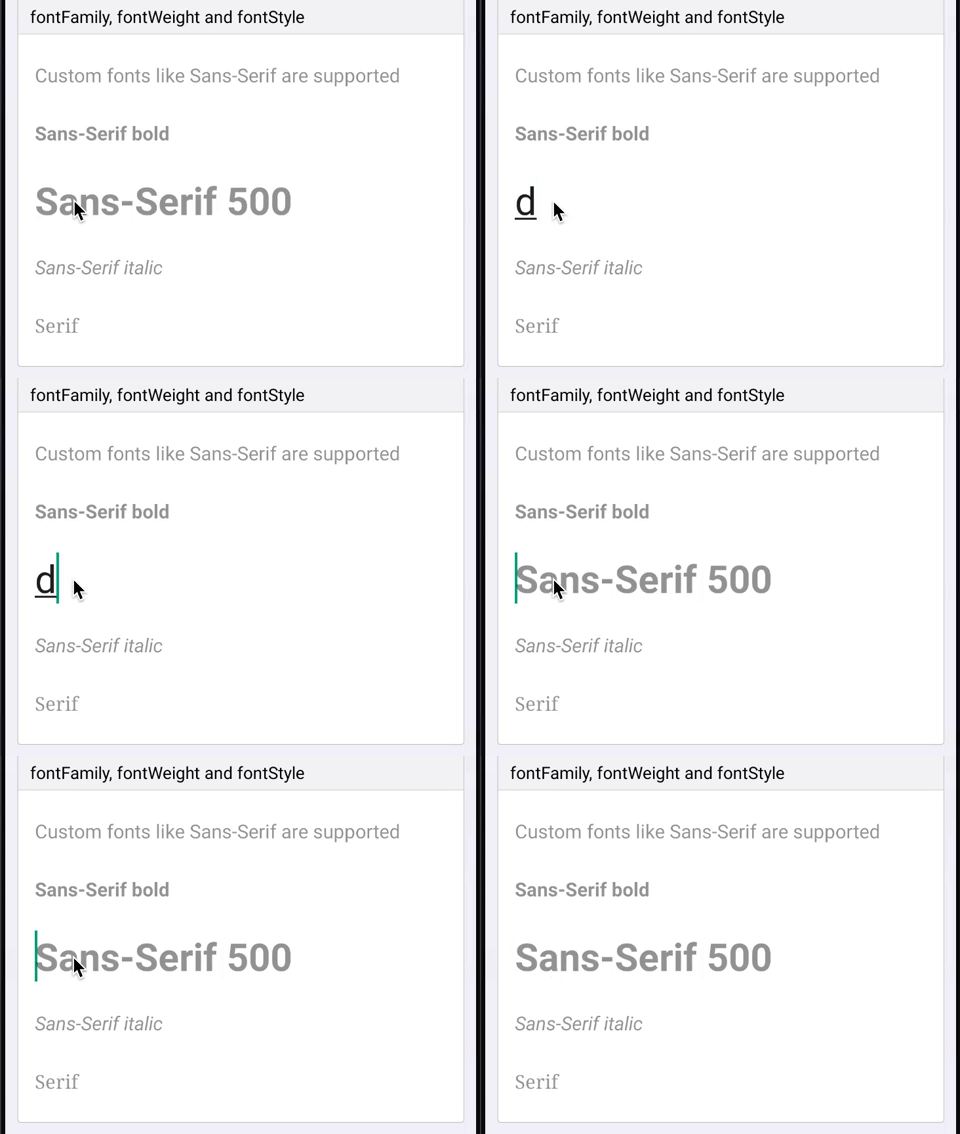
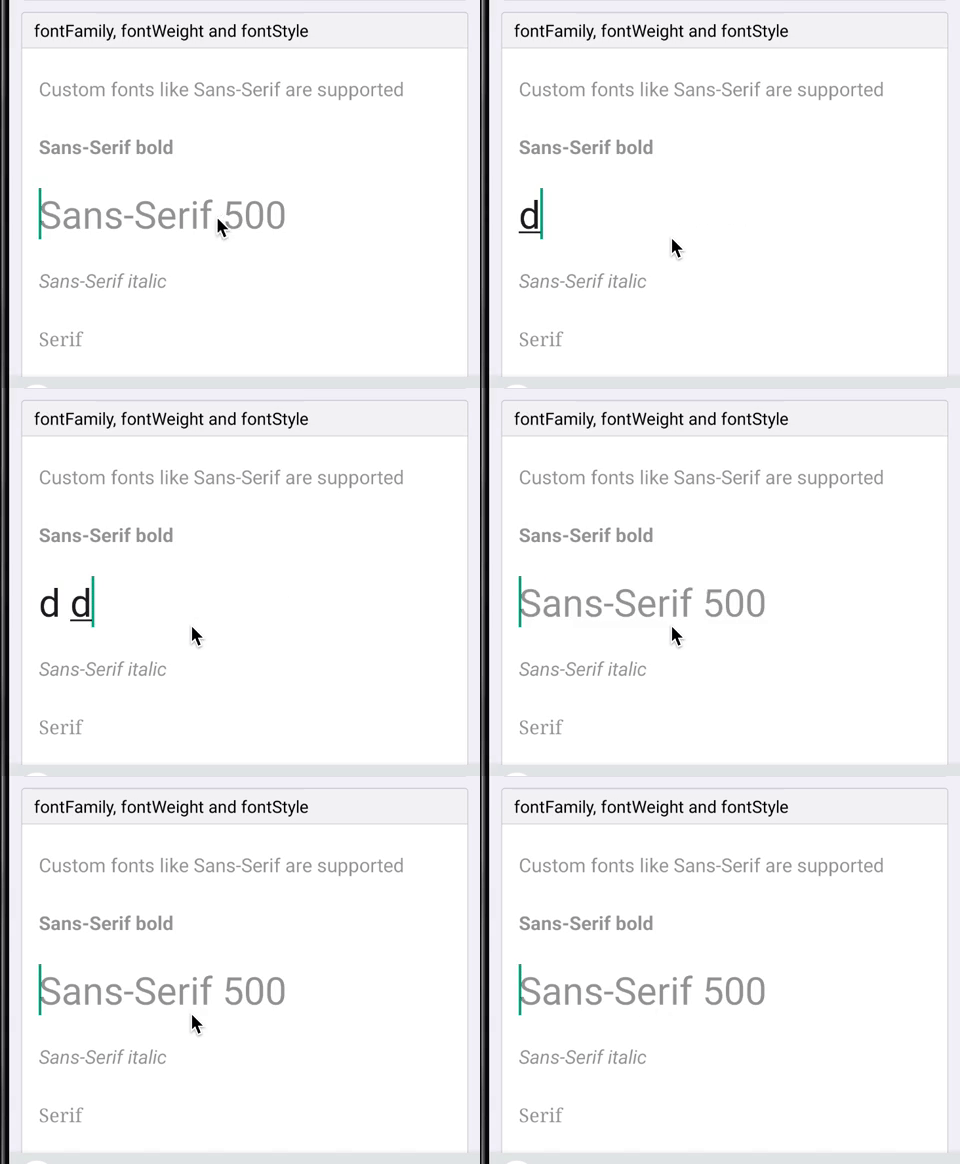
When using a medium (500) font weight on Android the wrong weight is used for the placeholder and for the first few seconds of input (before it gets text back from JS). To fix it I refactored the way we handle text styles (family, weight, style) to create a typeface to be more like the `Text` component.
Since all these 3 props are linked and used to create the typeface object it makes more sense to do it at the end of setting props instead of in each prop handler and trying to recreate the object without losing styles set by other prop handlers. Do do that we now store fontFamily, fontStyle and fontWeight as ivar of the ReactEditText class. At the end of updating prop if any of those changed we recreate the typeface object.
This doesn't actually fix the bug but was a first step towards it. There were a bunch of TODOs in the code to remove duplication between `Text` and `TextInput` for parsing and creating the typeface object. To do that I simply moved the code to util functions in a static class. Once the duplication was removed the bug was fixed! I assume proper support for medium font weights was added for `Text` but not in the duplicated code for `TextInput`.
## Changelog
[Android] [Fixed] - Fix medium font weights for TextInput on Android
Pull Request resolved: https://github.com/facebook/react-native/pull/26434
Test Plan:
Tested in my app and in RNTester that custom styles for both text and textinput all seem to work.
Repro in RNTester:
```js
function Bug() {
const [value, setValue] = React.useState('');
return (
<TextInput
style={[
styles.singleLine,
{fontFamily: 'sans-serif', fontWeight: '500', fontSize: 32},
]}
placeholder="Sans-Serif 500"
value={value}
onChangeText={setValue}
/>
);
}
```
Before:
After:
Reviewed By: mmmulani
Differential Revision: D17468825
Pulled By: JoshuaGross
fbshipit-source-id: bc2219facb94668551a06a68b0ee4690e5474d40
Summary: Today, View Managers are all initialized as soon as we start up the app. Making them lazy, so that we only intantiate them when they are really needed

Differential Revision: D17329940

fbshipit-source-id: 821bf121f04d58c7b871c7923fed81d8c735f8b4
Summary: Support existing, backwards-compatible AndroidTextInput component for minimal support of TextInput on Android.

Reviewed By: shergin, mdvacca

Differential Revision: D17086758

fbshipit-source-id: 25726f22229e0d5dfe96eb36b386a5317601283d
Summary:
Changing showSoftKeyboard and hideSoftKeyboard to be protected, as we need this change for an internal control that extends ReactEditText.

## Changelog

[Android] [Changed] - part of our react native platform, we have a control that extends ReactEditText and we need to be able to override these 2 methods.
Pull Request resolved: https://github.com/facebook/react-native/pull/25964

Test Plan: The change has been in Microsoft's branch of RN for almost 2 years, and since it's a relatively small change we've done a quick sanity check in RNTester prior to this PR, making sure the TextInput page loads fine and it's functional.

Differential Revision: D16686878

Pulled By: cpojer

fbshipit-source-id: 63035ee9c58e93bc0fa40e5bec318df05322c6c5
Summary:
I believe there's a mismatch between the type definitions and the expected prop in Android for `TextInput`'s `autoComplete` prop.

* Android is expecting `autoComplete`.
* JS types are expecting `autoCompleteType`.
* Latest documentation documents `autoCompleteType`.

Prop added here: https://github.com/facebook/react-native/commit/179d490607620a988a53aacb01031ed300d4ac66

This change updates the JS types to match what Android is expecting (`autoComplete`). Can update documentation if this is the approach we'd prefer (rather than updating Android to expect `autoCompleteType`).

## Changelog

[Javascript] [Fixed] - Update types for `TextInput`'s `autoComplete` prop.
Pull Request resolved: https://github.com/facebook/react-native/pull/25549

Test Plan:
Before:

* Pass invalid value to `TextInput`'s `autoComplete` prop, see no type errors on JS side, and Android blows up with:

```sh
Invalid autocomplete option: foobar
updateViewProp
    ViewManagersPropertyCache.java:95
setProperty
    ViewManagerPropertyUpdater.java:132
updateProps
    ViewManagerPropertyUpdater.java:51
updateProperties
    ViewManager.java:37
```

After:

* Pass invalid value to `TextInput`'s `autoComplete` prop, see PropType warning for `autoComplete` prop.

Differential Revision: D16220809

Pulled By: mdvacca

fbshipit-source-id: e25e198cbcbe721c8d71f069bba293856bf5f36d
Summary:
This diff migrates the usages Nullable and NonNull annotations to AndroidX instead of javax.

The purpose of this change is to bring consistency in the annotations used by the core of RN

Reviewed By: makovkastar

Differential Revision: D16054504

fbshipit-source-id: 21d888854da088d2a14615a90d4dc058e5286b91
Summary:
This diff fixes a crash caused by an IllegalStateException thrown from the `TextView.onEditorAction()`. This could happen if we don't return false from the `OnEditorActionListener.onEditorAction()` and Android will fallback to the default behaviour, which will try to search and focus the next/previous view in case of `EditorInfo.IME_ACTION_NEXT` or `EditorInfo.IME_ACTION_PREVIOUS` accordingly. Because ReactEditText prevents requesting focus from Android (`ReactEditText.requestFocus()` returns false), the following piece of code from `TextView.onEditorAction()` will crash the app:

```
} else if (actionCode == EditorInfo.IME_ACTION_PREVIOUS) {
    View v = focusSearch(FOCUS_BACKWARD);
    if (v != null) {
        if (!v.requestFocus(FOCUS_BACKWARD)) {
            throw new IllegalStateException("focus search returned a view "
                    + "that wasn't able to take focus!");
        }
    }
    return;

} else if (actionCode == EditorInfo.IME_ACTION_DONE) {
    InputMethodManager imm = InputMethodManager.peekInstance();
    if (imm != null && imm.isActive(this)) {
        imm.hideSoftInputFromWindow(getWindowToken(), 0);
    }
    return;
}
```

To prevent this we have to catch `EditorInfo.IME_ACTION_NEXT` and `EditorInfo.IME_ACTION_PREVIOUS` inside `OnEditorActionListener.onEditorAction()` and prevent the default Android behaviour.

Reviewed By: mdvacca

Differential Revision: D16180306

fbshipit-source-id: 6118257c16a7a4a205ae05da671cd76d3a18d565
Summary:
This diff formats the Java class files inside xplat/js/react-native-github. Since google-java-format was enabled in D16071401 we want to codemode the existing code so that users don't have to deal with formatter lint noise at diff-time.

```arc f --paths-cmd 'hg files -I "**/*.java"'```

drop-conflicts

Reviewed By: cpojer

Differential Revision: D16071725

fbshipit-source-id: fc6e3852e45742c109f0c5ac4065d64201c74204
Summary:
Similar to D15909582, this change makes the Android TextInput take strings for the value of autoCapitalize and not just numbers. As we are going to stop sending view configs from native and instead hardcode them in JS we can't do that anymore.

In this commit we are supporting the old style as well as the new style.

Changelog:
[Android] [Internal] - Supporting autoCapitalize as string to clean up internal TextInput.js file

Reviewed By: mdvacca

Differential Revision: D15911323

fbshipit-source-id: b236fdb314489cc1ef33f9214ff2d6b0e28b7310
Summary:
There's an issue with TextInput on Android where if you have TalkBack enabled, double tapping doesn't focus the text input. It turns out this is because we ignore all focus events that aren't from JS in ReactEditText. This diff makes an exception for the accessibility click event.

I think this should also fix https://github.com/facebook/react-native/issues/17624

Reviewed By: lunaleaps

Differential Revision: D15818103

fbshipit-source-id: 354728b58f1023c4d44edd48337c8daa8ea15c0c
Summary:
Add prop showSoftInputOnFocus to TextInput. This fixes#14045. This prop can be used to prevent the system keyboard from displaying at all when focusing an input text, for example if a custom keyboard component needs to be displayed instead.
On Android, currently TextInput always open the soft keyboard when focused. This is because `requestFocus` calls `showSoftKeyboard`, which in turn instructs `InputMethodManager` to show the soft keyboard.
Unfortunately even if we were to define a new input type that extends ReactEditText, there is no way to overcome this issue.
This is because `showSoftKeyboard` is a private method so it can't be overriden. And at the same time `requestFocus` needs to invoke `super.requestFocus` to properly instruct Android that the field has gained focused, so overriding `requestFocus` in a subclass of ReactEditText is also not an option, as when invoking `super.requestFocus` we would end up calling again the one defined in ReactEditText.
So currently the only way of doing this is to basically add a listener on the focus event that will close the soft keyboard immediately after. But for a split second it will still be displayed.
The code in the PR changes `requestFocus` to honor showSoftInputOnFocus as defined in Android TextView, displaying the soft keyboard unless instructed otherwise.
## Changelog
[Android] [Added] - Add showSoftInputOnFocus to TextInput
Pull Request resolved: https://github.com/facebook/react-native/pull/25028
Differential Revision: D15503070
Pulled By: mdvacca
fbshipit-source-id: db4616fa165643d6ef2b3185008c4d279ae08092
Summary:
We're working on a custom EditText that supports some rich text editing, and one of the places where our logic has to be different from the textinput provided by RN is the text setting logic:

https://github.com/facebook/react-native/blob/7abfd23b90db08b426c3c91b0cb6d01d161a9b9e/ReactAndroid/src/main/java/com/facebook/react/views/textinput/ReactEditText.java#L377

However, some of the important members are private and our subclass cannot access them (we work around this now with reflection). It would be nice if we could work with them directly, either using getters and setters or by changing the  access. Let me know what you think about this. Thanks.

## Changelog

[Android] [Added] - allow custom maybeSetText logic for ReactEditText subclasses
Pull Request resolved: https://github.com/facebook/react-native/pull/24927

Differential Revision: D15431682

Pulled By: cpojer

fbshipit-source-id: 91860cadac0798a101ff7df6f6b868f3980ba9b1
Summary:
Resolve#24690
This is very simple unicode detecting. Should I improve this solution creating StringsUtils for detecting unicodes in whole react-native project ?
[Android][Fixed] onKeyPress method is calling, when user type emoji
Pull Request resolved: https://github.com/facebook/react-native/pull/24717
Differential Revision: D15238388
Pulled By: cpojer
fbshipit-source-id: 038b1040e1c44fd6f9401a3988a782f5778e1209
Summary: This is removing packages and libraries from the repo.  Any modified buck files simply change the redirect targets to something more appropriate (no logic actually changed)

Differential Revision: D14950721

fbshipit-source-id: 6c14f827b76ca1dbaf83dcb983930f362c6a27d4
Summary:
Android API 26 and Android Support Library 26 added support for font resource type and native/downloadable fonts. It allows apps to easily download fonts from online providers, but also use of various font weights other than normal and bold, like medium. So it deprecated APIs for asset fonts, and should be removed in the future.

Advantages:
- Just copy font files in res/font and use it specifying filename (without extension) in fontFamily
- Define custom font-family using XML file (in res/font) and font files, it may have many weights and styles. See PR for example.
- Define configuration to download fonts from online font providers, and use it.

See https://developer.android.com/guide/topics/ui/look-and-feel/fonts-in-xml and https://developer.android.com/guide/topics/ui/look-and-feel/downloadable-fonts

[Android] [Changed] - add support for custom/downloadable fonts
Pull Request resolved: https://github.com/facebook/react-native/pull/23865

Differential Revision: D14506542

Pulled By: hramos

fbshipit-source-id: 67ba3148fb4b548cdbc779213cf6c1b2c3baffd2
Summary:
Since text and selection has dependency, handle text selection in
updateExtraData as well.

The root cause is due to setText is handled on extra data update but setSelection is handled on set property. And extra data update will be handled after all properties are handled. Since selection and text has dependency, move selection to extra data update as well.

Changelog:
----------
[Android] [Fixed] - Fix crash when set text and selection on textinput at the same time
Pull Request resolved: https://github.com/facebook/react-native/pull/22723

Differential Revision: D14783791

Pulled By: cpojer

fbshipit-source-id: a4065f3e151d23f4813d76e91d68362cfd4daaf4
Summary:
Try to prevent the crash described in https://github.com/facebook/react-native/issues/17530

There seems to be a bug in `Drawable.mutate()` in some devices/android os versions even after you check the constant state. This error is hard to reproduce and to fix, so just try to catch the exception to prevent crash.

[Android][Fixed] Prevent random crash when setting underlineColorAndroid
Pull Request resolved: https://github.com/facebook/react-native/pull/24183

Differential Revision: D14710484

Pulled By: cpojer

fbshipit-source-id: 3af20a5cb0ecd40839beaf85118c0f5aa6905414
Summary:
Potential breaking change: The signature of ReactShadowNode's onBeforeLayout method was changed
  - Before: public void onBeforeLayout()
  - After:  public void onBeforeLayout(NativeViewHierarchyOptimizer nativeViewHierarchyOptimizer)

Implements same feature as this iOS PR: https://github.com/facebook/react-native/pull/7304

Previously, only Text and Image could be nested within Text. Now, any view can be nested within Text. One restriction of this feature is that developers must give inline views a width and a height via the style prop.

Previously, inline Images were supported via FrescoBasedReactTextInlineImageSpan. To get support for nesting views within Text, we create one special kind of span per inline view. This span is called TextInlineViewPlaceholderSpan. It is the same size as the inline view. Its job is just to occupy space -- it doesn't render any visual. After the text is rendered, we query the Android Layout object associated with the TextView to find out where it has positioned each TextInlineViewPlaceholderSpan. We then position the views to be at those locations.

One tricky aspect of the implementation is that the Text component needs to be able to render native children (the inline views) but the Android TextView cannot have children. This is solved by having the native parent of the ReactTextView also host the inline views. Implementation-wise, this was accomplished by extending the NativeViewHierarchyOptimizer to handle this case. The optimizer now handles these cases:
  - Node is not in the native tree. An ancestor must host its children.
  - Node is in the native tree and it can host its own children.
  - (new) Node is in the native tree but it cannot host its own children. An ancestor must host both this node and its children.

I added the `onInlineViewLayout` event which is useful for writing tests for verifying that the inline views are positioned properly.

Limitation: Clipping
----------

If Text's height/width is small such that an inline view doesn't completely fit, the inline view may still be fully visible due to hoisting (the inline view isn't actually parented to the Text which has the limited size. It is parented to an ancestor which may have a different clipping rectangle.). Prior to this change, layout-only views had a similar limitation.
Pull Request resolved: https://github.com/facebook/react-native/pull/23195

Differential Revision: D14014668

Pulled By: shergin

fbshipit-source-id: d46130f3d19cc83ac7ddf423adcc9e23988245d3
Summary: This diff fixes an IllegalStateException that is thrown when the user click is on a edit text and tap 'Next' on the keyboard to focus on the next view, but the next view is hidden.

Reviewed By: lunaleaps, mmmulani

Differential Revision: D14598410

fbshipit-source-id: 2999cc468ed24bedff163eedcfaec50f6ee005d6
Summary:
Google recommends to use Gravity.START and Gravity.END instead of Gravity.LEFT and Gravity.RIGHT to support RTL better.

[Android] [Changed] - Improve RTL support
Pull Request resolved: https://github.com/facebook/react-native/pull/24069

Differential Revision: D14541569

Pulled By: cpojer

fbshipit-source-id: 5c104d8bd666e1270d5410216c7f2efa6152692a
Summary:
This diff migrates RN to AndroidX.
As part of this diff I disabled few tests in RNAndroid OSS that will be re-enabled this week. As part of the refactor of BUCK files in OSS

Reviewed By: shergin

Differential Revision: D14200097

fbshipit-source-id: 932fcae251d1553e672acd67ecd0e703dcb364aa
Summary:
Autofill Hints were added in [Android API 26](https://developer.android.com/reference/android/view/View.html#setAutofillHints(java.lang.String...)). Without this runtime check, pre-26 devices will crash.

[Android][Fixed] - Fixes crash on pre-26 Android devices when setting text content type

Reviewed By: lunaleaps

Differential Revision: D14479468

fbshipit-source-id: 238c1efd6aea682a93ecb45e1123aaed6bdcd9e3
Summary:
Clearing the android TextInput text programmatically (i.e. calling: this.textInputRef.clear()) does not clear the previously composing text, if enabled, causing inconveniences when such behaviour is desired (i.e. chat input box, where you constantly have to clear the input after sending a message). Instead, the currently observed behaviour is that, after a new text is entered (usually as soon as the first letter), the previously composing text reappears making the input unusable.

The effect is only observable on some devices, for example, we observed it on Samsung S6 devices using both Android 6 and 7, and several LG devices running Android 6.

This issue is only present when clearing the text; setting text to some other value does not produce the same effect.

<!--
  Required: Write your motivation here.
  If this PR fixes an issue, type "Fixes #issueNumber" to automatically close the issue when the PR is merged.
-->
Pull Request resolved: https://github.com/facebook/react-native/pull/18859

Differential Revision: D14067144

Pulled By: hramos

fbshipit-source-id: 09f337edc026b83221f8a399749222cd75457ec7
Summary:
Native Android sets the EditText widget to multiline only if the InputType flags are set to Text (or its variants like textEmailAddress) and Multiline, which causes the React Native TextInput to not break the line when set to multiline={true} and keyboardType={'numeric'} as it only have the flags Multiline and Number set.

This fix forces the widget to enable multiline, by calling setSingleLine(false) everytime a state change needs to be commited and the multiline prop is set to true.
Pull Request resolved: https://github.com/facebook/react-native/pull/21884

Differential Revision: D14162701

Pulled By: cpojer

fbshipit-source-id: b7d3fc8c5a4444dcfd29ad74d515a8ae486c7ede
Summary:
In API 26, autofill framework was introduced in Android.
Read more about Autofill at https://developer.android.com/guide/topics/text/autofill.

Now, if in case for some text input if developer wants to disable
autofill then he can take help from this `importantForAutoFill` prop
and pass `no` to it.

Also important of auto fill can be configured with this prop, like:
* `auto`: Let the Android System use its heuristics to determine if the view is important for autofill.
* `no`: This view isn't important for autofill.
* `noExcludeDescendants`: This view and its children aren't important for autofill.
* `yes`: This view is important for autofill.
* `yesExcludeDescendants`: This view is important for autofill, but its children aren't important for autofill.

Default value if `auto`.

Read more at: https://developer.android.com/guide/topics/text/autofill-optimize

Changelog:
----------
[Android] [Added] - Add prop to configure `importantForAutofill` in `TextInput`.
Pull Request resolved: https://github.com/facebook/react-native/pull/22763

Differential Revision: D14121242

Pulled By: cpojer

fbshipit-source-id: aa4360480dd19f6dde66f0409d26a41a6a318c94
Summary:
TL;DR: Setting `autoComplete` will allow the system to suggest autofill options for the `<TextInput>` component.

Android Oreo introduced the AutoFill Framework, for secure communication between an app and autofill services (e.g. Password managers). When using `<TextInput>` on Android Oreo+, the system already tries to autofill (based on heuristics), but there is no way to set configuring options or disable.

The quick solution would be to just add the same Android attributes (`autofillHints` & `importantForAutofill`) in React Native TextInput, but that doesn't bond well with the cross-platform nature of the library.

Introduces an `autoComplete` prop based on HTML's `autocomplete` attribute, mapping to Android `autofillHints` & `importantForAutofill` and serving as a proper placeholder for autofill/autocomplete in other platforms:

Also gives you the ability to disable autofill by setting autocomplete="off".
Pull Request resolved: https://github.com/facebook/react-native/pull/21575

Differential Revision: D14102949

Pulled By: hramos

fbshipit-source-id: 7601aeaca0332a1f3ce8da8020dba037b700853a
Summary:
Basically I want my cursor to be the same color of the text. Which means obviously that selecting the text will make it invisibible (ie, red text on red selection rectangle)

Today, setting a selection color does set a cursor color, which may be a good default in some cases, but we don't always couple these 2 colors together.

See original commit of janicduplessis https://github.com/facebook/react-native/commit/ae57b25134c4db8be8539a0f0e6e52d46c850339

I'd like to be able to set different colors for selection and cursor.
Pull Request resolved: https://github.com/facebook/react-native/pull/20276

Differential Revision: D14102952

Pulled By: cpojer

fbshipit-source-id: 652ff782044277a0c8a821dd628f0373659a7850
Summary:
Fix lint errors and warning, which might be a cause of various crashes on older Android OS, using Android Support Library.

```bash
./gradlew :ReactAndroid:lint
```

[Android] [Changed] - fix lint error/warnings
Pull Request resolved: https://github.com/facebook/react-native/pull/23333

Differential Revision: D14019322

Pulled By: mdvacca

fbshipit-source-id: 74c98da269c318cf3b114c8d9c876186369f2b8c
 Joshua Gross
 David Vacca
 Marco Munizaga
 Andres Suarez
 Oleksandr Melnykov
 Janic Duplessis
 Ram N
Ram N
 Onti Vals
 Dan Gilbert
 Eli White
 Emily Janzer
 valerio.ponte
 Vojtech Novak
 Uilque Messias
 Piotr Trocki
 Kevin Gozali
 Christoph Nakazawa
 Rick Ratmansky
 Dulmandakh
 YuTeh Shen
 Sunny Luo
 Adam Comella
 Héctor Ramos
 Luna Wei
 Vishwesh Jainkuniya
 mannol
 Murilo Araujo
 Cassio Zen
 Sébastien Lorber