Summary:
Changelog: [Internal]

Previously `setTextAndSelection` was not dirtying layout. This would cause an issue where `setTextAndSelection` causes layout change. For example calling setTextAndSelection with empty string on a multiline auto expanding text input.

I changed one example in TextInputSharedExamples.js, "Live Re-Write (no spaces allowed) and clear" example is now multiline. This allows to test whether `setTextAndSelection` dirties layout. Enter multiline string to to the example text input and press clear. Observe that the text input shrinks to single line height.

Reviewed By: shergin

Differential Revision: D21182990

fbshipit-source-id: de8501ea0b97012cf4cdf8d5f658649139f92da6
Summary:
Changelog: [Internal]

We don't use view command `setMostRecentEventCount`, let's get rid of it.

Reviewed By: JoshuaGross

Differential Revision: D21016600

fbshipit-source-id: 6491c063e9d6a89252300cb47c010b248e473f4b
Summary:
This implement the autoFocus functionality natively instead of calling the focus method from JS on mount. This is needed to properly fix the issue described in https://github.com/facebook/react-native/issues/27217, where when using native navigation (UINavigationController) text input focus needs to happen in the same frame transition starts or it leads to an animation bug in UIKit.

My previous attempt fixed the problem only partially and the bug could still happen since there is no guaranty code executed in useEffect will end up in the same frame as the native view being created and attached.

To fix this I added an autoFocus prop to the native component on iOS and in didAttachToWindow we focus the input if it is set. This makes sure the focus is set in the same frame as the view hierarchy containing the input is created.

## Changelog

[iOS] [Fixed] - Add native support for TextInput autoFocus on iOS
Pull Request resolved: https://github.com/facebook/react-native/pull/27803

Test Plan:
- Tested that the UI glitch when transitionning to a screen with an input with autofocus no longer happens in my app.
- Tested that autofocus still works in RNTester
- Made sure that onFocus does get called and TextInputState is updated properly

Differential Revision: D19673369

Pulled By: TheSavior

fbshipit-source-id: 14d8486ac635901622ca667c0e61c75fb446e493
Summary:
Add Native Commands handlers to TextInput.
It is intentionally done in a way so that it can be easily swapped for codegened implementation once we properly type TextInput.

We also add native commands to view managers for backwards compatibility.

Changelog: [Internal]

Reviewed By: TheSavior, shergin

Differential Revision: D19412026

fbshipit-source-id: 8dc64275cf1da599b1bd5992a41035d51dd4148f
Summary:
We need to expose the `multiline` prop in View Manager class to enable Fabric component to use it.

Changelog: [Internal] Fabric-specific internal change.

Reviewed By: sammy-SC

Differential Revision: D18950429

fbshipit-source-id: 69b225b24b4512a1ea21381daacbf868a23ccf6d
Summary:
The moved code fragment is a workaround for a bug in UITextField in iOS 8. There is no need to have this code in a general base class that serves both UITextField- and UITextView-based components. Especially for such workarounds like that, we have a dedicated class RCTUITextField. This diff moves that there.

Read more about the bug:
https://stackoverflow.com/questions/14220187/uitextfield-has-trailing-whitespace-after-securetextentry-toggle/22537788#22537788

Changelog: [Internal]

Reviewed By: sammy-SC

Differential Revision: D18444734

fbshipit-source-id: a3764c19f562231ba3fa3d4c0ad7de069ea04d98
Summary:
A very common pattern I've seen in RN codebase:

     - (instancetype) init {
        [[NSNotificationCenter defaultCenter] addObserver:self ...]
      }

    - (void) dealloc {
       [[NSNotificationCenter defaultCenter] removeObserver:self ...]
     }

From Apple:

https://developer.apple.com/documentation/foundation/nsnotificationcenter/1413994-removeobserver?language=objc

> If your app targets iOS 9.0 and later or macOS 10.11 and later, you don't need to unregister an observer in its dealloc method.

RN targets iOS9+

Changelog: [Internal][Cleanup] Remove unneeded NSNotification center removeObserver

Reviewed By: shergin

Differential Revision: D18264235

fbshipit-source-id: 684e5f5555cec96b055b13cd83daaeb393f4fac9
Summary:
Move RCTAccessibilityManager to CoreModules (since that's the only dir that supports TM).

Fixup some variable names to match spec.

Reviewed By: RSNara

Differential Revision: D16861739

fbshipit-source-id: a0a53b221dcc172979d1f2c83851ab92e23f2333
Summary:
This is my proposal for fixing `use_frameworks!` compatibility without breaking all `<React/*>` imports I outlined in https://github.com/facebook/react-native/pull/25393#issuecomment-508457700. If accepted, it will fix https://github.com/facebook/react-native/issues/25349.

It builds on the changes I made in https://github.com/facebook/react-native/pull/25496 by ensuring each podspec has a unique value for `header_dir` so that framework imports do not conflict. Every podspec which should be included in the `<React/*>` namespace now includes it's headers from `React-Core.podspec`.

The following pods can still be imported with `<React/*>` and so should not have breaking changes: `React-ART`,`React-DevSupport`, `React-CoreModules`, `React-RCTActionSheet`, `React-RCTAnimation`, `React-RCTBlob`, `React-RCTImage`, `React-RCTLinking`, `React-RCTNetwork`, `React-RCTPushNotification`, `React-RCTSettings`, `React-RCTText`, `React-RCTSettings`, `React-RCTVibration`, `React-RCTWebSocket` .

There are still a few breaking changes which I hope will be acceptable:

- `React-Core.podspec` has been moved to the root of the project. Any `Podfile` that references it will need to update the path.
- ~~`React-turbomodule-core`'s headers now live under `<turbomodule/*>`~~ Replaced by https://github.com/facebook/react-native/pull/25619#issuecomment-511091823.
- ~~`React-turbomodulesamples`'s headers now live under `<turbomodulesamples/*>`~~ Replaced by https://github.com/facebook/react-native/pull/25619#issuecomment-511091823.
- ~~`React-TypeSaferty`'s headers now live under `<TypeSafety/*>`~~ Replaced by https://github.com/facebook/react-native/pull/25619#issuecomment-511040967.
- ~~`React-jscallinvoker`'s headers now live under `<jscallinvoker/*>`~~ Replaced by https://github.com/facebook/react-native/pull/25619#issuecomment-511091823.
- Each podspec now uses `s.static_framework = true`. This means that a minimum of CocoaPods 1.5 ([released in April 2018](http://blog.cocoapods.org/CocoaPods-1.5.0/)) is now required. This is needed so that the ` __has_include` conditions can still work when frameworks are enabled.

Still to do:

- ~~Including `React-turbomodule-core` with `use_frameworks!` enabled causes the C++ import failures we saw in https://github.com/facebook/react-native/issues/25349. I'm sure it will be possible to fix this but I need to dig deeper (perhaps a custom modulemap would be needed).~~ Addressed by https://github.com/facebook/react-native/pull/25619/commits/33573511f02f3502a28bad48e085e9a4b8608302.
- I haven't got Fabric working yet. I wonder if it would be acceptable to move Fabric out of the `<React/*>` namespace since it is new? �

## Changelog

[iOS] [Fixed] - Fixed compatibility with CocoaPods frameworks.
Pull Request resolved: https://github.com/facebook/react-native/pull/25619

Test Plan:
### FB

```
buck build catalyst
```

### Sample Project

Everything should work exactly as before, where `use_frameworks!` is not in `Podfile`s. I have a branch on my [sample project](https://github.com/jtreanor/react-native-cocoapods-frameworks) here which has `use_frameworks!` in its `Podfile` to demonstrate this is fixed.

You can see that it works with these steps:

1. `git clone git@github.com:jtreanor/react-native-cocoapods-frameworks.git`
2. `git checkout fix-frameworks-subspecs`
3. `cd ios && pod install`
4. `cd .. && react-native run-ios`

The sample app will build and run successfully. To see that it still works without frameworks, remove `use_frameworks!` from the `Podfile` and do steps 3 and 4 again.

### RNTesterPods

`RNTesterPodsPods` can now work with or without `use_frameworks!`.

1. Go to the `RNTester` directory and run `pod install`.
2. Run the tests in `RNTesterPods.xcworkspace` to see that everything still works fine.
3. Uncomment the `use_frameworks!` line at the top of `RNTester/Podfile` and run `pod install` again.
4. Run the tests again and see that it still works with frameworks enabled.

Reviewed By: PeteTheHeat

Differential Revision: D16465247

Pulled By: PeteTheHeat

fbshipit-source-id: cad837e9cced06d30cc5b372af1c65c7780b9e7a
Summary:
On `textContentType` `newPassword` on ios, there is another property called `passwordRules` on ios 12 that can give hints to the os to generate a password with specific requirements like [here](https://developer.apple.com/password-rules/).
This is useful for apps that have a "register" screen with `emailAddress`/`username` and a `newPassword` fields, to let ios make a password that will satisfy the requirements and not one that might be not accepted after the user presses "register".

## Changelog

[iOS] [Added] - PasswordRules for new password textContentType input fields
Pull Request resolved: https://github.com/facebook/react-native/pull/25407

Test Plan: This is a bit harder, but to test you need to make an app that has associated domains with an apple-app-site-association file on that domain, enable iCloud Keychain on the test device, and then iOS will suggest a password, otherwise you will just get a warning on Xcode saying "Couldn't suggest password because of: blabla".

Differential Revision: D16028684

Pulled By: cpojer

fbshipit-source-id: d22426e07f1db45d1f79f5dad81f1465a9701f0b
Summary:
This is a fix for #5859, based on the feedback in #18587. Instead of using `didSetProps` it uses a setter. I will also note that setting to `nil` no longer works (crashes) so setting it to a blank string then back to the original works fine.

[iOS] [Fixed] - Toggling secureTextEntry correctly places cursor.
Pull Request resolved: https://github.com/facebook/react-native/pull/23524

Differential Revision: D14143028

Pulled By: cpojer

fbshipit-source-id: 5f3203d56b1329eb7359465f8ab50eb4f4fa5507
Summary: This change drops the year from the copyright headers and the LICENSE file.

Reviewed By: yungsters

Differential Revision: D9727774

fbshipit-source-id: df4fc1e4390733fe774b1a160dd41b4a3d83302a
Summary:
On iOS, it is not possible to select a range of text using a `Text` component (see #13938). Because of how the `Text` component is implemented on iOS, this will not work without a complete re-write. On Android however, this is not an issue.

As the `TextInput` component has evolved, it can more or less be used as a drop-in replacement on iOS by setting `multiline={true}` and `editable={false}`. Except for one detail: the text input field has scrolling activated and it's not possible to turn off. (See #1391 and #15962).

This pull request addresses that issue, simply by exposing the `scrollEnabled` property:

```
<TextInput
    multiline
    editable={false}
    scrollEnabled={false}
  />
```

1. Create a multiline `TextInput` component, with the attributes presented above.
2. Run on iOS
3. The `TextInput` field should not be able to scroll

facebook/react-native-website#367

[IOS] [FEATURE] [TextInput] - Made it possible to turn off scrolling on a multiline TextInput component
Pull Request resolved: https://github.com/facebook/react-native/pull/19330

Differential Revision: D9235061

Pulled By: hramos

fbshipit-source-id: 99d278004fc236b47dde7e61d74c71e8a3b9d170
Summary:
This PR makes sure that changing the `keyboardType` props of `<TextInput>` is reflected while the text field has focus. It is something that is also discusses in #13782. The workaround mentioned in that issue using `key` causes the TextInput to re-render itself which has some undesired side-effects.
Fixes#13782
```javascript
export default class KeyboardTypeApp extends Component {
state = { keyboardType: 'default' };
toggleKeyboardType = () => {
this.setState({
keyboardType: this.state.keyboardType === 'default' ? 'numeric' : 'default'
});
}
render() {
return (
<View style={{ padding: 40 }}>
<TextInput autoFocus value="Press Toggle :)" keyboardType={this.state.keyboardType} />
<Button title="Toggle" onPress={this.toggleKeyboardType} />
</View>
);
}
}
```
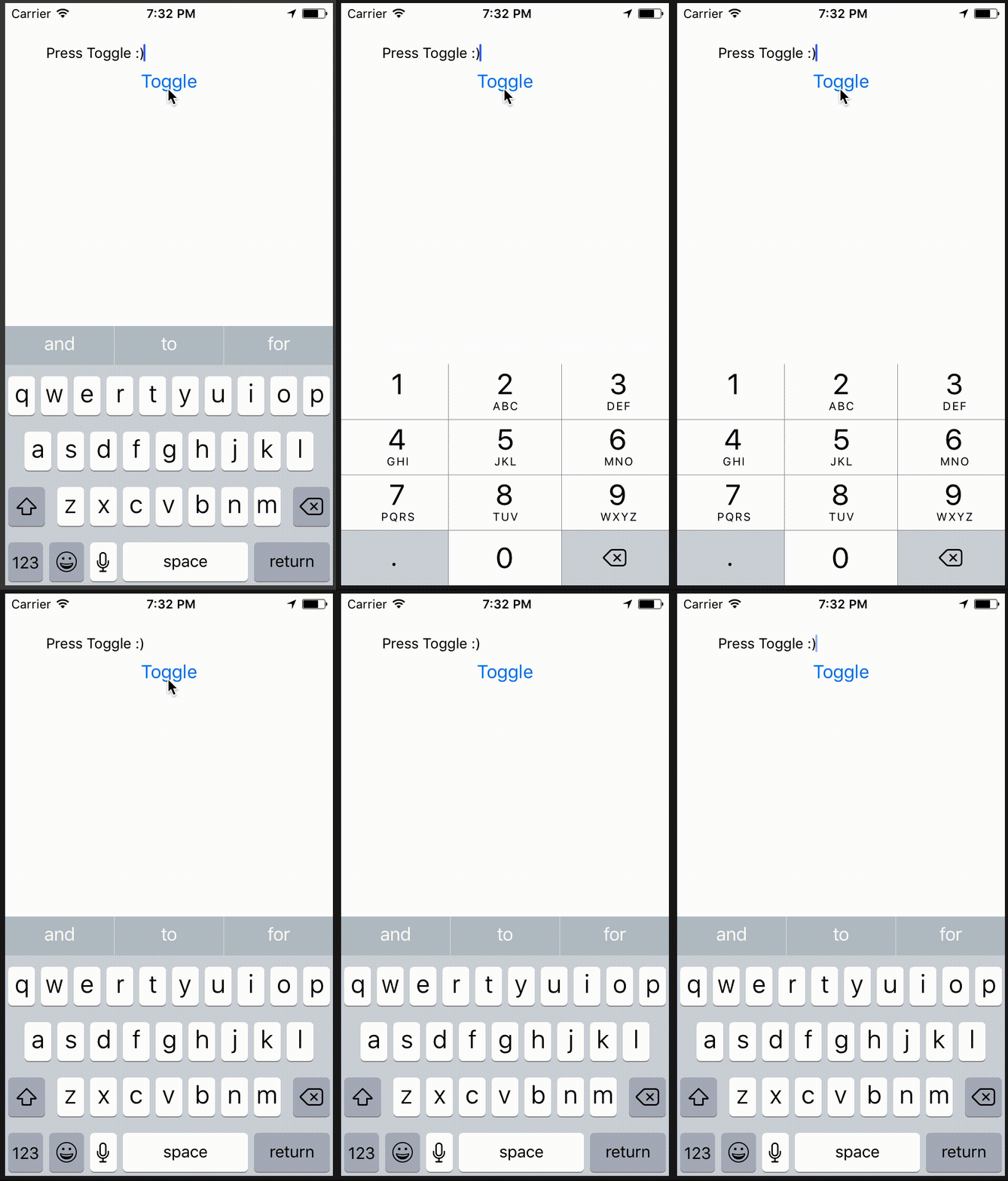
<!--
Does this PR require a documentation change?
Create a PR at https://github.com/facebook/react-native-website and add a link to it here.
-->
[IOS] [ENHANCEMENT] [TextInput] - Keyboard layout now updates when changing `keyboardType` while it has focus
<!--
**INTERNAL and MINOR tagged notes will not be included in the next version's final release notes.**
CATEGORY
[----------] TYPE
[ CLI ] [-------------] LOCATION
[ DOCS ] [ BREAKING ] [-------------]
[ GENERAL ] [ BUGFIX ] [ {Component} ]
[ INTERNAL ] [ ENHANCEMENT ] [ {Filename} ]
[ IOS ] [ FEATURE ] [ {Directory} ] |-----------|
[ ANDROID ] [ MINOR ] [ {Framework} ] - | {Message} |
[----------] [-------------] [-------------] |-----------|
EXAMPLES:
[IOS] [BREAKING] [FlatList] - Change a thing that breaks other things
[ANDROID] [BUGFIX] [TextInput] - Did a thing to TextInput
[CLI] [FEATURE] [local-cli/info/info.js] - CLI easier to do things with
[DOCS] [BUGFIX] [GettingStarted.md] - Accidentally a thing/word
[GENERAL] [ENHANCEMENT] [Yoga] - Added new yoga thing/position
[INTERNAL] [FEATURE] [./scripts] - Added thing to script that nobody will see
-->
Closes https://github.com/facebook/react-native/pull/19027
Differential Revision: D8416007
Pulled By: PeteTheHeat
fbshipit-source-id: c4f89ab3dc0819bca52feddbc9c7a9f62fd96794
Summary:
Setting `textContentType` will provide the keyboard and system with semantic meaning for inputs. Should enable password/username autofill in apps running on iOS 11+ as demonstrated here: https://developer.apple.com/videos/play/wwdc2017/206/
Also gives you the ability to disable autofill by setting `textContentType="none"`: https://stackoverflow.com/questions/48489479/react-native-disable-password-autofill-option-on-ios-keyboard
Adding `textContentType` equal to `username` or `password` should give you an autofill-bar over the keyboard which will let you fill in values from the device Keychain:
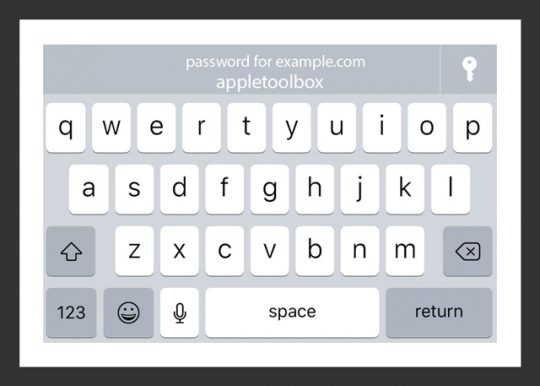
Setting the appropriate `textContentType` will fill in the correct value in the `TextInput`.
I have only been able to get this to work on device, and not simulator.
Usage:
```jsx
<TextInput
value={this.state.username}
onChangeText={this.setUserName}
textContentType="username"
/>
```
```jsx
<TextInput
value={this.state.password}
onChangeText={this.setPassword}
secureTextEntry={true}
textContentType="password"
/>
```
To disable:
```jsx
<TextInput
value={this.state.password}
onChangeText={this.setPassword}
secureTextEntry={true}
textContentType="none"
/>
```
This will set `textContentType` to an empty string: https://stackoverflow.com/a/46474180/5703116
<!--
Does this PR require a documentation change?
Create a PR at https://github.com/facebook/react-native-website and add a link to it here.
-->
Docs PR coming up.
[IOS] [MINOR] [TextInput] - Added `textContentType` prop for iOS 10+. Will enable password autofill for iOS 11+.
Closes https://github.com/facebook/react-native/pull/18526
Differential Revision: D7469630
Pulled By: hramos
fbshipit-source-id: 852a9749be98d477ecd82154c0a65a7c084521c1
Summary:
<!--
Thank you for sending the PR! We appreciate you spending the time to work on these changes.

Help us understand your motivation by explaining why you decided to make this change.

You can learn more about contributing to React Native here: http://facebook.github.io/react-native/docs/contributing.html

Happy contributing!

-->

There is currently no way to disable to context menu that automatically appears over a TextInput. This is especially troublesome if you would like to disable the user from pasting text into certain fields. This PR adds a `contextMenuHidden` property to TextInput that will hide it.

I'm not sure if testing is necessary here. I would be happy to investigate further on how this would be tested, if deemed necessary!

https://github.com/facebook/react-native-website/pull/95

<!--
Help reviewers and the release process by writing your own release notes

**INTERNAL and MINOR tagged notes will not be included in the next version's final release notes.**

  CATEGORY
[----------]        TYPE
[ CLI      ]   [-------------]      LOCATION
[ DOCS     ]   [ BREAKING    ]   [-------------]
[ GENERAL  ]   [ BUGFIX      ]   [-{Component}-]
[ INTERNAL ]   [ ENHANCEMENT ]   [ {File}      ]
[ IOS      ]   [ FEATURE     ]   [ {Directory} ]   |-----------|
[ ANDROID  ]   [ MINOR       ]   [ {Framework} ] - | {Message} |
[----------]   [-------------]   [-------------]   |-----------|

[CATEGORY] [TYPE] [LOCATION] - MESSAGE

 EXAMPLES:

 [IOS] [BREAKING] [FlatList] - Change a thing that breaks other things
 [ANDROID] [BUGFIX] [TextInput] - Did a thing to TextInput
 [CLI] [FEATURE] [local-cli/info/info.js] - CLI easier to do things with
 [DOCS] [BUGFIX] [GettingStarted.md] - Accidentally a thing/word
 [GENERAL] [ENHANCEMENT] [Yoga] - Added new yoga thing/position
 [INTERNAL] [FEATURE] [./scripts] - Added thing to script that nobody will see
-->

[FEATURE][TextInput] - Added `contextMenuHidden` property
Closes https://github.com/facebook/react-native/pull/18125

Differential Revision: D7101888

Pulled By: hramos

fbshipit-source-id: fe36603a3fbdcefbd644251a7ea894ac7e23e5b8
Summary:
Includes React Native and its dependencies Fresco, Metro, and Yoga. Excludes samples/examples/docs.

find: ^(?:( *)|( *(?:[\*~#]|::))( )? *)?Copyright (?:\(c\) )?(\d{4})\b.+Facebook[\s\S]+?BSD[\s\S]+?(?:this source tree|the same directory)\.$
replace: $1$2$3Copyright (c) $4-present, Facebook, Inc.\n$2\n$1$2$3This source code is licensed under the MIT license found in the\n$1$2$3LICENSE file in the root directory of this source tree.

Reviewed By: TheSavior, yungsters

Differential Revision: D7007050

fbshipit-source-id: 37dd6bf0ffec0923bfc99c260bb330683f35553e
Summary: Letting them fire on whatever queue we get the notification from throws an assert.

Reviewed By: shergin

Differential Revision: D7002789

fbshipit-source-id: 669474af1a07f0df6784b69b54afe0152c1ba3c4
Summary:
This is a complete rewrite of RCTText, the part of React Native which manages Text and TextInput components.
Key points:
* It's understandable now. It follows a simple architectural pattern, and it's easy to debug and iterate. Text flow layout is a first-class citizen in React Native layout system now, not just a wired special case. It also brings entirely new possibilities such as nested interleaving <Text> and <View> components.
* All <Text>-specific APIs were removed from UIManager and co (it's about ~16 public methods which were used exclusively only by <Text>).
* It relies on new Yoga measurement/cloning API and on-dirty handler. So, it removes built-in dirty propagation subsystem from RN completely.
* It caches string fragments properly and granularly on a per-node basis which makes updating text-containing components more performant.
* It does not instantiate UIView for virtual components which reduces memory utilization.
* It drastically improves <TextInput> capabilities (e.g. rich text inside single line <TextInput> is now supported).
Screenshots:
https://cl.ly/2j3r1V0L0324https://cl.ly/3N2V3C3d3q3R
Reviewed By: mmmulani
Differential Revision: D6617326
fbshipit-source-id: 35d4d81b35c9870e9557d0211c0e934e6072a41e
Summary: Bunch or identical code was moved to superclass.

Reviewed By: mmmulani

Differential Revision: D6663772

fbshipit-source-id: 82321f56bbab0e9d17c0227c97dd86904cf5ab30
 Samuel Susla
 Janic Duplessis
 Valentin Shergin
 Peter Argany
 Andres Suarez
 James Treanor
 Pavlos Vinieratos
 Xiuli Shen
 Estevão Lucas
 Eric Lewis
 Héctor Ramos
 Johannes Baldursson
 Mattijs Fuijkschot
 Christian Brevik
 Alex Hinson
 Sophie Alpert
 Mehdi Mulani


