Summary:
PlatformColor should work on all *color style attributes on all platform.

Partially fixes https://github.com/facebook/react-native/issues/32942

## Changelog

[Android] [Fixed] - Support PlatformColor in borderColor

Pull Request resolved: https://github.com/facebook/react-native/pull/33544

Test Plan: Open rn tester (USE_FABRIC=false) platform color api examples. Without the changes to ViewProps.java, it will error out.

Reviewed By: lunaleaps

Differential Revision: D39413519

Pulled By: NickGerleman

fbshipit-source-id: 58962ba2956aa3df45144108eec194aedf23886b
Summary:
Pull Request resolved: https://github.com/facebook/react-native/pull/33160

Enables Kotlin build in RNAndroid, while adjusting the package structure to help with path/package inconsistency.

Moves `react/uimanager/interfaces` files into `react/uimanager` to make sure package name matches with file location and updates Buck configuration to still include it as a separate target.

Changelog: [Android][Changed] - Moved `com/react/facebook/uimanager/interfaces` files into `com/react/facebook/uimanager` to enable Kotlin build

Reviewed By: cortinico

Differential Revision: D34381179

fbshipit-source-id: 252588d9c7f62b8019bdfcce66197628d63e63a1
Summary:
Some of the existing files under uimanager/ are self contained and used by the component codegen output. This commit split out those files into a dedicated uimanager/interfaces/ dir/target so that more targets can depend on it without causing dep cycle.

Also, the component codegen output doesn't need LayoutShadowNode at all, so this removed the import.

This will allow us to combine the Java codegen output for TM spec and Fabric components, simplifying build and dependency management (not in this commit yet).

Changelog: [Internal]

Reviewed By: JoshuaGross

Differential Revision: D25451409

fbshipit-source-id: 827545a3d78ebed1815cf9e52da2fa896b012aa1
Summary:
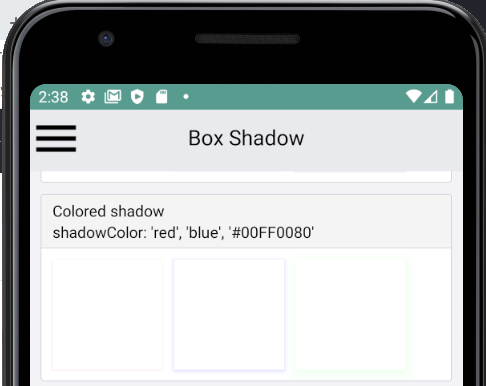
This PR adds support for the `shadowColor` style on Android.
This is possible as of Android P using the `setOutlineAmbientShadowColor` and `setOutlineSpotShadowColor` View methods. The actual rendered color is a multiplication of the color-alpha, shadow-effect and elevation-value.
## Changelog
`[Android] [Added] - Add support for shadowColor on API level >= 28`
Pull Request resolved: https://github.com/facebook/react-native/pull/28650
Test Plan:
- Only execute code on Android P
- Added Android `BoxShadow` tests to RNTester app
Reviewed By: mdvacca
Differential Revision: D21125479
Pulled By: shergin
fbshipit-source-id: 14dcc023977d7a9d304fabcd3c90bcf34482f137
Summary:
Changelog: [Internal]

Flip text alignment in case layout direction is RTL.

Reviewed By: JoshuaGross, mdvacca

Differential Revision: D21130371

fbshipit-source-id: cf56ca052c17a48e321803b0f99f8a4baaa0e67b
Summary:
This diff implements serialization and deserialization of text attachments as part of the calculation of layout of text components
changelog: [internal]

Reviewed By: JoshuaGross

Differential Revision: D20087251

fbshipit-source-id: dbcbd22f856aadace14343205548154ea80c8464
Summary:
This adds support for `adjustsFontSizeToFit` and `minimumFontScale` on Android. The implementation tries to match closely the behaviour on iOS (hardcoded 4px min size for example). It uses a simpler linear algorithm for now, opened to improving it now if it is a deal breaker or in a follow up.

See https://twitter.com/janicduplessis/status/1171147709979516929 for a more detailed thread about the implementation

## Changelog

[Android] [Added] - Implement `adjustsFontSizeToFit` on Android
Pull Request resolved: https://github.com/facebook/react-native/pull/26389

Test Plan: Tested by adding the existing `adjustsFontSizeToFit` example from the iOS text page to android. Also added a case for limiting size by using `maxHeight` instead of `numberOfLines`.

Reviewed By: mdvacca

Differential Revision: D17285473

Pulled By: JoshuaGross

fbshipit-source-id: 43dbdb05e2d6418e9a390d11f921518bfa58e697
Summary:
React Native components need a mechanism to specify their value to assistive technologies. This PR adds the notion of accessibilityValueDescription-- a property which either contains a textual description of a component's value, or for range-based components, such as sliders and progress bars, it contains range information (minimum, current, and maximum).

On iOS, the range-based info if present is converted into a percentage and added to the accessibilityValue property of the UIView. If text is present as part of the accessibilityValueDescription, it is used instead of the range-based information.

On Android, any range-based information in accessibilityValueDescription is exposed in the AccessibilityNodeInfo's RangeInfo. Text which is part of accessibilityValueDescription is appended to the content description.

## Changelog

[GENERAL] [Change] - add accessibilityValuedescription property.
Pull Request resolved: https://github.com/facebook/react-native/pull/26169

Test Plan: Added two new accessibility examples to RNTester, one which uses text and another which uses range-based info in accessibilityValueDescription. Verified that they both behave correctly on both Android and iOS.

Differential Revision: D17444730

Pulled By: cpojer

fbshipit-source-id: 1fb3252a90f88f7cafe1cbf7db08c03f14cc2321
Summary:
We added the accessibilityState property as a more semantically rich way for components to describe information about their state to accessibility services. This PR removes the old accessibilityStates property.

 <!-- Explain the **motivation** for making this change. What existing problem does the pull request solve? -->

## Changelog

[General] [Change] - Remove accessibilityStates property.
Pull Request resolved: https://github.com/facebook/react-native/pull/26168

Test Plan: Ensure that RNTester accessibility examples function properly on both iOS and Android.

Differential Revision: D17152891

Pulled By: cpojer

fbshipit-source-id: d71d3cf0f2e0846979d2ba104b6c69e4e5725252
Summary:
This diff introduces an interface `ViewManagerDelegate` and its base implementation `BaseViewManagerDelegate`, which is used as a parent class for all view manager delegates generated by the JS codegen. Before the changes in this diff, generated delegates didn't support setting the base view properties such as background color, rotation, opacity, etc. Now it's possible to do by using `BaseViewManagerDelegate.setProperty(...)`, and since all generated delegates extend BaseViewManagerDelegate, they can just call `super.setProperty(...)` for properties they don't want to handle.

This diff also introduced a new method `ViewManager.getDelegate()`. This will allow view managers to return an instance of the delegate generated by JS and ensure that the view properties are set in a type-safe manner. If this method returns null (it does by default), we fall back to the default implementation of setting view properties using Java-generated `$$PropsSetter`
classes.

This is an example of an interface class generated by JS:

```
public interface RCTAxialGradientViewViewManagerInterface<T extends View> {
  void setColors(T view, Nullable ReadableArray value);
  void setLocations(T view, Nullable ReadableArray value);
  void setEndX(T view, Float value);
  void setEndY(T view, Float value);
  void setStartX(T view, Float value);
  void setStartY(T view, Float value);
}
```

This is an example of a delegate class generated by JS:

```
public class RCTAxialGradientViewManagerDelegate<T extends View, U extends BaseViewManager<T, ? extends LayoutShadowNode> & RCTAxialGradientViewManagerInterface<T>> extends BaseViewManagerDelegate<T, U> {
  public RCTAxialGradientViewManagerDelegate(U viewManager) {
    super(viewManager);
  }
  Override
  public void setProperty(T view, String propName, Nullable Object value) {
    switch (propName) {
      case "colors":
        mViewManager.setColors(view, (ReadableArray) value);
        break;
      case "locations":
        mViewManager.setLocations(view, (ReadableArray) value);
        break;
      case "endX":
        mViewManager.setEndX(view, value == null ? Float.NaN : ((Double) value).floatValue());
        break;
      case "endY":
        mViewManager.setEndY(view, value == null ? Float.NaN : ((Double) value).floatValue());
        break;
      case "startX":
        mViewManager.setStartX(view, value == null ? Float.NaN : ((Double) value).floatValue());
        break;
      case "startY":
        mViewManager.setStartY(view, value == null ? Float.NaN : ((Double) value).floatValue());
        break;
      default:
        super.setProperty(view, propName, value);
    }
  }
}
```

NOTE: What if a view manager, for instance ReactAxialGradientManager, wanted to add support for the borderRadius prop? In the old Java codegen, it would just need to create a method and annotate it with ReactProp (name = ViewProps.BORDER_RADIUS) and $$PropsSetter would call this method when a property with this name must be set. With the new JS codegen, borderRadius is a part of the basic view props, so setBorderRadius is not generated as a part of the ViewManagerInterface, so it’s not possible to set this value. I see two options: 1) add a method boolean setProperty (String propName, Object value) and let the view manager handle it in a non-type safe way (return true if it’s been handled). 2) Generate BaseViewManagerInterface which will include all basic view props and make BaseViewManager implement this interface, leaving all methods empty so that it stays compatible with the current implementation. Override these methods in a view manager that needs to handle a specific property in a custom way (so we would override setBorderRadius in ReactAxialGradientManager).

Reviewed By: mdvacca

Differential Revision: D16667686

fbshipit-source-id: 06a15a92f8af55640b7a53c5a34f40366d1be2a8
Summary:
This diff formats the Java class files inside xplat/js/react-native-github. Since google-java-format was enabled in D16071401 we want to codemode the existing code so that users don't have to deal with formatter lint noise at diff-time.

```arc f --paths-cmd 'hg files -I "**/*.java"'```

drop-conflicts

Reviewed By: cpojer

Differential Revision: D16071725

fbshipit-source-id: fc6e3852e45742c109f0c5ac4065d64201c74204
Summary:
On android when borderXColor is null it causes the app to crash with:
```
04-28 17:44:18.021 20114 20213 E unknown:ReactNative: com.facebook.react.bridge.NoSuchKeyException: borderBottomColor
04-28 17:44:18.021 20114 20213 E unknown:ReactNative: at com.facebook.react.bridge.ReadableNativeMap.getValue(ReadableNativeMap.java:111)
04-28 17:44:18.021 20114 20213 E unknown:ReactNative: at com.facebook.react.bridge.ReadableNativeMap.getValue(ReadableNativeMap.java:115)
04-28 17:44:18.021 20114 20213 E unknown:ReactNative: at com.facebook.react.bridge.ReadableNativeMap.getInt(ReadableNativeMap.java:158)
04-28 17:44:18.021 20114 20213 E unknown:ReactNative: at com.facebook.react.uimanager.ViewProps.isLayoutOnly(ViewProps.java:246)
04-28 17:44:18.021 20114 20213 E unknown:ReactNative: at com.facebook.react.uimanager.NativeViewHierarchyOptimizer.isLayoutOnlyAndCollapsable(NativeViewHierarchyOptimizer.java:482)
```
Basically it is missing a `isNull` check on the props map before trying to access the value.
Fixes#22727
[Android] [Fixed] - Fix a crash when borderXColor is null
Pull Request resolved: https://github.com/facebook/react-native/pull/24640
Differential Revision: D15120182
Pulled By: cpojer
fbshipit-source-id: bc41da572f04d8abf733b5a4e94a74a0f40acda1
Summary:
Equivalent of this iOS PR: https://github.com/facebook/react-native/pull/20915

Motivation:
----------

Whenever a user changes the system font size to its maximum allowable setting, React Native apps that allow font scaling can become unusable because the text gets too big. Experimenting with a native app like iMessage on iOS, the font size used for non-body text (e.g. header, navigational elements) is capped while the body text (e.g. text in the message bubbles) is allowed to grow.

This PR introduces a new prop on `<Text>` and `<TextInput>` called `maxFontSizeMultiplier`. This enables devs to set the maximum allowed text scale factor on a Text/TextInput. The default is 0 which means no limit.
Pull Request resolved: https://github.com/facebook/react-native/pull/23069

Differential Revision: D13748513

Pulled By: mdvacca

fbshipit-source-id: 8dd5d6d97bf79387d9a2236fa2e586ccb01afde9
Summary: There hasn't been any reports of overflow issues since the last issue was fixed in v183 (July 30th). Let's remove this flag

Reviewed By: yungsters

Differential Revision: D10020006

fbshipit-source-id: 593c7d2c2bef5f0bd60d5de1941cd58f7fd6ccc7
Summary: This change drops the year from the copyright headers and the LICENSE file.

Reviewed By: yungsters

Differential Revision: D9727774

fbshipit-source-id: df4fc1e4390733fe774b1a160dd41b4a3d83302a
Summary:
Set clipChildren to false by default in ReactRootView.java so that Overflow: visible/hidden will work for the root view.

Moved sDefaultOverflowHidden from ReactViewGroup.java to ViewProps.java so that it can be used in both ReactViewGroup.java and ReactRootView.java.

Reviewed By: mdvacca

Differential Revision: D8727140

fbshipit-source-id: b593bed63e479cdbd22e4a025b936e6aeb28fc8c
Summary:
Fixes `ReactScrollView` so that it respects the drawing rect (i.e. the bounding box of the element).

In JavaScript, this is the backing view for `ScrollView` (vertical) on Android.

Reviewed By: fadinghorse

Differential Revision: D8710256

fbshipit-source-id: f3bd96e39b8569cfcb21e486944b70fdb57c12b6
Summary:
Adds support for the `overflow` style property on React Native for Android.

This is the second attempt to do this. See https://github.com/facebook/react-native/commit/6110a4cc75bf8f285ff091cc175b9ebf737f88fc (D8666509) for the first attempt.

Similar to the first attempt, this sets `setClipChildren(false)` by default on all `ViewGroup` instances. However, this differs in how it implements `overflow: hidden`. Instead of conditionally setting `setClipChildren`, this manually clips children to the `ViewGroup`'s bounds  (which was incidentally what we were doing for background + border radius already).

Reviewed By: achen1

Differential Revision: D8690805

fbshipit-source-id: 58757825cd9d138c18c8758918d85b4ca1915f87
Summary:
Tidies up the hardcoded strings for referencing the `overflow` style values.

Also, the `OVERFLOW` case in the optimized view flattening code path is unnecessary because `OVERFLOW` is already in the `LAYOUT_ONLY_PROPS` set.

Reviewed By: achen1

Differential Revision: D8690804

fbshipit-source-id: 3befbe93ed761e57e45f9b50e59bffc8a29a407f
Summary:
Reverts D8666509. Unfortunately, I misunderstood `setClipChildren` on Android.

When set on a `ViewGroup`, `setClipChildren` configures whether its //children// — not itself — are clipped to their bounds. This is unlike `overflow` (as it behaves on iOS) which configures whether the view itself is clipped to its bounds.

But they are definitely related. In theory, I think we could implement `overflow` using `setClipChildren` by:

- Setting `setClipChildren(false)` by default. (This part, I got right.)
- When `overflow` is set to `hidden` on a `View`, we create an extra `ViewGroup` (child) within the normal `ViewGroup` (parent). Then, we can set `setClipChildren(true)` on the parent `ViewGroup` which will cause the child `ViewGroup` to be clipped to its bounds.

However, I think the tricky thing will be to create the child `ViewGroup` without incurring unintentional side effects.

I need to decide whether or not this is worth trying. The alternative is to add a new `clipChildren` boolean prop that is Android-only, but I really hate further bifurcating the platform. But for now, I am reverting my mistake.

Reviewed By: achen1

Differential Revision: D8690551

fbshipit-source-id: 1ba3bbcc5458ffbd5c475430ea0382b3fd0916b2
Summary:
Adds support for the `overflow` style property on React Native for Android.

This switches overflowing views to be visible by default with the ability to override this at the container level using `overflow: 'hidden'`. This is the same behavior as React Native on iOS.

One major caveat to this solution is that it uses `setClipChildren` which does not extend the hit target to the overflow draw regions. While this is a pitfall, the current state of React Native on Android where `overflow` is hidden by default (which is the opposite of iOS) is also a huge pitfall. But I think this moves us in the right direction because where you *don't* need the touch behavior, you are now able to leverage overflow draws.

Reviewed By: himabindugadupudi

Differential Revision: D8666509

fbshipit-source-id: 5e98e658e16188414016260224caa696b4fbd390
Summary:
Includes React Native and its dependencies Fresco, Metro, and Yoga. Excludes samples/examples/docs.

find: ^(?:( *)|( *(?:[\*~#]|::))( )? *)?Copyright (?:\(c\) )?(\d{4})\b.+Facebook[\s\S]+?BSD[\s\S]+?(?:this source tree|the same directory)\.$
replace: $1$2$3Copyright (c) $4-present, Facebook, Inc.\n$2\n$1$2$3This source code is licensed under the MIT license found in the\n$1$2$3LICENSE file in the root directory of this source tree.

Reviewed By: TheSavior, yungsters

Differential Revision: D7007050

fbshipit-source-id: 37dd6bf0ffec0923bfc99c260bb330683f35553e
Summary:
Overview -

This PR resolves the issue described in #14606. This PR makes Text components take into account the includeFontPadding property when calculating their size.

Background -

Currently, on Android, when includeFontPadding is set to false, the React Text component does not adjust its height. This makes it difficult to lay out other components at a precise spacing relative to a Text component.

iOS calculates the height of a UILabel based on the font's descent + ascent.

Android lets you choose whether to calculate the height of a TextView based on the font's top + bottom (includeFontPadding=true) or ascent + descent (includeFontPadding=false).

In order for a text component to be the same size on iOS and Android (relative to the rest of the layout in points and dips), one should set includeFontPadding=false on Android - but the React Text component needs to take this property into account when sizing itself for this to work.

Please see this stack overflow post for a visual explanation of the difference between a font's ascent/descent and top/bottom - https://stackoverflow.com/questions/27631736/meaning-of-top-ascent-baseline-descent-bottom-and-leading-in-androids-font

Testing -

Please see the attached screenshots to see the height difference of a Text component with this PR when includeFontPadding is true vs false.

The font I am using has an ascent + descent = em-size so that the height of the Text component will be equal to the font-size for a single line of text. This is to clearly show the additional height that includeFontPadding=true adds to the Text component.

For Text components that are styled in the same way,

When includeFontPadding=true, height = ~29.714 dips
When includeFontPadding=false, height= 24 dips

<img width="342" alt="includefontpaddingtrue" src="https://user-images.githubusercontent.com/1437344/27299391-3eec9de0-54fa-11e7-81d5-d0aeb40e8e27.png">

<img width="346" alt="includefontpaddingfalse" src="https://user-images.githubusercontent.com/1437344/27299401-45c95248-54fa-11e7-98d7-17dd152d3cb8.png">
Closes https://github.com/facebook/react-native/pull/14609

Reviewed By: AaaChiuuu

Differential Revision: D5587602

Pulled By: achen1

fbshipit-source-id: 6d2f12ba72ec7462676645519cd27820279278eb
Summary:
Make more views collapse on Android by designating FLEX_BASIS, FLEX_GROW and FLEX_SHRINK as "layout-only" props.

Relies on existing layout tests.

See Issue #13622
Closes https://github.com/facebook/react-native/pull/13868

Reviewed By: astreet

Differential Revision: D5035864

Pulled By: javache

fbshipit-source-id: d2c9e0b33b07e51b19afc383ef913ac41b70415c
Summary:
This diff adds display:none support to React Native. This enables hiding components which still calling their render method and keeping them within the state of your application. This enables preserving state in a component even though the component is not visible. Previously this was often implemented by rendering a component off screen as a work around. See below playground for usage.

```
class Playground extends React.Component {
  render() {
    return (
      <View style={{width: '100%', height: '100%', flexDirection: 'row', backgroundColor: 'white'}}>
        <View style={{width: 100, height: 100, display: 'none', backgroundColor: 'red'}}/>
        <View style={{width: 100, height: 100, backgroundColor: 'blue'}}/>
      </View>
    );
  }
}
```

Reviewed By: astreet

Differential Revision: D4611771

fbshipit-source-id: 0dbe0494d989df42994ab9ad5125d47f3233cc5a
Summary:
Android has a text API called breakStrategy for controlling how paragraphs are broken up into lines. For example, some modes support automatically hyphenating words so a word can be split across lines while others do not.

One source of complexity is that Android provides different defaults for `breakStrategy` for `TextView` vs `EditText`. `TextView`'s default is `BREAK_STRATEGY_HIGH_QUALITY` while `EditText`'s default is `BREAK_STRATEGY_SIMPLE`.

In addition to exposing `textBreakStrategy`, this change also fixes a couple of rendering glitches with `Text` and `TextInput`. `TextView` and `EditText` have different default values for `breakStrategy` and `hyphenationFrequency` than `StaticLayout`. Consequently, we were using different parameters for measuring and rendering. Whenever measuring and rendering parameters are inconsistent, it can result in visual glitches such as the text taking up too much space or being clipped.

This change fixes these inconsistencies by setting `breakStrategy` and `hyphenat
Closes https://github.com/facebook/react-native/pull/11007

Differential Revision: D4227495

Pulled By: lacker

fbshipit-source-id: c2d96bd0ddc7bd315fda016fb4f1b5108a2e35cf
Summary:
The reason for this change is to implement `allowFontScaling` on the Android's React Native Text component.  Prior to this PR `allowFontScaling` only works for iOS.

The following link contains images of `allowFontScaling` working in Android on small, normal, large, and huge system fonts (from native Android display settings)

http://imgur.com/a/94bF1

The following link is a video of the same thing working on an Android emulator

https://youtu.be/1jTlZhPdj9Y

Here is the sample code snippet driving the video/images
```
render() {
    const size = [12, 14, 16, 18];
    return (
      <View style={{backgroundColor: 'white', flex: 1}}>
        <Text>
          Default size no allowFontScaling prop (default true)
        </Text>
        <Text allowFontScaling={true}>
          Default size allowFontScaling: true
        </Text>
        <Text style={{ marginBottom: 10, }} allowFontScaling={false}>
          Default size allowFontScaling: false
        </Text>

        { size.map(
Closes https://github.com/facebook/react-native/pull/10898

Differential Revision: D4335190

Pulled By: lacker

fbshipit-source-id: 0480809c44983644ff2abfcaf4887569b2bfede5
Summary:
Expose aspectRatio style prop from css-layout to React Native.

This means the following will now work:

    <View style={{backgroundColor: 'blue', aspectRatio: 1}}/>

Reviewed By: javache

Differential Revision: D4226472

fbshipit-source-id: c8709a7c0abbf77089a4e867879b42dcd9116f65
 Danilo Bürger
 fabriziobertoglio1987
 Moti Zilberman
 Andrei Shikov
 Kevin Gozali
 Hein Rutjes
 Samuel Susla
 David Vacca
 Janic Duplessis
 Maurus Cuelenaere
 Andres Suarez
 Marc Mulcahy
 Oleksandr Melnykov
 Adam Comella
 Andrew Chen (Eng)
 Héctor Ramos
 Jiaqi Wu
 Tim Yung
 Moti Zilberman
 Sophie Alpert
 Ramanpreet Nara
 Aaron Chiu
 Tomas Reimers
 Tomas Reimers
 Misha Greenberg
 Greg Herlihy
 Emil Sjolander
 Pieter De Baets
 Steven Goff