Summary:
There seems to be a rounding error in the android code for line height, so that for some fonts and at some combinations of line height and font size the actual height of the elements seems to be slightly too short.
I've identified one issue that I mentioned here https://github.com/facebook/react-native/issues/10712#issuecomment-359382137 that could at least explain some of the problem. That when the line-height minus the original sum of the absolute value of top and bottom from the metrics, happens to be an odd number, the division by two causes a rounding error of 1, so that the actual line height is 1pt less than it should.
The fix uses floating point division instead of integer division, and rounds (arbitrarily) the negative values up and the positive values down so that the total is still the correct for odd numbers.
It turns out that only ascent and descent is used to give the actual line-height between lines in the same text-element. The top and bottom values are only used for padding the top and bottom of the text. So when the line-height is greater than the font size and the extra padding this PR sets the ascent and descent to the same value as the top and bottom respectively.
I've renamed the shouldIncreaseAllMetricsProportionally test to evenLineHeightShouldIncreaseAllMetricsProportionally and added an extra assertion to check that bottom-top still equals the line height.
Added another test oddLineHeightShouldAlsoWork that is similar but uses an odd number for the line height to test that it still works with odd numbers. This test only uses the sum of the values so that it's indifferent to what value the implementation chooses to round up or down.
Improvement on https://github.com/facebook/react-native/pull/16448
Fix line-height calculation on Android.
| Before | After |
| ------------- |-------------|
|  |  |
(All three columns have font size 16 and lineHeight: 32. The first one is has fixed height 9*32, the second is 9 Text elements, the last is one text element with lots of text limited to 9 lines, so they should be the same height. )
Closes https://github.com/facebook/react-native/pull/17952
Differential Revision: D6980333
Pulled By: hramos
fbshipit-source-id: 0a501358cfbf7f139fca46056d0d972b1daf6ae3
Summary:
ClassCastException fix: getText() returns CharSequence not Spanned.
From the other hand, EditTexts getText method returns Editable which extends Spanned.
This commit fixes two similar bugs one in flat TextView and another in standard TextView.
Also, it removes redundant checks in the ReactEditText.

Application without this change sporadically crashes with the following stack trace:
```
java.lang.ClassCastException: java.lang.String cannot be cast to android.text.Spanned
	at com.facebook.react.views.text.ReactTextView.reactTagForTouch(ReactTextView.java:195)
	at com.facebook.react.uimanager.TouchTargetHelper.getTouchTargetForView(TouchTargetHelper.java:269)
	at com.facebook.react.uimanager.TouchTargetHelper.findTargetTagAndCoordinatesForTouch$58866680(TouchTargetHelper.java:101)
	at com.facebook.react.uimanager.JSTouchDispatcher.handleTouchEvent(JSTouchDispatcher.java:77)
	at com.facebook.react.ReactRootView.dispatchJSTouchEvent(ReactRootView.java:151)
	at com.facebook.react.ReactRootView.onInterceptTouchEvent(ReactRootView.java:127)
	at android.view.ViewGroup.dispatchTouchEvent(ViewGroup.java:2110)

```
Closes https://github.com/facebook/react-native/pull/15452

Differential Revision: D6775986

Pulled By: hramos

fbshipit-source-id: 6de929937cbbb3e7bd98a708a40700f883cbaef0
Summary:
👋 Hello! Thanks for react-native, it’s a great project.

I was digging into the Android implementation in _ReactAndroid_ and noticed a couple typos in the documentation. I went through and tried to fix all the typos I could find using [aspell](http://aspell.net).

Not applicable: these changes are only to comments, and CI should be skipped.

[ANDROID][ENHANCEMENT][*] - Correct comment and docblock typos
Closes https://github.com/facebook/react-native/pull/17049

Differential Revision: D6472182

Pulled By: shergin

fbshipit-source-id: 7e62cab118609596b483d1cf16c3abf651d6753b
Summary:
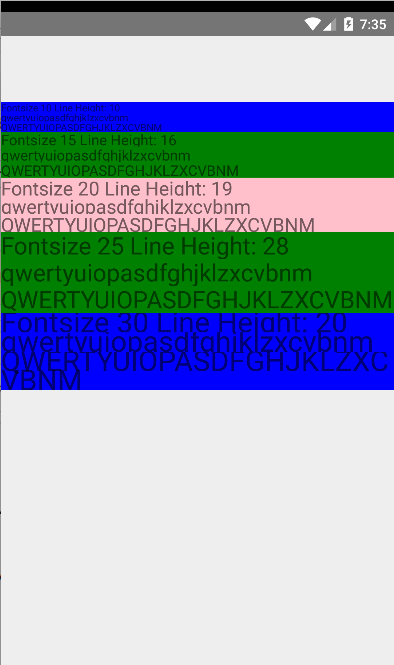
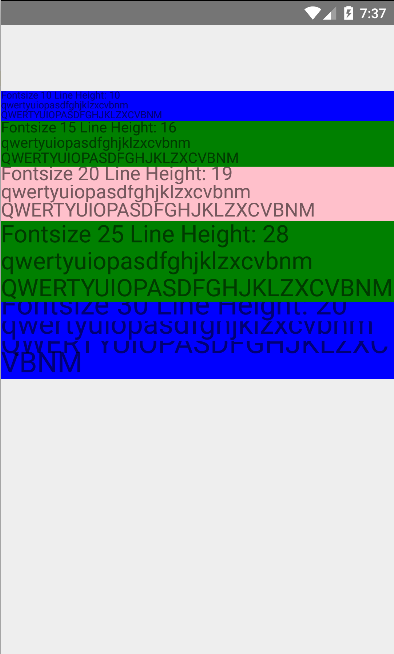
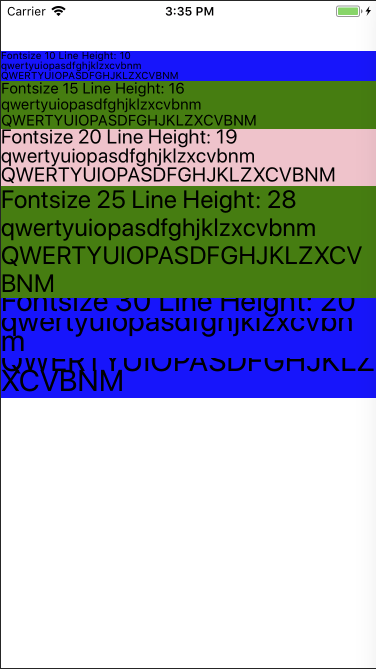
We noticed that on Android the lineHeight behaviour is different from iOS for built in fonts and custom fonts. The problem becomes visible when the lineHeight approaches the fontSize, showing a cut-off on the bottom of the TextView. This issue has been raised before in #10712. There is a mention of a PR with a fix in that issue, which has not been merged yet. This implementation is a less intrusive fix leaving the current lineHeight approach in place and fixing the discrepancy only.
This proposed change prioritises ascent over descent for reduction, making the lineHeight functionality behave identical to iOS.
There is no existing test covering the lineHeight property and its behaviour in the CustomLineHeightSpan. This PR contains new unit tests that covers the various scenario's for the lineHeight calculations.
The original behaviour, before the change can against these unit tests. The case that fails is `shouldReduceAscentThird`, which can be made to succeed on the old code by changing the asserts to:
```
assertThat(fm.top).isEqualTo(-5);
assertThat(fm.ascent).isEqualTo(-5);
assertThat(fm.descent).isEqualTo(-4);
assertThat(fm.bottom).isEqualTo(-4);
```
The unit test succeeds for the current implementation, which has the values for ascent and descent inverted.
Below screenshots show before, after and iOS:
BEFORE
AFTER
iOS
[ANDROID] [BUGFIX] [Text] - Fix the lineHeight behaviour on Android to match iOS
Closes https://github.com/facebook/react-native/pull/16448
Differential Revision: D6221854
Pulled By: andreicoman11
fbshipit-source-id: 7292f0f05f212d79678ac9d73e8a46bf93f1a7c6
Summary:
When we convert nested <Text> components to Spannable object we must enforce the order of spans somehow,
otherwise we will have Spannable object with unpredictable order of spans, which will produce unpredictalbe text layout.
We can do it only using `Spannable.SPAN_PRIORITY` feature because Spannable objects do not maintain the order of spans internally.

We also have to fix this to implement autoexpandable <TextInput>.

Reviewed By: achen1

Differential Revision: D5811172

fbshipit-source-id: 5bc68b869e58aba27d6986581af9fe3343d116a7
Summary:
Abstract class `ReactBaseTextShadowNode` was decoupled from `ReactTextShadowNode` to separate two goals/roles:
 * `ReactBaseTextShadowNode` represents spanned `<Text>` nodes, which can bear text attributes (both `RCTText` and `RCTVirtualText`);
 * `ReactTextShadowNode` represents anchor `<Text>` view in Yoga terms, which can bear layout attributes (`RCTText` and `RCTTextInput`).

`ReactVirtualTextShadowNode` now inherits `ReactBaseTextShadowNode`.
The same architectural changes was applited to view managers.

Why?
 * This is just a better architecture which represents the nature of this objects.
 * Bunch of "negative" logic which turn off excessive features for some suclasses was removed.
 * Memory efficiency.
 * Now we can improve `<TextInput>` component using right inheritance. Yay!

Reviewed By: achen1

Differential Revision: D5715830

fbshipit-source-id: ecc0764a03b5b7586fe77ad31f149cd840f4da41
Summary:
ReactRawTextShadowNode represents "raw" text node (aka textContent), so it cannot have layout or styling, it is just a line of text, a pure string.
So, we must not interit it from HUGE ReactTextShadowNode (which represents <Text> node with ReactRawTextShadowNode instance inside).
We need this change to make future fancy (and valuable from product perspective) refactoring possible. Stay tuned!

Reviewed By: achen1

Differential Revision: D5712961

fbshipit-source-id: 009e48046bdf34ddfd40b93175934969af64b98b
Summary:
Overview -

This PR resolves the issue described in #14606. This PR makes Text components take into account the includeFontPadding property when calculating their size.

Background -

Currently, on Android, when includeFontPadding is set to false, the React Text component does not adjust its height. This makes it difficult to lay out other components at a precise spacing relative to a Text component.

iOS calculates the height of a UILabel based on the font's descent + ascent.

Android lets you choose whether to calculate the height of a TextView based on the font's top + bottom (includeFontPadding=true) or ascent + descent (includeFontPadding=false).

In order for a text component to be the same size on iOS and Android (relative to the rest of the layout in points and dips), one should set includeFontPadding=false on Android - but the React Text component needs to take this property into account when sizing itself for this to work.

Please see this stack overflow post for a visual explanation of the difference between a font's ascent/descent and top/bottom - https://stackoverflow.com/questions/27631736/meaning-of-top-ascent-baseline-descent-bottom-and-leading-in-androids-font

Testing -

Please see the attached screenshots to see the height difference of a Text component with this PR when includeFontPadding is true vs false.

The font I am using has an ascent + descent = em-size so that the height of the Text component will be equal to the font-size for a single line of text. This is to clearly show the additional height that includeFontPadding=true adds to the Text component.

For Text components that are styled in the same way,

When includeFontPadding=true, height = ~29.714 dips
When includeFontPadding=false, height= 24 dips

<img width="342" alt="includefontpaddingtrue" src="https://user-images.githubusercontent.com/1437344/27299391-3eec9de0-54fa-11e7-81d5-d0aeb40e8e27.png">

<img width="346" alt="includefontpaddingfalse" src="https://user-images.githubusercontent.com/1437344/27299401-45c95248-54fa-11e7-98d7-17dd152d3cb8.png">
Closes https://github.com/facebook/react-native/pull/14609

Reviewed By: AaaChiuuu

Differential Revision: D5587602

Pulled By: achen1

fbshipit-source-id: 6d2f12ba72ec7462676645519cd27820279278eb
Summary:
Make android-version accept a decimal
number as lineHeight.

Credits where due, solution was given in this
issue: facebook/react-native#10607

According to the w3 spec the property
line-height should accept decimal values
(and it does on iOS) but the android
version has the wrong data-type for the
shadowed method, resulting in a stacktrace
saying:
com.facebook.react.bridge.UnexpectedNativeTypeException: TypeError:
expected dynamic type `int64', but had type `double'

Setting it to a float makes it accept
decmial values as it should.

* Create an app without this commit and create the same app with this commit:
In both apps:
- Leave line-height undefined. Behavior is unaffected by this commit.
- Set lineHeight to a integer number. Behavior is unaffected by this commit.
- Set lineHeight to a decimal number. Line height is now rendered with decimals in the app with this fix.

* Run android integration tests to see nothing
  else broke.

Sign the [CLA][2], if you haven't already.

Small pull requests are much easier to review and more likely to get merged. Make sure the PR does only one thing, otherwise please split it.

Make sure all **tests pass** on both [Travis][3] and [Circle CI][4]. PRs that break tests are unlikely to be merged.

For more info, see the ["Pull Requests"][5] section of our "Contributing" guidelines.

[1]: https://medium.com/martinkonicek/what-is-a-test-plan-8bfc840ec171#.y9lcuqqi9
[2]: https://code.facebook.com/cla
[3]: https://travis-ci.org/facebook/react-native
[4]: http://circleci.com/gh/facebook/react-native
[5]: https://github.com/facebook/react-native/blob/master/CONTRIBUTING.md#pull-requests
Closes https://github.com/facebook/react-native/pull/13843

Differential Revision: D5152982

Pulled By: shergin

fbshipit-source-id: cda3b72497a6c27d6948b31ec846640a8913775a
Summary:
Inspired by #13191

Creating a test app with spannable `TextView`, and observe the text width/height
Closes https://github.com/facebook/react-native/pull/13203

Differential Revision: D4795809

Pulled By: hramos

fbshipit-source-id: a7c6845abe7472dc7ad2f1f978a20d02fe49eda8
Summary:
Bug in Android https://code.google.com/p/android/issues/detail?id=33868 causes the RN catalyst instrumentation test to fail with

```
java.lang.ArrayIndexOutOfBoundsException: length=253; index=-1
	at android.text.StaticLayout.calculateEllipsis(StaticLayout.java:667)
	at android.text.StaticLayout.out(StaticLayout.java:631)
	at android.text.StaticLayout.generate(StaticLayout.java:423)
	...
```

The fix is to set singleLine to true when there is only one line of text

Reviewed By: AaaChiuuu

Differential Revision: D4562000

fbshipit-source-id: 84248e3982063b767e8b0465effe2321b54a7fa2
Summary:
Fixes#11592
This bug was seen on a Galaxy S4 running Android 4.4.2. On this device, Android's `Layout.getDesiredWidth` method doesn't correctly measure text that contains unicode emoticons. It appears to think the emoticons take up 0 space.
Setting ANTI_ALIAS_FLAG in the TextPaint's constructor instead of setting it later with setFlags works around the Android bug.
**Test plan (required)**
My team uses this fix in our app.
Adam Comella
Microsoft Corp.
Closes https://github.com/facebook/react-native/pull/12690
Differential Revision: D4673649
Pulled By: mkonicek
fbshipit-source-id: 535f371281927bfff5d8b42966496bc8daf30045
Summary:
A copy of https://github.com/facebook/react-native/pull/7791 because of our very imperfect tools that mirror the changes from pull requests in the fb monorepo. The internal Phabricator revision for #7791 is in an 'abandoned' state (by foghina probably because of changing teams) and Phabricator doesn't allow me to claim that revision and merge it. Therefore I'm creating a new one.

(It's not foghina's fault, no one probably knew about this "abandoned Phabricator revision" edge case, don't remember we hit it before.)

Will try to keep attribution (git blame) to rigdern when merging.
Closes https://github.com/facebook/react-native/pull/12448

Differential Revision: D4584743

Pulled By: mkonicek

fbshipit-source-id: 66e5b88134fca1980adc4cd8a2ff17c42e10022c
Summary:
Android has a text API called breakStrategy for controlling how paragraphs are broken up into lines. For example, some modes support automatically hyphenating words so a word can be split across lines while others do not.

One source of complexity is that Android provides different defaults for `breakStrategy` for `TextView` vs `EditText`. `TextView`'s default is `BREAK_STRATEGY_HIGH_QUALITY` while `EditText`'s default is `BREAK_STRATEGY_SIMPLE`.

In addition to exposing `textBreakStrategy`, this change also fixes a couple of rendering glitches with `Text` and `TextInput`. `TextView` and `EditText` have different default values for `breakStrategy` and `hyphenationFrequency` than `StaticLayout`. Consequently, we were using different parameters for measuring and rendering. Whenever measuring and rendering parameters are inconsistent, it can result in visual glitches such as the text taking up too much space or being clipped.

This change fixes these inconsistencies by setting `breakStrategy` and `hyphenat
Closes https://github.com/facebook/react-native/pull/11007

Differential Revision: D4227495

Pulled By: lacker

fbshipit-source-id: c2d96bd0ddc7bd315fda016fb4f1b5108a2e35cf
Summary:
The reason for this change is to implement `allowFontScaling` on the Android's React Native Text component.  Prior to this PR `allowFontScaling` only works for iOS.

The following link contains images of `allowFontScaling` working in Android on small, normal, large, and huge system fonts (from native Android display settings)

http://imgur.com/a/94bF1

The following link is a video of the same thing working on an Android emulator

https://youtu.be/1jTlZhPdj9Y

Here is the sample code snippet driving the video/images
```
render() {
    const size = [12, 14, 16, 18];
    return (
      <View style={{backgroundColor: 'white', flex: 1}}>
        <Text>
          Default size no allowFontScaling prop (default true)
        </Text>
        <Text allowFontScaling={true}>
          Default size allowFontScaling: true
        </Text>
        <Text style={{ marginBottom: 10, }} allowFontScaling={false}>
          Default size allowFontScaling: false
        </Text>

        { size.map(
Closes https://github.com/facebook/react-native/pull/10898

Differential Revision: D4335190

Pulled By: lacker

fbshipit-source-id: 0480809c44983644ff2abfcaf4887569b2bfede5
Summary:
By default Android will put extra space above text to allow for upper-case accents or other ascenders. With some fonts, this can make text look slightly misaligned when centered vertically.

We have found that the effect is very noticeable with certain custom fonts on Android. On iOS the font aligns vertically as expected.

Android exposes a property `includeFontPadding` that will remove this extra padding if set to false. This PR exposes that to JS, and adds it to the documentation and UIExplorer.
Closes https://github.com/facebook/react-native/pull/9323

Differential Revision: D4266713

Pulled By: lacker

fbshipit-source-id: f9711254bc26c09b4586a865f0e95ef4bf77cf3f
Summary:
Virtual shadow nodes (e.g. text) don't use CSSNodes so we don't need to create them. This shows large savings in CSSNodes allocated, depending on the app.

This could be breaking if:
- You have virtual nodes that still set and get CSS properties. The setters now no-op for virtual nodes (I unfortunately couldn't remove them completely -- see the comment on LayoutShadowNode), but the getters will NPE. If you see these NPE's, you should almost definitely be using your own datastructure instead of a CSSNode as virtual nodes will not participate in the layout process (and the CSSNode is then behaving just as a POJO for you).

I do not anticipate this to be breaking for anyone, but am including breaking in the commit message since this is a change in API contract.

Reviewed By: emilsjolander

Differential Revision: D4220204

fbshipit-source-id: b8dc083fff420eb94180f669dd49389136111ecb
Summary:
Moves from CSSNodeDEPRECATED to CSSNode. This has shown to be a huge performance win for layout time within FB.

This is BREAKING because CSSNode contains bug fixes that were not migrated to CSSNodeDEPRECATED which may change the way your layout appears. The most common of these by far involves `flex: 1`.

Previously, developers had to put `flex: 1` in many places it didn't belong in order to work around a bug in css-layout. Now `flex: 1` is treated properly and, unfortunately, this means that your layout may no longer look correct. Specifically, you may see that your layout looks collapsed, or children don't render. The fix is to simply remove `flex: 1` from those containers.

Reviewed By: emilsjolander

Differential Revision: D3992787

fbshipit-source-id: 7a3a2a34a8941c0524e6ba3c5379e434d3e03247
Summary:
This diff makes it so ReactShadowNode holds a CSSNode instead of extending one. This will enable us to pool and re-use CSSNodes and will allow us to keep from breaking the CSSNode api assumption that nodes that have measure functions don't have children (right now, text nodes have measure functions, but they also have raw text children).

BREAKING
This diff makes ReactShadowNode no longer extend CSSNodeDEPRECATED. If you have code that depended on that, e.g. via instanceof checks, that will no longer work as expected. Subclasses that override getChildAt/addChildAt/etc will need to update your method signatures. There should be no runtime behavior changes.

Reviewed By: emilsjolander

Differential Revision: D4153818

fbshipit-source-id: 2836434dd925d8e4651b9bb94b602c235e1e7665
Summary:
The issue here is that on some devices (ie. Nexus 5X), under certain
circumstances, the text gets trimmed. A simple example is P56651885, where the
text is at the end of the line and some padding is set. Digging further with
P56659346, I found that only the paddings that have integer pixel values work
correctly: these are the values P56656483, and this is the screenshot of that
test: {F63510378}.

It turns out that when we set the padding directly on the TextView, we have to
convert from float to int, and use `ceil` in the process. We lose some precision
here, since the csslayout will use the float values to compute the layout of the
views. The ideal solution would be to just set the float values on the TextView,
but since we can't do that, we should avoid using `ceil` instead of `floor`
since it can have bad side-effects in some scenarios.
Going way back to D1881202 and D1710471, we started using `ceil` because that
is how android handles non-integer
density ratios: "This figure is the factor by which you should multiply the dp
units on order to get the actual pixel count for the current screen. (Then add
0.5f to round the figure up to the nearest whole number, when converting to an
integer.)", see https://developer.android.com/guide/practices/screens_support.html.

Reviewed By: emilsjolander

Differential Revision: D3876310

fbshipit-source-id: 701c05a8b1a045d4e06fc89ffe79162c1eecb62c
Summary:
Setting the line height with the help of Android-provided StaticLayout is incorrect. A
simple example app will display the following when `setLineSpacing(50.f, 0.f)`
is set: {F62987699}. You'll notice that the height of the first line is a few
pixels shorter than the other lines.
So we use a custom LineHeightSpan instead, which needs to be applied to the text
itself, and no height-related attributes need to be set on the TextView itself.

Reviewed By: lexs

Differential Revision: D3841658

fbshipit-source-id: 7257df4f1b2ce037554c7a7a5ca8f547a2056939
Summary:
Currently, `<Text>` and `<TextInput>` components on Android do not support borders.
This change adds support for the borderRadius, borderColor, and
borderWidth props on the `<Text>` and `<TextInput>` components on Android.

ReactViewGroup already implements this functionality so
we copied its implementation over into the ReactTextView
and ReactEditText classes.

**Test plan (required)**

Verified that the various border props work on Text and TextInput components in a test app.

Adam Comella
Microsoft Corp.
Closes https://github.com/facebook/react-native/pull/9658

Differential Revision: D3819993

Pulled By: lexs

fbshipit-source-id: 183b0aa95369dd781f03b5a1f0f409ab47284e39
Summary:
There are a couple of buggy behaviors in the current implementation of the `ellipsizeMode` prop on Android:
  - Setting the `numberOfLines` prop stomps on whatever value you provided for `ellipsizeMode` earlier.
  - The value you've provided for `ellipsizeMode` is used even if you've configured your view to have an unlimited size (i.e. `numberOfLines` is 0 or unspecified).

This change fixes these issues which makes Android's `ellipsizeMode` prop more consistent with iOS's. Additionally, it renames LineBreakMode to EllipsizeMode in a couple of places.

**Test plan (required)**

Verified that the `numberOfLines` and `ellipsizeMode` props work correctly in an Android test app.

Adam Comella
Microsoft Corp.
Closes https://github.com/facebook/react-native/pull/9594

Differential Revision: D3810166

Pulled By: foghina

fbshipit-source-id: 229c9bfc3ef10670a1090311ea9d095cb2c1121a
 Stein Strindhaug
 Taras Tsugrii
 Sergei Dryganets
 Jonathan Kim
 Jonathan Keljo
 Cory Reed
 Bartol Karuza
 David Vacca
 Andrew Chen (Eng)
 Valentin Shergin
 Misha Greenberg
 Jonas Lundberg
 Aaron Chiu
 Emil Sjolander
 hoangpham95
 Adam Comella
 Michael Bolin
 Martin Konicek
 Satyajit Sahoo
 Steven Goff
 Delyan Kratunov
 Ben Clayton
 Andy Street
 Andrei Coman
 leeight







