Summary:
Changelog: [Internal]

Previously `setTextAndSelection` was not dirtying layout. This would cause an issue where `setTextAndSelection` causes layout change. For example calling setTextAndSelection with empty string on a multiline auto expanding text input.

I changed one example in TextInputSharedExamples.js, "Live Re-Write (no spaces allowed) and clear" example is now multiline. This allows to test whether `setTextAndSelection` dirties layout. Enter multiline string to to the example text input and press clear. Observe that the text input shrinks to single line height.

Reviewed By: shergin

Differential Revision: D21182990

fbshipit-source-id: de8501ea0b97012cf4cdf8d5f658649139f92da6
Summary:
This is a follow-up pull request to https://github.com/facebook/react-native/issues/28280 (reviewed by shergin).
This pull request tried to solve the problem of the default color in a TextInput in dark mode on iOS being white instead of black. I got suggested to solve the problem not on the level of RCTTextAttributes, but on the level of RCTUITextField.

Setting `self.textColor = [UIColor black];` in the constructor did not work, because it gets overwritten by nil in `RCTBaseTextInputView.m`. There I implemented the logic that if NSForegroundColorAttributeName color is nil then the color is being set to black. I think the `defaultTextAttributes` property confuses here, because it ends up being the effective text attributes, e.g. if I unconditionally set the default text color to black, it cannot be changed in React Native anymore. So I put the nil check in.

## Changelog

[iOS] [Fixed] - TextInput color has the same default (#000) on iOS whether in light or dark mode
Pull Request resolved: https://github.com/facebook/react-native/pull/28708

Test Plan:
I have manually tested the following:
- The default text color in light mode is black
- The default text color in dark mode is black
- The color can be changed using the `style.color` attribute
- Setting the opacity to 0.5 results in the desired behavior, the whole TextInput becoming half the opacity.
– Setting the `style.color` to rgba(0, 0, 0, 0.5) works as intended, creating a half-opaque text color.

Differential Revision: D21186579

Pulled By: shergin

fbshipit-source-id: ea6405ac6a0243c96677335169b214a2bb9ccc29
Summary:
Changelog: [Internal]

# Fabric

1. If `start` and `end` parameters in `setTextAndSelection` are -1, we don't move the cursor. Previously the cursor would be moved to beginning of text input.

2. In view commands, do not validate `eventCount`. It is passed in as undefined from JS because Fabric's text input doesn't use `eventCount`.

# Paper

1. If `start` and `end` parameters in `setTextAndSelection` are -1, we don't move the cursor. Previously the cursor would be moved to beginning of text input.

Reviewed By: shergin

Differential Revision: D20538290

fbshipit-source-id: c7aeddc25f58697254474058ce901df958321f7c
Summary:
Resolve React-RCTText warning: `'UIKeyboardTypeASCIICapableNumberPad' is only available on iOS 10.0 or newer`

## Changelog

[iOS] [Fixed] - Resolve React-RCTText Xcode warning
Pull Request resolved: https://github.com/facebook/react-native/pull/28054

Test Plan: Build template, React-RCTText should no longer throw a warning.

Differential Revision: D19887063

Pulled By: hramos

fbshipit-source-id: 3437ee993babd7cdaec259af24526e197acb64bb
Summary:
This implement the autoFocus functionality natively instead of calling the focus method from JS on mount. This is needed to properly fix the issue described in https://github.com/facebook/react-native/issues/27217, where when using native navigation (UINavigationController) text input focus needs to happen in the same frame transition starts or it leads to an animation bug in UIKit.

My previous attempt fixed the problem only partially and the bug could still happen since there is no guaranty code executed in useEffect will end up in the same frame as the native view being created and attached.

To fix this I added an autoFocus prop to the native component on iOS and in didAttachToWindow we focus the input if it is set. This makes sure the focus is set in the same frame as the view hierarchy containing the input is created.

## Changelog

[iOS] [Fixed] - Add native support for TextInput autoFocus on iOS
Pull Request resolved: https://github.com/facebook/react-native/pull/27803

Test Plan:
- Tested that the UI glitch when transitionning to a screen with an input with autofocus no longer happens in my app.
- Tested that autofocus still works in RNTester
- Made sure that onFocus does get called and TextInputState is updated properly

Differential Revision: D19673369

Pulled By: TheSavior

fbshipit-source-id: 14d8486ac635901622ca667c0e61c75fb446e493
Summary:
Re-landing the reverted change:

This removes all callsites that rely on runtime checks to detect the target deployment version. We no longer need to check for iOS 10+ in a few places. Note: for this to compile, the hosting app needs to target iOS 10.0+.

Changelog: [iOS] [Deprecated] - Deprecate iOS 9

Reviewed By: sammy-SC

Differential Revision: D19411136

fbshipit-source-id: ec0a957dc57819f0ee7d138c858209cabe3e5102
Summary:
This removes all callsites that rely on runtime checks to detect the target deployment version. We no longer need to check for iOS 10+ in a few places. Note: for this to compile, the hosting app needs to target iOS 10.0+.

Changelog: [iOS] [Deprecated] - Deprecate iOS 9

Reviewed By: hramos

Differential Revision: D19271321

fbshipit-source-id: 424ad7e2161261d148cb436cc20b4c531a4ba5b7
Summary:
This is a more feature-full replacement for `textInputShouldChangeTextInRange:replacementText:` that allows implementing things like limiting text input content length without hacks and compromising the order of events. The new version of the TextInput will rely on that. The existing TextInput will use that as exacly like the previous version (because the new API is a superset of the the old one).

Changelog: [Internal] Fabric-specific internal change.

Reviewed By: sammy-SC

Differential Revision: D18670792

fbshipit-source-id: 0c434b351dfc8ab42404eb9aea0ede70bedaa9dc
Summary:
The moved code fragment is a workaround for a bug in UITextField in iOS 8. There is no need to have this code in a general base class that serves both UITextField- and UITextView-based components. Especially for such workarounds like that, we have a dedicated class RCTUITextField. This diff moves that there.

Read more about the bug:
https://stackoverflow.com/questions/14220187/uitextfield-has-trailing-whitespace-after-securetextentry-toggle/22537788#22537788

Changelog: [Internal]

Reviewed By: sammy-SC

Differential Revision: D18444734

fbshipit-source-id: a3764c19f562231ba3fa3d4c0ad7de069ea04d98
Summary:
This diff changes how we apply default text attributes to backed text input.
The original change in https://github.com/facebook/react-native/pull/23585 that introduced the `reactTextAttributes` field in for RCTBackedTextInputViewProtocol was great! Thank you Wu zhongwuzw !
However, there is one detail that needs to be changed.
RCTBackedTextInputViewProtocol is designed to only abstract complexity of iOS text input components (UITextView and UITextField); it intentionally does not have any React-specific fields or types. Adding a field `RCTTextAttributes *reactTextAttributes;` violates this principle and make it hard to reuse this functionality in the new Fabric-powered TextInput.

This diff changes the type of this prop from `RCTTextAttributes` to `NSDictionary<NSAttributedStringKey,id> *`  (exact same type that UITextView and UITextField use).

Reviewed By: cpojer

Differential Revision: D17408501

fbshipit-source-id: 65f2bba119ccc30f22e87c28d0f8ea6f731cd365
Summary:
Move RCTAccessibilityManager to CoreModules (since that's the only dir that supports TM).

Fixup some variable names to match spec.

Reviewed By: RSNara

Differential Revision: D16861739

fbshipit-source-id: a0a53b221dcc172979d1f2c83851ab92e23f2333
Summary:
This is my proposal for fixing `use_frameworks!` compatibility without breaking all `<React/*>` imports I outlined in https://github.com/facebook/react-native/pull/25393#issuecomment-508457700. If accepted, it will fix https://github.com/facebook/react-native/issues/25349.

It builds on the changes I made in https://github.com/facebook/react-native/pull/25496 by ensuring each podspec has a unique value for `header_dir` so that framework imports do not conflict. Every podspec which should be included in the `<React/*>` namespace now includes it's headers from `React-Core.podspec`.

The following pods can still be imported with `<React/*>` and so should not have breaking changes: `React-ART`,`React-DevSupport`, `React-CoreModules`, `React-RCTActionSheet`, `React-RCTAnimation`, `React-RCTBlob`, `React-RCTImage`, `React-RCTLinking`, `React-RCTNetwork`, `React-RCTPushNotification`, `React-RCTSettings`, `React-RCTText`, `React-RCTSettings`, `React-RCTVibration`, `React-RCTWebSocket` .

There are still a few breaking changes which I hope will be acceptable:

- `React-Core.podspec` has been moved to the root of the project. Any `Podfile` that references it will need to update the path.
- ~~`React-turbomodule-core`'s headers now live under `<turbomodule/*>`~~ Replaced by https://github.com/facebook/react-native/pull/25619#issuecomment-511091823.
- ~~`React-turbomodulesamples`'s headers now live under `<turbomodulesamples/*>`~~ Replaced by https://github.com/facebook/react-native/pull/25619#issuecomment-511091823.
- ~~`React-TypeSaferty`'s headers now live under `<TypeSafety/*>`~~ Replaced by https://github.com/facebook/react-native/pull/25619#issuecomment-511040967.
- ~~`React-jscallinvoker`'s headers now live under `<jscallinvoker/*>`~~ Replaced by https://github.com/facebook/react-native/pull/25619#issuecomment-511091823.
- Each podspec now uses `s.static_framework = true`. This means that a minimum of CocoaPods 1.5 ([released in April 2018](http://blog.cocoapods.org/CocoaPods-1.5.0/)) is now required. This is needed so that the ` __has_include` conditions can still work when frameworks are enabled.

Still to do:

- ~~Including `React-turbomodule-core` with `use_frameworks!` enabled causes the C++ import failures we saw in https://github.com/facebook/react-native/issues/25349. I'm sure it will be possible to fix this but I need to dig deeper (perhaps a custom modulemap would be needed).~~ Addressed by https://github.com/facebook/react-native/pull/25619/commits/33573511f02f3502a28bad48e085e9a4b8608302.
- I haven't got Fabric working yet. I wonder if it would be acceptable to move Fabric out of the `<React/*>` namespace since it is new? �

## Changelog

[iOS] [Fixed] - Fixed compatibility with CocoaPods frameworks.
Pull Request resolved: https://github.com/facebook/react-native/pull/25619

Test Plan:
### FB

```
buck build catalyst
```

### Sample Project

Everything should work exactly as before, where `use_frameworks!` is not in `Podfile`s. I have a branch on my [sample project](https://github.com/jtreanor/react-native-cocoapods-frameworks) here which has `use_frameworks!` in its `Podfile` to demonstrate this is fixed.

You can see that it works with these steps:

1. `git clone git@github.com:jtreanor/react-native-cocoapods-frameworks.git`
2. `git checkout fix-frameworks-subspecs`
3. `cd ios && pod install`
4. `cd .. && react-native run-ios`

The sample app will build and run successfully. To see that it still works without frameworks, remove `use_frameworks!` from the `Podfile` and do steps 3 and 4 again.

### RNTesterPods

`RNTesterPodsPods` can now work with or without `use_frameworks!`.

1. Go to the `RNTester` directory and run `pod install`.
2. Run the tests in `RNTesterPods.xcworkspace` to see that everything still works fine.
3. Uncomment the `use_frameworks!` line at the top of `RNTester/Podfile` and run `pod install` again.
4. Run the tests again and see that it still works with frameworks enabled.

Reviewed By: PeteTheHeat

Differential Revision: D16465247

Pulled By: PeteTheHeat

fbshipit-source-id: cad837e9cced06d30cc5b372af1c65c7780b9e7a
Summary:
On `textContentType` `newPassword` on ios, there is another property called `passwordRules` on ios 12 that can give hints to the os to generate a password with specific requirements like [here](https://developer.apple.com/password-rules/).
This is useful for apps that have a "register" screen with `emailAddress`/`username` and a `newPassword` fields, to let ios make a password that will satisfy the requirements and not one that might be not accepted after the user presses "register".

## Changelog

[iOS] [Added] - PasswordRules for new password textContentType input fields
Pull Request resolved: https://github.com/facebook/react-native/pull/25407

Test Plan: This is a bit harder, but to test you need to make an app that has associated domains with an apple-app-site-association file on that domain, enable iCloud Keychain on the test device, and then iOS will suggest a password, otherwise you will just get a warning on Xcode saying "Couldn't suggest password because of: blabla".

Differential Revision: D16028684

Pulled By: cpojer

fbshipit-source-id: d22426e07f1db45d1f79f5dad81f1465a9701f0b
Summary:
Bug comes from #23545, if `allowedLength < 0`, it would crash if `text.length > 1`.

cc. cpojer

[iOS] [Fixed] - Fixed crash when textinput's default value exceeds maxLength
Pull Request resolved: https://github.com/facebook/react-native/pull/24084

Differential Revision: D14562719

Pulled By: cpojer

fbshipit-source-id: 87ed930e35b8fa889d8b04829795fa46b7787b07
Summary:
Currently, if we has `defaultValue`, textAttributes like `letterSpacing` can works, but if textinput has not default text, when we typing the text, some attributes not applied.

[iOS] [Fixed] - Fix textAttributes not applied when typing text
Pull Request resolved: https://github.com/facebook/react-native/pull/23585

Differential Revision: D14206568

Pulled By: cpojer

fbshipit-source-id: 7db276d811684bf6e01f8d30287cca80095db87c
Summary:
This is a fix for #5859, based on the feedback in #18587. Instead of using `didSetProps` it uses a setter. I will also note that setting to `nil` no longer works (crashes) so setting it to a blank string then back to the original works fine.

[iOS] [Fixed] - Toggling secureTextEntry correctly places cursor.
Pull Request resolved: https://github.com/facebook/react-native/pull/23524

Differential Revision: D14143028

Pulled By: cpojer

fbshipit-source-id: 5f3203d56b1329eb7359465f8ab50eb4f4fa5507
Summary:
Throw error warning when build Text module, we can add tvOS available check to remove error.

[iOS] [Fixed] - Fix build error warning of Text module
Pull Request resolved: https://github.com/facebook/react-native/pull/23586

Differential Revision: D14181198

Pulled By: cpojer

fbshipit-source-id: 6a62c831ba119ddcbc6effa0b24f22bd4588b982
Summary:
This is an updated version of #22579 which uses compile conditionals to prevent `use of undeclared identifier` errors when compiling on older versions of Xcode.

--------

Currently the only `textContentType` values that work are: `username`, `password`, `location`, `name` and `nickname`. This is due to the strings provided by React Native not matching up with the underlying string constants used in iOS (with the exception of the aforementioned types). Issue #22578 has more detail examples/explanation.
Pull Request resolved: https://github.com/facebook/react-native/pull/22611

Differential Revision: D13460949

Pulled By: cpojer

fbshipit-source-id: e6d1108422b850ebc3aea05693ed05118b77b5de
Summary:
If we change the text attributes dynamically, for example, change the textColor, it not works in iOS, Android works fine.

[iOS] [fixed] - Fixed textInput appearance not update when text attributes changed
Pull Request resolved: https://github.com/facebook/react-native/pull/23533

Differential Revision: D14146700

Pulled By: cpojer

fbshipit-source-id: 4a7c84d6e7f818acb712242bea6484b177a775c6
Summary:
I found the TextInput can't control input length when default value's length > maxLength.
for example:
1.Set the value in special cases
```
<TextInput value={'12345678'} maxLength={6}/>
```
2.Quickly press the keyboard with multiple fingers

```
// RCTBaseTextInputView.m
……
if (_maxLength) {
    NSUInteger allowedLength = _maxLength.integerValue - backedTextInputView.attributedText.string.length + range.length;
    if (text.length > allowedLength) {
……
```
when value's length > maxLength,the allowedLength not a negative number.it was transformed into a big number,because it is type NSUInteger.so the `text.length > allowedLength` always false.

[iOS][Fixed] - fix the TextInput can't control input length when value's length > maxLength
Pull Request resolved: https://github.com/facebook/react-native/pull/23545

Differential Revision: D14146581

Pulled By: cpojer

fbshipit-source-id: f53b1312ae55fad9fc10430ab94784c1a9ad4723
Summary:
Fixes#21243.
Fixes#20908.
Credit goes to superandrew213 who provided the patch based on 0.56; this commit merges and resolved the conflict introduced in 0.57.
Pull Request resolved: https://github.com/facebook/react-native/pull/21951
Differential Revision: D13980799
Pulled By: cpojer
fbshipit-source-id: 6b9f1a1ae54ad9dba043005d683d6a221472c729
Summary:
Fixes#22578
Currently the only `textContentType` values that work are: `username`, `password`, `location`, `name` and `nickname`. This is due to the strings provided by React Native not matching up with the underlying string constants used in iOS (with the exception of the aforementioned types). Issue #22578 has more detail examples/explanation.
Pull Request resolved: https://github.com/facebook/react-native/pull/22579
Differential Revision: D13402177
Pulled By: shergin
fbshipit-source-id: 55f4a2029cd3ea1fb4834e9f56d2df5a05b31b4e
Summary:
1. The user inserts a character ('0') at index 0. Because the range matches 0, 0, predictedText is set to that character that was inserted.
2. In textInputDidChange, it discovers a mismatch between the rendered text ('1234') and predicted text ('0')
3. This triggers textInputShouldChangeTextInRange to be called again with the 'new' text that it thinks was just added ('1234')
4. It goes to insert this text, but runs into the maxLength limit, so it gets truncated and then inserted.

(I'm not totally sure why only happens if maxLength is set - I need to look into that.)

One fix for this is to just get rid of the range check, but that'll regress #18374. I decided to just check and see if the rendered text is empty instead of checking the range where text could be inserted, since that seems like it should properly handle both cases.

Reviewed By: shergin

Differential Revision: D10392176

fbshipit-source-id: 84fb3b6cac9b0aa25b3c1a127d43f9cdc5a1c6a8
Summary: This change drops the year from the copyright headers and the LICENSE file.

Reviewed By: yungsters

Differential Revision: D9727774

fbshipit-source-id: df4fc1e4390733fe774b1a160dd41b4a3d83302a
Summary:
@public
This should fix#18403.
When the user is inputting in Chinese/Japanese with <TextInput> in a controlled manner, the RCTBaseTextInputView will compare the JS-generated attributed string against the TextInputView attributed string and repeatedly overwrite the TextInputView one. This is because the native TextInputView will provide extra styling to show that some text is provisional.
My solution is to do a plain text string comparison at this point, like how we do for dictation.
Expected behavior when typing in a language that has "multistage" text input: For instance, in Chinese/Japanese it's common to type out the pronunciation for a word and then choose the appropriate word from above the keyboard. In this model, the "pronunciation" shows up in the text box first and then is replaced with the chosen word.
Using the word Japan which is written 日本 but first typed as にほん. It takes 4 key-presses to get to 日本, since に, ほ, ん, are all typed and then 日本 is selected. So here is what should happen:
1. enter に, onChange fires with 'に', markedTextRange covers 'に'
2. enter ほ, onChange fires with 'にほ', markedTextRange covers 'にほ'
3. enter ん, onChange fires with 'にほん', markedTextRange covers 'にほん'
4. user selects 日本 from the menu above the keyboard (provided by the keyboard/OS), onChange fires with '日本', markedTextRange is removed
previously we were overwriting the attributed text which would remove the markedTextRange, preventing the user from selecting 日本 from above the keyboard.
Cheekily, I've also fixed an issue with secure text entry as it's the same type of problem.
Reviewed By: PeteTheHeat
Differential Revision: D9002295
fbshipit-source-id: 7304ede055f301dab9ce1ea70f65308f2a4b4a8f
Summary:
Potential fixes for 18890. The issue was that when the setAttributedText method in RCTBaseTextInputView.m is called it does two main things:

Check that the attributed text that it receives is equal to the existing attributed text in the underlying backed up view ( backedTextInputView)
If not set the attributed text of the backed up view to the value passed into the method. This kills the dictation as it is effectively the equivalent of typing in the backed up text view.
    self.backedTextInputView.attributedText = attributedText;
is the problem. It kills the dictation. It may have other effects as well.

In all cases I have seen the underlying text of the attributed string that is passed in the same as the text in the backedTextInputView, what was said to the dictation; however the attributes are different, which causes the isEqualToAttributedString: check to fail and thus the update happens, and the keyboard is killed.

Fix is to test for the underlying string equality not the attributed string equality when the input mode is dictation.

By necessity this had to be an integration test on an existing application. To test I enabled the keyboard and started the dictation. It worked with this fixes and not without. Will upload videos later.

This might break attributes on dictation, as it is happening. However anything set on the existing underlying text view should hold.

[IOS] [BUG] [Textinput] fixed an issue where the keyboard dictation ended abruptly.
Closes https://github.com/facebook/react-native/pull/19687

Differential Revision: D8450590

Pulled By: hramos

fbshipit-source-id: f97084131f98e9e0ed1f32111afc0f9f510f3b3b
Summary:
The bug #18374 was caused by the loose condition to execute `stringByReplacingCharactersInRange` in the method `textInputShouldChangeTextInRange` . As a result, `findMismatch` wrongly returning `true` which ends up the Backspace event being fired in another `textInputShouldChangeTextInRange` call in `textInputDidChange`.

<!--
  Required: Write your motivation here.
  If this PR fixes an issue, type "Fixes #issueNumber" to automatically close the issue when the PR is merged.
-->

1. Pass all the tests by `yarn run test`
2. Run the following code and type any text. (This code is brought from #18374. Thank you michalpetrov!!) And then verify that 'Backspace' events are not emitted after clearing text
and entering any letters.

```javascript
type Props = {};
type State = {
  text: string,
  keys: string
};
export default class App extends Component<Props, State> {
  state = {text: '', keys: ''}
  render() {
    return (
      <View style={styles.container}>
        <TextInput style={styles.textInput} value={this.state.text} onChangeText={this.onChangeText} onKeyPress={this.onKeyPress}/>
        <Button title="Clear" onPress={this.onClear}/>
        <Text>Text: {this.state.text}</Text>
        <Text>Keys: {this.state.keys}</Text>
      </View>
    );
  }

  onChangeText = (text: string) => {
    this.setState({text})
  }

  onKeyPress = ({ nativeEvent }: Object) => {
    this.setState({keys: this.state.keys + nativeEvent.key + ', '})
  }

  onClear = () => {
    this.setState({text: '', keys: ''})
  }
}
```

<!--
  Does this PR require a documentation change?
  Create a PR at https://github.com/facebook/react-native-website and add a link to it here.
-->

<!--
  Required.
  Help reviewers and the release process by writing your own release notes. See below for an example.
-->

[IOS] [BUGFIX] [TextInput] - Fixed the bug where Backspace event was emitted when entering a character after clearing a text in TextInput by an empty string

<!--
  **INTERNAL and MINOR tagged notes will not be included in the next version's final release notes.**

    CATEGORY
  [----------]      TYPE
  [ CLI      ] [-------------]    LOCATION
  [ DOCS     ] [ BREAKING    ] [-------------]
  [ GENERAL  ] [ BUGFIX      ] [ {Component} ]
  [ INTERNAL ] [ ENHANCEMENT ] [ {Filename}  ]
  [ IOS      ] [ FEATURE     ] [ {Directory} ]   |-----------|
  [ ANDROID  ] [ MINOR       ] [ {Framework} ] - | {Message} |
  [----------] [-------------] [-------------]   |-----------|

 EXAMPLES:

 [IOS] [BREAKING] [FlatList] - Change a thing that breaks other things
 [ANDROID] [BUGFIX] [TextInput] - Did a thing to TextInput
 [CLI] [FEATURE] [local-cli/info/info.js] - CLI easier to do things with
 [DOCS] [BUGFIX] [GettingStarted.md] - Accidentally a thing/word
 [GENERAL] [ENHANCEMENT] [Yoga] - Added new yoga thing/position
 [INTERNAL] [FEATURE] [./scripts] - Added thing to script that nobody will see
-->
Closes https://github.com/facebook/react-native/pull/18627

Differential Revision: D8436331

Pulled By: hramos

fbshipit-source-id: ec75a6ca926061cbf7cb106db652f2b4a71c9a0c
Summary:
This PR makes sure that changing the `keyboardType` props of `<TextInput>` is reflected while the text field has focus. It is something that is also discusses in #13782. The workaround mentioned in that issue using `key` causes the TextInput to re-render itself which has some undesired side-effects.
Fixes#13782
```javascript
export default class KeyboardTypeApp extends Component {
state = { keyboardType: 'default' };
toggleKeyboardType = () => {
this.setState({
keyboardType: this.state.keyboardType === 'default' ? 'numeric' : 'default'
});
}
render() {
return (
<View style={{ padding: 40 }}>
<TextInput autoFocus value="Press Toggle :)" keyboardType={this.state.keyboardType} />
<Button title="Toggle" onPress={this.toggleKeyboardType} />
</View>
);
}
}
```
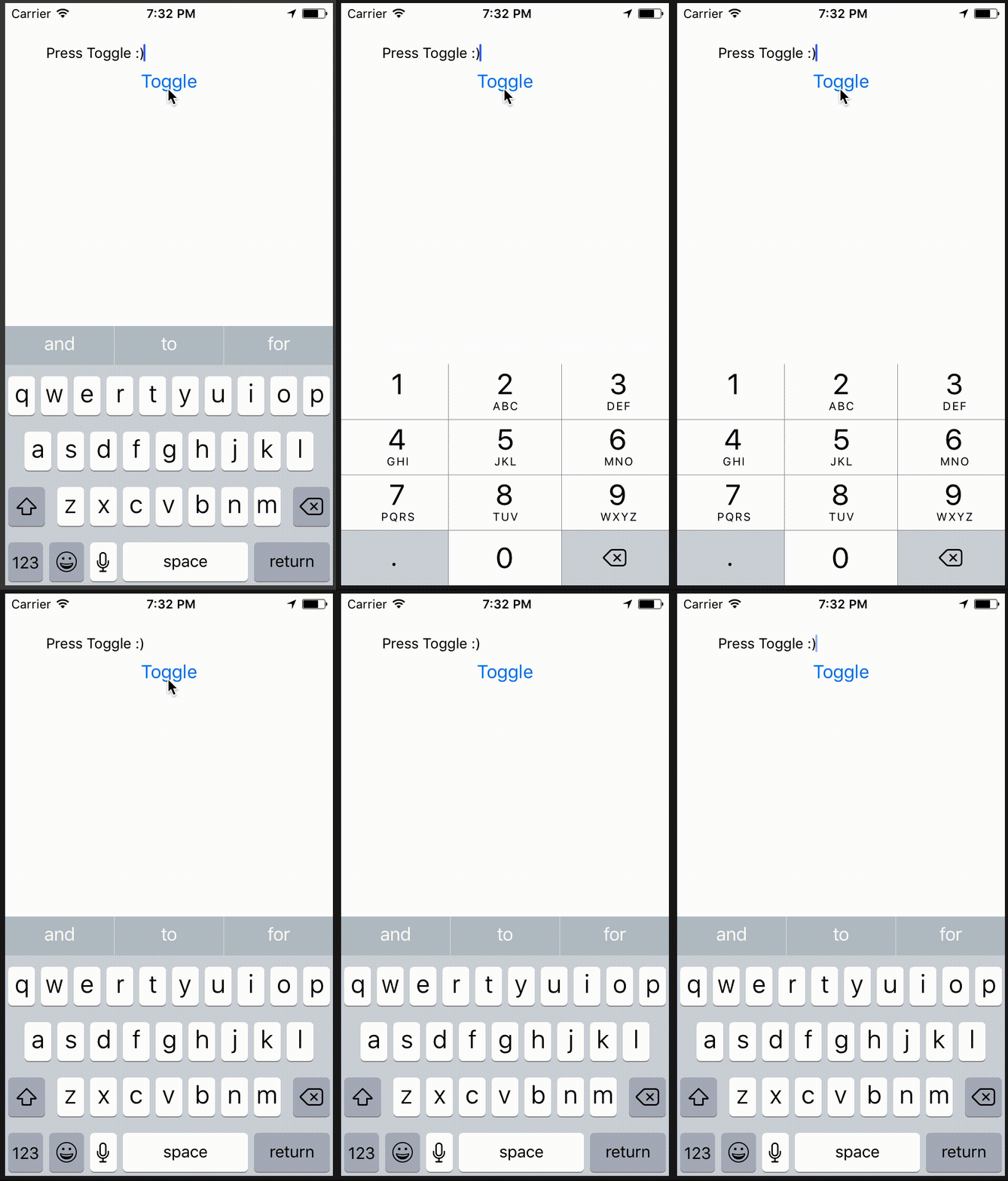
<!--
Does this PR require a documentation change?
Create a PR at https://github.com/facebook/react-native-website and add a link to it here.
-->
[IOS] [ENHANCEMENT] [TextInput] - Keyboard layout now updates when changing `keyboardType` while it has focus
<!--
**INTERNAL and MINOR tagged notes will not be included in the next version's final release notes.**
CATEGORY
[----------] TYPE
[ CLI ] [-------------] LOCATION
[ DOCS ] [ BREAKING ] [-------------]
[ GENERAL ] [ BUGFIX ] [ {Component} ]
[ INTERNAL ] [ ENHANCEMENT ] [ {Filename} ]
[ IOS ] [ FEATURE ] [ {Directory} ] |-----------|
[ ANDROID ] [ MINOR ] [ {Framework} ] - | {Message} |
[----------] [-------------] [-------------] |-----------|
EXAMPLES:
[IOS] [BREAKING] [FlatList] - Change a thing that breaks other things
[ANDROID] [BUGFIX] [TextInput] - Did a thing to TextInput
[CLI] [FEATURE] [local-cli/info/info.js] - CLI easier to do things with
[DOCS] [BUGFIX] [GettingStarted.md] - Accidentally a thing/word
[GENERAL] [ENHANCEMENT] [Yoga] - Added new yoga thing/position
[INTERNAL] [FEATURE] [./scripts] - Added thing to script that nobody will see
-->
Closes https://github.com/facebook/react-native/pull/19027
Differential Revision: D8416007
Pulled By: PeteTheHeat
fbshipit-source-id: c4f89ab3dc0819bca52feddbc9c7a9f62fd96794
Summary:
Setting `textContentType` will provide the keyboard and system with semantic meaning for inputs. Should enable password/username autofill in apps running on iOS 11+ as demonstrated here: https://developer.apple.com/videos/play/wwdc2017/206/
Also gives you the ability to disable autofill by setting `textContentType="none"`: https://stackoverflow.com/questions/48489479/react-native-disable-password-autofill-option-on-ios-keyboard
Adding `textContentType` equal to `username` or `password` should give you an autofill-bar over the keyboard which will let you fill in values from the device Keychain:
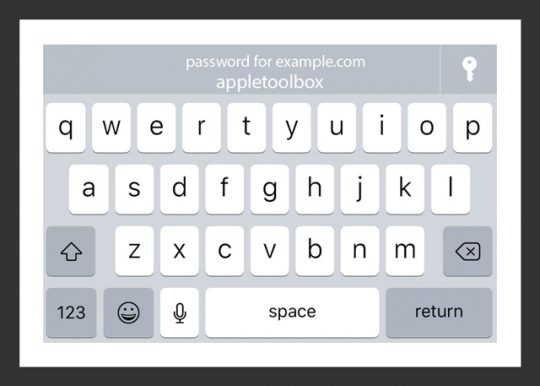
Setting the appropriate `textContentType` will fill in the correct value in the `TextInput`.
I have only been able to get this to work on device, and not simulator.
Usage:
```jsx
<TextInput
value={this.state.username}
onChangeText={this.setUserName}
textContentType="username"
/>
```
```jsx
<TextInput
value={this.state.password}
onChangeText={this.setPassword}
secureTextEntry={true}
textContentType="password"
/>
```
To disable:
```jsx
<TextInput
value={this.state.password}
onChangeText={this.setPassword}
secureTextEntry={true}
textContentType="none"
/>
```
This will set `textContentType` to an empty string: https://stackoverflow.com/a/46474180/5703116
<!--
Does this PR require a documentation change?
Create a PR at https://github.com/facebook/react-native-website and add a link to it here.
-->
Docs PR coming up.
[IOS] [MINOR] [TextInput] - Added `textContentType` prop for iOS 10+. Will enable password autofill for iOS 11+.
Closes https://github.com/facebook/react-native/pull/18526
Differential Revision: D7469630
Pulled By: hramos
fbshipit-source-id: 852a9749be98d477ecd82154c0a65a7c084521c1
Summary:
Includes React Native and its dependencies Fresco, Metro, and Yoga. Excludes samples/examples/docs.

find: ^(?:( *)|( *(?:[\*~#]|::))( )? *)?Copyright (?:\(c\) )?(\d{4})\b.+Facebook[\s\S]+?BSD[\s\S]+?(?:this source tree|the same directory)\.$
replace: $1$2$3Copyright (c) $4-present, Facebook, Inc.\n$2\n$1$2$3This source code is licensed under the MIT license found in the\n$1$2$3LICENSE file in the root directory of this source tree.

Reviewed By: TheSavior, yungsters

Differential Revision: D7007050

fbshipit-source-id: 37dd6bf0ffec0923bfc99c260bb330683f35553e
Summary:
The problem was recently introduced in the last refactoring of the Text module.
There are two problem actually:
(1) Compare this current code with stable version.
In the stable version the event is only triggered here:
https://github.com/facebook/react-native/blob/0.52-stable/Libraries/Text/RCTTextField.m#L132-L140
In the new version the event is triggered in two places (which is obviously wrong).

(2) Executing `[_eventDispatcher sendTextEventWithType:RCTTextEventTypeChange:...]` and _onChange() actually do the same thing.
Historically, the single-line <TextInput> used the first approach and multi-line used second one. When we unify the logic, mixed both of them, which was apparenly wrong.
So, we have to remove another call of `[_eventDispatcher sendTextEventWithType:RCTTextEventTypeChange:...]`.
The the future we have to completly remove usage of `_eventDispatcher` from this component.

Depends on D6854770.

Reviewed By: fkgozali

Differential Revision: D6869678

fbshipit-source-id: 6705ee8dda2681ae184ef6716238cc8b62efeff1
Summary:
Now, in the new model, we transfer text attributes with actual text via attributed text to a native text component,
so previous text-only comparsion is not sufficient anymore.

Depends on D6600685.

Differential Revision: D6809833

fbshipit-source-id: 475b7426cf3c6694781790d99ef32466606da2f2
Summary:
This is a complete rewrite of RCTText, the part of React Native which manages Text and TextInput components.
Key points:
* It's understandable now. It follows a simple architectural pattern, and it's easy to debug and iterate. Text flow layout is a first-class citizen in React Native layout system now, not just a wired special case. It also brings entirely new possibilities such as nested interleaving <Text> and <View> components.
* All <Text>-specific APIs were removed from UIManager and co (it's about ~16 public methods which were used exclusively only by <Text>).
* It relies on new Yoga measurement/cloning API and on-dirty handler. So, it removes built-in dirty propagation subsystem from RN completely.
* It caches string fragments properly and granularly on a per-node basis which makes updating text-containing components more performant.
* It does not instantiate UIView for virtual components which reduces memory utilization.
* It drastically improves <TextInput> capabilities (e.g. rich text inside single line <TextInput> is now supported).
Screenshots:
https://cl.ly/2j3r1V0L0324https://cl.ly/3N2V3C3d3q3R
Reviewed By: mmmulani
Differential Revision: D6617326
fbshipit-source-id: 35d4d81b35c9870e9557d0211c0e934e6072a41e
 Aditya Kumar
 Manvir Singh
 Samuel Susla
 Jonny Burger
 Jason Safaiyeh
 Janic Duplessis
 Kevin Gozali
 Jiawei Lv
 Valentin Shergin
 Andres Suarez
 Peter Argany
 James Treanor
 Min ho Kim
 Pavlos Vinieratos
 Christoph Nakazawa
 zhongwuzw
 Xiuli Shen
 Estevão Lucas
 Eric Lewis
 Levi Buzolic
 jsfu
jsfu
 dchersey
 Ben Holcomb
 Emily Janzer
 Héctor Ramos
 Mehdi Mulani
 Eoin Norris
 hamaron
 Mattijs Fuijkschot
 Christian Brevik
 Sophie Alpert



