Summary: Support existing, backwards-compatible AndroidTextInput component for minimal support of TextInput on Android.

Reviewed By: shergin, mdvacca

Differential Revision: D17086758

fbshipit-source-id: 25726f22229e0d5dfe96eb36b386a5317601283d
Summary:
After some thought, we decided we don't need the flexibility of
separate horizontal and vertical props - it would be much nicer
to just have a single prop for the edge length and then the native
code can enable the booleans as appropriate.

Original PR: https://github.com/facebook/react-native/pull/26163

Original commit changeset: f72a9a890d90

Reviewed By: TheSavior

Differential Revision: D16997468

fbshipit-source-id: 7973262287a7ec2cee5957f8dc1806a0f28c1432
Summary:
Changing showSoftKeyboard and hideSoftKeyboard to be protected, as we need this change for an internal control that extends ReactEditText.

## Changelog

[Android] [Changed] - part of our react native platform, we have a control that extends ReactEditText and we need to be able to override these 2 methods.
Pull Request resolved: https://github.com/facebook/react-native/pull/25964

Test Plan: The change has been in Microsoft's branch of RN for almost 2 years, and since it's a relatively small change we've done a quick sanity check in RNTester prior to this PR, making sure the TextInput page loads fine and it's functional.

Differential Revision: D16686878

Pulled By: cpojer

fbshipit-source-id: 63035ee9c58e93bc0fa40e5bec318df05322c6c5
Summary:
Since the Android's Picker implementation uses an ArrayAdapter,
it means that the views that were created may be reused for other items
in order to save memory. With this in mind, if one sets the Picker.Item
prop color for only certain items there might be an state that
some items that does not have the color set will end up appearing
with the wrong color. This happens because, this new item is
reusing a view of an item that had the color prop set.
In order to avoid this problem, once a new view is created
the ReactPickerAdapter will save the original color and
re-apply if the item does not have the color prop.
## Changelog
[Android] [Fixed] - Picker.Item displays wrong colors
Pull Request resolved: https://github.com/facebook/react-native/pull/25750
Test Plan:
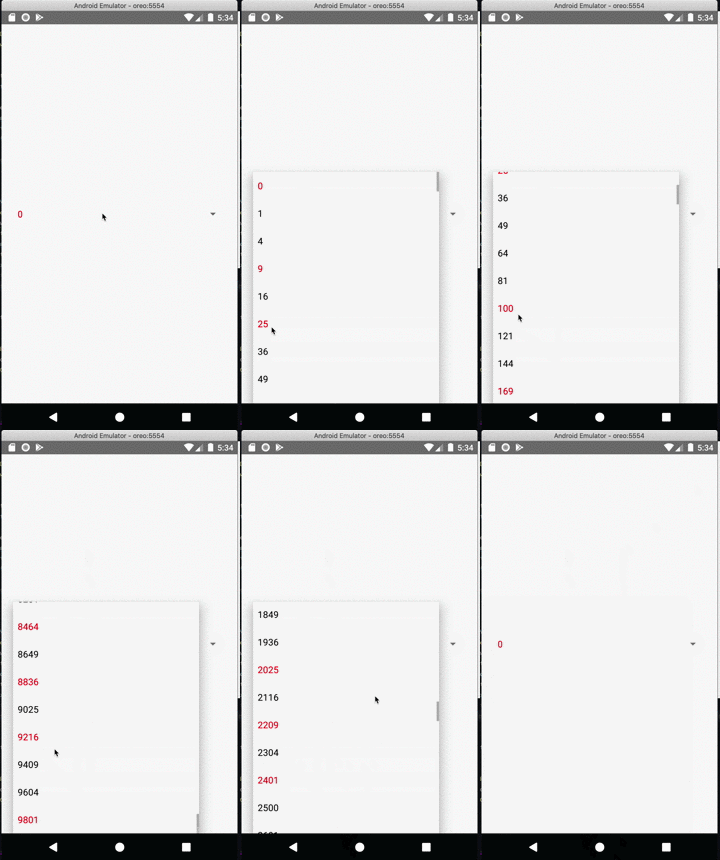
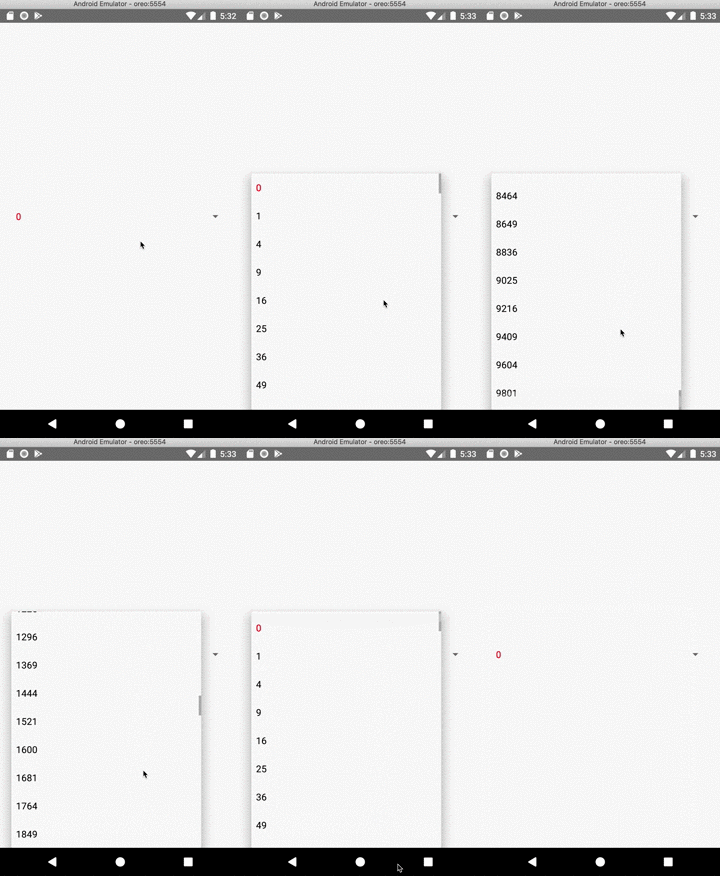
On android execute the code below. Only the FIRST item should be red.
```javascript
import React from 'react';
import { StyleSheet, View, Picker } from 'react-native';
const values = new Array(100);
for (let i = 0; i < values.length; i += 1) {
values[i] = (i * i).toString();
}
const App = () => {
const [selected, setSelected] = React.useState(0);
const onValueChange = React.useCallback((_, idx) => {
setSelected(idx);
}, []);
return (
<View style={styles.container}>
<Picker onValueChange={onValueChange} selectedValue={values[selected]}>
{values.map((v, i) => (
<Picker.Item
key={v}
value={v}
label={v}
{...(!i ? { color: 'red' } : {})}
/>
))}
</Picker>
</View>
);
};
export default App;
const styles = StyleSheet.create({
container: {
flex: 1,
justifyContent: 'center',
paddingHorizontal: 20,
},
});
```
### Without the patch
You should see various items with the red color (when only the first one should be red)
### With the patch
Only the first item is red.
Closes https://github.com/facebook/react-native/issues/25456
Differential Revision: D16430961
Pulled By: mdvacca
fbshipit-source-id: 48b41845d465df2e3dd34fc4a76950ddc75a010a
Summary:
In order to properly set the view's borderRadius the inner*RadiusX/inner*RadiusY should not
be used, since their values are obtained via the following formula:
int innerTopLeftRadiusX = Math.max(topLeftRadius - borderWidth.left, 0);
If topLeftRadius and borderWidth.left have the same value innerTopLeftRadiusX will
be zero and it will cause the top left radius to never be set since
"(innerTopLeftRadiusX > 0 ? extraRadiusForOutline : 0)" will evaluate to zero.
In order to prevent this issue the condition will only consider topLeftRadius, topRightRadius, and etc.
I took a closer look to see if this fix does not causes a regression in https://github.com/facebook/react-native/issues/22511
## Changelog
[Android] [FIX] - Correctly set the border radius on android
Pull Request resolved: https://github.com/facebook/react-native/pull/25626
Test Plan:
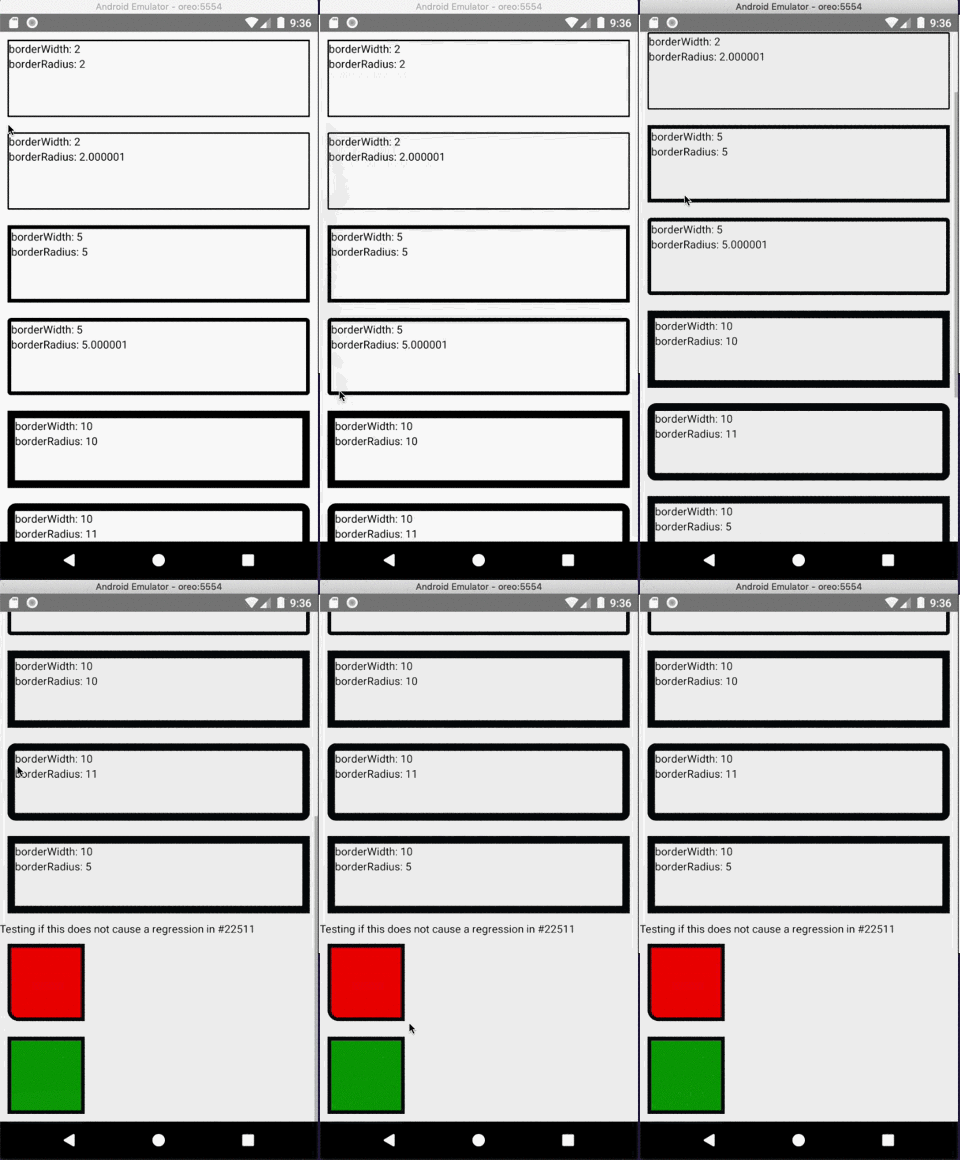
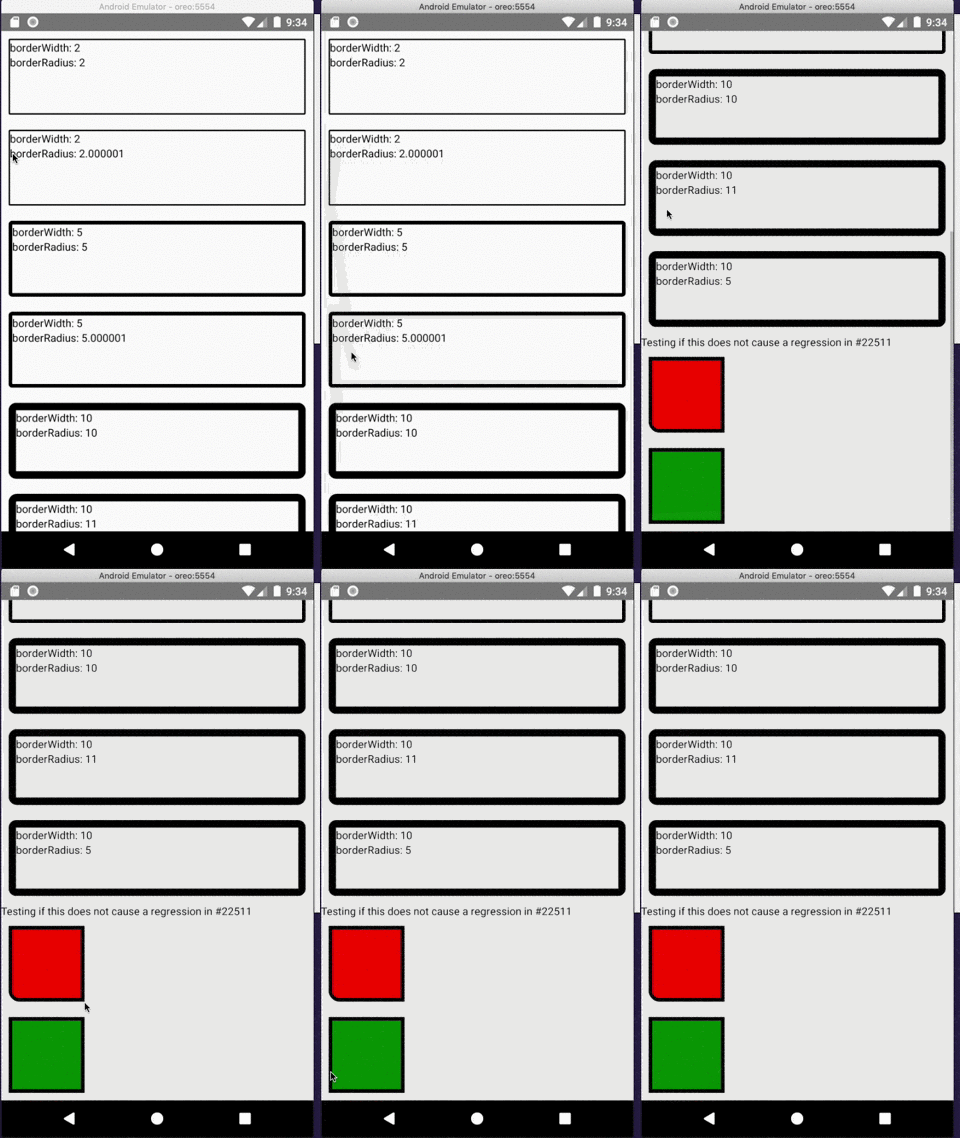
Using the following code and Android certify that the border radius is correctly applied.
```javascript
import React from "react";
import { ScrollView, StyleSheet, Text, View } from "react-native";
export default class App extends React.Component<Props> {
render() {
return (
<ScrollView style={styles.container}>
<View style={styles.box1}>
<Text>borderWidth: 2</Text>
<Text>borderRadius: 2</Text>
</View>
<View style={styles.box2}>
<Text>borderWidth: 2</Text>
<Text>borderRadius: 2.000001</Text>
</View>
<View style={styles.box3}>
<Text>borderWidth: 5</Text>
<Text>borderRadius: 5</Text>
</View>
<View style={styles.box4}>
<Text>borderWidth: 5</Text>
<Text>borderRadius: 5.000001</Text>
</View>
<View style={styles.box5}>
<Text>borderWidth: 10</Text>
<Text>borderRadius: 10</Text>
</View>
<View style={styles.box6}>
<Text>borderWidth: 10</Text>
<Text>borderRadius: 11</Text>
</View>
<View style={styles.box7}>
<Text>borderWidth: 10</Text>
<Text>borderRadius: 5</Text>
</View>
<Text>Testing if this does not cause a regression in https://github.com/facebook/react-native/issues/22511</Text>
<View style={{
margin: 10,
backgroundColor: 'red',
width: 100,
height: 100,
borderWidth: 5,
borderBottomLeftRadius: 15,
}} />
<View style={{
margin: 10,
backgroundColor: 'green',
borderWidth: 5,
width: 100,
height: 100,
}} />
</ScrollView>
);
}
}
const styles = StyleSheet.create({
container: {
flex: 1
},
box1: {
margin: 10,
height: 100,
borderRadius: 2,
borderWidth: 2,
borderColor: "#000000"
},
box2: {
margin: 10,
height: 100,
borderRadius: 2.000001,
borderWidth: 2,
borderColor: "#000000"
},
box3: {
margin: 10,
height: 100,
borderRadius: 5,
borderWidth: 5,
borderColor: "#000000"
},
box4: {
margin: 10,
height: 100,
borderRadius: 5.000001,
borderWidth: 5,
borderColor: "#000000"
},
box5: {
margin: 10,
height: 100,
borderRadius: 10,
borderWidth: 10,
borderColor: "#000000"
},
box6: {
margin: 10,
height: 100,
borderRadius: 11,
borderWidth: 10,
borderColor: "#000000"
},
box7: {
margin: 10,
height: 100,
borderRadius: 5,
borderWidth: 10,
borderColor: "#000000"
}
});
```
### Without the fix
### With the fix
Closes https://github.com/facebook/react-native/issues/25591
Reviewed By: osdnk
Differential Revision: D16243602
Pulled By: mdvacca
fbshipit-source-id: 1e16572fdf6936aa19c3d4c01ff6434028652942
Summary:
This commit fixes an issue where ripple touch feedback extends beyond the border radius of a view.

### Before

<img src="https://user-images.githubusercontent.com/590904/59892832-9cb19180-938f-11e9-8239-b2d5f0e1ce56.png" width="300" />

### After

<img src="https://user-images.githubusercontent.com/590904/59925227-766e0f00-93ec-11e9-9efe-c41e696f8c3c.gif" width="300" />

### The fix

It achieves this by adding a mask to the RippleDrawable background, collecting that information from two new methods on ReactViewGroup:

1. getBorderRadiusMask() returns a drawable rounded rectangle matching the view's border radius properties
2. getBorderRadius() produces a float[] with the border radius information required to build a RoundedRectShape in getBorderRadiusMask()

Additionally, this commit updates setBorderRadius in ReactViewManager to re-apply the background whenever it is set, which is necessary to update the mask on the RippleDrawable background image as the border radius changes.

Related issues:
https://github.com/facebook/react-native/issues/6480

## Changelog

[Android][fixed] - Adding border radius styles to TouchableNative react-native run-android --port <x> correctly connects to dev server and related error messages display the correct port
Pull Request resolved: https://github.com/facebook/react-native/pull/25342

Test Plan:
Link this branch to a new React native project with the following App.js class:

```
import React, { Component } from "react";
import { StyleSheet, Text, View, TouchableNativeFeedback } from "react-native";

export default class App extends Component {
  render() {
    const ripple = TouchableNativeFeedback.Ripple("#ff0000");

    return (
      <View style={styles.container}>
        <TouchableNativeFeedback background={ripple}>
          <View
            style={{
              width: 96,
              borderRadius: 12,
              borderTopLeftRadius: 10,
              borderBottomRightRadius: 37,
              height: 96,
              alignItems: "center",
              justifyContent: "center",
              borderColor: "black",
              borderWidth: 2
            }}
          >
            <Text>{"CLICK CLICK"}</Text>
          </View>
        </TouchableNativeFeedback>
      </View>
    );
  }
}

const styles = StyleSheet.create({
  container: {
    flex: 1,
    justifyContent: "center",
    alignItems: "center",
    backgroundColor: "#F5FCFF"
  }
});
```

It's important to ensure that updates to border radius are accounted for. I did this by enabling hot module reloading and updating the border radius styles to verify that the ripple remains correct.

Reviewed By: cpojer

Differential Revision: D16221213

Pulled By: makovkastar

fbshipit-source-id: 168379591e79f9eca9d184b1607ebb564c2d83dd
Summary:
Drawing the border in one pass should only be done with the borderWidth and
borderColor are the same for all directions (top, left, bottom and right),
otherwise React may draw wrong colors.
This commit adds a check to verify if all the colors are the same,
otherwise it will draw each quadrilateral independently.
## Changelog
[Android] [Fix] - Properly paint the border colors and there are round borders
Pull Request resolved: https://github.com/facebook/react-native/pull/25649
Test Plan:
Using the code below one must see the correct border colors just like the example below:
### Without the fix

Notice that the first rectangle does not have a transparent top bar and the third rectangle have all borders black
### With the fix

All borders are properly colored.
```javascript
import React from "react";
import { ScrollView, StyleSheet, Text, View } from "react-native";
export default class App extends React.Component<Props> {
render() {
return (
<ScrollView style={styles.container}>
<View style={styles.react1}>
<Text>Top border transparent</Text>
</View>
<View style={styles.react5}>
<Text>Top border transparent - no round corners</Text>
</View>
<View style={styles.react2}>
<Text>all borders green</Text>
</View>
<View style={styles.react3}>
<Text>Green, Red, Blue, Purple colors</Text>
</View>
<View style={styles.react4}>
<Text>Green, Red, Blue, Purple colors - no round corners</Text>
</View>
</ScrollView>
);
}
}
const styles = StyleSheet.create({
container: {
flex: 1,
},
react1: {
alignItems: 'center',
borderWidth: 1,
borderColor: 'red',
borderTopColor: 'transparent',
borderBottomLeftRadius: 15,
borderBottomRightRadius: 15,
paddingVertical: 10,
margin: 10,
marginBottom: 20,
},
react5: {
alignItems: 'center',
borderWidth: 1,
borderColor: 'red',
borderTopColor: 'transparent',
paddingVertical: 10,
margin: 10,
marginBottom: 20,
},
react2: {
alignItems: 'center',
borderWidth: 1,
borderColor: 'green',
borderRadius: 20,
paddingVertical: 10,
margin: 10,
marginBottom: 20,
},
react3: {
alignItems: 'center',
borderWidth: 1,
borderTopColor: 'green',
borderLeftColor: 'red',
borderBottomColor: 'blue',
borderRightColor: 'purple',
borderBottomLeftRadius: 15,
borderBottomRightRadius: 15,
borderTopLeftRadius: 30,
borderTopRightRadius: 30,
paddingVertical: 10,
margin: 10,
marginBottom: 20,
},
react4: {
alignItems: 'center',
borderWidth: 1,
borderTopColor: 'green',
borderLeftColor: 'red',
borderBottomColor: 'blue',
borderRightColor: 'purple',
paddingVertical: 10,
margin: 10,
marginBottom: 20,
},
});
```
Closes https://github.com/facebook/react-native/issues/25643
Differential Revision: D16258526
Pulled By: mdvacca
fbshipit-source-id: 2d43eade23a5a78ccfda8693cc4e2e336ccec156
Summary:
I believe there's a mismatch between the type definitions and the expected prop in Android for `TextInput`'s `autoComplete` prop.

* Android is expecting `autoComplete`.
* JS types are expecting `autoCompleteType`.
* Latest documentation documents `autoCompleteType`.

Prop added here: https://github.com/facebook/react-native/commit/179d490607620a988a53aacb01031ed300d4ac66

This change updates the JS types to match what Android is expecting (`autoComplete`). Can update documentation if this is the approach we'd prefer (rather than updating Android to expect `autoCompleteType`).

## Changelog

[Javascript] [Fixed] - Update types for `TextInput`'s `autoComplete` prop.
Pull Request resolved: https://github.com/facebook/react-native/pull/25549

Test Plan:
Before:

* Pass invalid value to `TextInput`'s `autoComplete` prop, see no type errors on JS side, and Android blows up with:

```sh
Invalid autocomplete option: foobar
updateViewProp
    ViewManagersPropertyCache.java:95
setProperty
    ViewManagerPropertyUpdater.java:132
updateProps
    ViewManagerPropertyUpdater.java:51
updateProperties
    ViewManager.java:37
```

After:

* Pass invalid value to `TextInput`'s `autoComplete` prop, see PropType warning for `autoComplete` prop.

Differential Revision: D16220809

Pulled By: mdvacca

fbshipit-source-id: e25e198cbcbe721c8d71f069bba293856bf5f36d
Summary:
This diff migrates the usages Nullable and NonNull annotations to AndroidX instead of javax.

The purpose of this change is to bring consistency in the annotations used by the core of RN

Reviewed By: makovkastar

Differential Revision: D16054504

fbshipit-source-id: 21d888854da088d2a14615a90d4dc058e5286b91
Summary:
This diff fixes a crash caused by an IllegalStateException thrown from the `TextView.onEditorAction()`. This could happen if we don't return false from the `OnEditorActionListener.onEditorAction()` and Android will fallback to the default behaviour, which will try to search and focus the next/previous view in case of `EditorInfo.IME_ACTION_NEXT` or `EditorInfo.IME_ACTION_PREVIOUS` accordingly. Because ReactEditText prevents requesting focus from Android (`ReactEditText.requestFocus()` returns false), the following piece of code from `TextView.onEditorAction()` will crash the app:

```
} else if (actionCode == EditorInfo.IME_ACTION_PREVIOUS) {
    View v = focusSearch(FOCUS_BACKWARD);
    if (v != null) {
        if (!v.requestFocus(FOCUS_BACKWARD)) {
            throw new IllegalStateException("focus search returned a view "
                    + "that wasn't able to take focus!");
        }
    }
    return;

} else if (actionCode == EditorInfo.IME_ACTION_DONE) {
    InputMethodManager imm = InputMethodManager.peekInstance();
    if (imm != null && imm.isActive(this)) {
        imm.hideSoftInputFromWindow(getWindowToken(), 0);
    }
    return;
}
```

To prevent this we have to catch `EditorInfo.IME_ACTION_NEXT` and `EditorInfo.IME_ACTION_PREVIOUS` inside `OnEditorActionListener.onEditorAction()` and prevent the default Android behaviour.

Reviewed By: mdvacca

Differential Revision: D16180306

fbshipit-source-id: 6118257c16a7a4a205ae05da671cd76d3a18d565
Summary:
All props to Eric Lewis! cc ericlewis

This revert of revert of land of changes originally published in #24873 (with some slight fixes). The change removes usage of LocalData from the `<Text>` component.

After this change we only have ---one (maybe two)--- three components left using LocalData.

Reviewed By: mdvacca

Differential Revision: D15962376

fbshipit-source-id: 19f41109ce9d71ce30d618a45eb2b547a11f29a2
Summary: Now, the signature of `updateState` method practically copies the signature of `updateLocalData`. We need that to support all features that `updateLocalData` does support now (to migrate from it).

Reviewed By: mdvacca

Differential Revision: D15962377

fbshipit-source-id: 61e0af6c191e0c6a358c5859613e9c512f91d29a
Summary:
[Android] [Fixed] - Use HYPHENATION_FREQUENCY_NONE instead of HYPHENATION_FREQUENCY_NORMAL to measure text

The text must be measured with HYPHENATION_FREQUENCY_NONE instead of HYPHENATION_FREQUENCY_NORMAL, since ReactTextView has hyphenation frequency set to HYPHENATION_FREQUENCY_NONE. These two values must match, otherwise the measured height of text we return from the Yoga measure function might be wrong.

Even though the TextView [documentation](https://developer.android.com/reference/android/widget/TextView#setHyphenationFrequency(int)) says that the default hyphenation frequency is HYPHENATION_FREQUENCY_NORMAL before Android Q, it's not true for TextViews instantiated in code (the default value is set from the theme which is missing in case of ReactTextView).

See the screenshots below where the text is measured incorrectly which causes the last line to be cut off.

I extracted the value to a class member variable because I'm planning to expose the hyphenationFrequency prop for the Text component so that it can be configured on Android (as requested by this Github issue: https://github.com/facebook/react-native/issues/17199).

Reviewed By: shergin

Differential Revision: D16109430

fbshipit-source-id: 278c8182c0f819be27bc1d2468559b9e9ae1f807
Summary:
Using Ricky's last changes I managed to subscribe for both new and old event name.

Fixed event to proper one for codegen in native code.

Reviewed By: TheSavior

Differential Revision: D16065660

fbshipit-source-id: b5d3762d673a34bbdf5a8e60ff4d51617c8adb81
Summary: The method FabricUIManager.scheduleMountItems receives only one MountItem, is makes more sense to be called FabricUIManager.scheduleMountItem

Reviewed By: JoshuaGross, makovkastar

Differential Revision: D16062749

fbshipit-source-id: a27063be33b644af83ede6a9198edbfb1c3296e1
Summary: I've been analyzing some issue in RN Android code and I noticed some warnings to clean up

Reviewed By: ejanzer

Differential Revision: D16060522

fbshipit-source-id: 327fa86c24c7dd67ac2376bbd2f0ca4339f106d1
Summary: This diff exposes LayoutDirection as part of UpdateLayoutMountItem

Reviewed By: JoshuaGross

Differential Revision: D16060521

fbshipit-source-id: 163bf2a0bdca62dcecb03a8aaa2f4bf595b18c8f
Summary:
This diff adds support to Update Modal State when there is a change on the size of the screen

// TODO

Reviewed By: JoshuaGross

Differential Revision: D16000755

fbshipit-source-id: be87caa6d7f85c3d2778d2707c1e0cd821d6f6c6
Summary: After we ran google-java-format D16071725, some Javadocs which weren't properly written broke. This includes putting unordered and ordered lists not using <ul> and <ol>, putting code blocks and pseudo-graphics not using <pre>. I ran through all the changed classes and tried to fix the broken Javadocs.

Reviewed By: cpojer

Differential Revision: D16090087

fbshipit-source-id: f31971cbc0e367a04814ff90bbfb2192751d5e16
Summary:
This diff formats the Java class files inside xplat/js/react-native-github. Since google-java-format was enabled in D16071401 we want to codemode the existing code so that users don't have to deal with formatter lint noise at diff-time.

```arc f --paths-cmd 'hg files -I "**/*.java"'```

drop-conflicts

Reviewed By: cpojer

Differential Revision: D16071725

fbshipit-source-id: fc6e3852e45742c109f0c5ac4065d64201c74204
Summary:
ScrollView doesn't handle the scrollEnabled property using dpad. When set to false, the directionnal pad still allows to scroll in the view.

## Changelog

[ANDROID] [ADDED] - Prevent scrollView to scroll with dpad when scrollEnabled property is set to false.
Pull Request resolved: https://github.com/facebook/react-native/pull/25309

Test Plan:
Add P67680731 to Playground.js and start the Catalyst Android app:

```buck install -r catalyst```

Send the following adb commands to the device/emulator:

```adb shell input keyevent DPAD_RIGHT_LEFT```
```adb shell input keyevent DPAD_RIGHT_RIGHT```

Make sure the ScrollView doesn't scroll to the left and right.

Add ```horizontal={true}``` to ScrollView and send the following adb commands to the device/emulator:

```adb shell input keyevent DPAD_RIGHT_TOP```
```adb shell input keyevent DPAD_RIGHT_BOTTOM```

Make sure the ScrollView doesn't scroll to the top and bottom.

Reviewed By: mdvacca

Differential Revision: D15983785

Pulled By: makovkastar

fbshipit-source-id: 678cc801a168531d71c8651b986c99ecd9da400e
Summary:
Right now JS triggers a view manager command with the following code:

```
UIManager.dispatchViewManagerCommand(
  ReactNative.findNodeHandle(this),
  UIManager.getViewManagerConfig('RCTView').Commands.hotspotUpdate,
  [destX || 0, destY || 0],
);
```

As we want to get rid of calls to UIManager, we need to stop looking for the integer defined in native from JavaScript. We will be changing methods like this to be:

```
UIManager.dispatchViewManagerCommand(
  ReactNative.findNodeHandle(this),
  'hotspotUpdate',
  [destX || 0, destY || 0],
);
```

We need to support ints and Strings to be backwards compatible, but ints will be deprecated.

Reviewed By: shergin

Differential Revision: D15955444

fbshipit-source-id: d1c488975ae03404f8f851a7035b58a90ed34163
Summary: This diff fixes a typo in the JavaDoc for ReactScrollViewManager.

Reviewed By: cpojer

Differential Revision: D15965028

fbshipit-source-id: 3506cdde21c8d00ab916455a2d9fa29772f35359
Summary:
On Android, if the ActivityIndicator component is initially set to `animate={false}`, it does not display if later set to `true` (https://github.com/facebook/react-native/issues/9023)
For some reason, the layout width/height of the associated ProgressBar remains 0, despite the parent layout having the correct width/height:

I wasn't able to determine why this is the case, but I did notice that changing the visibility settings from `View.GONE` to `View.INVISIBLE` fixes the issue while not (as far as I can tell) having an impact on the React Native layout:
#### Before:

#### After:

Using `View.INVISIBLE` appears to alleviate the issue.
This should fix https://github.com/facebook/react-native/issues/9023
## Changelog
[Android][fixed] - ActivityIndicator appears as expected when `animated={false}` is later set to `true`.
Pull Request resolved: https://github.com/facebook/react-native/pull/25354
Test Plan:
Link this branch to a new React native project with the following App.js class:
```javascript
import React, { Component } from "react";
import {
StyleSheet,
Text,
Button,
View,
ActivityIndicator,
TouchableHighlight
} from "react-native";
export default class App extends Component {
constructor() {
super();
this.state = {
show: false
};
}
hide = () => {
this.setState({ show: false });
};
show = () => {
this.setState({ show: true });
};
render() {
return (
<View>
<ActivityIndicator
animating={this.state.show}
size="large"
style={styles.indicator}
/>
<ActivityIndicator
animating={this.state.show}
size="small"
style={styles.indicator}
/>
<View style={{ flexDirection: "row" }}>
<Button title="Hide" style={styles.button} onPress={this.hide} />
<Button title="Show" style={styles.button} onPress={this.show} />
</View>
<Text>Showing ? {this.state.show.toString()}</Text>
</View>
);
}
}
const styles = StyleSheet.create({
indicator: {
borderColor: "red",
borderWidth: 1
},
button: {
marginRight: 8
}
});
```
Differential Revision: D15963366
Pulled By: cpojer
fbshipit-source-id: ee3df3fd84acbff342599dc6f4f4a391704876fa
Summary:
I found that on Android we only support 2 fontWeight options, either **normal** or **bold**, even developer can set any numeric value. But iOS supports all possible numeric values. This PR tries to add support for all possible numeric values on Android, even if it's supported only on Android P(28) and above.

This change might break texts where fontWeight use improperly, because this PR removes conversion of values above 500 to BOLD and below 500 to normal.

FYI, also moved **mCustomTypefaceCache** usage up because it was working after unnecessary mFontCache usage.

## Changelog

[Android] [Changed] - add custom font weight support to Text component on Android, only on P(API 28) and above versions.
Pull Request resolved: https://github.com/facebook/react-native/pull/25341

Test Plan: RNTester app's Text examples will show Rubik Regular, Rubik Light, Rubik Bold, Rubik Medium and Rubik Medium Italic texts in corresponding font family, style and weights.

Differential Revision: D15956350

Pulled By: mdvacca

fbshipit-source-id: 61079d953c65fb34ab4497d44c22317912a5a616
Summary:
Similar to D15909582, this change makes the Android TextInput take strings for the value of autoCapitalize and not just numbers. As we are going to stop sending view configs from native and instead hardcode them in JS we can't do that anymore.

In this commit we are supporting the old style as well as the new style.

Changelog:
[Android] [Internal] - Supporting autoCapitalize as string to clean up internal TextInput.js file

Reviewed By: mdvacca

Differential Revision: D15911323

fbshipit-source-id: b236fdb314489cc1ef33f9214ff2d6b0e28b7310
Summary:
Previously DrawerLayoutAndroid required taking an int as the drawerPosition. This required a complex dance of pulling these constant values off of the native view config. As we are going to stop sending view configs from native and instead hardcode them in JS we can't do that anymore.

In this commit we are supporting the old style as well as the new style. The old way of specifying the sizes will go away in a future release.

Changelog:
[Android][Added] - DrawerLayoutAndroid now supports strings and not just numbers for drawerPosition.

Reviewed By: mdvacca

Differential Revision: D15912607

fbshipit-source-id: b444454a1e74f8f659995b9ebe5e164ac9660138
Summary:
This is a follow up PR to https://github.com/facebook/react-native/issues/24359. There's a good thread in the mentioned PR for more background for why I'm doing this change. Essentially `focusable` makes more sense since it is about whether a view can receive user-initiated focus from a pointer or keyboard.
Pull Request resolved: https://github.com/facebook/react-native/pull/25274

Differential Revision: D15873739

Pulled By: cpojer

fbshipit-source-id: 0f526bb99ecdc68131dfc10200a5d44c2ef75b33
Summary:
Previously SwipeRefreshLayout (RefreshControl on Android) required taking an int as the size. This required a complex dance of pulling these constant values off of the native view config. As we are going to stop sending view configs from native and instead hardcode them in JS we can't do that anymore.

We will change the type of size from:
```
size?: ?(
  | typeof RefreshLayoutConsts.SIZE.DEFAULT
  | typeof RefreshLayoutConsts.SIZE.LARGE
),
```

to:
```
size?: ?('default' | 'large')
```

In this commit we are supporting the old style as well as the new style. The old way of specifying the sizes will go away in a future release.

Changelog:
[Android] [Added] - RefreshControl now supports strings and not just numbers for size.

Reviewed By: mdvacca

Differential Revision: D15909582

fbshipit-source-id: 1849edc980e1698de147e88d710e0f28d0fdc8d8
Summary:
There's an issue with TextInput on Android where if you have TalkBack enabled, double tapping doesn't focus the text input. It turns out this is because we ignore all focus events that aren't from JS in ReactEditText. This diff makes an exception for the accessibility click event.

I think this should also fix https://github.com/facebook/react-native/issues/17624

Reviewed By: lunaleaps

Differential Revision: D15818103

fbshipit-source-id: 354728b58f1023c4d44edd48337c8daa8ea15c0c
Summary:
D14014668 introduced support for nesting views within Text on Android. Part of the implementation involved accessing the UIManagerModule from ReactTextView through context. This doesn't work in bridgeless RN because we have no UIManagerModule, and the ReactContext has no Catalyst instance. Trying to access the Catalyst instance from ReactContext throws an exception if it doesn't exist, so i'm just adding a simple check here to make sure the instance exists before proceeding.

This means that this feature won't work in bridgeless mode, but that's ok for now - eventually we want to change the way this works so that it doesn't rely on accessing views in Java, which is potentially unsafe (there's nothing to stop you from mutating the views, and cpp/js would never know about it).

Reviewed By: mdvacca

Differential Revision: D15703100

fbshipit-source-id: 0448d55b8345fc707a25210a505cb6ac520c708a
Summary:
Scrolling improvements in ReactAndroid:

1.
Issue: With current ReactHorizontalScrollView behavior, it treats all views as focusable, regardless of if they are in view or not. This is fine for non-paged horizontal scroll view, but when paged this allows focus on elements that are not within the current page. Combined with logic to scroll to the focused view, this breaks the paging for ReactHorizontalScrollView.

Fix: limit the focusable elements to only elements that are currently in view when ReactHorizontalScrollView has paging enabled

2.
Issue: When keyboard is attached and user tries to navigate through Tab key, Scroll views do not scroll to the focused child.
Since ReactScrollView handles layout changes on JS side, it does not call super.onlayout due to which mIsLayoutDirty flag in android ScrollView remains true and prevents scrolling to child when requestChildFocus is called.

Fix: To fix the focus navigation, we are overriding requestChildFocus method in ReactScrollView. We are not checking any dirty layout flag and scrolling to child directly. This will fix focus navigation issue for KeyEvents which are not handled by android's ScrollView, for example: KEYCODE_TAB. Same applies to ReactHorizontalScrollView.

3.
Set Android ScrollView to be non-focusable when scroll is disabled. Prior to this change, non-scrollable Scrollview would still be focusable, causing a poor keyboarding experience

## Changelog

[Android] [Fixed] Scrolling improvements in ReactAndroid
Pull Request resolved: https://github.com/facebook/react-native/pull/25105

Differential Revision: D15737563

Pulled By: mdvacca

fbshipit-source-id: 0d57563415c68668dc1acb05fb3399e6645c9595
Summary: This moves the Toolbar Java files out RN and into our internal React shell.

Reviewed By: fkgozali

Differential Revision: D15469205

fbshipit-source-id: 15298505d74260618eb89673deb12d1b837b559f
Summary:
This diff fixes the bug of the switch component on Android being stuck in the middle when a user releases their finger whily dragging the thumb.

When a user releases their finger while dragging the thumb, `setChecked` will be called and if `mAllowChange` is set to false, `super.setChecked` is never called. The supper method will actually make sure the thumb will be animated to the correct edge. Without calling the super method, the thumb might stay in the middle of the switch where a user released their finger.

The fix had to be applied both to ReactSwitch and FbReactSwitchCompat.

One more fix had to be made to FbReactSwitchCompat since D5884661 was applied to ReactSwitch, but not to FbReactSwitchCompat:

if (mAllowChange && **isChecked() != checked**) {
...
}

Reviewed By: mdvacca

Differential Revision: D15535611

fbshipit-source-id: 22ca1fe3fa993ae65cbd677bfae2208a02c368d4
Summary:
Add prop showSoftInputOnFocus to TextInput. This fixes#14045. This prop can be used to prevent the system keyboard from displaying at all when focusing an input text, for example if a custom keyboard component needs to be displayed instead.
On Android, currently TextInput always open the soft keyboard when focused. This is because `requestFocus` calls `showSoftKeyboard`, which in turn instructs `InputMethodManager` to show the soft keyboard.
Unfortunately even if we were to define a new input type that extends ReactEditText, there is no way to overcome this issue.
This is because `showSoftKeyboard` is a private method so it can't be overriden. And at the same time `requestFocus` needs to invoke `super.requestFocus` to properly instruct Android that the field has gained focused, so overriding `requestFocus` in a subclass of ReactEditText is also not an option, as when invoking `super.requestFocus` we would end up calling again the one defined in ReactEditText.
So currently the only way of doing this is to basically add a listener on the focus event that will close the soft keyboard immediately after. But for a split second it will still be displayed.
The code in the PR changes `requestFocus` to honor showSoftInputOnFocus as defined in Android TextView, displaying the soft keyboard unless instructed otherwise.
## Changelog
[Android] [Added] - Add showSoftInputOnFocus to TextInput
Pull Request resolved: https://github.com/facebook/react-native/pull/25028
Differential Revision: D15503070
Pulled By: mdvacca
fbshipit-source-id: db4616fa165643d6ef2b3185008c4d279ae08092
Summary:
Changelog: [Android] [FIXED] - Fix backgroundColor top level prop of TextInput

This diff fixes two issues with the `backgroundColor` top level property of TextInput on Android:
 * Now it is possible to set a **string** value for the top-level `backgroundColor` property of TextInput (crashed the app previously):
```
<TextInput backgroundColor="#ffccbb">Hello, React Native</TextInput>
```
* Now it's possible to set an **integer** value for the top-level `backgroundColor` property of TextInput (had no effect previously):
```
<TextInput backgroundColor={0xffccbbff}>Hello, React Native</TextInput>
```

A `customType = "Color"` annotation parameter must be provided for `ReactBaseTextShadowNode.setBackgroundColor(...)` since the color value must be previously processed in JS before sending it over the bridge to the native code. The JS code will parse the color value and return the proper ARGB color integer to the native platforms (https://fburl.com/uqup52tn).

Without providing the custom type for the background color, if a string value is set for the top-level `backgroundColor` property in the JS code, the Android code will crash since it expects an integer value for the color in `ReactBaseTextShadowNode.setBackgroundColor(...)`, but a string will be passed from JS without any conversion and there will be a `ClassCastException` thrown. If an integer value without the alpha component (like `0xffccbb`) is set, the Android native view would get an integer color value with its alpha component set to `0x00`, which means a transparent color.

On a side note: the alpha component of a color must always be set when using an integer value for `backgroundColor` since the JS code, while processing the color type, shifts the rightmost 8 bytes (alpha component) to the leftmost position. If those 8 bytes are not the alpha component, you will get the wrong color in the end. It doesn't seem to be a problem for string values of `backgroundColor` though.

Reviewed By: mdvacca

Differential Revision: D15453980

fbshipit-source-id: f3f5d9c9877cdbce79a67f2ed93ad4589576d166
Summary: As of D14529038, LayoutAnimations can sometimes throw an exception due to the view being null.  This can happen when elements are removed/added and is not fixable in product code. This is a temporary fix - the root cause for this issue will be fixed soon.

Reviewed By: lunaleaps

Differential Revision: D15428791

fbshipit-source-id: 41200e572ed7d5d470754792c5576a0ea23fe946
 Joshua Gross
 André Krüger
 Spencer Ahrens
 Onti Vals
 Guilherme Iscaro
 Stepan Furdei
 Min ho Kim
 Nate
Nate
 Dan Gilbert
 David Vacca
 Oleksandr Melnykov
 Valentin Shergin
 Michał Osadnik
 soh335
 Eli White
 aamalric
 Dulmandakh
 Sam Mathias Weggersen
 Kudo Chien
 Emily Janzer
 Christoph Nakazawa
 Luna Wei
 valerio.ponte
 Vojtech Novak
 Blair Vanderhoof








