Summary:
In order to properly set the view's borderRadius the inner*RadiusX/inner*RadiusY should not
be used, since their values are obtained via the following formula:
int innerTopLeftRadiusX = Math.max(topLeftRadius - borderWidth.left, 0);
If topLeftRadius and borderWidth.left have the same value innerTopLeftRadiusX will
be zero and it will cause the top left radius to never be set since
"(innerTopLeftRadiusX > 0 ? extraRadiusForOutline : 0)" will evaluate to zero.
In order to prevent this issue the condition will only consider topLeftRadius, topRightRadius, and etc.
I took a closer look to see if this fix does not causes a regression in https://github.com/facebook/react-native/issues/22511
## Changelog
[Android] [FIX] - Correctly set the border radius on android
Pull Request resolved: https://github.com/facebook/react-native/pull/25626
Test Plan:
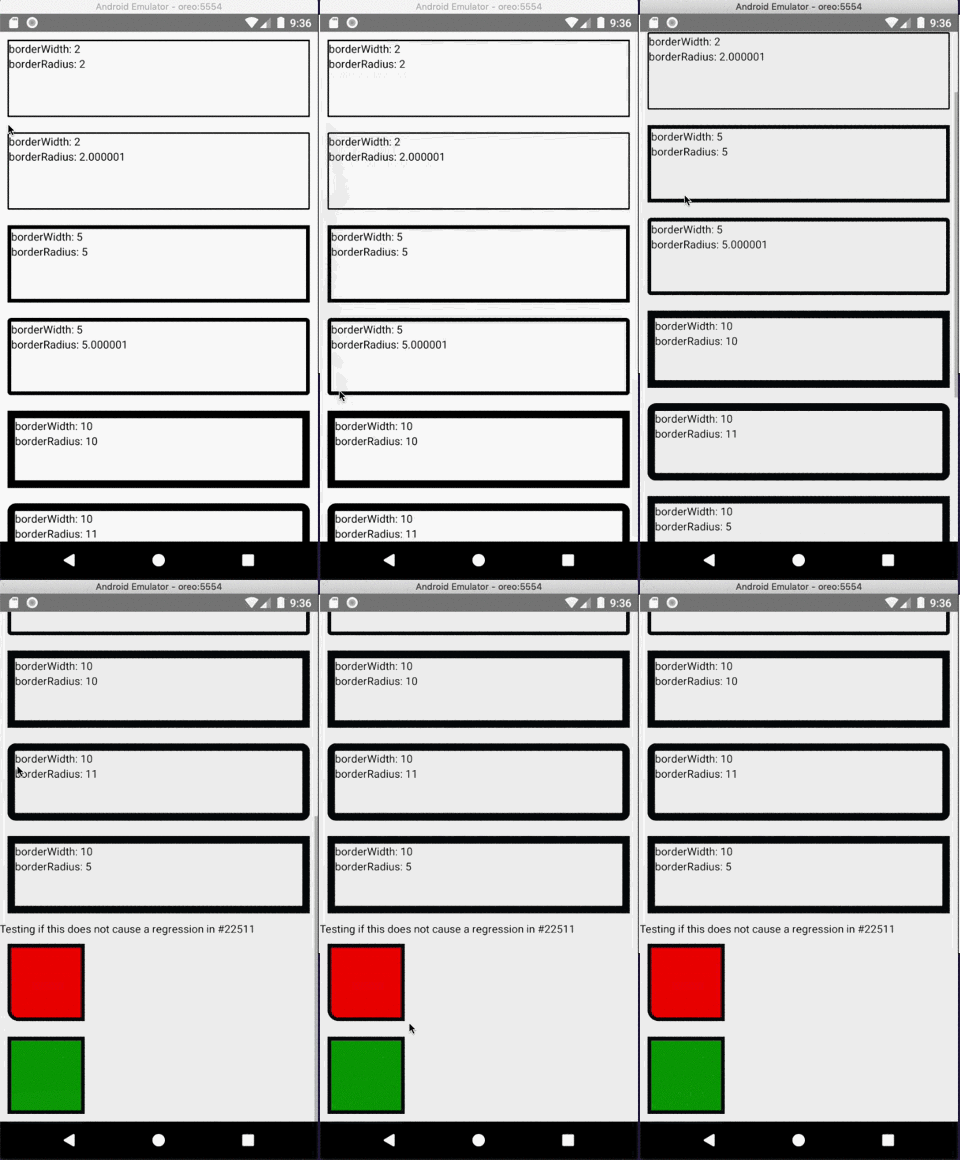
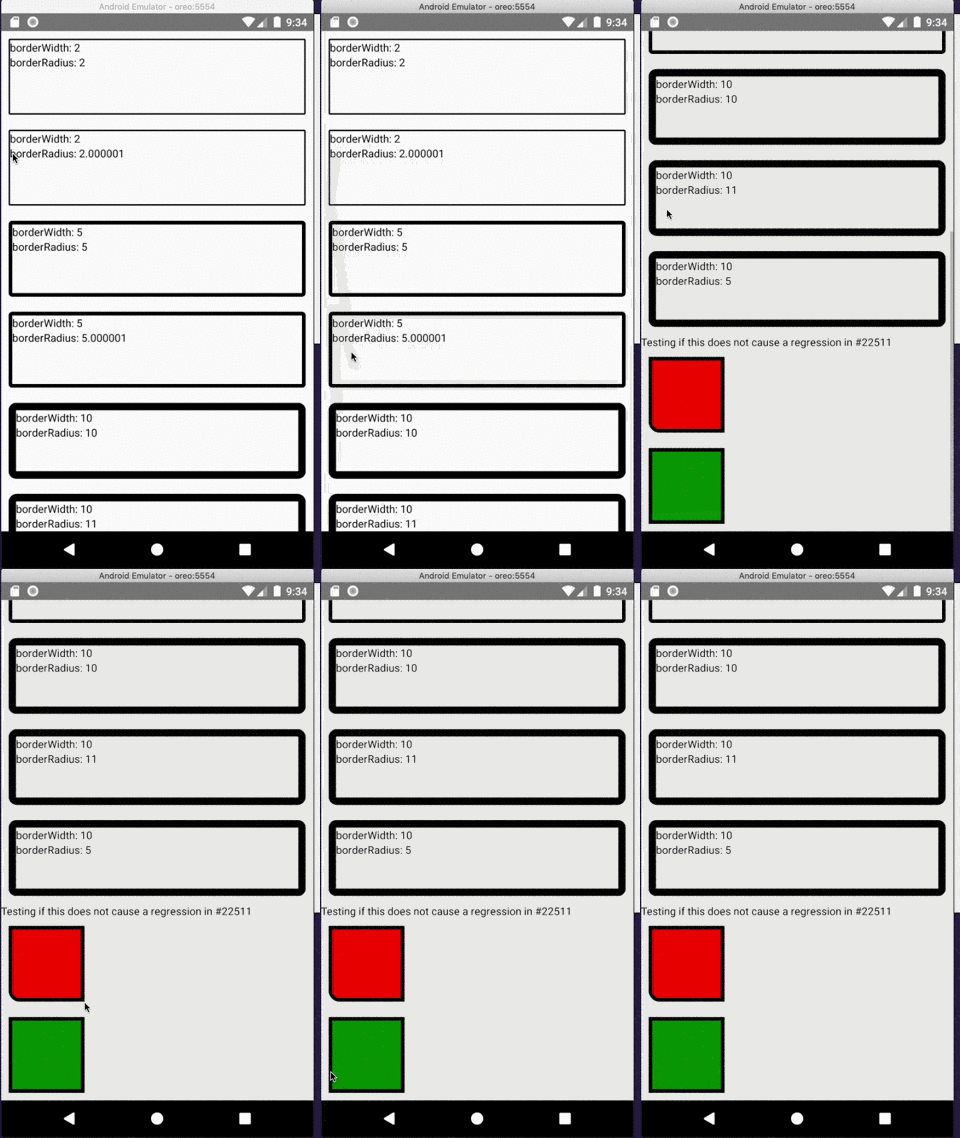
Using the following code and Android certify that the border radius is correctly applied.
```javascript
import React from "react";
import { ScrollView, StyleSheet, Text, View } from "react-native";
export default class App extends React.Component<Props> {
render() {
return (
<ScrollView style={styles.container}>
<View style={styles.box1}>
<Text>borderWidth: 2</Text>
<Text>borderRadius: 2</Text>
</View>
<View style={styles.box2}>
<Text>borderWidth: 2</Text>
<Text>borderRadius: 2.000001</Text>
</View>
<View style={styles.box3}>
<Text>borderWidth: 5</Text>
<Text>borderRadius: 5</Text>
</View>
<View style={styles.box4}>
<Text>borderWidth: 5</Text>
<Text>borderRadius: 5.000001</Text>
</View>
<View style={styles.box5}>
<Text>borderWidth: 10</Text>
<Text>borderRadius: 10</Text>
</View>
<View style={styles.box6}>
<Text>borderWidth: 10</Text>
<Text>borderRadius: 11</Text>
</View>
<View style={styles.box7}>
<Text>borderWidth: 10</Text>
<Text>borderRadius: 5</Text>
</View>
<Text>Testing if this does not cause a regression in https://github.com/facebook/react-native/issues/22511</Text>
<View style={{
margin: 10,
backgroundColor: 'red',
width: 100,
height: 100,
borderWidth: 5,
borderBottomLeftRadius: 15,
}} />
<View style={{
margin: 10,
backgroundColor: 'green',
borderWidth: 5,
width: 100,
height: 100,
}} />
</ScrollView>
);
}
}
const styles = StyleSheet.create({
container: {
flex: 1
},
box1: {
margin: 10,
height: 100,
borderRadius: 2,
borderWidth: 2,
borderColor: "#000000"
},
box2: {
margin: 10,
height: 100,
borderRadius: 2.000001,
borderWidth: 2,
borderColor: "#000000"
},
box3: {
margin: 10,
height: 100,
borderRadius: 5,
borderWidth: 5,
borderColor: "#000000"
},
box4: {
margin: 10,
height: 100,
borderRadius: 5.000001,
borderWidth: 5,
borderColor: "#000000"
},
box5: {
margin: 10,
height: 100,
borderRadius: 10,
borderWidth: 10,
borderColor: "#000000"
},
box6: {
margin: 10,
height: 100,
borderRadius: 11,
borderWidth: 10,
borderColor: "#000000"
},
box7: {
margin: 10,
height: 100,
borderRadius: 5,
borderWidth: 10,
borderColor: "#000000"
}
});
```
### Without the fix
### With the fix
Closes https://github.com/facebook/react-native/issues/25591
Reviewed By: osdnk
Differential Revision: D16243602
Pulled By: mdvacca
fbshipit-source-id: 1e16572fdf6936aa19c3d4c01ff6434028652942
Summary:
This commit fixes an issue where ripple touch feedback extends beyond the border radius of a view.

### Before

<img src="https://user-images.githubusercontent.com/590904/59892832-9cb19180-938f-11e9-8239-b2d5f0e1ce56.png" width="300" />

### After

<img src="https://user-images.githubusercontent.com/590904/59925227-766e0f00-93ec-11e9-9efe-c41e696f8c3c.gif" width="300" />

### The fix

It achieves this by adding a mask to the RippleDrawable background, collecting that information from two new methods on ReactViewGroup:

1. getBorderRadiusMask() returns a drawable rounded rectangle matching the view's border radius properties
2. getBorderRadius() produces a float[] with the border radius information required to build a RoundedRectShape in getBorderRadiusMask()

Additionally, this commit updates setBorderRadius in ReactViewManager to re-apply the background whenever it is set, which is necessary to update the mask on the RippleDrawable background image as the border radius changes.

Related issues:
https://github.com/facebook/react-native/issues/6480

## Changelog

[Android][fixed] - Adding border radius styles to TouchableNative react-native run-android --port <x> correctly connects to dev server and related error messages display the correct port
Pull Request resolved: https://github.com/facebook/react-native/pull/25342

Test Plan:
Link this branch to a new React native project with the following App.js class:

```
import React, { Component } from "react";
import { StyleSheet, Text, View, TouchableNativeFeedback } from "react-native";

export default class App extends Component {
  render() {
    const ripple = TouchableNativeFeedback.Ripple("#ff0000");

    return (
      <View style={styles.container}>
        <TouchableNativeFeedback background={ripple}>
          <View
            style={{
              width: 96,
              borderRadius: 12,
              borderTopLeftRadius: 10,
              borderBottomRightRadius: 37,
              height: 96,
              alignItems: "center",
              justifyContent: "center",
              borderColor: "black",
              borderWidth: 2
            }}
          >
            <Text>{"CLICK CLICK"}</Text>
          </View>
        </TouchableNativeFeedback>
      </View>
    );
  }
}

const styles = StyleSheet.create({
  container: {
    flex: 1,
    justifyContent: "center",
    alignItems: "center",
    backgroundColor: "#F5FCFF"
  }
});
```

It's important to ensure that updates to border radius are accounted for. I did this by enabling hot module reloading and updating the border radius styles to verify that the ripple remains correct.

Reviewed By: cpojer

Differential Revision: D16221213

Pulled By: makovkastar

fbshipit-source-id: 168379591e79f9eca9d184b1607ebb564c2d83dd
Summary:
Drawing the border in one pass should only be done with the borderWidth and
borderColor are the same for all directions (top, left, bottom and right),
otherwise React may draw wrong colors.
This commit adds a check to verify if all the colors are the same,
otherwise it will draw each quadrilateral independently.
## Changelog
[Android] [Fix] - Properly paint the border colors and there are round borders
Pull Request resolved: https://github.com/facebook/react-native/pull/25649
Test Plan:
Using the code below one must see the correct border colors just like the example below:
### Without the fix

Notice that the first rectangle does not have a transparent top bar and the third rectangle have all borders black
### With the fix

All borders are properly colored.
```javascript
import React from "react";
import { ScrollView, StyleSheet, Text, View } from "react-native";
export default class App extends React.Component<Props> {
render() {
return (
<ScrollView style={styles.container}>
<View style={styles.react1}>
<Text>Top border transparent</Text>
</View>
<View style={styles.react5}>
<Text>Top border transparent - no round corners</Text>
</View>
<View style={styles.react2}>
<Text>all borders green</Text>
</View>
<View style={styles.react3}>
<Text>Green, Red, Blue, Purple colors</Text>
</View>
<View style={styles.react4}>
<Text>Green, Red, Blue, Purple colors - no round corners</Text>
</View>
</ScrollView>
);
}
}
const styles = StyleSheet.create({
container: {
flex: 1,
},
react1: {
alignItems: 'center',
borderWidth: 1,
borderColor: 'red',
borderTopColor: 'transparent',
borderBottomLeftRadius: 15,
borderBottomRightRadius: 15,
paddingVertical: 10,
margin: 10,
marginBottom: 20,
},
react5: {
alignItems: 'center',
borderWidth: 1,
borderColor: 'red',
borderTopColor: 'transparent',
paddingVertical: 10,
margin: 10,
marginBottom: 20,
},
react2: {
alignItems: 'center',
borderWidth: 1,
borderColor: 'green',
borderRadius: 20,
paddingVertical: 10,
margin: 10,
marginBottom: 20,
},
react3: {
alignItems: 'center',
borderWidth: 1,
borderTopColor: 'green',
borderLeftColor: 'red',
borderBottomColor: 'blue',
borderRightColor: 'purple',
borderBottomLeftRadius: 15,
borderBottomRightRadius: 15,
borderTopLeftRadius: 30,
borderTopRightRadius: 30,
paddingVertical: 10,
margin: 10,
marginBottom: 20,
},
react4: {
alignItems: 'center',
borderWidth: 1,
borderTopColor: 'green',
borderLeftColor: 'red',
borderBottomColor: 'blue',
borderRightColor: 'purple',
paddingVertical: 10,
margin: 10,
marginBottom: 20,
},
});
```
Closes https://github.com/facebook/react-native/issues/25643
Differential Revision: D16258526
Pulled By: mdvacca
fbshipit-source-id: 2d43eade23a5a78ccfda8693cc4e2e336ccec156
Summary:
This diff migrates the usages Nullable and NonNull annotations to AndroidX instead of javax.

The purpose of this change is to bring consistency in the annotations used by the core of RN

Reviewed By: makovkastar

Differential Revision: D16054504

fbshipit-source-id: 21d888854da088d2a14615a90d4dc058e5286b91
Summary: The method FabricUIManager.scheduleMountItems receives only one MountItem, is makes more sense to be called FabricUIManager.scheduleMountItem

Reviewed By: JoshuaGross, makovkastar

Differential Revision: D16062749

fbshipit-source-id: a27063be33b644af83ede6a9198edbfb1c3296e1
Summary: I've been analyzing some issue in RN Android code and I noticed some warnings to clean up

Reviewed By: ejanzer

Differential Revision: D16060522

fbshipit-source-id: 327fa86c24c7dd67ac2376bbd2f0ca4339f106d1
Summary:
This diff formats the Java class files inside xplat/js/react-native-github. Since google-java-format was enabled in D16071401 we want to codemode the existing code so that users don't have to deal with formatter lint noise at diff-time.

```arc f --paths-cmd 'hg files -I "**/*.java"'```

drop-conflicts

Reviewed By: cpojer

Differential Revision: D16071725

fbshipit-source-id: fc6e3852e45742c109f0c5ac4065d64201c74204
Summary:
Right now JS triggers a view manager command with the following code:

```
UIManager.dispatchViewManagerCommand(
  ReactNative.findNodeHandle(this),
  UIManager.getViewManagerConfig('RCTView').Commands.hotspotUpdate,
  [destX || 0, destY || 0],
);
```

As we want to get rid of calls to UIManager, we need to stop looking for the integer defined in native from JavaScript. We will be changing methods like this to be:

```
UIManager.dispatchViewManagerCommand(
  ReactNative.findNodeHandle(this),
  'hotspotUpdate',
  [destX || 0, destY || 0],
);
```

We need to support ints and Strings to be backwards compatible, but ints will be deprecated.

Reviewed By: shergin

Differential Revision: D15955444

fbshipit-source-id: d1c488975ae03404f8f851a7035b58a90ed34163
Summary:
This is a follow up PR to https://github.com/facebook/react-native/issues/24359. There's a good thread in the mentioned PR for more background for why I'm doing this change. Essentially `focusable` makes more sense since it is about whether a view can receive user-initiated focus from a pointer or keyboard.
Pull Request resolved: https://github.com/facebook/react-native/pull/25274

Differential Revision: D15873739

Pulled By: cpojer

fbshipit-source-id: 0f526bb99ecdc68131dfc10200a5d44c2ef75b33
Summary: As of D14529038, LayoutAnimations can sometimes throw an exception due to the view being null.  This can happen when elements are removed/added and is not fixable in product code. This is a temporary fix - the root cause for this issue will be fixed soon.

Reviewed By: lunaleaps

Differential Revision: D15428791

fbshipit-source-id: 41200e572ed7d5d470754792c5576a0ea23fe946
Summary:
In order to meet our accessibility requirements we need to have full support for keyboard navigation. The Touchable components works with press/tap with a finger, but doesn't respond to 'enter' when using a keyboard. Navigation works fine. This PR adds an onClick listener to touchable views that have the onPress prop defined.

[Android] [Added] - Add View.OnClickListener to Touchable components when onPress is defined
Pull Request resolved: https://github.com/facebook/react-native/pull/24359

Differential Revision: D14971230

Pulled By: cpojer

fbshipit-source-id: ca5559ca1308ee6c338532a00dcea4d00fa57f42
Summary: This is removing packages and libraries from the repo.  Any modified buck files simply change the redirect targets to something more appropriate (no logic actually changed)

Differential Revision: D14950721

fbshipit-source-id: 6c14f827b76ca1dbaf83dcb983930f362c6a27d4
Summary:
Fixes#22511
I understand the motivation of adding extraRadiusForOutline to corner radius: without it there can be an empty space between border and view's background color.
So I add simple check: if corner radius is more than zero we still add extraRadiusForOutline. And if not, we don't add it to prevent all the corners to become slightly curved.
[GENERAL] [Fixed] - fix of Android's bug that causes all the corners to become slightly curved if only specific corners' radius should be more than zero.
Pull Request resolved: https://github.com/facebook/react-native/pull/24390
Differential Revision: D14870476
Pulled By: cpojer
fbshipit-source-id: df40fc584a2f8badc499413cb3c4e4d96b9e18cf
Summary:
This diff migrates RN to AndroidX.
As part of this diff I disabled few tests in RNAndroid OSS that will be re-enabled this week. As part of the refactor of BUCK files in OSS

Reviewed By: shergin

Differential Revision: D14200097

fbshipit-source-id: 932fcae251d1553e672acd67ecd0e703dcb364aa
Summary:
Fix lint errors and warning, which might be a cause of various crashes on older Android OS, using Android Support Library.

```bash
./gradlew :ReactAndroid:lint
```

[Android] [Changed] - fix lint error/warnings
Pull Request resolved: https://github.com/facebook/react-native/pull/23333

Differential Revision: D14019322

Pulled By: mdvacca

fbshipit-source-id: 74c98da269c318cf3b114c8d9c876186369f2b8c
Summary:
RN supports API 16 and above, but we have redundant historical artifacts where we check and target APIs 16 and below. This PR removes redundant artifacts.

[Android] [Changed] - remove redundant targetApi and version checks
Pull Request resolved: https://github.com/facebook/react-native/pull/23302

Differential Revision: D13970434

Pulled By: mdvacca

fbshipit-source-id: 096b5ee6c8f076b0365e7dda0e77940290077ea2
Summary:
React Native's minSdkVersion is 16, or we support Android versions 16 (Jelly Bean) and above. But in the code we have many checks if Android is Jelly Bean or newer, which are unnecessary. This PR removes unnecessary Android version checks, also uses Android version names instead of numbers.

[Android] [Changes] - remove unnecessary Android version checks
Pull Request resolved: https://github.com/facebook/react-native/pull/23277

Differential Revision: D13955909

Pulled By: cpojer

fbshipit-source-id: 6b1caa5ef4fe42273d3c69a6617fff140a697b5c
Summary:
ViewHelper has only setBackground method which works identical to ViewCompat.setBackground from Android Support Library. This PR removes ViewHelper, and uses ViewCompat instead.

[Android] [Changed] - remove ViewHelper, use ViewCompat instead
Pull Request resolved: https://github.com/facebook/react-native/pull/23280

Differential Revision: D13950510

Pulled By: mdvacca

fbshipit-source-id: 10b5122affac17d4b66fb995339c6715c0871ed0
Summary: Add a catch statement for NPE around ViewGroup's dispatchDraw and log it

Reviewed By: mdvacca

Differential Revision: D13554441

fbshipit-source-id: a94d3db71678e17ef6bcda46689a069b85e460c5
Summary:
Original PR: https://github.com/facebook/react-native/pull/21340

The original PR fixed a bug with border radius on Android 7.0, but caused a new bug where no `ReactART` components would render if they were nested within a View with border radius set.

Differential Revision: D10409352

fbshipit-source-id: 0b4e36ae9d4c3bc2f4884a43909f8efdeeb41b74
Summary: Simplifying our OSS enums (remove private variables and methods) so that redex can more easily optimize them for us.

Reviewed By: achen1, Feng23

Differential Revision: D9812796

fbshipit-source-id: 11a8272db41ff04399d1cdf366e28ddf1b07b7be
Summary:
This change adds getter for overflow attribute in ReactViewGroup class. Overflow setting can affect how view children are drawn but also how hit testing behaves when receiving touch. Exposing this setting makes it possible for gesture-handler library to implement proper hit testing that takes into account overflow property of a view.
Pull Request resolved: https://github.com/facebook/react-native/pull/21398

Differential Revision: D10105398

Pulled By: shergin

fbshipit-source-id: 15ae2b31be3bf80e7e1d28b87ce4474af0f486f5
Summary:
On Android N (API 24) rounded corners rendering has issues in case scale factor is set for the view.
Pull Request resolved: https://github.com/facebook/react-native/pull/21340

Differential Revision: D10084318

Pulled By: hramos

fbshipit-source-id: 53ae5a32b96cc7ee7eba084330682239d8beb85d
Summary: There hasn't been any reports of overflow issues since the last issue was fixed in v183 (July 30th). Let's remove this flag

Reviewed By: yungsters

Differential Revision: D10020006

fbshipit-source-id: 593c7d2c2bef5f0bd60d5de1941cd58f7fd6ccc7
Summary: Back out D9614432 and partially revert D9623235 to unbreak OSS.

Reviewed By: hramos

Differential Revision: D9779548

fbshipit-source-id: 931c4987ed5acbae3790c42717662fed77599335
Summary: This change drops the year from the copyright headers and the LICENSE file.

Reviewed By: yungsters

Differential Revision: D9727774

fbshipit-source-id: df4fc1e4390733fe774b1a160dd41b4a3d83302a
Summary:
/cc janicduplessis mdvacca

This addresses the same issue as #18830 which was reverted since it didn’t handle `removeClippedSubviews` properly.

When subview clipping is on, ReactViewGroup keeps track of its own children directly and accounts for the offset introduced by clipped views when calling ViewGroup methods that modify children.

Instead of accounting for just clipped children (views with no parent), it should account for any children that aren’t in the ViewGroup which also includes children that are being transitioned. If you look at the ViewGroup source code, [it explicitly retains the view parent until the transition finishes](https://github.com/aosp-mirror/platform_frameworks_base/blob/oreo-release/core/java/android/view/ViewGroup.java#L5034-L5036) which caused the `getParent()` checks to pass, even though those views should be ignored. I added a new `isChildInViewGroup` method that handles both clipped and transitioning views to fix this.

I reproduced the [earlier crash](https://github.com/facebook/react-native/pull/18830#issuecomment-382798628) by enabling clipping in [this test app](https://github.com/facebook/react-native/pull/18830#pullrequestreview-111758886) and adding a “clear views” button that resets the state to an empty items array with an animation.

- #18830

[ANDROID] [BUGFIX] [LayoutAnimation] - Removal LayoutAnimations no longer remove adjacent views as well in certain cases.
Pull Request resolved: https://github.com/facebook/react-native/pull/19775

Differential Revision: D9105838

Pulled By: hramos

fbshipit-source-id: 5ccb0957d1f46c36add960c0e4ef2a545cb03cbe
Summary:
Set clipChildren to false by default in ReactRootView.java so that Overflow: visible/hidden will work for the root view.

Moved sDefaultOverflowHidden from ReactViewGroup.java to ViewProps.java so that it can be used in both ReactViewGroup.java and ReactRootView.java.

Reviewed By: mdvacca

Differential Revision: D8727140

fbshipit-source-id: b593bed63e479cdbd22e4a025b936e6aeb28fc8c
Summary:
Brings back the fix for `overflow: hidden` on Android by implementing a workaround for a bug with `ReactNativeART`.

The ReactNativeART bug is that changes in the canvas due to a resize of the `Surface` are not properly reflected on Android. I have verified that the correct props are being computed and passed to the shadow nodes and that the `ARTSurfaceView`'s canvas is indeed updated. But for some reason, the paint is not updated.

This workaround is to simply unmount and remount `Surface` on Android. It sucks and we should eventually fix it.

Reviewed By: achen1

Differential Revision: D8818010

fbshipit-source-id: 71d1927580b6bde7263fd241797d4655140b5f34
Summary:
It looks like for some reason when ReactViewGroup uses setClipChildren(false), the ReactNativeARTSurface no longer redraws when its width is expanded.

Disable this new overflow behavior until the underlying issue is fixed.

Reviewed By: achen1

Differential Revision: D8739003

fbshipit-source-id: ffae0e3eb0cd8ce385eae33a87b5ba0325cae3c4
Summary:
Adds a kill switch that reverts the default behavior of `overflow` to be hidden again. The intent of this kill switch is to give applications more time to migrate if necessary (e.g. if they are depending on third party packages with native components that are not compatible with `overflow` being visible by default).

To use the flag, simply set:

  import com.facebook.react.views.view.ReactViewGroup;

  // Somewhere in the initialization of your application.
  ReactViewGroup.sDefaultOverflowHidden = true;

Reviewed By: achen1

Differential Revision: D8718963

fbshipit-source-id: 0eb9aee45dfe04e9ae34d86e3bedcd30a185ef82
Summary:
Adds support for the `overflow` style property on React Native for Android.

This is the second attempt to do this. See https://github.com/facebook/react-native/commit/6110a4cc75bf8f285ff091cc175b9ebf737f88fc (D8666509) for the first attempt.

Similar to the first attempt, this sets `setClipChildren(false)` by default on all `ViewGroup` instances. However, this differs in how it implements `overflow: hidden`. Instead of conditionally setting `setClipChildren`, this manually clips children to the `ViewGroup`'s bounds  (which was incidentally what we were doing for background + border radius already).

Reviewed By: achen1

Differential Revision: D8690805

fbshipit-source-id: 58757825cd9d138c18c8758918d85b4ca1915f87
Summary:
Tidies up the hardcoded strings for referencing the `overflow` style values.

Also, the `OVERFLOW` case in the optimized view flattening code path is unnecessary because `OVERFLOW` is already in the `LAYOUT_ONLY_PROPS` set.

Reviewed By: achen1

Differential Revision: D8690804

fbshipit-source-id: 3befbe93ed761e57e45f9b50e59bffc8a29a407f
Summary:
Reverts D8666509. Unfortunately, I misunderstood `setClipChildren` on Android.

When set on a `ViewGroup`, `setClipChildren` configures whether its //children// — not itself — are clipped to their bounds. This is unlike `overflow` (as it behaves on iOS) which configures whether the view itself is clipped to its bounds.

But they are definitely related. In theory, I think we could implement `overflow` using `setClipChildren` by:

- Setting `setClipChildren(false)` by default. (This part, I got right.)
- When `overflow` is set to `hidden` on a `View`, we create an extra `ViewGroup` (child) within the normal `ViewGroup` (parent). Then, we can set `setClipChildren(true)` on the parent `ViewGroup` which will cause the child `ViewGroup` to be clipped to its bounds.

However, I think the tricky thing will be to create the child `ViewGroup` without incurring unintentional side effects.

I need to decide whether or not this is worth trying. The alternative is to add a new `clipChildren` boolean prop that is Android-only, but I really hate further bifurcating the platform. But for now, I am reverting my mistake.

Reviewed By: achen1

Differential Revision: D8690551

fbshipit-source-id: 1ba3bbcc5458ffbd5c475430ea0382b3fd0916b2
Summary:
Adds support for the `overflow` style property on React Native for Android.

This switches overflowing views to be visible by default with the ability to override this at the container level using `overflow: 'hidden'`. This is the same behavior as React Native on iOS.

One major caveat to this solution is that it uses `setClipChildren` which does not extend the hit target to the overflow draw regions. While this is a pitfall, the current state of React Native on Android where `overflow` is hidden by default (which is the opposite of iOS) is also a huge pitfall. But I think this moves us in the right direction because where you *don't* need the touch behavior, you are now able to leverage overflow draws.

Reviewed By: himabindugadupudi

Differential Revision: D8666509

fbshipit-source-id: 5e98e658e16188414016260224caa696b4fbd390
Summary:
<!--
Thank you for sending the PR! We appreciate you spending the time to work on these changes.
Help us understand your motivation by explaining why you decided to make this change.
You can learn more about contributing to React Native here: http://facebook.github.io/react-native/docs/contributing.html
Happy contributing!
-->
* To be on par with Apple TV support, this makes it possible to run React Native apps on Android TV devices (See also: https://react-native.canny.io/feature-requests/p/android-tv-support)
* These changes also make it possible to navigate through the app using D-PAD buttons that are present on some mobile devices
* Since these changes affect, among others, `ReactRootView.java` and `Touchable.js` code and are closely related to Apple TV implementation, it makes sense for them to be included in the core
- React native apps can be launched on Android TV devices and properly render their content
- Navigation is possible using left, right, top, bottom arrows from the remote (or D-PAD)
- Touchable components can handle D-PAD center button press events and correctly fire their `onPress` handlers
- Touchable components will receive `onPressIn` and `onPressOut` events and can react to focus/blur changes appropriately (just like on Apple TV)
- `Platform` constants allow to check if the react-native app is running on TV (`Platform.isTV`)
- `ScrollView`s behave correctly (same as native implementation) when switching to view outside bounds – that is, the container would scroll such that the newly focused element is fully visible
- Native "clicking" sounds are played when moving between focusable elements
- Play/Pause click event is send to `TVEventHandler`
- Rewind and FastForward events are send to `TVEventHandler`
- Back button behaves as a normal Android back button
- Diagonal buttons work correctly on Android TV, e.g. if there is no button directly to the right from the focused one, but there is one to the right but a bit higher/lower it will grab focus
- Dev menu can be accessed by long pressing fast forward button
A demo showing RNTester app running on Android TV device (Amazon Fire TV Stick) can be found here:
[](http://www.youtube.com/watch?v=EzIQErHhY20)
- `TextInput` will not work on Android TV devices. There's an issue with native `ReactEditText` implementation that prevents it from receiving focus. This makes it impossible to navigate to `TextInput`.
This will be fixed next, but will be included in a separate Pull Request
- ~Overlay permissions cannot be granted on Android TV devices running Android version >= 6.0
This is because the overlay permission can only be granted by firing an Intent to open settings page (`ACTION_MANAGE_OVERLAY_PERMISSION`). Since this page does not exist on TV devices the permission cannot be requested. This will make the app crash when trying to open dev menu (⌘+M) or displaying a redbox error.
Note: This does not affect devices running Android version < 6.0 (for example Amazon Fire TV Stick)~
This is now fixed by: https://github.com/facebook/react-native/pull/16596
* Launch the RNTester app on Android TV device.
* Ensure it launches without a crash
* Ensure basic navigation is possible
* Ensure Touchable components can receive select events
* Ensure the changes do not break current Android and iOS mobile devices functionality.
* Ensure the changes do not break current Apple TV functionality.
[RNAndroidTVDemo video](http://img.youtube.com/vi/EzIQErHhY20/0.jpg)
* Added `ReactAndroidTVViewManager` that handles TV `KeyEvent`s and dispatches events to JS - This is the core that enables basic navigation functionality on Android TV devices
* Following the above change we copy `TVEventHandler.ios.js` into `TVEventHandler.android.js` to enable JS to pick up those native navigation events and dispatch them further to subscribed views. (Note: We do not have a native `TVNavigationEventEmitter` implementation on Android, thus this file is slightly modified, e.g. it does pass `null` to `NativeEventEmitter` constructor)
* Added `uiMode` to `AndroidInfoModule`. (**Note**: This required changing `extends BaseJavaModule` to `extends ReactContextBaseJavaModule` to be able to use `getSystemService` which requires `Context` instance!
* Added `isTV` constants to both `Platform.ios.js` (keeping the deprecated `isTVOS` as well) and `Platform.android.js`
* Changed condition check on `Touchable.js` to use the newly added `isTV` flag to properly handle TV navigation events on Android as well
* Added `LEANBACK_LAUNCHER` to `RNTester` `intent-filter` so that it is possible to launch it on Android TV devices.
* See also a PR to `react-native-website` repo with updated docs for Android TV: https://github.com/facebook/react-native-website/pull/59
- [ ] Fix `TextInput` components handling by allowing them to be focused and making a proper navigation between them (and/or other components) possible. One thing to note here that the default behavior to immediately open software keyboard when focused on `TextInput` field will need to be adjusted on Android TV as well)
- [x] Fix overlay permissions issue by changing the way redbox/dev menu are displayed (see: https://github.com/facebook/react-native/pull/16596)
- [ ] Adjust placement of TV-related files (e.g. the `TVEventHandler.js` file is placed inside `AppleTV` directory which is not accurate, since it does handle Android TV events as well)
Previous discussion: https://github.com/SoftwareMansion/react-native/pull/1
<!--
Help reviewers and the release process by writing your own release notes
**INTERNAL and MINOR tagged notes will not be included in the next version's final release notes.**
CATEGORY
[----------] TYPE
[ CLI ] [-------------] LOCATION
[ DOCS ] [ BREAKING ] [-------------]
[ GENERAl ] [ BUGFIX ] [-{Component}-]
[ INTERNAL ] [ ENHANCEMENT ] [ {File} ]
[ IOS ] [ FEATURE ] [ {Directory} ] |-----------|
[ ANDROID ] [ MINOR ] [ {Framework} ] - | {Message} |
[----------] [-------------] [-------------] |-----------|
[CATEGORY] [TYPE] [LOCATION] - MESSAGE
EXAMPLES:
[IOS] [BREAKING] [FlatList] - Change a thing that breaks other things
[ANDROID] [BUGFIX] [TextInput] - Did a thing to TextInput
[CLI] [FEATURE] [local-cli/info/info.js] - CLI easier to do things with
[DOCS] [BUGFIX] [GettingStarted.md] - Accidentally a thing/word
[GENERAL] [ENHANCEMENT] [Yoga] - Added new yoga thing/position
[INTERNAL] [FEATURE] [./scripts] - Added thing to script that nobody will see
-->
[ANDROID] [FEATURE] [TV] - Added support for Android TV devices
Closes https://github.com/facebook/react-native/pull/16500
Differential Revision: D6536847
Pulled By: hramos
fbshipit-source-id: 17bbb11e8583b97f195ced5fd9762f8902fb8a3d






