Summary:
Pull Request resolved: https://github.com/facebook/react-native/pull/35315

These headers are needed on react-native-macOS, but not explicitly imported all the time.

It seems that some UIKit header will implicitly import them.

We have other use case in react-native(-iOS) in which we also explicitly importing them - https://github.com/facebook/react-native/search?q=QuartzCore- , hence use following 'that' practice 'here'.

Changelog: [Internal]

Reviewed By: javache

Differential Revision: D41229835

fbshipit-source-id: b0182bf4f7905e8e157b341eb62cadec6ba354ca
Summary:
D31464478 enabled clang-format by default across projects, but opted out directories with a lot of formatting errors. This removes the opt-out, so clang-format is run in that directory as well.

Changelog:
[Internal][Changed] - Remove clang-format opt-out for Libraries

Reviewed By: lunaleaps

Differential Revision: D40310275

fbshipit-source-id: abe154ab466798fbfa010364a3627f40ca18b179
Summary:
This method assumes a semicolon existed before the closing bracket (`>`), but only does on iOS. This instead puts the content before the closing bracket, which is always there on both platforms.

Changelog:
[macOS][Fixed] - Fix exception thrown by [RCTTextView description] on macOS

Reviewed By: sammy-SC

Differential Revision: D38074642

fbshipit-source-id: f46d15c2bf2d966d1c1430568f083e4d501d4b40
Summary:
Refs: [0.62 release](https://reactnative.dev/blog/#moving-apple-tv-to-react-native-tvos), https://github.com/facebook/react-native/issues/28706, https://github.com/facebook/react-native/issues/28743, https://github.com/facebook/react-native/issues/29018

This PR removes most of the tvOS remnants in the code. Most of the changes are related to the tvOS platform removal from `.podspec` files, tvOS specific conditionals removal (Obj-C + JS) or tvOS CI/testing pipeline related code.

In addition to the changes listed above I have removed the deprecated `Platform.isTVOS` method. I'm not sure how `Platform.isTV` method is correlated with Android TV devices support which is technically not deprecated in the core so I left this method untouched for now.

## Changelog

<!-- Help reviewers and the release process by writing your own changelog entry. For an example, see:
https://github.com/facebook/react-native/wiki/Changelog
-->

* **[Internal] [Removed]** - remove most of tvOS remnants from the code:
  * `TVEventHandler`, `TVTouchable`, `RCTTVView`, `RCTTVRemoteHandler` and `RCTTVNavigationEventEmitter`
* **[Internal] [Removed]** - remove `TARGET_TV_OS` flag and all the usages
* **[iOS] [Removed]** - remove deprecated `Platform.isTVOS` method
* **[iOS] [Removed]** - remove deprecated and TV related props from View:
  * `isTVSelectable`, `hasTVPreferredFocus` and `tvParallaxProperties`
* **[iOS] [Removed]** - remove `BackHandler` utility implementation

Pull Request resolved: https://github.com/facebook/react-native/pull/29407

Test Plan: Local tests (and iOS CI run) do not yield any errors, but I'm not sure how the CI pipeline would react to those changes. That is the reason why this PR is being posted as Draft. Some tweaks and code adjustment could be required.

Reviewed By: PeteTheHeat

Differential Revision: D22619441

Pulled By: shergin

fbshipit-source-id: 9aaf3840c5e8bd469c2cfcfa7c5b441ef71b30b6
Summary:
I noticed when porting my iOS app to macOS via Catalyst that the text rendering was somewhat different on the two platforms. Text looked blurry and over-weight on macOS, even when disabling the Catalyst scaling transform.
I hazily remembered that I'd seen this problem before in my old Cocoa development days: this kind of blurring occurs when rendering text with sub-pixel anti-aliasing into an offscreen buffer which will then be traditionally composited, because when the SPAA algorithm attempts to blend with the underlying content (i.e. in the offscreen buffer), there isn't any. SPAA is disabled on iOS, so the issue wouldn't appear there. On macOS, typical approachs to displaying text (e.g. `CATextLayer`) normally disable SPAA, since it's been incompatible with the platform's compositing strategy since the transition to layer-backed views some years ago. But React Native uses `NSLayoutManager` to rasterize text (rather than relying on the system render server via `CATextLayer`), and that class doesn't touch the context's font smoothing bit before drawing.
This change makes macOS/Catalyst text rendering consistent with iOS text rendering by disabling SPAA.
It appears that the code I've modified is in the process of being refactored (for Fabric?). It looks like [this](https://github.com/facebook/react-native/blob/8d6b41e9bcede07fb627d57cf6c11050ae590d57/ReactCommon/react/renderer/textlayoutmanager/platform/ios/RCTTextLayoutManager.mm#L111) is the corresponding place in the new code (sammy-SC, is that right?). I'm happy to include a change to the new renderer in this patch if someone can point me at how to test that change.
## Changelog
[iOS] [Fixed] - Improved text rendering on macOS Catalyst
Pull Request resolved: https://github.com/facebook/react-native/pull/29609
Test Plan:
1. Prepare RNTester for running on macOS (or apply [this patch](https://gist.github.com/andymatuschak/d0f5b4fc1a28efc4f860801aa1deddcd) to handle parts 1 and 2, but you'll still need to do part 3):
1. Open the workspace, navigate to the `RNTester` target's configuration, and check the "Mac" checkbox under "Deployment Info.
2. Flipper doesn't yet compile for Catalyst (https://github.com/facebook/react-native/issues/27845), so you must disable it by: a) commenting out `use_flipper!` and `flipper_post_install` in the Podfile, then running `pod install`; and b) removing the `FB_SONARKIT_ENABLED` preprocessor flags in the Xcode project.
3. macOS has different signing rules from iOS; you must set a development team in the "Signing & Capabilities" tab of the `RNTester` target configuration pane. Unfortunately, you must also do this in the `Pods` project for the `React-Core-AccessibilityResources` target ([this is an issue which CocoaPods must fix](https://github.com/CocoaPods/CocoaPods/issues/8891)).
2. Run RNTester with and without the patch. You'll see that the font hinting is overweight without the patch; see screenshots below (incorrect rendering above, correct rendering below; note that fonts still remain slightly blurred because of Catalyst's window scaling transform, but that's removed on Big Sur).


Reviewed By: PeteTheHeat
Differential Revision: D23344751
Pulled By: sammy-SC
fbshipit-source-id: 1bbf682b681e381a8a90e152245d9b0df8ec7697
Summary:
This Pull Request implements the PlatformColor proposal discussed at https://github.com/react-native-community/discussions-and-proposals/issues/126.   The changes include implementations for iOS and Android as well as a PlatformColorExample page in RNTester.

Every native platform has the concept of system defined colors. Instead of specifying a concrete color value the app developer can choose a system color that varies in appearance depending on a system theme settings such Light or Dark mode, accessibility settings such as a High Contrast mode, and even its context within the app such as the traits of a containing view or window.

The proposal is to add true platform color support to react-native by extending the Flow type `ColorValue` with platform specific color type information for each platform and to provide a convenience function, `PlatformColor()`, for instantiating platform specific ColorValue objects.

`PlatformColor(name [, name ...])` where `name` is a system color name on a given platform.  If `name` does not resolve to a color for any reason, the next `name` in the argument list will be resolved and so on.   If none of the names resolve, a RedBox error occurs.  This allows a latest platform color to be used, but if running on an older platform it will fallback to a previous version.
 The function returns a `ColorValue`.

On iOS the values of `name` is one of the iOS [UI Element](https://developer.apple.com/documentation/uikit/uicolor/ui_element_colors) or [Standard Color](https://developer.apple.com/documentation/uikit/uicolor/standard_colors) names such as `labelColor` or `systemFillColor`.

On Android the `name` values are the same [app resource](https://developer.android.com/guide/topics/resources/providing-resources) path strings that can be expressed in XML:
XML Resource:
`@ [<package_name>:]<resource_type>/<resource_name>`
Style reference from current theme:
`?[<package_name>:][<resource_type>/]<resource_name>`
For example:
- `?android:colorError`
- `?android:attr/colorError`
- `?attr/colorPrimary`
- `?colorPrimaryDark`
- `android:color/holo_purple`
- `color/catalyst_redbox_background`

On iOS another type of system dynamic color can be created using the `IOSDynamicColor({dark: <color>, light:<color>})` method.   The arguments are a tuple containing custom colors for light and dark themes. Such dynamic colors are useful for branding colors or other app specific colors that still respond automatically to system setting changes.

Example: `<View style={{ backgroundColor: IOSDynamicColor({light: 'black', dark: 'white'}) }}/>`

Other platforms could create platform specific functions similar to `IOSDynamicColor` per the needs of those platforms.   For example, macOS has a similar dynamic color type that could be implemented via a `MacDynamicColor`.   On Windows custom brushes that tint or otherwise modify a system brush could be created using a platform specific method.

## Changelog

[General] [Added] - Added PlatformColor implementations for iOS and Android
Pull Request resolved: https://github.com/facebook/react-native/pull/27908

Test Plan:
The changes have been tested using the RNTester test app for iOS and Android.   On iOS a set of XCTestCase's were added to the Unit Tests.

<img width="924" alt="PlatformColor-ios-android" src="https://user-images.githubusercontent.com/30053638/73472497-ff183a80-433f-11ea-90d8-2b04338bbe79.png">

In addition `PlatformColor` support has been added to other out-of-tree platforms such as macOS and Windows has been implemented using these changes:

react-native for macOS branch: https://github.com/microsoft/react-native/compare/master...tom-un:tomun/platformcolors

react-native for Windows branch: https://github.com/microsoft/react-native-windows/compare/master...tom-un:tomun/platformcolors

iOS
|Light|Dark|
|{F229354502}|{F229354515}|

Android
|Light|Dark|
|{F230114392}|{F230114490}|

{F230122700}

Reviewed By: hramos

Differential Revision: D19837753

Pulled By: TheSavior

fbshipit-source-id: 82ca70d40802f3b24591bfd4b94b61f3c38ba829
Summary:
Fixes https://github.com/facebook/react-native/issues/27137

This PR fixes an issue on iOS where RCTTextView height is not calculated as it should for some fonts where font `leading` attributed is not equal to zero, which results in wrong baseline alignment behaviour.

The fix for this is by setting `usesFontLeading` property of `NSLayoutManager` to `NO`, which results is a layout behavior that is similar to `UILabel`

Probably the documentation for `usesFontLeading` describes why UILabel has a different (correct) layout behavior in that case
> // By default, a layout manager will use leading as specified by the font.  However, this is not appropriate for most UI text, for which a fixed leading is usually specified by UI layout guidelines.  These methods allow the use of the font's leading to be turned off.

## Changelog

[iOS] [Fixed] - Fix RCTTextView layout issue that happens on some font with `leading` attribute not equal to zero, which causes wrong base-alignment layout
Pull Request resolved: https://github.com/facebook/react-native/pull/27195

Test Plan:
Below are the test results before and after the change, and comparing that to native UILabel behavior.

The test is done with using system font and custom font (`GothamNarrow-Medium`) and font size 50

[GothamNarrow-Medium.otf.zip](https://github.com/facebook/react-native/files/3832143/GothamNarrow-Medium.otf.zip)

```js
const App: () => React$Node = () => {
  return (
    <View style={{flex: 1, margin: 40, flexDirection: 'row', justifyContent: 'center', alignItems: 'baseline'}}>
      <View style={{width: 30, height: 30, backgroundColor: 'lightgray'}} />
      <Text style={{fontSize: 50, backgroundColor: 'green', fontFamily: 'GothamNarrow-Medium'}}>{'Settings'}</Text>
    </View>
  );
};
```

-------
### Before the fix

<img width="962" alt="Screenshot 2019-11-11 at 16 53 26" src="https://user-images.githubusercontent.com/5355138/68601049-dd778780-04a3-11ea-879e-cc7b4eb2af95.png">

-----
### After the fix
<img width="944" alt="Screenshot 2019-11-11 at 16 55 11" src="https://user-images.githubusercontent.com/5355138/68601180-1d3e6f00-04a4-11ea-87bc-61c6fa2cdb18.png">

-----
### Using `UILabel`
<img width="805" alt="Screenshot 2019-11-11 at 16 59 28" src="https://user-images.githubusercontent.com/5355138/68601487-b2d9fe80-04a4-11ea-9a0f-c025c7753c24.png">

Differential Revision: D19576556

Pulled By: shergin

fbshipit-source-id: 4eaafdab963c3f53c461884c581e205e6426718a
Summary:
A very common pattern I've seen in RN codebase:

     - (instancetype) init {
        [[NSNotificationCenter defaultCenter] addObserver:self ...]
      }

    - (void) dealloc {
       [[NSNotificationCenter defaultCenter] removeObserver:self ...]
     }

From Apple:

https://developer.apple.com/documentation/foundation/nsnotificationcenter/1413994-removeobserver?language=objc

> If your app targets iOS 9.0 and later or macOS 10.11 and later, you don't need to unregister an observer in its dealloc method.

RN targets iOS9+

Changelog: [Internal][Cleanup] Remove unneeded NSNotification center removeObserver

Reviewed By: shergin

Differential Revision: D18264235

fbshipit-source-id: 684e5f5555cec96b055b13cd83daaeb393f4fac9
Summary:
This fixes a bug reported by Oculus and OSS.

https://github.com/facebook/react-native/issues/26577

When rendering images nested in a `<Text/>` node, on the native side, `RCTTextShadowView` adds an empty NSTextAttachment to the attributed string to add some extra space. The image is then overlaid in the empty space  . This all works fine and dandy on iOS12 and below.

Starting in iOS13, an empty NSTextAttachment doesn't render as blank space. It renders as the "missing image" white page. When the real image is overlaid on the white page, it looks super broken. See github issue and test plan for examples.

This fix is to assign an empty image to `NSTextAttachment`. I tried seeing if there was any other attribute we could use to just add white space to an attributed string, but this seems like the best one.

Changelog: [iOS][Fixed] Fixed bug rendering nested text on iOS13

Reviewed By: xyin96

Differential Revision: D18048277

fbshipit-source-id: 711cee96934fc1937d694621a4417c152dde3a31
Summary:
Move RCTAccessibilityManager to CoreModules (since that's the only dir that supports TM).

Fixup some variable names to match spec.

Reviewed By: RSNara

Differential Revision: D16861739

fbshipit-source-id: a0a53b221dcc172979d1f2c83851ab92e23f2333
Summary:
This is my proposal for fixing `use_frameworks!` compatibility without breaking all `<React/*>` imports I outlined in https://github.com/facebook/react-native/pull/25393#issuecomment-508457700. If accepted, it will fix https://github.com/facebook/react-native/issues/25349.

It builds on the changes I made in https://github.com/facebook/react-native/pull/25496 by ensuring each podspec has a unique value for `header_dir` so that framework imports do not conflict. Every podspec which should be included in the `<React/*>` namespace now includes it's headers from `React-Core.podspec`.

The following pods can still be imported with `<React/*>` and so should not have breaking changes: `React-ART`,`React-DevSupport`, `React-CoreModules`, `React-RCTActionSheet`, `React-RCTAnimation`, `React-RCTBlob`, `React-RCTImage`, `React-RCTLinking`, `React-RCTNetwork`, `React-RCTPushNotification`, `React-RCTSettings`, `React-RCTText`, `React-RCTSettings`, `React-RCTVibration`, `React-RCTWebSocket` .

There are still a few breaking changes which I hope will be acceptable:

- `React-Core.podspec` has been moved to the root of the project. Any `Podfile` that references it will need to update the path.
- ~~`React-turbomodule-core`'s headers now live under `<turbomodule/*>`~~ Replaced by https://github.com/facebook/react-native/pull/25619#issuecomment-511091823.
- ~~`React-turbomodulesamples`'s headers now live under `<turbomodulesamples/*>`~~ Replaced by https://github.com/facebook/react-native/pull/25619#issuecomment-511091823.
- ~~`React-TypeSaferty`'s headers now live under `<TypeSafety/*>`~~ Replaced by https://github.com/facebook/react-native/pull/25619#issuecomment-511040967.
- ~~`React-jscallinvoker`'s headers now live under `<jscallinvoker/*>`~~ Replaced by https://github.com/facebook/react-native/pull/25619#issuecomment-511091823.
- Each podspec now uses `s.static_framework = true`. This means that a minimum of CocoaPods 1.5 ([released in April 2018](http://blog.cocoapods.org/CocoaPods-1.5.0/)) is now required. This is needed so that the ` __has_include` conditions can still work when frameworks are enabled.

Still to do:

- ~~Including `React-turbomodule-core` with `use_frameworks!` enabled causes the C++ import failures we saw in https://github.com/facebook/react-native/issues/25349. I'm sure it will be possible to fix this but I need to dig deeper (perhaps a custom modulemap would be needed).~~ Addressed by https://github.com/facebook/react-native/pull/25619/commits/33573511f02f3502a28bad48e085e9a4b8608302.
- I haven't got Fabric working yet. I wonder if it would be acceptable to move Fabric out of the `<React/*>` namespace since it is new? �

## Changelog

[iOS] [Fixed] - Fixed compatibility with CocoaPods frameworks.
Pull Request resolved: https://github.com/facebook/react-native/pull/25619

Test Plan:
### FB

```
buck build catalyst
```

### Sample Project

Everything should work exactly as before, where `use_frameworks!` is not in `Podfile`s. I have a branch on my [sample project](https://github.com/jtreanor/react-native-cocoapods-frameworks) here which has `use_frameworks!` in its `Podfile` to demonstrate this is fixed.

You can see that it works with these steps:

1. `git clone git@github.com:jtreanor/react-native-cocoapods-frameworks.git`
2. `git checkout fix-frameworks-subspecs`
3. `cd ios && pod install`
4. `cd .. && react-native run-ios`

The sample app will build and run successfully. To see that it still works without frameworks, remove `use_frameworks!` from the `Podfile` and do steps 3 and 4 again.

### RNTesterPods

`RNTesterPodsPods` can now work with or without `use_frameworks!`.

1. Go to the `RNTester` directory and run `pod install`.
2. Run the tests in `RNTesterPods.xcworkspace` to see that everything still works fine.
3. Uncomment the `use_frameworks!` line at the top of `RNTester/Podfile` and run `pod install` again.
4. Run the tests again and see that it still works with frameworks enabled.

Reviewed By: PeteTheHeat

Differential Revision: D16465247

Pulled By: PeteTheHeat

fbshipit-source-id: cad837e9cced06d30cc5b372af1c65c7780b9e7a
Summary:
Original commit changeset: c45409a8413e

I was unable to find the cause of the problem.

Reviewed By: yungsters

Differential Revision: D16240754

fbshipit-source-id: c1e3f0aa615422f1156706f919e8f851f82c18b0
Summary:
This PR adds initial support for Project Catalyst a.k.a. UIKitForMac. This is not yet meant for production, but this is enough for RNTester to successfully compile and mostly work :)

Some APIs are not supported on the Mac -- e.g. telephony, and deprecated APIs are removed on Mac ���-- those had to be ifdef'd out via platform checks.

The biggest limitation right now is that I couldn't get Web Socket code to successfully compile, and so there are a lot of temporary platform checks  for that , and the RCTWebSocket.xcodeproj is marked as not supporting UIKitForMac. Again -- temporary, until someone with more knowledge knows how to fix this.

https://github.com/react-native-community/discussions-and-proposals/issues/131

## Changelog

[iOS] [Added] - Fixed compilation for macOS (Project Catalyst) -- not meant for production use yet
Pull Request resolved: https://github.com/facebook/react-native/pull/25427

Test Plan:
- Open RNTester/RNTester.xcodeproj with Xcode 10.2, run it like a normal iOS app -- make sure it compiles and runs correctly (no regression)
- Open the same project with Xcode 11 beta 2 (or higher) on macOS Catalina beta, select "My Mac" as device target, and run -- see that it actually compiles and runs. **Note** there are unfortunately some required steps:
   - change build configuration to Release (because packager doesn't work correctly yet)
   - change development team to yours if Xcode tells you to
   - go to RNTester project → Build phases → Link binary with libraries, and change `platforms` for `libRCTWebSocket.a` to `iOS` (without Mac compatibility). I can't commit that change because it breaks compatibility with earlier Xcode versions

The two extra steps for successful compile will disappear once web socket compilation for Catalyst is fixed

Reviewed By: mmmulani

Differential Revision: D16088263

Pulled By: sammy-SC

fbshipit-source-id: 9c0b932b048e50a8e0f336eaa0612851b1909cae
Summary:
The current technique we use to draw text uses linear memory, which means that when text is too long the UIView layer is unable to draw it. This causes the issue described [here](https://github.com/facebook/react-native/issues/19453). On an iOS simulator the bug happens at around 500 lines which is quite annoying. It can also happen on a real device but requires a lot more text.

To be more specific the amount of text doesn't actually matter, it is the size of the UIView that we use to draw the text. When we use `[drawRect:]` the view creates a bitmap to send to the gpu to render, if that bitmap is too big it cannot render.

To fix this we can use `CATiledLayer` which will split drawing into smaller parts, that gets executed when the content is about to be visible. This drawing is also async which means the text can seem to appear during scroll. See https://developer.apple.com/documentation/quartzcore/calayer?language=objc.

`CATiledLayer` also adds some overhead that we don't want when rendering small amount of text. To fix this we can use either a regular `CALayer` or a `CATiledLayer` depending on the size of the view containing the text. I picked 1024 as the threshold which is about 1 screen and a half, and is still smaller than the height needed for the bug to occur when using a regular `CALayer` on a iOS simulator.

Also found this which addresses the problem in a similar manner and took some inspiration from the code linked there https://github.com/GitHawkApp/StyledTextKit/issues/14#issuecomment-395234885

Fixes https://github.com/facebook/react-native/issues/19453

## Changelog

[iOS] [Fixed] - Use CALayers to draw text, fixes rendering for long text
Pull Request resolved: https://github.com/facebook/react-native/pull/24387

Test Plan:
- Added the example I was using to verify the fix to RNTester.
- Made sure all other examples are still rendering properly.
- Tested text selection

Reviewed By: shergin

Differential Revision: D15918277

Pulled By: sammy-SC

fbshipit-source-id: c45409a8413e6e3ad272be39ba527a4e8d349e28
Summary:
This PR fixes#24229.
Seems currently `opacity` props for Text is being applied twice (one for text color and one for the whole view). This PR disables applying the prop to the text.
[CATEGORY] [TYPE] - Fixed double applying opacity prop for Text
Pull Request resolved: https://github.com/facebook/react-native/pull/24435
Differential Revision: D14932795
Pulled By: cpojer
fbshipit-source-id: f9280fc75f788424cb5f1e42d2e79efdb354d645
Summary:
Fix#23849. When setting a semi-transparent background on text, it becomes obvious that we are drawing the background color twice. Since background color is handled by the view, we should not need to draw the glyph background color too.
| Before | After |
| ------------- |-------------|
|<img src="https://i.imgur.com/8JGpKTC.png" width="300"> | <img src="https://imgur.com/qjKU9Ze.png" width="300">
[iOS] [Fixed] - Semi-transparent backgrounds on text
Pull Request resolved: https://github.com/facebook/react-native/pull/23872
Differential Revision: D14430501
Pulled By: shergin
fbshipit-source-id: 19743415b2d20a3b941b1c80bd7b47144e929458
Summary:
If text is truncated and an inline view appears after the truncation point, the user should not see the inline view. Instead, we have a bug such that the inline view is always visible at the end of the visible text.
This commit fixes this by marking the inline view as hidden if it appears after the truncation point.
This appears to be a regression. React Native used to have logic similar to what this commit is adding: https://github.com/facebook/react-native/blob/1e2a924ba60001c6f0587c7561536f00b2922cbf/Libraries/Text/RCTShadowText.m#L186-L192
**Before fix**
Inline view (blue square) is visible even though it appears after the truncation point:

The full text being rendered was:
```
<Text numberOfLines={1}>
Lorem ipsum dolor sit amet, consectetur adipiscing elit,
sed do eiusmod tempor incididunt ut labore et dolore magna
<View style={{width: 50, height: 50, backgroundColor: 'steelblue'}} />
</Text>
```
**After fix**
Inline view is properly truncated:
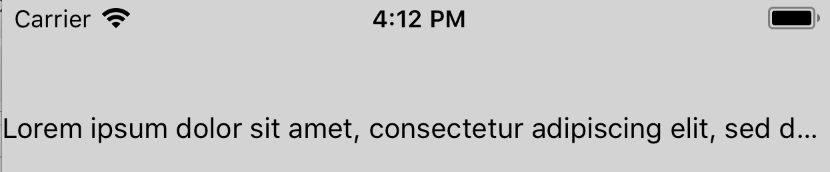
**Test Plan**
Tested that the inline view is hidden if it appears after the truncation point when `numberOfLines` is 1 and 2. Similarly, verified that the inline view is visible if it appears before the truncation point.
**Release Notes**
[IOS] [BUGFIX] [Text] - Fix case where inline view is visible even though it should have been truncated
Adam Comella
Microsoft Corp.
Pull Request resolved: https://github.com/facebook/react-native/pull/21456
Differential Revision: D10182991
Pulled By: shergin
fbshipit-source-id: a5bddddb1bb8672b61d4feaa04013a92c8224155
Summary:
This fixes#19193
Characters of different languages may have different height and different baseline, even with a same font and same font-size. When they mixed together, iOS will adjust their baselines automatically, to display a suitable view of text.
The problem is the behavior of dealing with the text-style property 'lineHeight'.
It once to be a right way at version 0.52.3, to setting a base-line-offset attribute for the whole range of the string. However, in current version, it enumerated the string, and set a different base-line-offset for different font-height characters.
And this behavior broke the baseline adjustment made by the iOS. It just make every character's baseline aligned to a same line. But it is not supposed to displaying characters of different languages like that. Chinese characters' baseline is the bottom of each, however, it is not for English characters.
So maybe it is the better way to give a same value of base-line-offset attribute for the whole string. And this PR just did that: found the biggest value of font-height in the text, and calculate the offset with that biggest value, then set to the whole string. This will keep the origin baseline adjustment for different languages' chars made by iOS.
Since I always got an error when running the snapshot test locally, I can't even pass the them with the unmodified code in master branch.
The error is "Nesting of \<View\> within \<Text\> is not currently supported."
After I comment all of the check of that error from the source code, I got a different snapshot from the reference ones. It seems that all components which will cause that error are not rendered in the reference images.
Since this PR changed the behavior of 'lineHeight' property, it's better to add a new snapshot case for the situation of different-language-characters' mixture. So maybe somebody could help me with that or maybe it should be a issue?
[IOS] [BUGFIX] [Text] - fix the baseline issue when displaying a mixture of different-language characters
Pull Request resolved: https://github.com/facebook/react-native/pull/19653
Differential Revision: D10140131
Pulled By: shergin
fbshipit-source-id: 646a9c4046d497b78a980d82a015168cf940646b
Summary: This change drops the year from the copyright headers and the LICENSE file.

Reviewed By: yungsters

Differential Revision: D9727774

fbshipit-source-id: df4fc1e4390733fe774b1a160dd41b4a3d83302a
Summary:
**Motivation**

Whenever a user changes the system font size to its maximum allowable setting, React Native apps that allow font scaling can become unusable because the text gets too big. Experimenting with a native app like iMessage on iOS, the font size used for non-body text (e.g. header, navigational elements) is capped while the body text (e.g. text in the message bubbles) is allowed to grow.

This PR introduces a new prop on `<Text>` and `<TextInput>` called `maxFontSizeMultiplier`. This enables devs to set the maximum allowed text scale factor on a Text/TextInput. The default is 0 which means no limit.

Another PR will add this feature to Android.

**Test Plan**

I created a test app which utilizes all categories of values of `maxFontSizeMultiplier`:
  - `undefined`: inherit from parent
  - `0`: no limit
  - `1`, `1.2`: fixed limits

I tried this with `Text`, `TextInput` with `value`, and `TextInput` with children. For `Text`, I also verified that nesting works properly (if a child `Text` doesn't specify `maxFontSizeMultiplier`, it inherits it from its parent).

Lastly, we've been using a version of this in Skype for several months.

**Release Notes**

[GENERAL] [ENHANCEMENT] [Text/TextInput] - Added maxFontSizeMultiplier prop to prevent some text from getting unusably large as user increases OS's font scale setting (iOS)

Adam Comella
Microsoft Corp.
Pull Request resolved: https://github.com/facebook/react-native/pull/20915

Differential Revision: D9646739

Pulled By: shergin

fbshipit-source-id: c823f59c1e342c22d6297b88b2cb11c5a1f10310
Summary: This adds a callback for <Text> to get metrics about the rendered text. It's divided by line but that could be changed to "fragments" (which makes more sense for multi-lingual). Right now by line is convenient as you frequently want to know where the first and last line end (though we could make this work with fragments I suppose).

Reviewed By: shergin

Differential Revision: D9440914

fbshipit-source-id: bb011bb7a52438380d3f604ffe7019b98c18d978
Summary:
This adds the accessibilityHint for View, Text and Touchable* on iOS.
The accessibilityHint provides some more information about an element
when the accessibilityLabel is not enough.

The accessibilityHint is a core accessibility property on iOS.

From https://developer.apple.com/documentation/objectivec/nsobject/1615093-accessibilityhint:
> An accessibility hint helps users understand what will happen when they perform an action on the accessibility element when that result is not obvious from the accessibility label.

Related issue: https://github.com/facebook/react-native/issues/14706

The npm scripts `test`, `flow`, `lint` and `prettier` are satisfied.

I added a couple of examples to the RNTester app. The Accessibility Inspector on Mac helps debugging accessibility stuff on a simulator, but it does not show the accessibilityHint. Therefore I tested the RNTester app on an iPhone 8 device using VoiceOver to verify the hint functionality. It works fine, and I've tested disabling and enabling "read hints" in the VoiceOver settings on the phone.

https://github.com/facebook/react-native-website/pull/222

[IOS][FEATURE][Accessibility] - Add accessibilityHint for View, Text, Touchable* on iOS
Closes https://github.com/facebook/react-native/pull/18093

Reviewed By: hramos

Differential Revision: D7230780

Pulled By: ziqichen6

fbshipit-source-id: 172ad28dc9ae2b67ea256100f6acb939f2466d0b
Summary:
Includes React Native and its dependencies Fresco, Metro, and Yoga. Excludes samples/examples/docs.

find: ^(?:( *)|( *(?:[\*~#]|::))( )? *)?Copyright (?:\(c\) )?(\d{4})\b.+Facebook[\s\S]+?BSD[\s\S]+?(?:this source tree|the same directory)\.$
replace: $1$2$3Copyright (c) $4-present, Facebook, Inc.\n$2\n$1$2$3This source code is licensed under the MIT license found in the\n$1$2$3LICENSE file in the root directory of this source tree.

Reviewed By: TheSavior, yungsters

Differential Revision: D7007050

fbshipit-source-id: 37dd6bf0ffec0923bfc99c260bb330683f35553e
Summary: Letting them fire on whatever queue we get the notification from throws an assert.

Reviewed By: shergin

Differential Revision: D7002789

fbshipit-source-id: 669474af1a07f0df6784b69b54afe0152c1ba3c4
Summary:
Fixing of recent regression in layout system.
Conseptually, a superview should define frames of child views.

Reviewed By: mmmulani

Differential Revision: D6980128

fbshipit-source-id: e267e966fd46af28db1d3d40939110040b74e33f
Summary:
This is reimagining of interoperability layer between Yoga and ShadowViews (at least in Yoga -> RN part).
Goals:
 * Make it clear and easy.
 * Make clear separation between "what layout what", now parent always layout children, noone layout itself.
 * Make possible to interleave Yoga layout with custom imperative layout (may be used in SafeAreaView, Text, Modal, InputAccessoryView and so on).

Reviewed By: mmmulani

Differential Revision: D6863654

fbshipit-source-id: 5a6a933874f121d46f744aab99a31ae42ddd4a1b
Summary: `contentFrame` is now always provided by shadow thread (with attributed string and embedded views), so we have to update it on every single relayout.

Reviewed By: yungsters

Differential Revision: D6817401

fbshipit-source-id: c2a1f314f34a2187053eb11ce0744c935edbb8ae
Summary:
This is a complete rewrite of RCTText, the part of React Native which manages Text and TextInput components.
Key points:
* It's understandable now. It follows a simple architectural pattern, and it's easy to debug and iterate. Text flow layout is a first-class citizen in React Native layout system now, not just a wired special case. It also brings entirely new possibilities such as nested interleaving <Text> and <View> components.
* All <Text>-specific APIs were removed from UIManager and co (it's about ~16 public methods which were used exclusively only by <Text>).
* It relies on new Yoga measurement/cloning API and on-dirty handler. So, it removes built-in dirty propagation subsystem from RN completely.
* It caches string fragments properly and granularly on a per-node basis which makes updating text-containing components more performant.
* It does not instantiate UIView for virtual components which reduces memory utilization.
* It drastically improves <TextInput> capabilities (e.g. rich text inside single line <TextInput> is now supported).
Screenshots:
https://cl.ly/2j3r1V0L0324https://cl.ly/3N2V3C3d3q3R
Reviewed By: mmmulani
Differential Revision: D6617326
fbshipit-source-id: 35d4d81b35c9870e9557d0211c0e934e6072a41e
Summary:
The previous file/class name convention seemed cool... but now it drives me BANANAS! It makes all this code really hard to maintain.
So, evething were renamed following common modern RN convention.

Reviewed By: mmmulani

Differential Revision: D6605090

fbshipit-source-id: 88ca13d793a5d2adaac2b7922ec6bd4654aacec5
 Adam Gleitman
 Christoph Purrer
 Nick Gerleman
 Christoph Purrer
 Andres Suarez
 simek
simek
 Andy Matuschak
 Tom Underhill
 Ahmed Ibrahim
 Peter Argany
 James Treanor
 Min ho Kim
 Samuel Susla
 Radosław Pietruszewski
 Janic Duplessis
 Valentin Shergin
 ericlewis
 Adam Comella
 BingBing
 Héctor Ramos
 Mehdi Mulani
 Mats Byrkeland
 Valentin Shergin
 Sophie Alpert
 Spencer Ahrens


